
How to use Dynamic DNS wit a Cable Modem Internet Access
Overview
More and more people get connected to the internet trough the broadband technology using a cable modem. One of the great things (beside speed) with a cable modem is, that you are permanently connected with the internet - no more dialing. It is now possible, even for private persons to have a "leased line" to the internet. And it becomes even better - you as a private person or small company can now operate the own HTTP, SMTP, FTP (or other) server(s).
One of the problem is, that you usually get a dynamic IP-address from the cable modem provider. Due to this, it is not possible to offer a HTTP, SMTP or FTP server to the outside world, because the IP-address is changing each time you boot your cable modem. However there is cool technology, so called dynamic DNS, which can handle exactly this situation.
Dynamic DNS
The Dynamic DNS service allows you to alias a dynamic IP address to a static hostname, allowing your computer to be more easily accessed from various locations on the Internet. To use the service, you must first apply an account from several free Web servers such as, www.dyndns.org.
With dynamic DNS supported by e.g. a Zyxel Prestige 314 cable modem router, you apply a DNS name for your server (e.g., web server) from a dynamic DNS server. The outside users can always access the web server using the associated DNS name regardless of the WAN IP.
When the ISP (e.g. Cable-Provider) assigns a new IP, the Zyxel Router updates this IP to the DYNDNS server so that the server can update its IP-to-DNS entry. Once the IP-to-DNS table in the dynamic DNS server is updated, the DNS name for your web server is still usable.
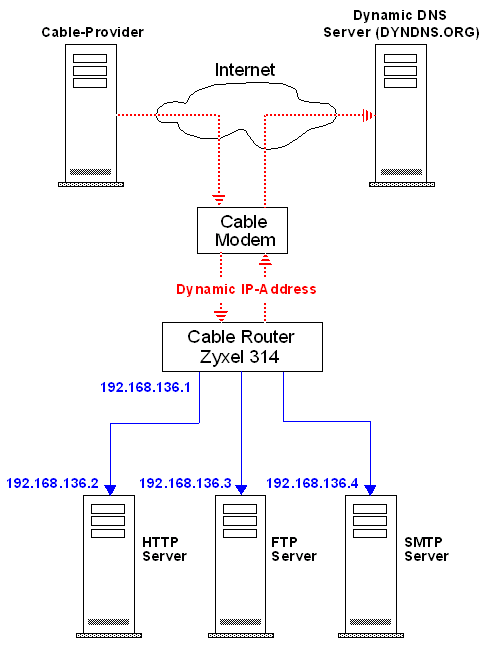
How can I detect my outside IP ?
If you are behind a firewall, you often don't know the IP address assigned by your provider. Probably you need to know this IP address if you logon to a server, which checks the incoming IP address.
DynDns has made a CGI script available which will display your IP address as the update system detects it. This CGI uses the same method as the update system to detect IPs through some types of proxy, so if your IP is reported incorrectly here, you will know that it needs to be manually entered in the update forms. The script also outputs the hostname your IP resolves to, as a sort of useless but neat feature.
Click the link http://checkip.dyndns.org/ and your dynamic IP address will be displayed.
Steps needed to setup dynamic DNS
-
Setup the cable modem and cable router as described in the users guide. Usually this is an easy task - specially the cable modem only has to be plugged to the cable connector.
-
Next you must register with the dynamic DNS service. They act like old-style phone operators: other users call the operator, and ask to speak to you, and magic happens. Every time your computer comes online, you tell the DDNS server what your current address is. Other users, through the magic of DNS, will be sent to the right place.
-
Enter the fixed hostname you got from the DDNS service, your E-Mail address, username and passwort in the Zyxel Router.

-
Finally setup the SUA server (sometimes known as NAT - Network Address Translation) on the Zyxel Router. When the Zyxel Router acting as SUA it receives a packet from a local client destined for the outside Internet, it replaces the source address in the IP packet header with its own address and the source port in the TCP or UDP header with another value chosen out of a local pool. It then recomputes the appropriate header checksums and forwards the packet to the Internet as if it is originated from the Router using the IP address assigned by ISP. When reply packets from the external Internet are received by the Router, the original IP source address and TCP/UDP source port numbers are written into the destination fields of the packet (since it is now moving in the opposite direction), the checksums are recomputed, and the packet is delivered to its true destination. This is because SUA keeps a table of the IP addresses and port numbers of the local systems currently using it.

We think, that this both technologies - hispeed internet access and dynamic DNS are innovative techniques, on a shoestring you get a lot.