
Strategies for approaching NULL values with SQL Server
Overview
Dealing with null values is a fact of life for every database developer. Take advantage of these tips to properly deal with them in SQL Server for your next project.
Data integrity is a critical aspect of any database system. No matter how well a system is planned, the issue of null data values is always present. Let's examine the three aspects of dealing with these values in SQL Server: counting, using null table values, and dealing with foreign keys.
Handle null values with COUNT(*)
Most aggregate functions eliminate null values in calculations; one exception is the COUNT function. When using the COUNT function against a column containing null values, the null values will be eliminated from the calculation. However, if the COUNT function uses an asterisk, it will calculate all rows regardless of null values being present.
If you want the COUNT function to count all rows of a given column, including the null values, use the ISNULL function. The ISNULL function can replace the null value with a valid value.
In fact, the ISNULL function is very valuable for aggregate functions where null values affect the results in an erroneous fashion. Remember that when using an asterisk, the COUNT function will calculate all rows. The following sample code illustrates the impact of null values in the AVG and COUNT aggregate functions:
DROP TABLE tabcount
GO
SET NOCOUNT ON
GO
CREATE TABLE tabcount (
pkey int IDENTITY NOT NULL CONSTRAINT pk_tabcount PRIMARY KEY,
col1 int NULL)
GO
INSERT tabcount (col1) VALUES (10)
GO
INSERT tabcount (col1) VALUES (15)
GO
INSERT tabcount (col1) VALUES (20)
GO
INSERT tabcount (col1) VALUES (NULL)
GO
SELECT AVG(col1) A1, (1)
AVG(ISNULL(col1,0)) A2, (2)
COUNT(col1) C1, (3)
COUNT(ISNULL(col1,0)) C2, (4)
COUNT(*) C3 (5)
FROM tabcount
GOA1 A2 C1 C2 C3
----------- ----------- ----------- ----------- ---
15 11 3 4 4
Warning: Null value is eliminated by an aggregate
or other SET operation.(1) - NULL values are eliminated.
(2) - With the IsNULL function, NULL is replaced with 0.
(3) - NULL values are eliminated.
(4) - With the IsNULL function, NULL is replaced with 0.
(5) - COUNT(*) calculates all rows, even those with NULLs.SQL-Server shows a warning message, that NULLs are eliminated by AVG and COUNT.
«MAY HAVE» Referential Integrity
There's a situation in SQL Server where Declarative Referential Integrity (DRI) is not enforced because nulls are allowed in the table referencing the parent table. Even though the parent table doesn't contain null values, the child table may contain null values in the column that references the parent table’s primary or unique constraint.
Example
A Departement may have zero, one or more employees. An employee may belong to a departement, but this is not mandatory.
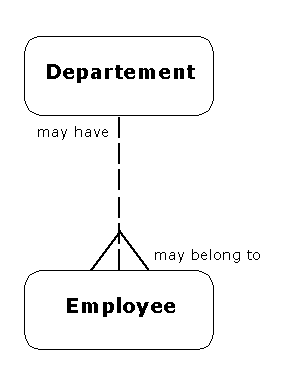
Often this situation may be appropriate when the value from the parent table is currently unknown. For example, the parent table may be an address table, and the child table may contain contact information. The contact address, which is to be passed to the parent table, may be temporarily unknown for any number of reasons. This is a time-dependent issue where null values may be appropriate.
For example, in the following code, the parent table is created and two values are inserted.
DROP TABLE child
GO
DROP TABLE parent
GO
SET NOCOUNT ON
GO
CREATE TABLE parent (
pkey int IDENTITY NOT NULL CONSTRAINT pk_parent PRIMARY KEY,
col1 int NULL)
GO
INSERT parent (col1) VALUES (10)
GO
INSERT parent (col1) VALUES (15)
GOIn the code below, the child table is created, and a null value is inserted into the column referencing the parent table.
CREATE TABLE child (
pnum int IDENTITY
CONSTRAINT pk_child PRIMARY KEY,
pkey int NULL
CONSTRAINT fk_child_parent FOREIGN KEY
REFERENCES parent(pkey),
col1 int NULL)
GO
INSERT child (pkey, col1) VALUES (NULL,2)
GOHowever, in the following code, the values are selected from both the parent and child tables. Even though the parent table doesn't contain null values, the child table will allow a null value for the column that references the parent table.
SELECT * FROM parent
GOpkey col1
----------- -----------
1 10
2 15SELECT * FROM child
GOpnum pkey col1
----------- ----------- -----------
1 NULL 2
Check for valid data in nullable foreign keys
When you have two columns that comprise the primary key, and a child table inherits the primary keys as nullable foreign keys, you may have bad data. You can insert a valid value into one of the foreign key columns and null into the other foreign key column. To avoid this situation you can add a table-check constraint that checks for valid data in the nullable foreign keys.
This anomaly may occur for any multicolumn foreign key. So you will need to add a check constraint to test for the anomaly. Initially, the check constraint will check for nullable values in all columns, which comprise the foreign key. The check constraint will also check for non-nullable values within these columns. If both checks pass, the anomaly should be circumvented.
The following is a sample script that illustrates such an anomaly and the check constraint that corrects it.
DROP TABLE child
GO
DROP TABLE parent
GO
SET NOCOUNT ON
GO
CREATE TABLE parent (
pkey1 int IDENTITY NOT NULL,
pkey2 int NOT NULL,
col1 int NULL,
CONSTRAINT pk_parent PRIMARY KEY NONCLUSTERED (pkey1, pkey2))
GO
INSERT parent (pkey2) VALUES (2)
INSERT parent (pkey2) VALUES (85)
INSERT parent (pkey2) VALUES (41)
INSERT parent (pkey2) VALUES (11)
GO
SELECT * FROM parent
GOpkey1 pkey2 col1 ----------- ----------- ----------- 1 2 NULL 2 85 NULL 3 41 NULL 4 11 NULLCREATE TABLE child (
pnum int IDENTITY NOT NULL
CONSTRAINT pk_child PRIMARY KEY NONCLUSTERED (pnum),
pkey1 int NULL,
pkey2 int NULL,
col1 int NULL,
CONSTRAINT fk_parent_child FOREIGN KEY (pkey1, pkey2)
REFERENCES parent (pkey1, pkey2))
GO
INSERT child (pkey1, pkey2) VALUES (NULL,85)
GOThe INSERT is passed ... but is this really what we want ... in most cases this is a typical anomaly.
SELECT * FROM child
GOpnum pkey1 pkey2 col1 ----------- ----------- ----------- ----------- 1 NULL 85 NULLNow, we remove the rows from the child table, then add a check constraint which avoids such situations.
DELETE FROM child
GO
ALTER TABLE child WITH NOCHECK
ADD CONSTRAINT ck_fk_parent_child CHECK
((pkey1 IS NOT NULL AND pkey2 IS NOT NULL) OR
(pkey1 IS NULL AND pkey2 IS NULL))
GO
INSERT child (pkey1, pkey2) VALUES (NULL, 11)
GOServer: Msg 547, Level 16, State 1, Line 1
INSERT statement conflicted with TABLE CHECK constraint
'ck_fk_parent_child'. The conflict occurred in database
'Northwind', table 'child'.
The statement has been terminated.The anomaly is now no more possible.
Conclusion
Null values are a fact of life for every database developer and administrator, so knowing how to deal with these values is imperative for a successful application. In this article, we have shared a few tips and techniques for dealing with nulls in your data.