
How to put a databound ComboBox in a Column of a Datagrid ?
More Information on installing the .Net Framework click here.
Download
examples from this Article.
Overview
One of the most missing features in the .NET / Windows Form programming is, that you cannot put a databound Combobox in a column of a Datagrid. And that too if you’re trying to get it programmed in a Windows Forms world its a lot of work to do. You got to write a whole lot of code for a simple extensibility of the existing features of datagrid.
To use a databound combobox, you have to add overrides for SetColumnValueAtRow and GetColumnValueAtRow to switch the DisplayMember and ValueMember as you get and set the data from the underlying table. Also, you cannot have the ComboBox bound with the same BindingContext to the same datasource as the datagrid.
Example
To use databound comboboxes in the datagrid the sample derives a new datagrid column style from the DataGridTextBoxColumn class and adds overrides for the SetColumnValueAtRow, GetColumnValueAtRow, Edit and Commit methods. This is performed in the DataGridComboBoxColumn class.
The Edit event is raised when the user sets the focus to the cell containing the combobox. In this event the dimensions of the combobox are set and an event handler is assigned to handle scrolling of the combobox. When a value is changed in the combobox and you leave the grid cell the new value must update the corresponding value in the bound data source. This requires tracking when the user starts to edit the combobox value and then commiting the changes to the data source. Hence the override to the Edit and Commit events.
A second NoKeyUpCombo class derives a new ComboBox whose WndProc method is overridden. This is required to address issues when TAB-bing through the grid so as not to leave focus on the combobox. It is this derived combobox that is added to the datagrid.
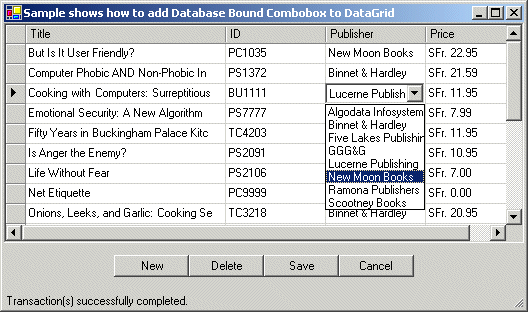
DataGridTextBoxColumn Class
The Class derives a new datagrid column style from the DataGridTextBoxColumn class that:
- Adds a ComboBox member.
- Tracks when the combobox has focus in the Enter and Leave events.
- Overrides Edit event so the ComboBox replaces the TextBox
- Overrides Commit event to save the changed data
- Overridest the SetColumnValueAtRow and GetColumnValueAtRow method
to switch the DisplayMember and ValueMember as you get and set the data from the underlying table.
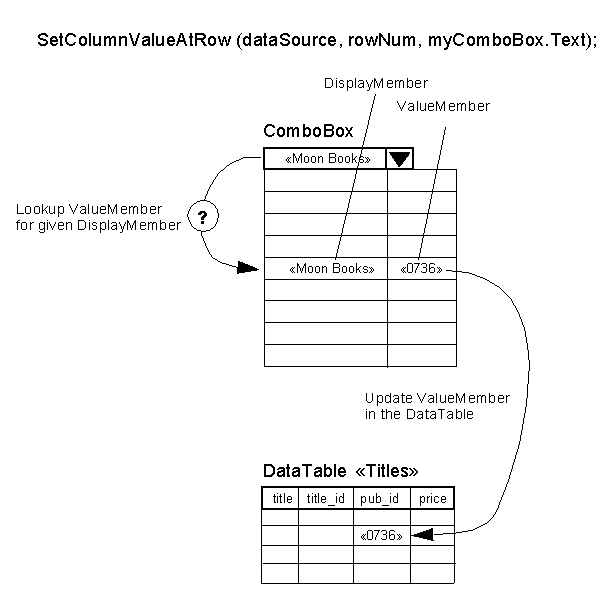
SetColumnValueAtRow
The SetColumnValueAtRow method updates the bound DataTable "Titles" with the ValueMember
for a given DisplayMember = myComboBox.Text from the Combobox.
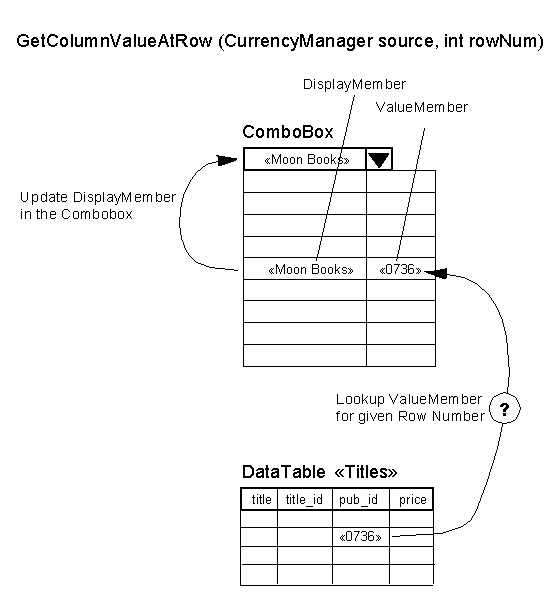
GetColumnValueAtRow
The GetColumnValueAtRow method updates the bound Combobox with the DisplayMember
for a given Row Number = rowNum from the DataTable "Titles".
Sample Code
myComboBox.cs
// The NoKeyUpCombo class derives a new ComboBox whose WndProc
// method is overridden. This is required to address issues when
// It is this derived combobox that is added to the datagrid.
// When you TAB trough the DataGrid and you reach the DropDown Combobox
// the Focus is immediately moved to the next Column.
using System;
namespace Akadia.DataGridBoundCombo
{
public class myComboBox: System.Windows.Forms.ComboBox
{
private const int WM_KEYUP = 0x101;
// The WndProc method corresponds exactly to the Windows WindowProc function.
// For more information about processing Windows messages, see the WindowProc
// function documentation in the Windows Platform SDK reference located in
// the MSDN Library.
protected override void WndProc(ref System.Windows.Forms.Message theMessage)
{
// Ignore KeyUp event to avoid problem with tabbing the dropdown.
if (theMessage.Msg == WM_KEYUP)
{
return;
}
else
{
base.WndProc(ref theMessage);
}
}
}
}
DataGridComboBoxColumn.cs
using System;
using System.Data;
using System.Drawing;
using System.Windows.Forms;
namespace Akadia.DataGridBoundCombo
{
public class DataGridComboBoxColumn : DataGridTextBoxColumn
{
public myComboBox myComboBox;
private System.Windows.Forms.CurrencyManager _currencyManager;
private int _rowNum;
private bool _Editing;
// Constructor, create our own customized Combobox
public DataGridComboBoxColumn()
{
_currencyManager = null;
_Editing = false;
// Create our own customized Combobox, which is used in the DataGrid
// DropDownList: The user cannot directly edit the text portion.
// The user must click the arrow button to display the
// list portion.
// DropDown: The text portion is editable. The user must click
// the arrow button to display the list portion.
// Simple: The text portion is editable. The list portion is
// always visible.
myComboBox = new myComboBox();
myComboBox.DropDownStyle = ComboBoxStyle.DropDownList;
// My own Combobox subscribes to the Leave Event. It occurs when the
// input focus leaves the ComboBox.
this.myComboBox.Leave +=
new System.EventHandler(LeaveComboBox);
// My own Combobox subscribes to the SelectionChangeCommitted Event.
// It occurs when the selected item has changed and that change
// is committed (save the changed data to the DataGrid TextBox).
this.myComboBox.SelectionChangeCommitted +=
new System.EventHandler(SelectionChangeCommit);
}
// Make current Combobox invisible when user scrolls
// the DataGrid control using the ScrollBar.
private void HandleScroll(Object sender, EventArgs e)
{
if (myComboBox.Visible)
{
myComboBox.Hide();
}
}
// The ColumnStartedEditing method allows the DataGrid
// to show a pencil in the row header indicating the row
// is being edited. (base is the parent DataGridTextBoxColumn)
private void SelectionChangeCommit(Object sender, EventArgs e)
{
_Editing = true;
base.ColumnStartedEditing((System.Windows.Forms.Control) sender);
}
// Handle Combobox Behaviour when Focus leaves the Combobox.
private void LeaveComboBox(Object sender, EventArgs e)
{
if (_Editing)
{
// Set the Combobox ValueMember to the current RowColumn
// when the Focus leaves the Combobox.
SetColumnValueAtRow(_currencyManager, _rowNum, myComboBox.Text);
_Editing = false;
// Redraws the column
Invalidate();
}
// Hide the current Combobox when Focus on Combobox is loosen
myComboBox.Hide();
// Let current Combobox visible when user scrolls
// the DataGrid control using the ScrollBar.
this.DataGridTableStyle.DataGrid.Scroll += new System.EventHandler(HandleScroll);
}
// The SetColumnValueAtRow method updates the bound
// DataTable "Titles" with the ValueMember
// for a given DisplayMember = myComboBox.Text from the Combobox.
protected override void SetColumnValueAtRow
(CurrencyManager source, int rowNum, Object value)
{
Object tbDisplay = value;
DataView dv = (DataView)this.myComboBox.DataSource;
int rowCount = dv.Count;
int i = 0;
Object cbDisplay;
Object cbValue;
// Loop through the Combobox DisplayMember values
// until you find the selected value, then read the
// ValueMember from the Combobox and update it in the
// DataTable "Titles"
while (i < rowCount)
{
cbDisplay = dv[i][this.myComboBox.DisplayMember];
if ((cbDisplay != DBNull.Value) &&
(tbDisplay.Equals(cbDisplay)))
{
break;
}
i += 1;
}
if (i < rowCount)
{
cbValue = dv[i][this.myComboBox.ValueMember];
}
else
{
cbValue = DBNull.Value;
}
base.SetColumnValueAtRow(source, rowNum, cbValue);
}
// The GetColumnValueAtRow method updates the bound
// Combobox with the DisplayMember
// for a given Row Number = rowNum from the DataTable "Titles".
protected override Object GetColumnValueAtRow
(CurrencyManager source, int rowNum)
{
// Get the ValueMember from the DataTable "Titles"
Object tbValue = base.GetColumnValueAtRow(source, rowNum);
// Associate a DataView to the Combox, so we can search
// the DisplayMember in the Combox corresponding to the
// ValueMember from the DataTable "Titles"
DataView dv = (DataView)this.myComboBox.DataSource;
int rowCount = dv.Count;
int i = 0;
Object cbValue;
// Loop through the Combox Entries and search the DisplayMember
while (i < rowCount)
{
cbValue = dv[i][this.myComboBox.ValueMember];
if ((cbValue != DBNull.Value) &&
(tbValue != DBNull.Value) &&
(tbValue.Equals(cbValue)))
{
break; // We found the DisplayMember - exit the Loop
}
i += 1;
}
// If we are within the Combox Entries, return now the DisplayMember
// for the found ValueMember above. If we are at the End of the Combox
// Entries, return NULL
if (i < rowCount)
{
return dv[i][this.myComboBox.DisplayMember];
}
else
{
return DBNull.Value;
}
}
// The Edit event is raised when the user sets the focus to the cell
// containing the combobox. In this event the dimensions of the combobox
// are set and an event handler is assigned to handle scrolling of the combobox.
protected override void Edit(
CurrencyManager source,
int rowNum,
Rectangle bounds,
bool readOnly,
string instantText,
bool cellIsVisible)
{
base.Edit(source, rowNum, bounds, readOnly, instantText, cellIsVisible);
// Set current Rownum and Postion Manager
_rowNum = rowNum;
_currencyManager = source;
// Calculate Location of the Combox relative to the TextBox
// of the DataGrid which have the Focus
Point NewLoc;
NewLoc = this.TextBox.Location;
NewLoc.X -= 3;
NewLoc.Y -= 3;
myComboBox.Location = NewLoc;
// Attach the Combobox to the same Parent Control
// as the TextBox of the DataGrid
myComboBox.Parent = this.TextBox.Parent;
// Position the Combox at the same Location as the TextBox
myComboBox.Size = new Size(this.TextBox.Size.Width + 3, myComboBox.Size.Height);
// Select the Entry in the Combobox corresponding to the Text in
// in the TextBox.
myComboBox.SelectedIndex = myComboBox.FindStringExact(this.TextBox.Text);
// myComboBox.Text = this.TextBox.Text;
// Make the TextBox invisible and then show the Combobox
this.TextBox.Visible = false;
myComboBox.Visible = true;
myComboBox.BringToFront();
myComboBox.Focus();
// Make Combobox invisible id User scrolls uo or down the DataGrid
this.DataGridTableStyle.DataGrid.Scroll += new System.EventHandler(HandleScroll);
}
// The Commit method can be used to put the Combomox ValueMember
// into the TextBox ValueMember. This can be handled in the
// LeaveComboBox EventHandler as well.
protected override bool Commit(
System.Windows.Forms.CurrencyManager dataSource,int rowNum)
{
if (_Editing)
{
_Editing = false;
SetColumnValueAtRow(dataSource, rowNum, myComboBox.Text);
}
return true;
}
}
}
Testapplication
using System;
using System.Drawing;
using System.Collections;
using System.ComponentModel;
using System.Windows.Forms;
using System.Data;
using System.Data.SqlClient;
namespace Akadia.DataGridBoundCombo
{
public class DataGridBoundCombo : System.Windows.Forms.Form
{
private DataSet _DataSet;
private SqlConnection _Conn;
private SqlDataAdapter _DataAdapterTitles;
private SqlDataAdapter _DataAdapterPublishers;
private System.Windows.Forms.DataGrid _DataGrid;
private CurrencyManager _currencyManager;
private System.Windows.Forms.Button btnUpdate;
private System.Windows.Forms.StatusBar statusBar1;
private System.Windows.Forms.Button btnDelete;
private System.Windows.Forms.Button btnNew;
private System.Windows.Forms.Button btnCancel;
private System.ComponentModel.Container components = null;
public DataGridBoundCombo()
{
InitializeComponent();
}
protected override void Dispose( bool disposing )
{
if( disposing )
{
if (components != null)
{
components.Dispose();
}
}
base.Dispose( disposing );
}
.....
.....
[STAThread]
static void Main()
{
Application.Run(new DataGridBoundCombo());
}
// Initializing
private void DataGridBoundCombo_Load(object sender, System.EventArgs e)
{
_DataGrid.AllowSorting = false;
GetData();
}
// Load Data from the Database
private void GetData()
{
string strConn = "data source=xeon;uid=sa;password=manager;database=pubs";
try
{
_Conn = new SqlConnection(strConn);
// Fill DataSet
string strSQL = "SELECT title, title_id, pub_id, price FROM Titles ORDER BY title";
_DataSet = new DataSet();
_DataAdapterTitles = new SqlDataAdapter(strSQL, _Conn);
_DataAdapterTitles.Fill(_DataSet, "Titles");
// Create an explicit UPDATE command for the Titles Table
_DataAdapterTitles.UpdateCommand = _Conn.CreateCommand();
_DataAdapterTitles.UpdateCommand.CommandText =
"UPDATE Titles SET "
+ "title = @u1, "
+ "pub_id = @u2, "
+ "price = @u3 "
+ "WHERE (title_id = @u4)";
// Add the parameters for UPDATE
SqlParameter u1 = new SqlParameter("@u1",SqlDbType.VarChar,80,"title");
u1.SourceVersion = DataRowVersion.Current;
_DataAdapterTitles.UpdateCommand.Parameters.Add(u1);
SqlParameter u2 = new SqlParameter("@u2",SqlDbType.Char,4,"pub_id");
u2.SourceVersion = DataRowVersion.Current;
_DataAdapterTitles.UpdateCommand.Parameters.Add(u2);
SqlParameter u3 = new SqlParameter("@u3",SqlDbType.Money,0,"price");
u3.SourceVersion = DataRowVersion.Current;
_DataAdapterTitles.UpdateCommand.Parameters.Add(u3);
SqlParameter u4 = new SqlParameter("@u4",SqlDbType.Char,6,"title_id");
u4.SourceVersion = DataRowVersion.Original;
_DataAdapterTitles.UpdateCommand.Parameters.Add(u4);
// Create an explicit INSERT command for the Titles Table
_DataAdapterTitles.InsertCommand = _Conn.CreateCommand();
_DataAdapterTitles.InsertCommand.CommandText =
"INSERT INTO titles (title, title_id, pub_id, price) " +
"VALUES(@i1, @i2, @i3, @i4)";
// Add the parameters for INSERT
SqlParameter i1 = new SqlParameter("@i1",SqlDbType.VarChar,80,"title");
i1.SourceVersion = DataRowVersion.Current;
_DataAdapterTitles.InsertCommand.Parameters.Add(i1);
SqlParameter i2 = new SqlParameter("@i2",SqlDbType.Char,6,"title_id");
i2.SourceVersion = DataRowVersion.Current;
_DataAdapterTitles.InsertCommand.Parameters.Add(i2);
SqlParameter i3 = new SqlParameter("@i3",SqlDbType.Char,4,"pub_id");
i3.SourceVersion = DataRowVersion.Current;
_DataAdapterTitles.InsertCommand.Parameters.Add(i3);
SqlParameter i4 = new SqlParameter("@i4",SqlDbType.Money,0,"price");
i4.SourceVersion = DataRowVersion.Current;
_DataAdapterTitles.InsertCommand.Parameters.Add(i4);
// Create an explicit DELETE command for the Titles Table
_DataAdapterTitles.DeleteCommand = _Conn.CreateCommand();
_DataAdapterTitles.DeleteCommand.CommandText =
"DELETE FROM titles " +
"WHERE title_id = @d1";
// Bind parameters to appropriate columns for DELETE command
SqlParameter d1 = new SqlParameter("@d1",SqlDbType.Char,6,"title_id");
d1.SourceVersion = DataRowVersion.Original;
_DataAdapterTitles.DeleteCommand.Parameters.Add(d1);
// Fill a DataTable for the bound ComboBox (publishers).
//
// NOTE: the ComboBox and grid are NOT bound to the same
// table. If bound to the same table, you must use
// different binding contexts.
strSQL = "SELECT pub_name, pub_id FROM publishers ORDER BY pub_name";
_DataAdapterPublishers = new SqlDataAdapter(strSQL, _Conn);
_DataAdapterPublishers.Fill(_DataSet, "Publishers");
}
catch (Exception ex)
{
string msg = ex.Message.ToString();
MessageBox.Show(msg, "Unable to retrieve data.",
MessageBoxButtons.OK, MessageBoxIcon.Error);
this.Close();
return;
}
// Create a TableStyle to format the datagrid's columns.
DataGridTableStyle tableStyle = new DataGridTableStyle();
DataTable dataTable = _DataSet.Tables["Titles"];
tableStyle.MappingName = "Titles";
tableStyle.RowHeadersVisible = true;
tableStyle.RowHeaderWidth = 20;
// Customize Columns using own ColumnStyle
for (int i = 0; i < dataTable.Columns.Count; i++)
{
switch (i)
{
case 0: // title - must correspond with "SELECT title ...
DataGridTextBoxColumn column_0 = new DataGridTextBoxColumn();
column_0.MappingName = "title";
column_0.HeaderText = "Title";
column_0.Width = 200;
tableStyle.GridColumnStyles.Add(column_0);
break;
case 1: // title_id - must correspond with "SELECT title ...
DataGridTextBoxColumn column_1 = new DataGridTextBoxColumn();
column_1.MappingName = "title_id";
column_1.HeaderText = "ID";
column_1.Width = 100;
tableStyle.GridColumnStyles.Add(column_1);
break;
case 2: // pub_id - must correspond with "SELECT title ...
// Use a combobox for the publisher.
DataGridComboBoxColumn column_2 = new DataGridComboBoxColumn();
column_2.MappingName = "pub_id";
column_2.HeaderText = "Publisher";
column_2.Width = 100;
column_2.myComboBox.DataSource = _DataSet.Tables["Publishers"].DefaultView;
column_2.myComboBox.DisplayMember = "pub_name";
column_2.myComboBox.ValueMember = "pub_id";
tableStyle.PreferredRowHeight = column_2.myComboBox.Height;
tableStyle.GridColumnStyles.Add(column_2);
break;
case 3: // price - must correspond with "SELECT title ...
// Use a PropertyDescriptor to format column Price.
PropertyDescriptorCollection pcol = this.BindingContext
[_DataSet,"Titles"].GetItemProperties();
DataGridTextBoxColumn column_3 =
new DataGridTextBoxColumn(pcol["price"], "c", true);
column_3.MappingName = "price";
column_3.HeaderText = "Price";
column_3.Width = 100;
tableStyle.GridColumnStyles.Add(column_3);
break;
default:
DataGridTextBoxColumn TextCol = new DataGridTextBoxColumn();
TextCol.MappingName = dataTable.Columns[i].ColumnName;
TextCol.HeaderText = TextCol.MappingName;
TextCol.Width = 100;
tableStyle.GridColumnStyles.Add(TextCol);
break;
}
}
// Add the custom Tablestyle to the Datagrid and bind the
// title Table data to the datagrid.
_DataGrid.TableStyles.Clear();
_DataGrid.TableStyles.Add(tableStyle);
_DataGrid.DataSource = dataTable;
// No adding of new rows through Dataview
_currencyManager = (CurrencyManager)this.BindingContext
[_DataGrid.DataSource, _DataGrid.DataMember];
// ((DataView)_currencyManager.List).AllowNew = false;
statusBar1.Text = "Data loaded.";
}
// Save Data to the Database - no Constrint Checking is done
// to keep code simple for thie demo.
private void btnUpdate_Click(object sender, System.EventArgs e)
{
// DEBUG: Print out "Titles" Table in the DataSet
// DataTable aTable = _DataSet.Tables["Titles"];
// foreach(DataRow aRow in aTable.Rows)
// {
// Console.WriteLine(aRow["title_id"].ToString()
// + ": " + oRow["pub_id"].ToString());
// }
// Pending Changes ?
if (_DataSet.HasChanges())
{
// Update the database
try
{
_DataAdapterTitles.Update(_DataSet,"Titles");
_DataSet.AcceptChanges();
Application.DoEvents();
statusBar1.Text = "Transaction(s) successfully completed.";
}
catch (SqlException ex)
{
_DataSet.RejectChanges();
MessageBox.Show(ex.Message);
}
}
else
{
statusBar1.Text = "No pending Data to save.";
}
}
// Reset StatusBar Message
private void _DataGrid_CurrentCellChanged(object sender, System.EventArgs e)
{
statusBar1.Text = "";
}
// Return the selected Rows in an ArrayList
public ArrayList GetSelectedRows(DataGrid dg)
{
ArrayList al = new ArrayList();
DataView dv = (DataView)_currencyManager.List;
for(int i = 0; i < dv.Count; ++i)
{
if (dg.IsSelected(i))
{
al.Add(i);
}
}
return al;
}
// Delete selected Rows from the Database, show simple Message.
// In a real Application the User shoul be asked before the
// Delete Action is performed.
private void btnDelete_Click(object sender, System.EventArgs e)
{
DataTable aTable = _DataSet.Tables["Titles"];
string s = "Deleted Rows: ";
if (GetSelectedRows(_DataGrid).Count > 0)
{
foreach(object o in GetSelectedRows(_DataGrid))
{
DataRow aRow = aTable.Rows[(int)o];
aRow.Delete();
s += " " + o.ToString();
}
// Update the database
try
{
_DataAdapterTitles.Update(_DataSet,"Titles");
_DataSet.AcceptChanges();
Application.DoEvents();
statusBar1.Text = s;
}
catch (SqlException ex)
{
_DataSet.RejectChanges();
MessageBox.Show(ex.Message);
}
}
else
{
statusBar1.Text = "No Rows selected for Deletion.";
}
}
// Jump to the last + 1 Row and offer a new created Row
// to the User to enter a new Title.
private void btnNew_Click(object sender, System.EventArgs e)
{
// _currencyManager.AddNew();
_DataGrid.CurrentCell = new DataGridCell(_currencyManager.Count,0);
statusBar1.Text = "Please enter new Title.";
}
// Reload the Data
private void btnCancel_Click(object sender, System.EventArgs e)
{
if (this._Conn != null)
{
_Conn.Close();
}
this.GetData();
}
}
}