Retrieving Data Using a C# .NET DataReader
More Information on installing the .Net Framework click here.
Download full Visual
Studio C# .NET Examples from this Article.
Contents
Retrieving Data Using a C# .NET DataReader
Creating Parameterized Queries
Using the ExecuteReader methodExecuting Stored Procedures with a Data Reader
Accessing Data in a Type-Safe Manner
Executing Stored Procedures with a DataReader
Getting the Result Set's Schema
Create an ArrayList to hold the results
Populate a List View with the Values from an Array List
The DataReader class in .NET provides similar functions to SQL Cursors, which are actually not supported in the .NET Framework. DataReades are used to efficiently retrieve a forward-only stream of data from a database. DataReaders are appropriate when the need is to simply display the result set, as only one record at a time is ever present in memory. The DataReader is mainly used in scenarios wherein data need not be updateable nor should persist across multiple requests.
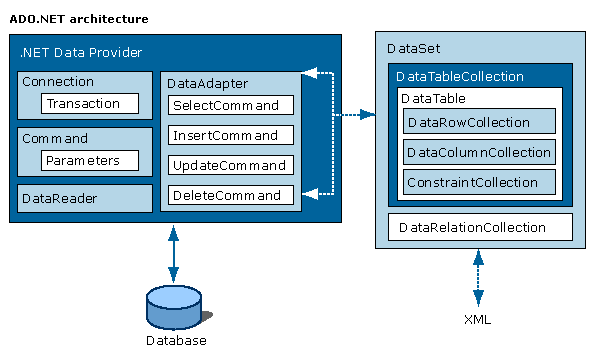
The ADO.NET components have been designed to factor data access from data manipulation. There are two central components of ADO.NET that accomplish this: the DataSet, and the .NET data provider, which is a set of components including the Connection, Command, DataReader, and DataAdapter objects.
The ADO.NET DataSet is the core component of the disconnected architecture of ADO.NET. The DataSet is explicitly designed for data access independent of any data source. As a result it can be used with multiple and differing data sources, used with XML data, or used to manage data local to the application. The DataSet contains a collection of one or more DataTable objects made up of rows and columns of data, as well as primary key, foreign key, constraint, and relation information about the data in the DataTable objects.
The other core element of the ADO.NET architecture is the .NET data provider, whose components are explicitly designed for data manipulation and fast, forward-only, read-only access to data. The Connection object provides connectivity to a data source. The Command object enables access to database commands to return data, modify data, run stored procedures, and send or retrieve parameter information. The DataReader provides a high-performance stream of data from the data source. Finally, the DataAdapter provides the bridge between the DataSet object and the data source. The DataAdapter uses Command objects to execute SQL commands at the data source to both load the DataSet with data, and reconcile changes made to the data in the DataSet back to the data source.
Retrieving Data Using a C# .NET DataReader
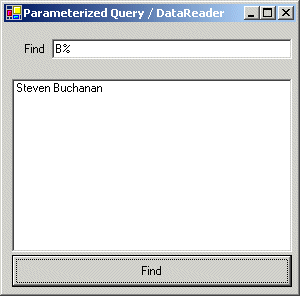
In the following example, a simple user interface allows users to look for employees inside the Employee table contained in the Northwind database. The example shows the following core features:
- Creating Parameterized Queries -- We can create parameterized queries by adding one or more parameters to the SQL statement and adding the same parameters to the commands Parameters collection.
- Using the ExecuteReader method, which executes the SQL statement or stored procedure that the Command object represents and returns a datareader object.
using System;
using System.Drawing;
using System.Collections;
using System.ComponentModel;
using System.Windows.Forms;
using System.Data;
using System.Data.SqlClient;
namespace Akadia
{
public class ParamQuery : System.Windows.Forms.Form
{
private System.Windows.Forms.ListBox lbFound;
private System.Windows.Forms.Label label1;
private System.Windows.Forms.TextBox txtFind;
private System.Windows.Forms.Button btnFind;
private System.ComponentModel.Container components = null;
public ParamQuery()
{
// Initialize Controls
InitializeComponent();
}
......
......
// The main entry point for the application.
static void Main()
{
Application.Run(new ParamQuery());
}
// Find the Employee and display it in the List Box
private void btnFind_Click(object sender, System.EventArgs e)
{
SqlDataReader rdr = null;
SqlConnection con = null;
SqlCommand cmd = null;
try
{
// Open connection to the database
string ConnectionString = "server=xeon;uid=sa;"+
"pwd=manager; database=northwind";
con = new SqlConnection(ConnectionString);
con.Open();
// Set up a command with the given query and associate
// this with the current connection.
string CommandText = "SELECT FirstName, LastName" +
" FROM Employees" +
" WHERE (LastName LIKE @Find)";
cmd = new SqlCommand(CommandText);
cmd.Connection = con;
// Add LastName to the above defined paramter @Find
cmd.Parameters.Add(
new SqlParameter(
"@Find", // The name of the parameter to map
System.Data.SqlDbType.NVarChar, // SqlDbType values
20, // The width of the parameter
"LastName")); // The name of the source column
// Fill the parameter with the value retrieved
// from the text field
cmd.Parameters["@Find"].Value = txtFind.Text;
// Execute the query
rdr = cmd.ExecuteReader();
// Fill the list box with the values retrieved
lbFound.Items.Clear();
while(rdr.Read())
{
lbFound.Items.Add(rdr["FirstName"].ToString() +
" " + rdr["LastName"].ToString());
}
}
catch(Exception ex)
{
// Print error message
MessageBox.Show(ex.Message);
}
finally
{
// Close data reader object and database connection
if (rdr != null)
rdr.Close();
if (con.State == ConnectionState.Open)
con.Close();
}
}
}
}
Executing Stored Procedures with a Data Reader
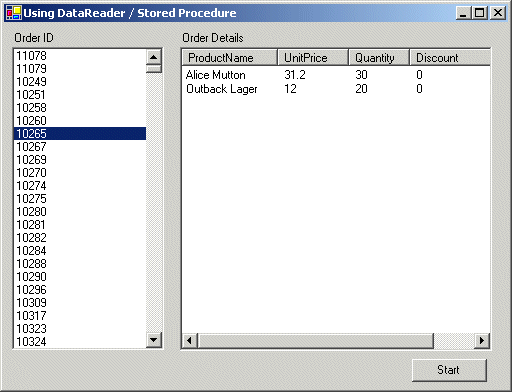
This example shows how to execute a stored procedure. We will be using the CustOrdersDetail stored procedure that comes with the SQL Server Northwind database. The stored procedure is shown below; it takes an OrderID and returns the details for that order. The example shows the following core features:
The GetOrdinal method of the DataReader provides a way to access data in a type-safe manner. GetOrdinal takes the column name as a parameter, and returns that column's ordinal position.
iOrderID = reader.GetOrdinal("OrderID");
orderIDsList.Items.Add (reader.GetInt32(iOrderID));The command object does most of the work when executing stored procedures. We still use the DataReader in exactly the same way we normally would:
SqlCommand storedProcCommand =
new SqlCommand ("CustOrdersDetail", con);
storedProcCommand.CommandType = CommandType.StoredProcedure;
storedProcCommand.Parameters.Add("@OrderID",orderID);The first line constructs the SqlCommand object with the name of the stored procedure as the first argument. The second argument is the connection object.
The second line line tells the command object that a stored procedure is going to be executed.
The third line adds parameters to the command object. Note the use of the @ symbol, all the information in the command object is constructed to make a SQL statement. The @ symbol in a SQL statement us used to denote a parameter.
It is quite often useful to get the result set's schema. The DataReader provides a message that does just this. It's called GetSchemaTable. GetSchemaTable returns a DataTable that describes the column metadata of the DataReader. ColumnName is the name of the column; this might not be unique. If this cannot be determined, a null value is returned. This name always reflects the most recent renaming of the column in the current view or command text.
DataTable schema = reader.GetSchemaTable();
orderDetailsList.Columns.Add((string)row["ColumnName"],50,
HorizontalAlignment.Left);First we create an array of objects. Each object in the array represents a column in the DataReader. We know how many columns are in the DataReader by using the FieldCount property. Now we have the array of objects we need to get some values. If we wanted, we could get each value individually and add it to the array; another way is to use the GetValues method. This method will populate our object array with the column values currently in the DataReader.
ArrayList rowList = new ArrayList();
SqlDataReader reader = storedProcCommand.ExecuteReader();
while (reader.Read())
{
object[] values = new object[reader.FieldCount];
reader.GetValues(values);
rowList.Add(values);
}The first thing we have to do is to clear the ListView. Now we need to add the column values for each row into the ListView. We will do this by creating a ListViewItem object and adding that to the Items collection of the ListView. In order to create a ListViewItem we want to create an array of strings, where each string in the array corresponds to a column in the ListView. Using the Length property of the "row" in the ArrayList we are able to allocate enough strings in the string array to hold each column that exits in the row. Once we have built the string array, we create a new ListViewItem and add it to the ListView.
orderDetailsList.Items.Clear();
foreach (object[] row in rowList)
{
string[] orderDetails = new string[row.Length];
int columnIndex = 0;
foreach (object column in row)
{
orderDetails[columnIndex++] = Convert.ToString(column);
}
ListViewItem newItem = new ListViewItem (orderDetails);
orderDetailsList.Items.Add (newItem);
}
Used Stored Procedure
CREATE PROCEDURE CustOrdersDetail @OrderID int
AS
SELECT ProductName,
UnitPrice=ROUND(Od.UnitPrice, 2),
Quantity,
Discount=CONVERT(int, Discount * 100),
ExtendedPrice=ROUND(CONVERT(money,
Quantity * (1 - Discount) * Od.UnitPrice), 2)
FROM Products P, [Order Details] Od
WHERE Od.ProductID = P.ProductID and Od.OrderID = @OrderID
using System;
using System.Drawing;
using System.Collections;
using System.ComponentModel;
using System.Windows.Forms;
using System.Data;
using System.Data.SqlClient;
namespace Akadia
{
public class SqlBrowser : System.Windows.Forms.Form
{
private System.Windows.Forms.ListBox orderIDsList;
private System.Windows.Forms.ListView orderDetailsList;
private System.Windows.Forms.Label label1;
private System.Windows.Forms.Label label2;
private System.ComponentModel.Container components = null;
private System.Data.SqlClient.SqlConnection con;
private System.Windows.Forms.Button btnStart;
private bool _columnsSet = false;
public SqlBrowser()
{
// Create Controls
InitializeComponent();
// Setup Connection
string strCon = "server=xeon;uid=sa;" +
"pwd=manager; database=northwind";
con = new SqlConnection(strCon);
}
.....
.....
// The main entry point for the application.
static void Main()
{
Application.Run(new SqlBrowser());
}
// Fill orderIDsList with OrderID's
private void btnStart_Click(object sender, System.EventArgs e)
{
int iOrderID;
// Create a command to select the Order IDs from the ORDERS table
SqlCommand command = new SqlCommand
("SELECT OrderID from ORDERS", con);
// Open the connection
con.Open();
// Get the data reader
SqlDataReader reader = command.ExecuteReader();
// Process each result
while (reader.Read())
{
// Add each order ID in the result to the list
// view containing the orders IDs. We have only
// selected a single column in this code so we
// can be pretty save in using reader.GetInit32(0)
// there are no more columns in the data reader.
iOrderID = reader.GetOrdinal("OrderID");
orderIDsList.Items.Add (reader.GetInt32(iOrderID));
}
// Close the reader and the connection
reader.Close();
this.con.Close();
}
// Populate the list view with the order details
//
// Used Stored Procedure:
// ----------------------
// CREATE PROCEDURE CustOrdersDetail @OrderID int
// AS
// SELECT ProductName,
// UnitPrice=ROUND(Od.UnitPrice, 2),
// Quantity,
// Discount=CONVERT(int, Discount * 100),
// ExtendedPrice=ROUND(CONVERT(money, Quantity *
// (1 - Discount) * Od.UnitPrice), 2)
// FROM Products P, [Order Details] Od
// WHERE Od.ProductID = P.ProductID and Od.OrderID = @OrderID
//
private void orderIDsList_SelectedIndexChanged
(object sender, System.EventArgs e)
{
// Get the selected item and convert it to the correct order ID
int orderID = Convert.ToInt32(orderIDsList.SelectedItem);
// Create a command to execute a stored procedure
SqlCommand storedProcCommand =
new SqlCommand ("CustOrdersDetail", con);
// Let the command know it will be executed a stored procedure
storedProcCommand.CommandType = CommandType.StoredProcedure;
// Add a parameter that's passed to the stored proc,
// this is the order ID we selected
storedProcCommand.Parameters.Add("@OrderID",orderID);
// Open the connection
con.Open ();
// Create an ArrayList to hold the results
ArrayList rowList = new ArrayList();
// Get the reader
SqlDataReader reader = storedProcCommand.ExecuteReader();
// Process each result in the result set
while (reader.Read())
{
// Create an array big enough to hold the column values
object[] values = new object[reader.FieldCount];
// Get the column values into the array
reader.GetValues(values);
// Add the array to the ArrayList
rowList.Add(values);
}
// Have the columns already being added to the list view?
if (_columnsSet == false)
{
// No, so get the schema for this result set
DataTable schema = reader.GetSchemaTable();
// And set the list view to reflect the
// contents of the schema
SetColumnHeaders(schema);
}
// Close the reader and the connection
reader.Close ();
con.Close ();
// Now populate the list view with the order details
PopulateOrderDetails(rowList);
}
// Populate the list view with the order details
private void PopulateOrderDetails (ArrayList rowList)
{
// Clear any exsisting items from the orders view
orderDetailsList.Items.Clear();
// Now process each array in the arraylist
foreach (object[] row in rowList)
{
// Create a string array large enough to hold all
// the column values in this array
string[] orderDetails = new string[row.Length];
// Create a column index into the array
int columnIndex = 0;
// Now process each column value
foreach (object column in row)
{
// Convert the value to a string and stick
// it in the string array
orderDetails[columnIndex++] = Convert.ToString (column);
}
// Now use the string array to create a new item
// to go in the list view
ListViewItem newItem = new ListViewItem (orderDetails);
// Finally add the new item to the view
orderDetailsList.Items.Add (newItem);
}
}
// Set the list view to reflect the contents of the schema
private void SetColumnHeaders (DataTable schema)
{
// Process each row in the schema table
foreach (DataRow row in schema.Rows)
{
// For each column add a new column to the list view
orderDetailsList.Columns.Add((string)row["ColumnName"],
50, HorizontalAlignment.Left);
}
// Set this flag to stop the method being called again
_columnsSet = true;
}
}
}