DB Transactions using .NET Data Sets
Oracle and SQL Server 2000 Database Transactions using
.NET Framework with C# and DataSets
Martin Zahn, Akadia AG, Information Technology, CH-3604
Thun
January 2003, Copyright © 2003, Akadia AG, all rights
reserved
Contents
1. Introduction
2. Database Updates from Datasets
3. Oracle9i Updates from DatasetsMore Information on installing the .Net Framework click here.
1. Introduction
Summary
Datasets Datasets are a fundamental part of the ADO.NET architecture, providing both high-performance data access as well as scalability. Datasets store data in a disconnected cache. The structure of a dataset is similar to that of a relational database; it exposes a hierarchical object model of tables, rows, and columns. In addition, it contains constraints and relationships defined for the dataset.
2. Database Updates from Datasets
Two Step Process
Updating a data source via a dataset is a two-step process. The first step is to update the dataset with new information — new records, changed records, or deleted records.
If you are updating a data source (such as a database), the second step is to send the changes from the dataset to the original data source. That is, the process of updating the dataset does not also write the changes through to an underlying data source; you must explicitly perform this second step.
After changes have been made in a dataset, you can transmit the changes to a data source. Most commonly, you do this by calling the Update method of a data adapter. The method loops through each record in a data table, determines what type of update is required (update, insert, or delete), if any, and then executes the appropriate command.
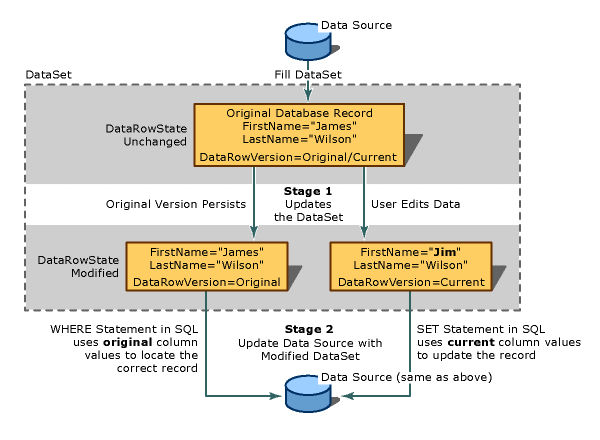
How an Update Is Transmitted to the Data Source
As an illustration of how updates are made, suppose your application uses a dataset containing a single data table. The application fetches two rows from the database. After the retrieval, the in-memory data table looks like this:
(RowState) FirstName LastName
(Unchanged) Nancy Buchanan
(Unchanged) James WilsonYour application changes "James" to "Jim". As a result of this change, the value of the DataRow.RowState property for that row changes from Unchanged to Modified. The value of the RowState property for the other row remains Unchanged. The data table now looks like this:
(RowState) FirstName LastName
(Unchanged) Nancy Buchanan
(Modified) Jim WilsonYou application now calls the Update method to transmit the dataset to the database. The method inspects each row in turn. For the first row, the method transmits no SQL statement to the database, because that row has not changed since it was originally fetched from the database.
For the second row, however, the Update method automatically invokes the proper data command and transmits it to the database. The specific syntax of the SQL statement depends on the dialect of SQL supported by the underlying data store. But the following general traits of the transmitted SQL statement are noteworthy:
- The transmitted SQL statement is an UPDATE statement. The OracleDataAdapter or SqlDataAdapter know to use an UPDATE statement because the value of the RowState property is Modified.
- The transmitted SQL statement includes a WHERE clause. The information for the WHERE clause is derived from the original version of the record (DataRowVersion.Original), in case values required to identify the row have been changed.
- The transmitted SQL statement includes the SET clause, to set the new values of the modified columns.
3. Oracle9i Updates from Datasets
Introduction
If you are building applications using Microsoft® .NET against an Oracle backend database, you will want to take a close look at the new .NET Framework Data Provider for Oracle released on MSDN in June 2002. The goal of the provider is to boost the performance and scalability of .NET applications with Oracle databases by providing a native .NET interface to Oracle databases that bypasses the need to use an OLE DB provider.
The .NET Framework Data Provider for Oracle, unlike the Microsoft OLE DB provider for Oracle, also supports new Oracle 9i datatypes, as well as ref cursors (useful for running Oracle stored procedures that return result sets). This provider, System.Data.OracleClient, is similar to the .NET Framework Data Provider for SQL Server, System.Data.SqlClient.
Using ADO.NET with Oracle
Until recently, the primary mechanism developers used to access Oracle databases from .NET application was OLE DB, channeling database requests through the System.Data.OleDb data classes. However, developers writing .NET data-driven applications against SQL Server have been able to take advantage of the super-fast System.Data.SqlClient data classes, which provide data access to SQL Server via a SQL Server provider written in managed .NET code. This provider communicates to SQL Server via the native SQL Server client libraries, and derives very fast speeds. While OLE DB provided an adequate data access mechanism for .NET applications to communicate with Oracle backends, certainly developers have been asking for a faster, more scalable Oracle data access mechanism to get better performance for the .NET applications. The new .NET Framework Data Provider for Oracle, recently released on MSDN, provides just this.
Basically, developers now have a much faster database access mechanism for ADO.NET in the form of new System.Data.OracleClient framework classes that work in much the same way as the System.Data.SqlClient classes. In both cases, the fastest database read mechanism will be ADO.NET Data Readers, as opposed to Data Sets, although both are fully functional using the new Oracle Managed Provider. The good news is the new OracleClient classes should provide significant performance improvements for .NET applications, and migrating code between OLE DB data classes and OracleClient data classes is not very difficult, although some work is required. However, the performance boost can be dramatic.
Where Is the Performance Boost Coming From?
The OLE DB client classes are designed to provide a database-independent layer for accessing generic databases. While the value of a generic layer is nearly universal access, it is difficult to deliver database-specific optimizations in this generic access layer. Also, the OLE DB layer is implemented as a COM library, so the System.Data.Oledb namespace works through COM interop. To achieve the significant performance boost described here, the .NET Framework Data Provider for Oracle avoids the cost of COM interop, and also employs Oracle-specific optimizations.
Installation and Configuration
The Microsoft® .NET Framework Data Provider for Oracle is an add-on component to the Microsoft .NET Framework that provides access to an Oracle database using the Oracle Call Interface (OCI) as provided by Oracle Client software. Oracle 8i Release 3 (8.1.7) Client or later must be installed for this provider to function.
The Oracle .NET Data Provider is available for download
The following files are installed by Setup:
File name Description Eula.rtf .NET Framework Data Provider for Oracle end-user license agreement. Oracleref.chm .NET Framework Data Provider for Oracle documentation. Oracleref.chi Index file that accompanies Oracleref.chm (.NET Framework Data Provider for Oracle documentation). Readme.txt Additional product information that is not contain in Oracleref.chm (.NET Framework Data Provider for Oracle documentation). System.Data.OracleClient.dll The .NET Framework Data Provider for Oracle. Mtxoci8.dll DLL that provides distributed transaction support. All of these files, except Mtxoci8.dll, are installed in C:\Program Files\Microsoft.NET\OracleClient.Net by default (assuming that C:\Program Files is your default Program Files folder location). Mtxoci8.dll is installed in the windows system directory (for example, C:\Windows\System32 on a Windows 2000 computer on which C: is the system drive).
As part of Setup, the System.Data.OracleClient namespace is added to the global assembly cache.
Example to update Oracle 9.2.0 from a DataSet
using System;
using System.Data;
using System.Data.OracleClient;
public class DataSetTrans
{
public static void Main(string[] args)
{
OracleConnection con;
OracleDataAdapter da;
DataSet ds = new DataSet();
// Setup connection string to access Oracle 9i
string connectionString = "Data Source=ARK2;User ID=scott; Password=tiger";
// Instantiate the connection, passing the
// connection string into the constructor
con = new OracleConnection(connectionString);
// Open the connection
con.Open();
// Populate DataSet and close the Database Connection
string sql = "SELECT empno,ename,job FROM emp";
da = new OracleDataAdapter (sql,con);
da.Fill(ds,"Emp");
// Close the connection
con.Close();
// Display the Column Names
foreach (DataColumn dc in ds.Tables[0].Columns) {
Console.Write("{0,15}", dc.ColumnName);
}
Console.Write("\n");
// Display the Data in the DataSet Row by Row
foreach (DataRow dr in ds.Tables[0].Rows) {
// Loop through the Columns for the current Row
for (int i=0; i<ds.Tables[0].Columns.Count; i++) {
Console.Write("{0,15}", dr[i]);
}
Console.Write("\n");
}
// Change a value in the DataSet
ds.Tables[0].Rows[8]["ENAME"] = "ZAHN";
// Reconnect to the Database
con.Open();
// Create the CommandBuilder object
OracleCommandBuilder cb = new OracleCommandBuilder(da);
// Display the generated Update Command
Console.WriteLine("UPDATE: " + cb.GetUpdateCommand().CommandText);
// Update Orcale from the DataSet
try
{
da.Update(ds,"Emp");
ds.AcceptChanges();
Console.WriteLine("Transaction successfully committed ...");
}
catch(Exception e)
{
ds.RejectChanges();
Console.WriteLine(e.Message);
Console.WriteLine("Transaction failed - Rolled back ...");
}
finally
{
con.Close();
}
}
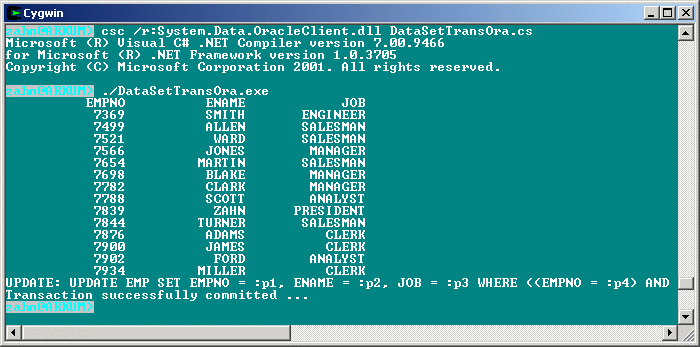
}This file is called DataSetTransOra.cs, we can compile it from the command line by typing csc /r:System.Data.OracleClient.dll DataSetTransOra.cs. The reference to the System.Data.OracleClient.dll is needed.