Finding Rows in ADO.NET
More Information on installing the .Net Framework click here.
Download full Visual
Studio C# .NET Examples from this Article.
Overview
ADO.NET implements three basic forms to locate Rows - The Find method as applied to the Rows collection, the Find method as applied to the DataView object and the Contains method as applied to the Rows collection.
DataRowCollection Find and Contains Method
The DataRowCollection is a major component of the DataTable. While the DataColumnCollection defines the schema of the table, the DataRowCollection contains the actual data for the table, where each DataRow in the DataRowCollection represents a single row.
You can call the Add and Remove methods to insert and delete DataRow objects from the DataRowCollection. You can also call the Find method to search for DataRow objects that contain specific values in primary key columns, and the Contains method to search character-based data for single words or phrases.
DataView Find and FindRows Method
Using the Find and FindRows methods of the DataView, you can search for rows according to their sort key values. The case-sensitivity of search values in the Find and FindRows methods is determined by the CaseSensitive property of the underlying DataTable. Search values must match existing sort key values in their entirety in order to return a result.
The Rows Collection Find Method
Similar to the DataTable Select method, the Rows collection Find method returns a DataRow object - in this case a single row instead of an array. This method requires that you set the Primary Key property before using it. If you don't, you will trip a trappable exception.
Setting the PrimaryKey Property
Whem you execute a query that executes a stored procedure, ADO.NET is not likely to discover and set the Primary Key for you. This means you'll probably have to set it manually - at least most of the time. The following example illustrates setting the Primary Key Property when there are two columns in the Primary Key:
// Setting the Primary Key when there are
// two columns in the Primary Key.
DataColumn[] colPk = new DataColumn[2];
colPk[0] = dsOrderItem.Tables[0].Columns["CustomerID"];
colPk[1] = dsOrderItem.Tables[0].Columns["OrderID"];
dsOrderItem.Tables[0].PrimaryKey = colPk;
The Rows.Find Method
After the Primary Key is set, using the Rows collection Find method is fairly straightforward. The following example sets up and executes the Find method against a Rows collection. Find returns a DataRow object based on the Primary Key passwd as an argument.
The DataView Object's Find Method
The DataView object's Find method could care less abaout the Primary Key. The Find method returns an integer with the index of the DataRowView that matches the search criteria. If more than one row matches the search criteria, only the index of the first matching DataRowView is returned. If no match is found, Find returns -1.
To return search results that match multiple rows, you can use the FindRows method. FindRows works just like the Find method, except that it returns a DataRowView array that references all matching rows in the DataView. If no matches are found, the DataRowView array will be empty.
To use the Find or FindRows methods you must specify a sort order either by setting ApplyDefaultSort to true or by using the Sort property. If no sort order is specified, an exception is thrown.
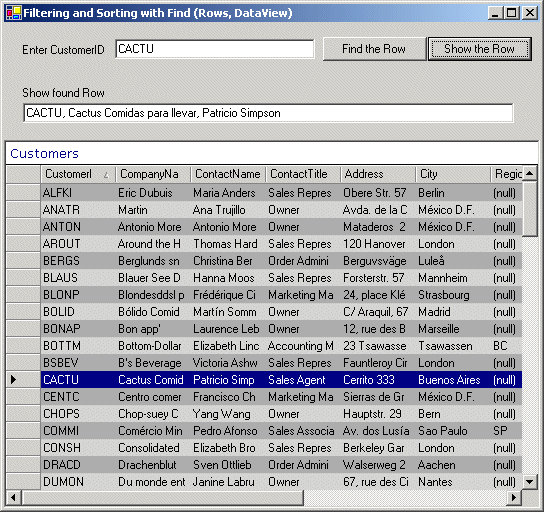
The following Example shows the use of the Find Method for both the Rows Collection and DataView.
using System;
using System.Diagnostics;
using System.Drawing;
using System.Collections;
using System.ComponentModel;
using System.Windows.Forms;
using System.Data;
using System.Data.SqlClient;
namespace RowsAndDataViewFind
{
public class FindDemo : System.Windows.Forms.Form
{
private SqlConnection cn;
private SqlCommand cmd;
private SqlDataAdapter da;
private DataSet ds;
internal System.Windows.Forms.TextBox txtFoundRow;
internal System.Windows.Forms.TextBox txtFindArg;
internal System.Windows.Forms.Button btnFind;
internal System.Windows.Forms.Button btnFindRow;
internal System.Windows.Forms.DataGrid DataGrid;
private System.Windows.Forms.Label lbl_enter;
private System.Windows.Forms.Label lbl_showrow;
private System.ComponentModel.Container components = null;
public FindDemo()
{
try
{
InitializeComponent();
// Connect to Database and create Controls
cn = new SqlConnection(
"server=xeon;database=northwind;uid=sa;pwd=manager");
cmd = new SqlCommand("Select * from customers",cn);
cmd.CommandType = CommandType.Text;
da = new SqlDataAdapter(cmd);
ds = new DataSet();
RunQuery();
}
catch(Exception ex)
{
MessageBox.Show(ex.ToString());
}
}
// Fill DataGrid with Data
private void RunQuery()
{
try
{
DataColumn[] dcPk = new DataColumn[1];
da.Fill(ds, "Customers");
// Set Primary Key
dcPk[0] = ds.Tables["Customers"].Columns["CustomerID"];
ds.Tables["Customers"].PrimaryKey = dcPk;
// Set Default Sort
ds.Tables[0].DefaultView.Sort = "CustomerID";
DataGrid.DataSource = ds.Tables[0];
}
catch (Exception ex)
{
MessageBox.Show(ex.ToString());
Debug.WriteLine(ex.ToString());
}
}
// Finds a row in the DataView by the specified sort key value
private void btnFind_Click(object sender, System.EventArgs e)
{
try
{
int intRow;
// Finds the row specified in txtFindArg
intRow = ds.Tables[0].DefaultView.Find(txtFindArg.Text);
Debug.WriteLine(intRow);
if (intRow == -1)
{
MessageBox.Show("No PK matches " + txtFindArg.Text);
}
else
{
// Jump to the Row and select it
DataGrid.CurrentRowIndex = intRow;
DataGrid.Select(intRow);
}
}
catch(Exception ex)
{
MessageBox.Show(ex.ToString());
}
}
// Most applications that consume data need to access specific
// records that satisfy some kind of criteria. In order to find
// a particular row in a dataset you invoke the Find Method of
// the DataRowCollection. If the primary key exists, a DataRow
// object is returned. If the primary key cannot be found, a null
// value is returned.
private void btnFindRow_Click(object sender, System.EventArgs e)
{
try
{
DataRow drFound;
// Find the Row specified in txtFindArg
drFound = ds.Tables[0].Rows.Find(txtFindArg.Text);
if (drFound == null)
{
MessageBox.Show("No PK matches " + txtFindArg.Text);
}
else
{
txtFoundRow.Text = drFound[0].ToString() + ", " +
drFound[1].ToString() + ", " +
drFound[2].ToString();
}
}
catch(Exception ex)
{
MessageBox.Show(ex.ToString());
Debug.WriteLine(ex.ToString());
}
}
....
....
[STAThread]
static void Main()
{
Application.Run(new FindDemo());
}
}
}
The Rows Collection Contains Method
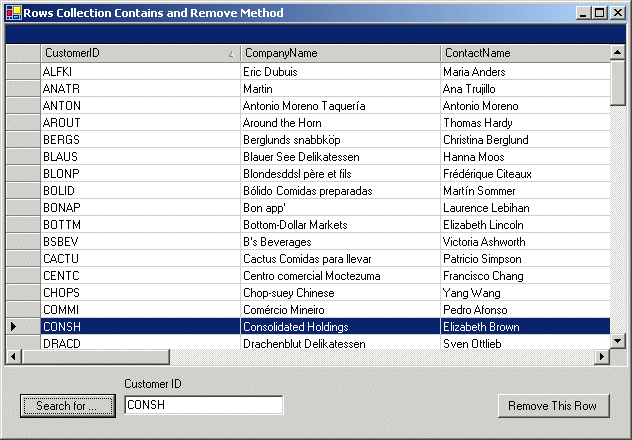
Another way to locate a row based on your DataTable object's Primary Key property is to use the Rows collection Contains method. This method works very much like the Find method in that it expects you to set the Primary Key Property. However instead of returning a DataRow, the Contains method simply returns a Boolean - TRUE, if the Row is found and FALSE if not.
The following example shows the use of the Contains and Remove Methods.
using System;
using System.Diagnostics;
using System.Drawing;
using System.Collections;
using System.ComponentModel;
using System.Windows.Forms;
using System.Data;
using System.Data.SqlClient;
namespace RowsContain {
public class ContainAndRemove : System.Windows.Forms.Form {
private SqlConnection cn;
private SqlCommand cmd;
private SqlDataAdapter da;
private DataSet ds;
private DataRow rowFound;
internal System.Windows.Forms.Button btnSearch;
internal System.Windows.Forms.TextBox txtSearchFor;
internal System.Windows.Forms.Button btnRemoveRow;
internal System.Windows.Forms.DataGrid DataGrid;
internal System.Windows.Forms.Label lblSearch;
private System.ComponentModel.Container components = null;
public ContainAndRemove() {
try{
InitializeComponent();
// Connect to the Database
cn = new SqlConnection(
"server=xeon;database=northwind;uid=sa;pwd=manager");
cmd = new SqlCommand(
"SELECT * FROM Customers ORDER BY CustomerID", cn);
da= new SqlDataAdapter(cmd);
ds= new DataSet();
da.Fill(ds);
DataGrid.PreferredColumnWidth = 200;
DataGrid.DataSource = ds.Tables[0];
}
catch(Exception ex) {
Debug.WriteLine(ex.ToString());
MessageBox.Show(ex.ToString());
}
}
// Gets a value indicating whether the primary key column(s)
// of any row in the collection contains the specified value.
private void btnSearch_Click(object sender, System.EventArgs e)
{
try {
DataTable tb = ds.Tables[0];
int intRow;
// Set Primary Key and Sort Order
DataColumn[] dcolPk = new DataColumn[1];
dcolPk[0] = tb.Columns["CustomerID"];
tb.PrimaryKey = dcolPk;
tb.DefaultView.Sort = "CustomerID";
// Rows.Contains returns TRUE or FALSE
if (tb.Rows.Contains(txtSearchFor.Text)) {
// At least one row matches primary key
rowFound = tb.Rows.Find(txtSearchFor.Text);
intRow = ds.Tables[0].DefaultView.Find(txtSearchFor.Text);
if ((rowFound == null) | (intRow == -1)) {
MessageBox.Show("Could not find row ");
}
else {
DataGrid.CurrentRowIndex = intRow;
DataGrid.Select(intRow);
}
}
else {
MessageBox.Show("No row found that matches " + txtSearchFor.Text);
}
}
catch(Exception ex) {
Debug.WriteLine(ex.ToString());
MessageBox.Show(ex.ToString());
}
}
// When a row is removed, all data in that row is lost. You can
// also call the Delete method of the DataRow class to simply mark
// a row for removal. Calling Remove is the same as calling Delete
// and then calling AcceptChanges.
// You can also use the Clear method to remove all members of
// the collection at once.
private void btnRemoveRow_Click(object sender, System.EventArgs e)
{
try {
ds.Tables[0].Rows.Remove(rowFound);
}
catch(Exception ex) {
Debug.WriteLine(ex.ToString());
MessageBox.Show(ex.ToString());
}
}
....
....
[STAThread]
static void Main() {
Application.Run(new ContainAndRemove());
}
}
}