Handling Row Violations in ADO.NET
More Information on installing the .Net Framework click here.
Download full
Visual Studio C# .NET Examples from this Article.
Overview
Multiuser applications often must allow for multiple users to edit the same record concurrently. In database-locking parlance, the term optimistic concurrency means that your application assumes that no one else will be making changes to the same record that it is currently editing.
Although the Data Adapter Configuration Wizard in Visual Studio .NET generates code to check for optimistic concurrency violations, it does not handle the errors itself. Running into an optimistic concurrency violation simply causes your program to blow up by throwing an exception. You can add a Try…Catch block to handle the actual exception, but you’ll probably want to be able to give your users the best overall experience by intelligently handling the violation itself.
In addition to Try/Catch and exceptions, the ADO.NET data architecture allows you to add error messages to each row of Data in a DataSet. SqlDataAdapters attach error messages to Rows if updates or other actions fail. Furthermore, you can filter for rows in error to present them to the user, or pass them to error handling functions.
Check for Errors before Update
As users work on a set of data contained in a DataSet, you can mark each change with an error if the change causes some validation failure. You can mark an entire DataRow with an error message using the RowError property. You can also set errors on each column of the row with the SetColumnError method.
Before updating a data source with a DataSet, it's recommended that you first invoke the GetChanges method on the target DataSet. The method results in a DataSet that contains only the changes made to the original. Before sending the DataSet to the data source for updating, check the HasErrors property of each table to see if any errors have been attached to the rows or columns in the rows.
// **** Handle Errors before UPDATE
protected void btnUpdate_Click (object sender, System.EventArgs e)
{
// Use the GetChanges method to create a second DataSet
// object that is then used to update a data source.
DataSet dataSetChanged =
_dataSet.GetChanges(DataRowState.Modified);
// Test to make sure all the changed rows are without errors
bool okayFlag = true;
if (dataSetChanged.HasErrors)
{
okayFlag = false;
string msg = "Error in row with customer ID ";
// Examine each table in the changed DataSet
foreach (DataTable theTable in dataSetChanged.Tables)
{
// If any table has errors, find out which rows
if (theTable.HasErrors)
{
// Get the rows with errors
DataRow[] errorRows = theTable.GetErrors();
// iterate through the errors and correct
// (in our case, just identify)
foreach (DataRow theRow in errorRows)
{
msg = msg + theRow["CustomerID"];
}
}
}
lblMessage.Text = msg;
}
// If we have no errors
if (okayFlag)
{
// Update the database on second dataset
_dataAdapter.Update(dataSetChanged,"Customers");
// Inform the user
Application.DoEvents();
// Commit the changes
_dataSet.AcceptChanges();
}
else
{ // If we had errors, reject the changes
_dataSet.RejectChanges();
}
}
Example
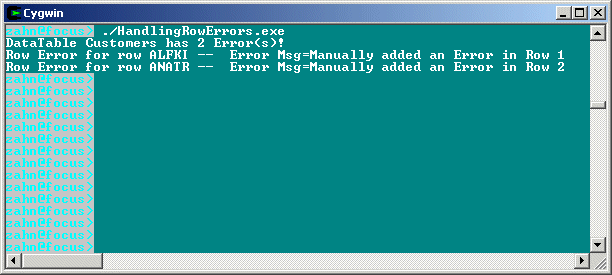
The following example loads a DataSet, sets some errors, and then shows the Errors in the Rows. You can then get the errors in a DataTable with the GetErrors() method. You can also test for errors using HasErrors.
namespace ADO.HandlingRowErrors
{
using System;
using System.Data;
using System.Data.SqlClient;
public class handleerrors
{
public static void Main()
{
handleerrors myhandleerrors = new handleerrors();
myhandleerrors.Run();
}
public void Run()
{
// Create a new Connection and SqlDataAdapter
SqlConnection myConnection = new SqlConnection(
"server=xeon;uid=sa;pwd=manager;database=northwind");
SqlDataAdapter mySqlDataAdapter = new SqlDataAdapter(
"select * from customers", myConnection);
// Create the new instance of the DataSet
DataSet myDataSet = new DataSet();
try
{
// Load the customer table from the database
// into a table called Customers in the dataset
mySqlDataAdapter.Fill(myDataSet,"Customers");
// Create a new dataview instance on the Customers
// table that was just created
DataView myDataView = new DataView(myDataSet.Tables["Customers"]);
// Sort the view based on the FirstName column
myDataView.Sort = "CustomerID";
// Manually add Errors ...
myDataSet.Tables["Customers"].Rows[0].RowError =
"Manually added an Error in Row 1";
myDataSet.Tables["Customers"].Rows[1].RowError =
"Manually added an Error in Row 2";
// ... and check the DataTable for these inserted Errors
if ( myDataSet.Tables["Customers"].HasErrors )
{
// If we have Errors, get them ...
DataRow[] ErrDataRows = myDataSet.Tables["Customers"].GetErrors();
Console.WriteLine("DataTable {0} has {1} Error(s)!",
myDataSet.Tables["Customers"].TableName,ErrDataRows.Length.ToString());
// ... for each Row in the DataTable
for (int i = 0; i <= ErrDataRows.Length -1; i++)
{
Console.WriteLine("Row Error for row {0} -- Error Msg={1}",
ErrDataRows[i]["CustomerID"].ToString(),ErrDataRows[i].RowError);
}
}
else
{
Console.WriteLine("=================");
Console.WriteLine("DataTable {0} Has no errors",
myDataSet.Tables["Customers"].TableName);
}
}
catch(Exception e)
{
Console.WriteLine(e.ToString());
}
}
}
}