Temporarily suspended Validation Rules in DataRows
More Information on installing the .Net Framework click here.
Download full Visual
Studio C# .NET Examples from this Article.
Overview
If a dataset contains constraints (such as a UNIQUE constraint), updating a column in a record can violate the constraint: After you have finished updating one column but before you get to the next one, the record can temporarily be in an error state. For example, imagine that you have a data table in your dataset with two columns that do not allow null values. As soon as you start to write a new record there will always be a null value in at least one of the columns (you can only write one column at a time). If there were no mechanism to allow temporary constraint suspension, an error would be raised every time after writing the first column and before writing the second.
To temporarily suspend constraints in a DataRow:
Before changing data in a data row, call the DataRow object's BeginEdit method.
(Note: Changes you make to the row after calling BeginEdit are saved.)
Make the updates to that row.
Call the EndEdit method to commit changes to the row and re-enable constraint checking.
The RowChanging event is raised.
BeginEdit and EndEdit
Use the BeginEdit method to put a DataRow into Edit Mode. In this mode, events are temporarily suspended allowing the user to make multiple changes to more than one row without triggering validation rules. For example, if you need to ensure that the value of the column for a total amount is equal to the values for the debit and credit columns in a row, you can put each of the rows into edit mode to suspend the validation of the row values until the user attempts to commit the values.
The BeginEdit method is called implicitly when the user changes the value of a data-bound control; the EndEdit method is called implicitly when you invoke the DataTable object's AcceptChanges method. While in this edit mode, the DataRow stores representations of the original and new proposed values. Therefore, as long as the EndEdit method has not been called, you can retrieve either the original or proposed version by passing either DataRowVersion.Original or DataRowVersion.Proposed for the version parameter of the Item property. You can also cancel any edits at this time by invoking the CancelEdit method.
To see if the row contains an original or proposed value, call the HasVersion method.
Example
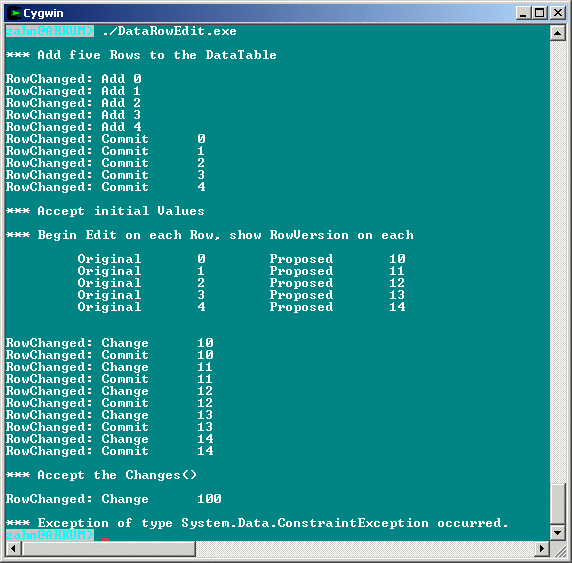
The example creates a simple DataTable with one DataColumn and five DataRow objects, and a UniqueConstraint. A RowChanged event handler is also added to monitor when the row's value is changing. After invoking BeginEdit on the existing rows, the constraint and event are temporarily disabled and the original and proposed values are printed. The BeginEdit is again invoked to set two rows to the same value. When EndEdit is called, the UniqueConstraint is enforced on the identical values.
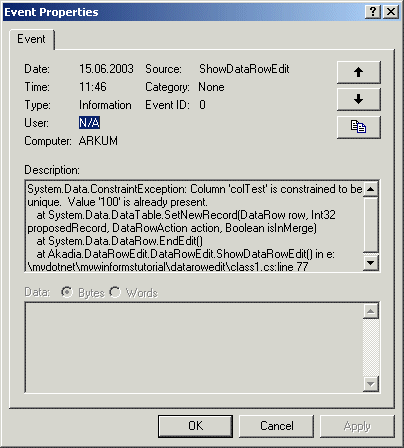
Additional, we log an entry to the System Log:
Here is the C# Code
using System;
using System.Data;
namespace Akadia.DataRowEdit
{
// Shows DataRow Editing
public class DataRowEdit
{
public DataRowEdit()
{
ShowDataRowEdit();
}
public void ShowDataRowEdit()
{
// Create the DateTable
DataTable tabTest = new DataTable("TestTable");
// Crate a Column
DataColumn colTest = new DataColumn("colTest",Type.GetType("System.Int32"));
// Hook our own RowChanged Event Handler to the DataTable
tabTest.RowChanged += new DataRowChangeEventHandler(myRowChangedHandler);
// Add the Column to the DataTable
tabTest.Columns.Add(colTest);
// Add a UniqueConstraint to the Column in the DataTable
tabTest.Constraints.Add(new UniqueConstraint(colTest));
// Add five Rows
DataRow rowTest;
Console.WriteLine("\n*** Add five Rows to the DataTable\n");
for(int i=0; i<5; i++)
{
// RowChanged Event will occur for every addition!
rowTest = tabTest.NewRow();
rowTest["colTest"]= i;
tabTest.Rows.Add(rowTest);
}
// Accept initial Values
tabTest.AcceptChanges();
Console.WriteLine("\n*** Accept initial Values");
// Invoke BeginEdit on each Row
Console.WriteLine("\n*** Begin Edit on each Row, show RowVersion on each\n");
foreach(DataRow myRow in tabTest.Rows)
{
myRow.BeginEdit();
// Add 10 to the inital Values
// RowChanged Event will occur for every change!
myRow["colTest"] = (int) myRow["colTest"] + 10;
// Show RowVersion
Console.Write("\t Original \t" + myRow["colTest",DataRowVersion.Original]);
Console.Write("\t Proposed \t" + myRow["colTest",DataRowVersion.Proposed] + "\n");
}
// Accept the Changes
Console.WriteLine("\n");
tabTest.AcceptChanges();
Console.WriteLine("\n*** Accept the Changes()\n");
// Change two Rows to identical values after invoking BeginEdit.
tabTest.Rows[0].BeginEdit(); // Begin Edit on First Row
tabTest.Rows[1].BeginEdit(); // Begin Edit on Second Row
tabTest.Rows[0]["colTest"]= 100; // Change first Row
tabTest.Rows[1]["colTest"]= 100; // Violate Unique Constraint
try
{
// Now invoke EndEdit, this will cause the
// UniqueConstraint to be enforced
tabTest.Rows[0].EndEdit();
tabTest.Rows[1].EndEdit();
}
catch(Exception e)
{
// Process Exception, add Message to System Log and return
System.Diagnostics.EventLog log = new System.Diagnostics.EventLog();
log.Source = "ShowDataRowEdit";
log.WriteEntry(e.ToString());
Console.WriteLine("\n*** Exception of type {0} occurred.", e.GetType());
}
}
// Process RowChanged Event
private void myRowChangedHandler(object sender, System.Data.DataRowChangeEventArgs e)
{
DataTable t = (DataTable) sender;
Console.WriteLine("RowChanged: " + e.Action.ToString() + "\t" + e.Row.ItemArray[0]);
}
// The main entry point for the application.
[STAThread]
static void Main(string[] args)
{
DataRowEdit dataRowEdit;
dataRowEdit = new DataRowEdit();
}
}
}