
Accessing a shared (WebDAV) webfolder from Windows
Overview
WebDAV stands for "Web-based Distributed Authoring and Versioning". It is a set of extensions to the HTTP protocol which allows users to collaboratively edit and manage files on remote web servers.
Some people see DAV as a network filesystem suitable for the Internet, one that works on entire files at a time, with good performance in high-latency environments. Others view DAV as a protocol for manipulating the contents of a document management system via the Web. An important goal of DAV is to support virtual enterprises, being the primary protocol supporting a wide range of collaborative applications. Importantly, a major goal is the support of remote software development teams. A final goal of DAV is to leverage the success of HTTP in being a standard access layer for a wide range of storage repositories -- HTTP gave them read access, while DAV gives them write access.
WebDAV provides a network protocol for creating interoperable, collaborative applications. Major features of the protocol include:
- Locking (concurrency control): long-duration exclusive and shared write locks prevent the overwrite problem, where two or more collaborators write to the same resource without first merging changes. To achieve robust Internet-scale collaboration, where network connections may be disconnected arbitrarily, and for scalability, since each open connection consumes server resources, the duration of DAV locks is independent of any individual network connection.
- Properties: XML properties provide storage for arbitrary metadata, such as a list of authors on Web resources. These properties can be efficiently set, deleted, and retrieved using the DAV protocol. DASL, the DAV Searching and Locating protocol, provides searches based on property values to locate Web resources.
- Namespace manipulation: Since resources may need to be copied or moved as a Web site evolves, DAV supports copy and move operations. Collections, similar to file system directories, may be created and listed.
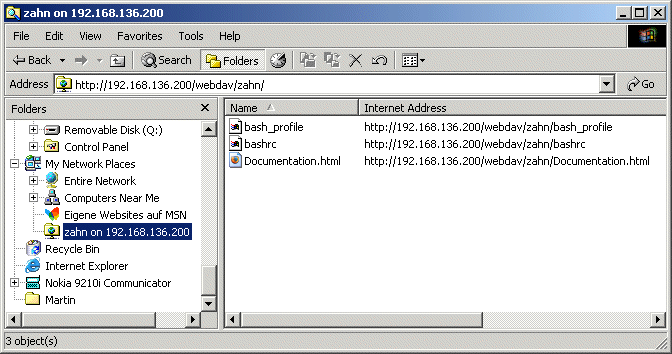
Here is a typical example of a webfolder - a mounted WebDAV folder from a Linux Workstation on W2K Explorer.
WebDAV Configuration on Apache (mod_dav)
This article details only the configuration of the mod_dav Apache module. We do not explain how to build the mod_dav module. If you use Apache 2, this module is already included. To build / install the mod_dav module click here.
Loading the DAV Module
Apache must be informed about the mod_dav module through the LoadModule directives. LoadModule is used when mod_dav is dynamically loaded (i.e. built using APXS or you're on the Win32 platform). These configuration lines are (normally) inserted automatically on the Unix platforms (by APXS or the Apache build process). To add mod_dav to Apache, add the following line to the httpd.conf file:
LoadModule dav_module modules/mod_dav.so
Enabling DAV
Configuring the mod_dav module is quite simple, actually. Within a
<Directory>or<Location>directive in your Apache configuration file (i.e.httpd.conf), simply insert the following line:
DAV OnIf the
DAVdirective is within a<Directory>directive, then DAV will be enabled for that particular directory and its subdirectories. For a<Location>directive, then DAV will be enabled for that portion of the URL namespace.
The Lock Database
Next, add a
DAVLockDBdirective at the top-level of your configuration file (i.e. outside of a<Directory>or<Location>directive). This directive should specify a filename that mod_dav will create. The directory should exist and should be writable by the web server process.Note: the directory should not be on an NFS-mounted partition. mod_dav uses
flock/fcntlto manage access to the database. Some operating systems cannot use these operations on an NFS-mounted partition.
DavLockDB /usr/local/apache/var/DAVLock
The
DAVLockDBdirective can appear outside of any container or within a<VirtualHost>, it only needs to appear once, and a file extension should not be supplied.
Lock Timeout Minimums
An optional directive,
DAVMinTimeout, specifies the minimum lifetime of a lock in seconds. If a client requests a lock timeout less thanDAVMinTimeout, then theDAVMinTimeoutvalue will be used and returned instead. For example, Microsoft's Web Folders defaults to a lock timeout of 2 minutes; 10 minutes could be used to reduce network traffic and the chance that the client might lose a lock due to network latency.The
DAVMinTimeoutdirective is optional, and may be used on a per-server or per-directory/location basis. It takes a single, non-negative integer. Since this value represents a minimum allowed, setting it to zero (0) will disable this feature. The default value forDAVMinTimeoutis zero.DAVMinTimeout 600
Limiting DAV Access to Authorized Users
The
DAVandDAVLockDBdirectives are the only two configuration changes necessary to operate a DAV server. However, it is usually best to secure the site to be writable only by specific users. This requires the use of the<LimitExcept>directive. Here is an example:<Directory /home/webdav/zahn>
AllowOverride None
Options None
Order Allow,Deny
Allow from All
<LimitExcept GET HEAD OPTIONS>
Require user zahn
</LimitExcept>
</Directory>The above configuration will allow only authorized users (e.g. "zahn") to manipulate the site. Rather than using the
<Limit>directive and specifying an exhaustive list of HTTP methods to secure, it is also possible to use the<LimitExcept>directive. This directive applies the access restrictions to all methods except for the methods listed.
Authentication
There are several ways apache can authenticate users. In this document we'll use htpasswd to create a user authentication file named /usr/local/apache/conf/passwd_httpd.
cd /usr/local/apache/conf
htpasswd -c /usr/local/apache/conf/passwd_httpd zahn
New password:
Re-type new password:
Adding password for user zahnNOTE - use the -c flag to htpasswd only the first time you use it - this creates the password file. If you use -c subsequently, you will overwrite the password file (and any existing passwords).
Set ownership and permissions so that only the apache service account can read it:
chown root:apache /usr/local/apache/conf/passwd_httpd
chmod 640 /usr/local/apache/conf/passwd_httpd
Setting Up the File Repository (Per User Directory)
mod_dav requires read/write access to the filesystem where the documents are stored. The following discussion uses Unix as an example.
The need for read/write access means that the owner and group of the files will be that of the web server. For discussion, let's say that your Apache configuration file contains the following directives (among others!):
User apache
Group apacheCreate a directory for our user (zahn) to store his files via webdav:
mkdir /home/webdav/zahn
Change ownership and permissions on this directory so that it's accessible only by the apache service account:
chown apache:apache /home/webdav/zahn
chmod 750 /home/webdav/zahncd /home/webdav/zahn
ls -l-rw-r--r-- 1 apache apache 3084 Apr 15 21:01 bash_profile
-rw-r--r-- 1 apache apache 461 Apr 15 21:01 bashrc
-rw-r--r-- 1 apache apache 177205 Apr 15 21:04 Documentation.htmlNow insert the following lines in yout httpd.conf file
Alias /webdav /home/webdav
<Directory /home/webdav>
DAV On
AuthType Basic
AuthName "WebDAV Zugang Akadia AG"
AuthUserFile /usr/local/apache/conf/passwd_httpd
</Directory>
- The Alias directive tells apache where to look for requests for /webdav/
- The DAV on directive turns on WebDAV in the directory (and its subdirectories).
- The Auth* directives specify that access to anything in the webdav directory should use basic authentication using the password file we created earlier.
Here is the complete entry in httpd.conf
DavLockDB /usr/local/apache/var/DAVLock
DAVMinTimeout 600
Alias /webdav /home/webdav
<Directory /home/webdav>
    DAV On
    AuthType Basic
    AuthName "WebDAV Zugang Akadia AG"
    AuthUserFile  /usr/local/apache/conf/passwd_httpd
</Directory>
<Directory /home/webdav/zahn>
     AllowOverride None
     Options None
     Order Allow,Deny
     Allow from All
     <LimitExcept GET HEAD OPTIONS>
          Require user zahn
     </LimitExcept>
</Directory>
Save and exit your editor, and restart apache.
Accessing a shared (WebDAV) webfolder from Windows 2000
Unfortunately, Windows XP support for WebDAV is a little strange, so we're supplying two separate methods of mounting your Web Folder on your desktop. Try both and use the one that works.
Method 1: My Network Places
- Go to My Network Places, and click on Add Network Place at the top of the left sidebar.
- The window that pops up is the Add Network Place Wizard. Click Next.
- On the next page, enter the URL of the WebDAV folder in the box named Internet or network address:. Example:
http://192.168.136.200/webdav/zahnand click Next.
- If the shared web folder is password protected, a window asking for your username and password will pop up at this point. Enter the appropriate username and password, and click OK.
- On the next page, enter a name for this share -- this is the name that will show up in the My Network Places listing.
- Click Finish on the next page, and you're done!
From now on, you can access that shared web folder through the My Network Places window.
Method 2: Map Network Drive
- Right click on My Computer and select Map Network Drive.
- Enter the URL of your WebDAV web folder in the Folder: entry field, and click Finish.
- Enter the appropriate username and password in the authentication box that shows up, and you're done.
From now on, you can access that shared web folder though the My Computer window.