|
 Using
UTL_TCP to send E-Mail from PL/SQL with Oracle 8.1.6 Using
UTL_TCP to send E-Mail from PL/SQL with Oracle 8.1.6
The UTL_TCP is a TPC/IP package that provides PL/SQL
procedures to support simple TCP/IP-based communications between servers and the outside
world. It is used by the SMTP package, to implement Oracle server-based clients for the
internet email protocol. For more information see: Oracle8i Supplied PL/SQL Packages
Reference Release 2 (8.1.6).
The following procedure SEND_MAIL can be used to send an
E-Mail directly from the database.
CREATE OR REPLACE PROCEDURE send_mail (
msg_from varchar2 := 'martin dot zahn at akadia dot ch',
msg_to varchar2 := 'martin dot zahn at akadia dot
ch',
msg_subject varchar2 := 'Message from PL/SQL daemon',
msg_text varchar2 := 'Automatically send by PL/SQL daemon')
IS
conn utl_tcp.connection;
rc integer;
mailhost varchar2(30) := 'rabbit.akadia.com';
BEGIN
conn := utl_tcp.open_connection(mailhost,25); -- open the SMTP
port
dbms_output.put_line(utl_tcp.get_line(conn, TRUE));
rc := utl_tcp.write_line(conn, 'HELO '||mailhost);
dbms_output.put_line(utl_tcp.get_line(conn, TRUE));
rc := utl_tcp.write_line(conn, 'MAIL FROM: '||msg_from);
dbms_output.put_line(utl_tcp.get_line(conn, TRUE));
rc := utl_tcp.write_line(conn, 'RCPT TO: '||msg_to);
dbms_output.put_line(utl_tcp.get_line(conn, TRUE));
rc := utl_tcp.write_line(conn, 'DATA'); -- Start message
body
dbms_output.put_line(utl_tcp.get_line(conn, TRUE));
rc := utl_tcp.write_line(conn, 'Subject: '||msg_subject);
rc := utl_tcp.write_line(conn, '');
rc := utl_tcp.write_line(conn, msg_text);
rc := utl_tcp.write_line(conn, '.'); -- End of message
body
dbms_output.put_line(utl_tcp.get_line(conn, TRUE));
rc := utl_tcp.write_line(conn, 'QUIT');
dbms_output.put_line(utl_tcp.get_line(conn, TRUE));
utl_tcp.close_connection(conn); -- Close the
connection
EXCEPTION
when others then
raise_application_error(-20000,
'Unable to send E-mail message from pl/sql procedure');
END;
/
Examples
set serveroutput on
exec send_mail();
exec send_mail(msg_to =>'martin dot zahn at akadia dot ch');
exec send_mail(msg_to =>'martin dot zahn at akadia dot ch',
msg_text=>'How to send E-Mail from PL/SQL');
Show Oracle Version and
installed Options
The data dictionary views V$OPTION and V$VERSION can be used
to get the current Oracle version and the installed options. Click here for the Script.
select banner
from sys.v$version;
select parameter
from sys.v$option
where value = 'TRUE';
select parameter
from sys.v$option
where value <> 'TRUE';
begin
dbms_output.put_line('Specific Port Information:
'||dbms_utility.port_string);
end;
/
Here is the produced Output from the Script:
Oracle Version:
BANNER
----------------------------------------------------------------
Oracle8i Enterprise Edition Release 8.1.5.0.0 - Production
PL/SQL Release 8.1.5.0.0 - Production
CORE Version 8.1.5.0.0 - Production
TNS for 32-bit Windows: Version 8.1.5.0.0 - Production
NLSRTL Version 3.4.0.0.0 - Production
Installed Options:
PARAMETER
----------------------------------------------------------------
Objects
Advanced replication
Bit-mapped indexes
Connection multiplexing
Connection pooling
Database queuing
Incremental backup and recovery
Instead-of triggers
Parallel backup and recovery
Parallel execution
Parallel load
Point-in-time tablespace recovery
Fine-grained access control
N-Tier authentication/authorization
Function-based indexes
Plan Stability
Online Index Build
Coalesce Index
Managed Standby
Materialized view rewrite
Materialized view warehouse refresh
Database resource manager
Spatial
Visual Information Retrieval
Export transportable tablespaces
Transparent Application Failover
Fast-Start Fault Recovery
Sample Scan
Duplexed backups
Java
Not Installed Options:
PARAMETER
----------------------------------------------------------------
Partitioning
Parallel Server
Specific Port Information: IBMPC/WIN_NT-8.1.0
Oracle 8i temporary Tables
A temporary table has a definition or structure that
persists like that of a regular table, but the data it contains exists only for the
duration of a transaction or session. Oracle8i allows you to create
temporary tables to hold session-private data. You specify whether the data is specific to
a session or to a transaction.
There are two options: Delete rows after commit or Delete
rows after exit session.
create global temporary table mytemp (a date)
on commit delete rows -- Delete rows after commit
/
Show Status of the temporary table
select table_name, temporary, duration
from user_tables
where table_name = 'MYTEMP
/
Rows exists after insert
insert into mytemp values (sysdate);
select * from mytemp;
Inserted rows are missing after commit
commit;
select * from mytemp;
Avoid REVERSE KEY index
together with a FOREIGN Key
This alert comes from the oracle support.
Reverse key index on foreign key column allows deletion of parent key
!
The FOREIGN KEY integrity constraint is provided to define and ensure the
integrity of a parent-child relationship between two tables. It requires that each value in
a column, or a set of columns match a value in a related (parent) table's UNIQUE or PRIMARY
KEY. FOREIGN KEY integrity constraints also define referential integrity actions such as ON
DELETE CASCADE which specifies that upon the deletion of the row in the parent table, all
corresponding rows in the referential (child) tables will be deleted as well. If the ON
DELETE CASCADE option is not specified for the FOREIGN KEY constraint, the deletion of the
row from the parent table is prevented with an error message signalling the presence of
corresponding rows in a child table.
If, however, a REVERSE KEY index is created on the column(s) defined in
the FOREIGN KEY integrity constraint, the deletion of the row in the parent table is
allowed to proceed without error, thereby leaving orphaned rows in the corresponding child
table(s). If the FOREIGN KEY was created with the ON DELETE CASCADE option, this directive
is ignored and the corresponding rows in the child table are not deleted.
Likelihood of Occurence
If you have defined a REVERSE KEY index on column(s) designated as a
FOREIGN KEY constraint and have deleted rows from the parent table, then it is likely that
you will have orphaned rows in the child table.
There are no error messages generated unless you disable and
attempt to re-enable the FOREIGN KEY constraint. If orphaned rows exist in the child table,
you will receive an ORA-02291 error message listing the name of the FOREIGN KEY constraint.
"ORA-02291:integrity constraint (SCOT7.FK-DEPTNO),violated-parent key not found"
Inserting in two or more tables with
SQL*Loader
If you want to load data from an ASCII or EBCDIC file into
an Oracle Database -- SQL*Loader is the tool. In this article we want to show, how to
distribute the rows in the file in two tables depending on a value at a specified character
position in the file.
As an example, insert the row in table A if the value ra is 2 on position 7, insert the row
in table B if ra is 1 (see the following figure).

You need the following SQL*Loader controlfile to accomplish
this task.
OPTIONS (SKIP=1)
LOAD DATA
CHARACTERSET WE8EBCDIC500
INFILE '$BOTENFILE' "fix 86"
BADFILE '$BOTENFILE.bad'
DISCARDFILE '$BOTENFILE.dsc'
REPLACE
INTO TABLE B
WHEN ra = X'F1'
(
astrnr POSITION (1:6) INTEGER EXTERNAL,
ra POSITION (7:7) INTEGER
EXTERNAL,
mc POSITION (8:8) INTEGER
EXTERNAL,
astrg POSITION (9:36) CHAR,
astrgk POSITION (37:61) CHAR "UPPER(LTRIM(RTRIM(:astrgk)))",
astamm POSITION (62:71) CHAR,
aadrplz POSITION (72:77) INTEGER EXTERNAL,
astrart POSITION (78:79) INTEGER EXTERNAL,
apra POSITION (80:81) INTEGER EXTERNAL,
asprc POSITION (82:82) INTEGER EXTERNAL,
gplz POSITION (83:86) INTEGER EXTERNAL,
line SEQUENCE (1,1)
)
INTO TABLE A
WHEN ra = X'F2'
(
astrnr POSITION (1:6) INTEGER EXTERNAL,
ra POSITION (7:7) INTEGER
EXTERNAL,
abzart POSITION (8:8) INTEGER EXTERNAL,
abbez POSITION (9:11) CHAR
"(LTRIM(RTRIM(:abbez)))",
ahnrvn POSITION (12:15) INTEGER EXTERNAL,
ahnrva POSITION (16:17) CHAR "(LTRIM(RTRIM(:ahnrva)))",
ahnrbn POSITION (18:21) INTEGER EXTERNAL,
ahnrba POSITION (22:23) CHAR "(LTRIM(RTRIM(:ahnrba)))",
atc POSITION (24:24) CHAR,
line SEQUENCE (1,1)
)
The first line in the EBCDIC file is skipped OPTIONS (SKIP=1). The most
interesting part is the WHEN clause. The attribute "ra" is the single character that has
the value specified by hex-byte in the character encoding schema, such as X ' F1
' (equivalent to 241 decimal), "X" must be uppercase. Due to National Language
Support NLS requirements, hex 00 cannot be used (See Oracle 8 Utilities Guide).
Avoid Rollback Segement
Problems with huge Updates / Deletes
If you have to UPDATE or DELETE a huge number of rows, you may encounter
problems with Rollback Segmets. One solution is to COMMIT after sets of n Rows, as the next
example shows.
declare
i number := 0;
n numner := 1000;
--
-- Lock the Rows for the UPDATE
--
cursor s1 is SELECT * FROM tab1
WHERE col1 = 'value1'
FOR UPDATE;
begin
for c1 in s1 loop
update tab1 set col1 = 'value2'
where current of
s1;
--
-- Commit after every n rows
--
i := 1 + 1;
if i > n then
commit;
i := 0;
end if;
end loop;
commit;
end;
/
Special characters needs 2 bytes in UTF8
If you want to import a dump file created by e.g.
WE81SO8859P1 character set into UTF8 you can get an ORA-1401 Truncating Data Too Long for a
Column. You can prevent this message by increasing the size of your VARCHAR2 fields,
because a special character like umlauts needs 2 bytes in UTF8 and e.g. one byte in
WE81SO8859P1. This means that you must resize all your VARCHAR2 fields if you want to
import VARCHAR2 fields with umlauts.
How to set SYS password in Oracle for
NT ?
-
Run the Windows NT Registry editor regedt32
-
Make the HKEY_LOCAL_MACHINE window of the Registry
editor the active window.
In the tree view, open the Software folder, then the ORACLE folder.
-
The correct location of the password file for each
database appears in the right-hand pane of the Registry editor. The format appears as
ORA_<SID>_PWFILE, followed by the password file location where <SID> is the
name of the Oracle database or the standard folder $ORACLE_HOME/database filename
PWD<SID>.ora
orapwd file=<fname> password=<password>
entries=<users>
where:
file name of password file (mand)
password password for SYS and INTERNAL (mand)
entries maximum number of distinct DBA and OPERs (opt)
There are no spaces around the equal-to (=) character,
e.g.
orapwd file=passwd.ora password=manager
entries=10
After you have created the password file, you can relocate
it as you choose. After relocating the
password file, you must reset the appropriate environment variables to the new pathname
(check ORA_<SID>_PWFILE in registry), reboot your machine. If you receive the file
full error (ORA-1996) when you try to grant SYSDBA or SYSOPER system privileges to a user,
you must create a larger password file and re-grant the privileges to all of the users. In
8.1.5 the str<SID>.cmd file doesn't exist anymore and just one service handle all
database actions, like
Automatic startup, shutdown, pfile, etc.
How to avoid having remaining
characters filled with blanks?
You are spooling a file with SQL*PLUS and want to
avoid having remaining characters filled with blanks or tabs. This may happen if you have
set LINESIZE 500 and your table rows are only 100 in size. The resulting script will not
have the correct format although the display on the screen will look correct. Another
situation when this may happen is if you are dumping a table to a comma delimited ASCII
file to be used with SQL LOADER. The line length is likely to be padded with blanks and
will dramatically increase the size of the file. Use the TRIMSPOOL ON command at the
beginning of your SQL script. This will trim the unneeded spaces in your file.
How to split Export or
standard output into smaller pieces ?
If you want to export the whole oracle database, or create a
TAR archive of one of your filesystem, you may reach a filesize which is bigger than 2 GB.
On some unix filesystems this is the maximal size for one single file. Or you want to
distribute your software release over the internet, then you usually create a TAR file
which can be downloaded. For your customers it may be helpful to download several small
chunks than one huge file. To accomplish these tasks you need split and often a
named pipe.
-
Create a named pipe
mknod tar_pipe p
-
Write to the named pipe as the first process
tar cvf tar_pipe <tar_directory>
&
-
Read from the named pipe as the second process
split -b 100k tar_pipe tar_split_
Now you have several files
-rw-r--r-- 1 root root 102400 Apr 24 12:10 tar_split_aa
-rw-r--r-- 1 root root 102400 Apr 24 12:10 tar_split_ab
-rw-r--r-- 1 root root 102400 Apr 24 12:10 tar_split_ac
-rw-r--r-- 1 root root 102400 Apr 24 12:10 tar_split_ad
-rw-r--r-- 1 root root 102400 Apr 24 12:10 tar_split_ae
-rw-r--r-- 1 root root 102400 Apr 24 12:10 tar_split_af
-rw-r--r-- 1 root root 102400 Apr 24 12:10 tar_split_ag
-rw-r--r-- 1 root root 102400 Apr 24 12:10 tar_split_ah
-rw-r--r-- 1 root root 102400 Apr 24 12:10 tar_split_ai
-rw-r--r-- 1 root root 102400 Apr 24 12:10 tar_split_aj
-rw-r--r-- 1 root root 102400 Apr 24 12:10 tar_split_ak
-
Concatenate the files and recreate tar_directory
cat tar_split_* | tar xvf -
-
Create a named pipe
mknod export_pipe p
-
Read from the named pipe as the first process
split -b 100k export_pipe full_export_ &
-
Export to the named pipe
exp userid=system/... full=y file=export_pipe
rm export_pipe
-
Import the database again
mknod import_pipe p
cat full_export_* > import_pipe &
imp userid=system/... full=y file=import_pipe
rm import_pipe
How to remove the default value from a
column ?
If you want to remove the default value for a column which already has a
default value, use the following two equivalent statements in Oracle8i (Note: in Oracle 7/8
they are not equivalent).
ALTER TABLE address MODIFY (name DEFAULT NULL);
ALTER TABLE address MODIFY (name VARCHAR2(20) DEFAULT NULL);
Create table ADDRESS, then set a default value for column
NAME.
CREATE TABLE address (
id NUMBER(5),
name VARCHAR2(20)
);
ALTER TABLE address MODIFY (name VARCHAR2(20) DEFAULT 'Unknown');
Check the default value in the data dictionary
COLUMN column_name FORMAT A10
COLUMN data_default FORMAT A10
SELECT column_name,
data_default,
data_length
FROM user_tab_columns
WHERE table_name = 'ADDRESS';
COLUMN_NAM DATA_DEFAU DATA_LENGTH
---------- ---------- -----------
ID
22
NAME
'Unknown' 20
Remove default value and check again
ALTER TABLE address MODIFY (name DEFAULT NULL);
COLUMN_NAM DATA_DEFAU DATA_LENGTH
---------- ---------- -----------
ID
22
NAME
NULL
20
ALTER TABLE address MODIFY (name VARCHAR2(20) DEFAULT NULL);
COLUMN_NAM DATA_DEFAU DATA_LENGTH
---------- ---------- -----------
ID
22
NAME
NULL
20
The table USER_TAB_COLUMNS show a NULL string irrespective
of weather a datatype is specified in the table modify statement or not. In Oracle7 and 8 a
blank null is stored when you use ALTER TABLE address MODIFY (name DEFAULT NULL);
How to avoid performance
disaster with PL/SQL tables ?
Last week, we have been called to verify an application
written in PL/SQL, with a poor performance and a lot of CPU consuming. The application
fetches about 100'000 rows from the database into a PL/SQL table for further processing.
The PL/SQL table fits completely into the memory, no swapping takes place. A closer look
shows, that for each processing cycle a procedure was called with the PL/SQL table as an
argument -- here we found the performance disaster -- in PL/SQL arguments are passed by
value, that means, the whole table was copied for each cycle !
First, we want to show a small example (Example 1) with this
performance bottleneck -- DO NOT USE IT IN YOUR APPLICATION -- it's just a demonstration.
Next we will show you, how to avoid this situation in Oracle7/8 (Example 2) and at last we
will show you the NOCOPY hint in Oracle8i (Example 3).
The Procedure run_local uses local declaration
of table emp_tab. For each call of process_local, the full table emp_tab will be copied to
the procedure and return after processing (IN OUT definition), the content of the table
could be changed. Never do it in that way !
The procedure run_global uses global
declaration of table emp_tab. The procedure
uses the global definition of emp_tab, therefore no argument passing is necesary. This
procedure runs much faster, but we do not like like global variables ...
CREATE OR REPLACE
PACKAGE BODY plsql_tab IS
--
TYPE tab_type IS TABLE OF emp%ROWTYPE
INDEX BY BINARY_INTEGER;
g_emp_tab tab_type;
--
NofRuns CONSTANT NUMBER := 10;
NofRecords CONSTANT NUMBER := 9999;
--
-- Local usage
--
PROCEDURE process_local (p_emp_tab IN OUT
tab_type) IS
-- Parameter p_emp_tab is defined as IN OUT,
-- table emp_tab could be changed
i BINARY_INTEGER;
BEGIN
-- Parse EMP table
i := p_emp_tab.FIRST;
IF (NOT i IS NULL) THEN
LOOP
-- Do something
...
dbms_output.put(p_emp_tab(i).empno);
dbms_output.put_line(' ' ||
p_emp_tab(i).ename);
-- Get next
record
i := p_emp_tab.NEXT(i);
EXIT WHEN (i IS NULL);
END LOOP;
END IF;
END;
--
PROCEDURE run_local IS
l_emp_tab tab_type;
l_emp_rec emp%ROWTYPE;
BEGIN
-- Initialize local table
FOR i IN 1 .. NofRecords LOOP
l_emp_rec.empno := i;
l_emp_rec.ename := 'NEW';
l_emp_tab(i) := l_emp_rec;
END LOOP;
-- Process local table, for each cycle the PL/SQL
table is
-- put and fetch on the argument stack
FOR i IN 1 .. NofRuns LOOP
process_local
(l_emp_tab);
END LOOP;
END;
--
-- Global usage
--
PROCEDURE process_global IS
i BINARY_INTEGER;
BEGIN
-- Parse EMP table
i := g_emp_tab.FIRST;
IF (NOT i IS NULL) THEN
LOOP
-- Do something ...
dbms_output.put(g_emp_tab(i).empno);
dbms_output.put_line(' ' ||
g_emp_tab(i).ename);
-- Get next record
i := g_emp_tab.NEXT(i);
EXIT WHEN (i IS NULL);
END LOOP;
END IF;
END;
--
PROCEDURE run_global IS
-- Use g_emp_tab (global definition)
l_emp_rec emp%ROWTYPE;
BEGIN
-- Initialize global table
FOR i IN 1 .. NofRecords LOOP
l_emp_rec.empno := i;
l_emp_rec.ename := 'NEW';
g_emp_tab(i) := l_emp_rec;
END LOOP;
-- Process global table
FOR i IN 1 .. NofRuns LOOP
process_global;
END LOOP;
END;
--
END plsql_tab;
/
When the parameters hold large data structures, all this copying slows
down execution and uses up memory. To prevent that, you can specify the NOCOPY hint
in Oracle8i, which allows the PL/SQL compiler to pass OUT and IN OUT parameters by
reference. Remember, NOCOPY is a hint, not a directive.
DECLARE
TYPE Numlist IS TABLE OF emp.empno%TYPE;
Id Numlist;
PROCEDURE GetEmp (pDeptNo IN NUMBER, pId OUT
NOCOPY Numlist) IS
BEGIN
SELECT empno BULK COLLECT INTO pId
FROM emp
WHERE deptno = pDeptNo;
END;
BEGIN
GetEmp(10,Id);
FOR i IN Id.FIRST..Id.LAST LOOP
dbms_output.put_line(Id(i));
END LOOP;
END;
/
Speed up your
transactions with PL/SQL tables
Datawarehouse Applications often process several millions
rows, often each record is selected, processed and updated again in the database. This can
be a very time consuming task. If you can split to whole transaction in smaller pieces and
your machine have enough physical memory use PL/SQL tables, which are kept in-memory.
Select all needed rows and insert them into the in-memory PL/SQL table. Then analyze, group
or process them directly in the memory, finally write back the whole PL/SQL table to the
databse.
In one of our DSS application, we used this approach, the
performance gain is incredible. 20'000 records has been processed 100 - 150 times faster
with PL/SQL than the direct method (each record separate from / to the database). One
further advantage is, that the transaction is less longer open. One disadvantage of PL/SQL
tables is, that you have to use one BINARY INTEGER as the key for the table, real primary
keys cannot be used in PL/SQL tables. Therefore you have to create an artificial key, based
on the real primary key.
To demonstrate this performance gain, we use a simple
SELECT, PROCESS, UPDATE transaction, first processing row by row, then using a PL/SQL
table.
--
-- PL/SQL-Update
--
SET SERVEROUTPUT ON;
--
DECLARE
CURSOR check_reload_cur (p_dst_id statreload.dst_id%TYPE) IS
SELECT 'X'
FROM statreload
WHERE dst_id = p_dst_id;
--
NofRecords CONSTANT NUMBER := 20000;
NofKeys CONSTANT NUMBER := 500;
--
hashKey NUMBER(15);
i NUMBER(15);
l_dummy CHAR(1);
--
BEGIN
-- Clear table STATRELOAD
DELETE FROM statreload;
-- Process records
FOR i IN 1..NofRecords LOOP
BEGIN
hashKey := MOD(i, NofKeys);
-- If record has already processed
update
-- the result, else insert it.
OPEN check_reload_cur (hashKey);
FETCH check_reload_cur INTO l_dummy;
IF (check_reload_cur%FOUND) THEN
UPDATE statreload SET
sum_weekday = sum_weekday + hashKey,
sum_weekend = sum_weekend + hashKey,
num_weekday = num_weekday + 1,
num_weekend = num_weekend + 1
WHERE dst_id = hashKey;
ELSE
INSERT INTO statreload (
day, tim_id, chl_id, csh_id, dst_id,
srv_id, rld_id,
sum_weekday, sum_weekend, num_weekday,
num_weekend, trusted
) VALUES (
TRUNC(SYSDATE), 1, 1, 1, hashKey, 1, 1,
hashKey, hashKey, 1, 1, 0);
END IF;
CLOSE check_reload_cur;
END;
END LOOP;
COMMIT;
END;
/
--
-- PL/SQL-Tabelle
--
SET SERVEROUTPUT ON;
--
DECLARE
TYPE t_reload IS TABLE OF statreload%ROWTYPE
INDEX BY BINARY_INTEGER;
tab_reload t_reload;
--
NofRecords CONSTANT NUMBER := 20000;
NofKeys CONSTANT NUMBER := 500;
--
hashKey NUMBER(15);
i NUMBER(15);
--
BEGIN
-- Process records
FOR i IN 1..NofRecords LOOP
BEGIN
hashKey := MOD(i, NofKeys);
IF (tab_reload.EXISTS(hashKey)) THEN
-- Update temp. table
tab_reload(hashKey).sum_weekday :=
tab_reload(hashKey).sum_weekday + hashKey;
tab_reload(hashKey).sum_weekend :=
tab_reload(hashKey).sum_weekend + hashKey;
tab_reload(hashKey).num_weekday :=
tab_reload(hashKey).num_weekday + 1;
tab_reload(hashKey).num_weekend :=
tab_reload(hashKey).num_weekend + 1;
ELSE
-- Insert temp.
table
tab_reload(hashKey).sum_weekday := hashKey;
tab_reload(hashKey).sum_weekend := hashKey;
tab_reload(hashKey).num_weekday := 1;
tab_reload(hashKey).num_weekend := 1;
END IF;
END;
END LOOP;
-- Clear table STATRELOAD
DELETE FROM statreload;
-- Insert into table STATRELOAD
i := tab_reload.FIRST;
IF (NOT i IS NULL) THEN
LOOP
INSERT INTO statreload (day, tim_id, chl_id,
csh_id, dst_id, srv_id, rld_id, sum_weekday,
sum_weekend, num_weekday, num_weekend, trusted)
VALUES (TRUNC(SYSDATE), 1, 1, 1, i, 1, 1,
tab_reload(i).sum_weekday,
tab_reload(i).sum_weekend,
tab_reload(i).num_weekday,
tab_reload(i).num_weekend,0);
i := tab_reload.NEXT(i);
EXIT WHEN (i IS NULL);
END LOOP;
ELSE
dbms_output.put_line('No records to update!');
END IF;
COMMIT;
END;
/
How to migrate LONG fields into VARCHAR2
In Oracle7 the LONG datatype often cause difficulties, for
example a table in Oracle7 can have only one LONG, LONG's couldn't replicated and more. We
have seen, that in many cases simple text is inserted in these LONG fields. Due to this, we
suggest to convert the LONGs into VARCHAR2 with the following simple PL/SQL script. In
Oracle8 you may specify a longer VARCHAR2 (40000).
CREATE TABLE long_tab (
long_field LONG
);
ALTER TABLE long_tab ADD (char_field VARCHAR2(2000));
CREATE OR REPLACE PROCEDURE long2varchar IS
CURSOR getrowid IS
SELECT rowid, long_field
FROM long_tab;
BEGIN
FOR rec IN getrowid LOOP
UPDATE long_tab
SET char_field = rec.long_field;
END LOOP;
COMMIT;
END;
/
EXECUTE long2varchar;
Tracing other user sessions
If you want to look or trace at a certain oracle process,
belonging to an Orcale User, the best way is to trace the session for this user. As a DBA,
you can trace other sessions, normal users can only trace their own sessions.
1). Enable TIMED statistics
ALTER SESSION SET TIMED_STATISTICS = TRUE;
However, most Oracle systems have this INIT.ORA parameter
already set to TRUE, because the performance loss is small.
2). Get SID and Serial#
SELECT s.sid,s.serial#,p.pid,p.program
FROM v$session s, v$process p
WHERE s.paddr = p.addr;
3). Stop the process
EXEC
dbms_system.sql_trace_in_session(sid,serial,true);
Then use TKPROF in USER_DUMP_DEST with the generated trace
file.
How to start an Oracle
database with corrupted or lost dbfile ?
Help -- we cannot start the Oracle Database ... we get an
error message telling us, that one datafile is lost or corrupted ... what can we do ?
ORA-01157: cannot identify/lock data file 10 - see DBWR
trace file
ORA-01110: data file 10: '/u01/db/test.dbf'
If the database is in ARCHIVELOG mode with a working online
backup concept you are a lucky person, recover the database and everything is OK. But what
can we do, if the database is in NOARCHIVELOG mode and no backup is
present ?
1). Switch the damaged datafile to the RECOVER status
svrmgr> ALTER DATABASE DATAFILE
'/u01/db/test.dbf' OFFLINE DROP;
svrmgr> SELECT
file#,status,bytes,name FROM v$datafile;
FILE# STATUS BYTES NAME
------- -------- --------- ------------------------------
1 SYSTEM 104857600
/u01/db/SOL3/sys/SOL3_sys1.dbf
2 RECOVER 2097152
/u01/db/test.dbf
2). Stop and Start the database to verify that the database
can be started without ' test.dbf '.
svrmgr> SHUTDOWN IMMEDIATE;
svrmgr> STARTUP;
3). DROP the tablespace to which the datafile belongs
svrmgr> DROP TABLESPACE test INCLUDING
CONTENTS;
The database can only be stopped with SHUTDOWN ABORT with a
damaged or lost datafile and the datafile is still in ONLINE mode. Therefore it's better to
switch the datafile to the RECOVER status as shown above before stopping the database.
However there is a way to switch the datafile to the RECOVER status when the database is
stopped.
1). Mount the database and switch the damaged datafile to
the RECOVER status
svrmgr> STARTUP MOUNT;
svrmgr>
ALTER DATABASE DATAFILE '/u01/db/test.dbf' OFFLINE DROP;
svrmgr>
ALTER DATABASE OPEN;
2). DROP the tablespace to which the datafile belongs
svrmgr> DROP TABLESPACE test INCLUDING
CONTENTS;
3). Stop and Start the database to verify that the database
can be started without ' test.dbf '.
svrmgr> SHUTDOWN IMMEDIATE;
svrmgr> STARTUP;
-
The term ' OFFLINE DROP ' is misleading, it is not
possible to drop a datafile with this command. The only purpose of this command is to
startup a database with damaged or missing datafile and the databae is in NOARCHIVELOG
mode.
-
The command ' ALTER DATABASE DATAFILE ... OFFLINE DROP '
changes the datafile status from ONLINE to RECOVER. In this mode, the database can be
started even if the datafile is not present.
-
If space management (e.g. CREATE TABLE ..) occurs for
this datafile, Oracle will try to allocate space in this ' dropped ' datafile and
fails.
-
The only way to drop a datafile is to drop the
tablespace to which the datafile belongs. Unfortunately you will lose data if you don't
have an actual backup.
How to drop a tablespace
containing tables with references ?
You cannot drop a tablespace containing tables with active
referential integrity constraints.
SQL> DROP TABLESPACE test1 INCLUDING
CONTENTS;
ORA-02449: unique/primary keys in table referenced by foreign keys
Before you can drop the tablespace you have to to drop or
disable the referential integrity constraints. You can verify the tables with references to
tables in other tablespaces.
Let's create an example.
CREATE TABLESPACE test1 datafile '/u01/db/test1.dbf' SIZE 2M REUSE;
CREATE TABLESPACE test2 datafile '/u01/db/test2.dbf' SIZE 2M REUSE;
CREATE TABLE test1 (
id1 NUMBER(5) PRIMARY KEY,
val VARCHAR2(10)
)
TABLESPACE test1;
CREATE TABLE test2 (
id2 NUMBER(5) PRIMARY KEY,
id1 NUMBER(5) REFERENCES test1 (id1),
val VARCHAR2(10)
)
TABLESPACE test2;
SQL> ALTER TABLESPACE test1 OFFLINE;
SQL> DROP TABLESPACE test1 INCLUDING CONTENTS;
ORA-02449:
unique/primary keys in table referenced by foreign keys
List the Primary- and Foreign Key Relationsships. The output of the
SQL-Statement is listed below, click here for the SQL-Statement.
From From To
To
Table Foreign
Foreign Primary Primary
Owner Tablespace Table Column Table
Column
----- ---------- -------- ------- -------- ----------
SCOTT TAB EMP
DEPTNO DEPT DEPTNO
TAB EMP
MGR EMP
EMPNO
TAB ITEM
ORDID ORD ORDID
TAB ORD
CUSTID CUSTOMER CUSTID
TAB ORD
CUSTID CUSTOMER CUSTID
TEST1 TEST2
ID1 TEST1 ID1
SELECT constraint_name,table_name
FROM dba_constraints
WHERE constraint_type = 'R'
AND table_name like upper ('%TEST%');
CONSTRAINT_NAME
TABLE_NAME
------------------------------ ------------------------------
SYS_C005395
TEST2
SQL> ALTER TABLE test2 DROP CONSTRAINT
SYS_C005395;
SQL> DROP TABLESPACE test1 INCLUDING CONTENTS;
How to load EBCDIC data into an Oracle
database ?
Last week, we had to load EBCDIC data from an IBM host the
an Oracle 8 Database. Well, not a job we are doing every day, but with some hints from the
Oracle Support an easy task.
The "dd" Unix command can be used to convert EBCDIC data files to ASCII
and vice-versa.
For example:
dd if=data.ebc of=data.asc conv=ascii cbs=87
The example takes data.ebc as EBCDIC input file with a fixed record
length of 86, converts it into ASCII, and writes the converted output to file data.asc.
Specify the Characterset WE8EBCDIC500 for the EBCDIC data. The following
example shows the SQL*Loader Controlfile to load a fixed length EBCDIC record into the
Oracle Database.
LOAD DATA
CHARACTERSET WE8EBCDIC500
INFILE data.ebc "fix 86 buffers 1024"
BADFILE data.bad'
DISCARDFILE data.dsc'
REPLACE
INTO TABLE temp_data
(
field1 POSITION (1:4) INTEGER
EXTERNAL,
field2 POSITION (5:6) INTEGER
EXTERNAL,
field3 POSITION (7:12) INTEGER EXTERNAL,
field4 POSITION (13:42) CHAR,
field5 POSITION (43:72) CHAR,
field6 POSITION (73:73) INTEGER EXTERNAL,
field7 POSITION (74:74) INTEGER EXTERNAL,
field8 POSITION (75:75) INTEGER EXTERNAL,
field9 POSITION (76:86) INTEGER EXTERNAL
)
How to show column and table comments ?
If you have to verify an unkown database schema, it can be very helpful
to list the table and column comments, specially if there is no documentation.
Unfortunately, some designers are too lazy to specify these comments using the following
SQL statement:
COMMENT ON TABLE emp IS 'Employee Information';
COMMENT ON COLUMN emp.empno IS 'Employee Identification';
To generate a report with all column and table comments, you can use the
following simple SQL*Plus script -- click here to show the script.
The script generates the following output:
Table Comments
Table Table
Owner Name
Comments
----- --------------------- ---------------------------------------
SOL PRICE
A group of valid prices connections
RATE
Named rates that are applicable
Column Comments on Tabelle: PRICE
Table Column
Owner Name
Comments
----- --------------------- ---------------------------------------
SOL NAME
Name of the priceplan (UNIQUE)
DESCRIPTION
Description of the priceplan
The Mistery of Inline Views
One of the hidden features of Oracle, are the so called
Inline Views (Immediate View, View on the Fly, Anonymous View). They are very useful to
overcome some restrictions as:
- Users want to use Views, but have no CREATE VIEW privilege.
- A SELECT statement within CONNECT BY can select only one table.
Instead to create a view with CREATE VIEW, which needs the
necessary privileges, you can specify the view directly within the FROM clause. The
following example, shows how to print the number of rows from two tables in one line using
an Inline View.
SELECT e.emp_count, d.dept_count
FROM (SELECT COUNT(*) emp_count FROM emp) e,
(SELECT COUNT(*) dept_count FROM dept) d;
EMP_COUNT DEPT_COUNT
--------- ----------
14
4
Another example using an Inline View gives departments'
total employees and salaries as a decimal value of all the departments:
SELECT a.deptno "Department",
(a.num_emp/b.total_count)*100 "%Employees",
(a.sal_sum/b.total_sal)*100 "%Salary"
FROM (SELECT deptno, COUNT(*) num_emp, SUM(SAL) sal_sum
FROM emp
GROUP BY deptno) a,
(SELECT COUNT(*) total_count, SUM(sal) total_sal
FROM emp) b;
Department %Employees %Salary
---------- ---------- ---------
10 21.428571 30.146425
20 35.714286 37.4677
30 42.857143 32.385874
The next example demonstrates how to overcome the restriction, that a
SELECT statement with a CONNECT BY to represent hierarchical dependencies, can specify only
one table in the FROM clause. There is no possibility to enter a JOIN directly in the FROM
clause. This problem can be solved with an Inline View. In the top SELECT list, all
attributes must be defined, including those within the Inline View.
COLUMN employee FORMAT A12 HEADING "Chart"
COLUMN empno FORMAT 9999 HEADING "EmpNo"
COLUMN job FORMAT A10 HEADING "Job"
COLUMN dname FORMAT A10 HEADING "Dept"
COLUMN mgr FORMAT A8 HEADING "Boss"
COLUMN sal FORMAT 9999 HEADING "Salary"
COLUMN mgrno FORMAT A6 HEADING "BossNo"
SELECT employee, empno, job, d.dname, mgr, sal, mgrno
FROM dept d,
(SELECT LPAD(' ',2*(LEVEL-1)) || ename
employee,
empno,
job, deptno, PRIOR(ename) mgr, sal,
DECODE(LEVEL,1,NULL,PRIOR(empno)) mgrno
FROM emp
CONNECT BY PRIOR empno = mgr
START WITH job = 'PRESIDENT') e
WHERE e.deptno = d.deptno;
Note, that the SELECT list corresponds with the Inline View (Attributtes
without table alias). The departement name (d.dname) does not exist within the Inline View,
it is directly selected in the table DEPT using the JOIN e.deptno = d.deptno in the WHERE
clause, outside the Inline View.
Chart EmpNo Job
Dept
Boss Salary BossNo
------------ ----- ---------- ---------- ------ ------ ------
KING 7839 PRESIDENT ACCOUNTING
5000
JONES 7566 MANAGER RESEARCH
KING 2975 7839
SCOTT 7788 ANALYST RESEARCH
JONES 3000 7566
ADAMS 7876 CLERK
RESEARCH SCOTT 1100 7788
FORD 7902 ANALYST
RESEARCH JONE 3000 7566
SMITH 7369 CLERK
RESEARCH FORD 800
7902
BLAKE 7698 MANAGER SALES
KING 2850 7839
ALLEN 7499 SALESMAN SALES
BLAKE 1600 7698
WARD 7521 SALESMAN SALES
BLAKE 1250 7698
MARTIN 7654 SALESMAN SALES
BLAKE 1250 7698
TURNER 7844 SALESMAN SALES
BLAKE 1500 7698
JAMES 7900 CLERK
SALES BLAKE
950 7698
CLARK 7782 MANAGER ACCOUNTING
KING 2450 7839
MILLER 7934 CLERK
ACCOUNTING CLARK 1300 7782
Using PL/SQL to speed up UPDATEs
PL/SQL may provide an especially noticeable performance gain
when you are running large batch update jobs in which parent / child updating plays a role.
Consider the scenario in which the ACCOUNT (Parent) table is updated every night from the
daily "collection" table BOOKING (Child). There are about 10'000 rows in
ACCOUNT and approximarely 200 rows in BOOKING.

CREATE TABLE account (
acc_id NUMBER(6) NOT NULL,
balance NUMBER(15) NOT NULL,
CONSTRAINT pk_account PRIMARY KEY (acc_id));
CREATE TABLE booking (
bkg_id NUMBER(6) NOT NULL,
acc_id NUMBER(6) NOT NULL,
amount NUMBER(15) NOT NULL,
CONSTRAINT fk_booking_account
FOREIGN KEY (acc_id) REFERENCES account (acc_id),
CONSTRAINT pk_booking PRIMARY KEY (acc_id));
Using plain SQL may take several minutes, due the correlated
subquery.
For Oracle < Version 8.1.5
UPDATE account A
SET A.balance = (SELECT B.amount + A.balance
FROM booking B
WHERE B.acc_id = A.acc_id)
WHERE EXISTS (SELECT 'X'
FROM booking B
WHERE
B.acc_id = A.acc_id);
For Oracle >= Version 8.1.5
UPDATE account A
SET balance = balance + (SELECT amount
FROM booking B
WHERE B.acc_id = A.acc_id)
WHERE EXISTS (SELECT 'X'
FROM booking B
WHERE
B.acc_id = A.acc_id);
Now suppose you use PL/SQL to achieve the same result. This may run in
seconds.
DECLARE
CURSOR read_amount IS
SELECT acc_id, amount
FROM booking;
--
l_acc_id NUMBER (6);
l_amount NUMBER(15);
BEGIN
OPEN read_amount;
LOOP
FETCH read_amount INTO l_acc_id, l_amount;
EXIT WHEN read_amount%NOTFOUND;
--
UPDATE account A
SET balance = balance + l_amount
WHERE acc_id = l_acc_id;
END LOOP;
END;
Using PL/SQL instead of traditional SQL may result in a substantial
performance gains, however PL/SQL does not always produce such results. If the BOOKING
table contains 1'000 or more rows, rather than 200, the result is different. If a
child table updates more than 10% to 15% of the parent table, PL/SQL will actually make the
update run more slowly. PL/SQL uses the table's indexes and performs more physical
reads against the database than plain SQL, which performs a full table scan in this case.
Always experiment with alternatives, benchmark the options, and question the results.
How to cache a table in the SGA ?
In order to cache a table in the SGA it has to be smaller than
CACHE_SIZE_THRESHOLD as set in the init.ora file. However, the cost based analyzer
doesn't take table cacheing into account when doing optimization so you may want to force
the table using hints.
Optimize Table Structures with CAS and
ORDER BY
Specify CREATE TABLE AS SELECT ORDER BY if you intend to
create an index on the same key as the ORDER BY key column. Oracle will cluster data on the
ORDER BY key so that it corresponds to the index key. With this "trick", the COST based
Optimizer will more often use the index instead of performing a full table scan.
CREATE TABLE customer_reorg AS
SELECT * FROM customer ORDER BY name;
DROP TABLE customer;
RENAME customer_reorg TO customer;
CREATE INDEX idx_cust_name ON customer(name);
Creating Oracle 7 Export Files from Oracle
8
You can create an Oracle release 7 export file from an Oracle8i database by running Oracle release 7 Export against an Oracle8i server. To do so, however, the user SYS must first run the CATEXP7.SQL
script, which creates the export views that make the database look, to Export, like an
Oracle release 7 database.
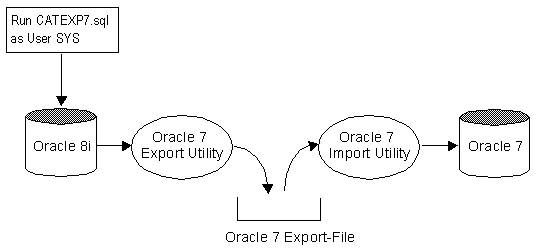
The following steps describe the procedure in more detail:
-
Run the catexp7.sql script on the Oracle8i database.
This script is in the $ORACLE_HOME/rdbms/admin directory.
-
Use the Oracle7 Export utility to export the parts
of the Oracle8i database containing the new or changed data.
-
Use the Oracle7 Import utility to import the file
previously exported from the Oracle8i database into the restored Oracle7 database.
How to remove in-doubt transactions ?
In doubt transactions may occur at double phase commit time for network,
break node ... reason. Normally if a double phase commit failed, you may have some entries
in views DBA_2PC_PENDING and DBA_2PC_NEIGHBORS. To force the in doubt transaction to
rollback you have to use the command:
ROLLBACK FORCE <transaction_id>;
Unfortunately, sometime the entries are still there ... and you may
discover in your alert<sid>.log file something like: ora-600 [18104] ... This point
to bug 445604 Fixes in version Oracle 7.3.4. Now it's possible to use package
DBMS_TRANSACTION to solve the problem if rollback force do not clean all entries.
Do as follow:
EXECUTE
DBMS_TRANSACTION.PURGE_LOST_DB_ENTRY('xid');
Where 'xid' come from: SELECT local_tran_id FROM DBA_2PC_PENDING;
How to install the Help-Tables for
SQL*Plus and PL/SQL ?
It can be handy to have the Help-Tables for SQL*PLUS online
using SQL>help command. Usually, these tables in
$ORACLE_HOME/sqlplus/admin/help are not installed per default, but it's easy done with the
following Shell-Script.
#!/bin/sh
$ORACLE_HOME/bin/svrmgrl << EOF
connect system/manager
@$ORACLE_HOME/sqlplus/admin/help/helptbl.sql;
exit;
EOF
$ORACLE_HOME/bin/svrmgrl << EOF
connect system/manager
@$ORACLE_HOME/sqlplus/admin/help/helpindx.sql;
exit;
EOF
cd $ORACLE_HOME/sqlplus/admin/help
$ORACLE_HOME/bin/sqlldr userid=system/manager control=plushelp.ctl
$ORACLE_HOME/bin/sqlldr userid=system/manager control=plshelp.ctl
$ORACLE_HOME/bin/sqlldr userid=system/manager control=sqlhelp.ctl
How much Redo-Log does this Transaction
generate ?
The Oracle Dicitonry is a wonderful Pool of many hidden
resorces. In the Oracle System Statistic Table V$SYSSTAT you can find the Number of blocks
written to the Redo. This can be found in the Attribute STATISTIC# = 71. If you measure
this value before and after the transaction, you can approximately find out how much
Redo-Log the transaction generates. Of course this is approximately, because there may
exists other transactions at the same time.
SQL> select * from v$sysstat where statistic#=71;
STATISTIC# NAME
---------- ----------------------------------------
71 physical writes direct
Example
SQL> select value from v$sysstat where statistic#=71;
VALUE
---------
436
SQL> create table myhelp as select * from system.help;
Table created.
SQL> select value from v$sysstat where statistic#=71;
VALUE
---------
642
Flush Shared Pool when it
reaches 60-70% of it's capacity
On a recent project we had a problem where performance would start
acceptable at the beginning of the day and by mid-day would be totally unacceptable.
Investigation showed that the third party application that ran on top of the Oracle
database was generating ad hoc SQL without using bind variables. This generation of ad hoc
SQL and non-use of bind variables was resulting in proliferation of non-reusable code
fragments in the shared pool, one user had over
90 shared pool segments assigned for queries that differed only by the selection parameter
(for example "where last_name='SMITH'" instead of "where last_name='JONES'"). This
proliferation of multiple nearly identical SQL statements meant that for each query issued
the time to scan the shared pool for identical statements was increasing for each
non-reusable statement generated.
A flush of the shared pool was the only solution to solve this
performance problem, resulting that all other query returned again in less than a
second.
It was determined that an automatic procedure was needed to monitor the
shared pool and flush it when it reached 60-70% of capacity.
The following procedue was created:
CREATE OR REPLACE VIEW sys.sql_summary AS SELECT
username,
sharable_mem,
persistent_mem,
runtime_mem
FROM sys.v_$sqlarea a, dba_users b
WHERE a.parsing_user_id = b.user_id;
CREATE OR REPLACE PROCEDURE sys.flush_it AS
CURSOR get_share IS
SELECT SUM(sharable_mem)
FROM sys.sql_summary;
CURSOR get_var IS
SELECT value
FROM v$sga
WHERE name like 'Var%';
CURSOR get_time is
SELECT SYSDATE
FROM dual;
todays_date DATE;
mem_ratio NUMBER;
share_mem NUMBER;
variable_mem NUMBER;
cur INTEGER;
sql_com VARCHAR2(60);
row_proc NUMBER;
BEGIN
OPEN get_share;
OPEN get_var;
FETCH get_share INTO share_mem;
DBMS_OUTPUT.PUT_LINE('share_mem: '||to_char(share_mem));
FETCH get_var INTO variable_mem;
DBMS_OUTPUT.PUT_LINE('variable_mem: '||to_char(variable_mem));
mem_ratio:=share_mem/variable_mem;
DBMS_OUTPUT.PUT_LINE('mem_ratio: '||to_char(mem_ratio));
IF (mem_ratio>0.3) THEN
DBMS_OUTPUT.PUT_LINE ('Flushing Shared Pool ...');
cur:=DBMS_SQL.open_cursor;
sql_com:='ALTER SYSTEM FLUSH SHARED_POOL';
DBMS_SQL.PARSE(cur,sql_com,dbms_sql.v7);
row_proc:=DBMS_SQL.EXECUTE(cur);
DBMS_SQL.CLOSE_CURSOR(cur);
END IF;
END;
/
This procedure was then loaded into the job queue and scheduled to run
every hour using the following commands:
DECLARE
job NUMBER;
BEGIN
DBMS_JOB.SUBMIT(job,'flush_it;',sysdate,'sysdate+1/24');
END;
/
Show who am I with my environment
set termout off
set head off
set termout on
select 'User: '|| user || ' on database ' || global_name,
'(Terminal='||USERENV('TERMINAL')||
', Session-Id='||USERENV('SESSIONID')||')'
from global_name;
User: SCOTT on database ARK1.WORLD
(Terminal=ARKUM, Session-Id=150)
Check current ROLE for Database Access
When a user logs on, Oracle enables all privileges granted explicitly to
the user and all privileges in the user's default roles. During the session, the user or an
application can use the SET ROLE statement any number of times to change the roles
currently enabled for the session. The number of roles that can be concurrently enabled is
limited by the initialization parameter MAX_ENABLED_ROLES. You can see which roles are
currently enabled by examining the SESSION_ROLES data dictionary view, for example:
SELECT role FROM session_roles;
ROLE
------------------------------
CONNECT
RESOURCE
You may check the DB access in your application context using the
following code construct.
DECLARE
HasAccess BOOLEAN := FALSE;
CURSOR cur_get_role IS
SELECT role FROM session_roles;
BEGIN
FOR role_rec IN cur_get_role LOOP
IF (UPPER(role_rec.role) IN ('ADMIN','CLERK')) THEN
HasAccess := TRUE;
END IF;
END LOOP;
IF (NOT HasAccess) THEN
RAISE_APPLICATION_ERROR
(-20020,'Sorry, you have no access to the database');
END IF;
END;
/
Useful UNIX
Utilities to manipulate fixed length records
The Unix operating system has a number of utilities that can be very
useful for pre-processing data files to be loaded
with SQL*Loader. Even when the same functionality can be achieved through SQL*Loader,
the utilities described here will be much faster. Data warehousing applications, in
particular, can benefit greatly from these utilities.
This article describes such Unix commands with examples of their
utilization. The Unix version of reference here is Sun Solaris, which is based on Unix
System V Release 4. For syntax details and the full range of options for each command,
consult the man pages in your system and your operating system documentation.
EXAMPLE 1
Let us assume a load with the following SQL*Loader control file:
LOAD DATA
INFILE 'example1.dat'
INTO TABLE emp
(empno POSITION(01:04) INTEGER
EXTERNAL,
ename POSITION(06:14) CHAR,
job POSITION(16:24)
CHAR,
mgr POSITION(26:29)
INTEGER EXTERNAL,
sal POSITION(31:37)
DECIMAL EXTERNAL,
comm POSITION(39:42)
DECIMAL EXTERNAL,
deptno POSITION(44:45) INTEGER
EXTERNAL)
Here are the contents of data file example1.dat:
7782 CLARK MANAGER 7839 2572.50 0.20
10
7839 KING PRESIDENT 5850.00
10
7654 MARTIN SALESMAN 7698 1894.00 0.15 30
EXAMPLE 2
Let us assume another load with the following control file:
LOAD DATA
INFILE 'example2.dat'
INTO TABLE dept
FIELDS TERMINATED BY ',' OPTIONALLY ENCLOSED BY '"'
(deptno, dname, loc)
Below are the contents of data file example2.dat:
12,RESEARCH,"SARATOGA"
10,"ACCOUNTING",CLEVELAND
13,"FINANCE","BOSTON"
The performance of direct path loads can be significantly improved by
presorting the input data on indexed columns.
Pre-sorting minimizes the demand for temporary segments during the load.
The Unix command to be used for presorting is "sort".
In Example 1, suppose you have added the SORTED INDEXES (empno) clause to
the control file to indicate that fields in the data file are presorted on the EMPNO
column. To do that presorting, you would enter at the Unix prompt:
sort +0 -1 example1.dat > example1.srt
This will sort file example1.dat by its first field (by default fields
are delimited by spaces and tabs) and send the output to file example1.srt:
7654 MARTIN SALESMAN 7698 1894.00 0.15 30
7782 CLARK MANAGER 7839 2572.50 0.20 10
7839 KING PRESIDENT 5850.00
10
In Example 2, if you wanted to sort file example2.dat by column DNAME,
you would enter:
sort -t, -d +1 -2 example2.dat > example2.srt
where "-t," indicates that commas are delimiters, "-d" causes sort to
consider only letters and digits in comparisons, and example2.srt is the output file:
10,"ACCOUNTING",CLEVELAND
13,"FINANCE","BOSTON"
12,RESEARCH,"SARATOGA"
Often, it is necessary to remove one or more fields from all the records
in the data file. The Unix command that does that is "cut". In Example 1, if you want
to eliminate the COMM field altogether from the data file, enter at the Unix prompt:
cut -c1-38,44- example1.dat > example1.cut
where the "-c" option specifies the character ranges that you want to
extract from each record. The output file example1.cut contains:
7782 CLARK MANAGER 7839 2572.50
10
7839 KING PRESIDENT 5850.00
10
7654 MARTIN SALESMAN 7698 1894.00 30
In Example 2, to eliminate the LOC field from the data file, you would
enter:
cut -f1-2 -d, example2.dat > example2.cut
where "-f1-2" indicates you want to extract the first two fields of each
record and "-d," tells cut to treat comma as a delimiter. The output file example2.cut
would contain:
12,RESEARCH
10,"ACCOUNTING"
13,"FINANCE"
Two Unix commands can be used here: "tr" or "sed". For instance, if you
want to replace all double quotes in the data file in Example 2 by single quotes, you may
enter:
cat example2.dat | tr \" \' > example2.sqt
The piped "cat" is necessary because tr's input source is the standard
input. Single and double quotes are preceded by backslashes because they are special
characters. The output file will be:
12,RESEARCH,'SARATOGA'
10,'ACCOUNTING',CLEVELAND
13,'FINANCE','BOSTON'
Similarly, to substitute colons for commas as delimiters in Example 2,
you may enter:
sed 's/,/:/g' example2.dat > example2.cln
The output would be:
12:RESEARCH:"SARATOGA"
10:"ACCOUNTING":CLEVELAND
13:"FINANCE":"BOSTON"
Just as for replacing characters, "tr" and "sed" can be used for
eliminating them from the data file. If you want to remove all double quotes from the data
file in Example 2, you may type:
cat example2.dat | tr -d \" > example2.noq
The contents of file example2.dat are piped to the tr process, in which
the "-d" option stands for "delete". The output file example2.noq would look
like:
12,RESEARCH,SARATOGA
10,ACCOUNTING,CLEVELAND
13,FINANCE,BOSTON
An identical result would be obtained by using sed:
sed 's/\"//g' example2.dat > example2.noq
The string in single quotes indicates that double quotes should be
replaced by an empty string globally in the input file. Another interesting usage of tr
would be to squeeze multiple blanks between fields down to a single space character.
That can be achieved by doing:
cat example1.dat | tr -s ' ' ' ' > example1.sqz
The output file would look like:
7782 CLARK MANAGER 7839 2572.50 0.20 10
7839 KING PRESIDENT 5850.00 10
7654 MARTIN SALESMAN 7698 1894.00 0.15 30
Inserting characters into the data file
A typical situation in which you may need to insert characters into the
datafile would be to convert a fixed position data file into a delimited one. The
data file in Example 1 is a fixed position one. To convert it into a file delimited
by commas, you would enter
cat example1.dat | tr -s ' ' ',' > example1.dlm
and obtain
7782,CLARK,MANAGER,7839,2572.50,0.20,10
7839,KING,PRESIDENT,5850.00,10
7654,MARTIN,SALESMAN,7698,1894.00,0.15,30
Merging different files into a single data file
Merging can be done by using "paste". This command allows you to
specify a list of files to be merged and the character(s) to be used as delimiter(s).
For instance, to merge the data files in Examples 1 and 2, you may enter:
paste -d' ' example1.dat example2.dat >
example.mrg
where "-d' '" specifies a blank character as the delimiter between
records being merged and example.mrg is the merged output file:
7782 CLARK MANAGER 7839 2572.50 0.20
10 12,RESEARCH,"SARATOGA"
7839 KING PRESIDENT 5850.00
10 10,"ACCOUNTING",CLEVELAND
7654 MARTIN SALESMAN 7698 1894.00 0.15 30 13,"FINANCE","BOSTON"
The Unix command for this is "uniq". It eliminates or reports
consecutive lines that are identical. Because only adjacent lines are compared, you
may have to use the sort utility before using uniq. In Example1, suppose you wanted to keep
only the first entry with DEPTNO = 10. The Unix command would be:
uniq +43 example1.dat > example1.unq
The "+43" indicates that the first 43 characters in each record should be
ignored for the comparison. The output file example1.unq would contain:
7782 CLARK MANAGER 7839 2572.50 0.20
10
7654 MARTIN SALESMAN 7698 1894.00 0.15 30
Use "wc". For example:
wc -l example1.dat
3 example1.dat
which indicates that the file contains three lines.
The "dd" Unix command can be used to convert EBCDIC data files to ASCII
and vice-versa. For example:
dd if=example1.ebc cbs=86 conv=ascii >
example1.asc
takes example1.ebc as EBCDIC input file, converts it into ASCII, and
writes the converted output to file example1.asc.
The "dd" and "tr" commands can also be used for converting between
uppercase and lowercase characters. Because Oracle is currently case-sensitive, this
can be useful in many situations. For example, to convert all characters in file
example1.dat from uppercase to lowercase, simply enter
dd if=example1.dat conv=lcase > example1.low
or
cat example1.dat | tr "[A-Z]" "[a-z]" >
example1.low
The contents of output file example1.low will be:
7782 clark manager 7839 2572.50 0.20
10
7839 king president 5850.00
10
7654 martin salesman 7698 1894.00 0.15 30
To convert this file back to uppercase characters, type
dd if=example1.low conv=ucase > example1.dat
or
cat example1.low | tr "[a-z]" "[A-Z]" >
example1.dat
Why to use locally managed
tablespaces ?
A tablespace that manages its own extents maintains a bitmap
in each datafile to keep track of the free or used status of blocks in that datafile. Each
bit in the bitmap corresponds to a block or a group of blocks. When an extent is allocated
or freed for reuse, Oracle changes the bitmap values to show the new status of the blocks.
These changes do not generate rollback information because they do not update tables in
the data dictionary.
Local management of extents automatically tracks adjacent
free space, eliminating the need to coalesce free extents. The sizes of extents that
are managed locally can be determined automatically by the system. Alternatively, all
extents can have the same size in a locally-managed tablespace.
A tablespace that manages its extents locally can have
either uniform extent sizes or variable extent sizes that are determined automatically by
the system. When you create the tablespace, the UNIFORM or AUTOALLOCATE (system-managed)
option specifies the type of allocation.
For system-managed extents, you can specify the size of the
initial extent and Oracle determines the optimal size of additional extents, with a minimum
extent size of 64 KB. This is the default for permanent tablespaces.
For uniform extents, you can specify an extent size or use
the default size, which is 1 MB. Temporary tablespaces that manage their extents locally
can only use this type of allocation.
The storage parameters NEXT, PCTINCREASE, MINEXTENTS,
MAXEXTENTS, and DEFAULT
STORAGE are not valid for extents that are managed locally. Actually, you cannot create a
locally managed SYSTEM tablespace. Locally managed temporary tablespaces must of type
"temporary" (not "permanent").
Local management of extents avoids recursive space
management operations, which can occur in dictionary-managed tablespaces if consuming or
releasing space in an extent results in another operation that consumes or releases space
in a rollback segment or data dictionary table. Local management of extents automatically
tracks adjacent free space, eliminating the need to coalesce free extents.
Example:
-
An insert causes a request for an extent
-
Oracle allocates space in the data tablespace
-
This causes an update of system tables in the data
dictionary if tablespace is dictionary-managed
-
Consequently, an update is made to the redo log.
So a large number of inserts in to a tablespace with a small
extent size may cause many I/O's to the system tablespace and consequently the redo log
files. Also, large sorts from "read-only" databases may cause many I/O's to the log file
due to system tablespace update for temporary tablespace extent allocation.
When creating tablespaces with a uniform extent size it is
important to understand that 64 Kbytes per datafile is allocated for the storage
management information. When creating database files, add an additional 64 Kbytes to
the size of your datafile.
Consider the following example to illustrate the matter:
SQL> CREATE TABLESPACE demo1
DATAFILE 'D:\Oradata\SAP1\tab\SAP1_demo1.dbf' SIZE 10M
EXTENT MANAGEMENT LOCAL UNIFORM SIZE 5M;
Tablespace created.
SQL> select bytes from dba_free_space where
TABLESPACE_NAME = 'DEMO1';
BYTES
----------
5242880
What happens here is we ask for 5 Mbyte extents in a 10 Mbyte file. After
64 Kbytes is allocated for the bitmap, we are left with one 5 Mbyte extent and one less
then 5 Mbytes extent. We cannot use the less then 5 Mbyte extent so it does not show up --
it is wasted. This can also happen when you have larger uniform extents when the remainder
of space in the datafile is just 64 Kbytes short of being able to accomodate your uniform
extent size.
SQL> drop TABLESPACE demo1;
Tablespace dropped.
If you change the test case to allow for the extra 64 Kbytes:
SQL> CREATE TABLESPACE demo1
DATAFILE 'D:\Oradata\SAP1\tab\SAP1_demo1.dbf' SIZE
10304K
EXTENT MANAGEMENT LOCAL UNIFORM SIZE 5M;
Tablespace created.
SQL> select bytes from dba_free_space where
TABLESPACE_NAME = 'DEMO1';
BYTES
----------
10485760
You can see that when we add 64 Kbytes to the datafile size the full 2
extents you want are there. Locally managed tablespaces should have datafiles that are 64
Kbytes
LARGER then a multiple of their extent size when using uniform sizing.
Download Scripts to create a
database (8.1.6) with locally managed tablespaces for NT4
Download Scripts to create a database (8.1.69 with
locally managed tablespaces for SUN-Solaris
How to create a
locally managed temporary Tablespace ?
The syntax to create a locally managed temporary tablespace
is different from the normally used syntax when creating a permanent tablespace -- find the
syntax below:
### Locally managed (SIZE + 64K for Header Bitmap)
CREATE TEMPORARY TABLESPACE temp
TEMPFILE '/u01/db/DIA2/tmp/DIA2_temp1.dbf' SIZE 512064K REUSE
AUTOEXTEND ON NEXT 10M MAXSIZE UNLIMITED
EXTENT MANAGEMENT LOCAL UNIFORM SIZE 256K;
You may get an ORA-03212 error message after creating
locally managed tablespace. This will happen when you create an oracle user without a
temporary tablespace specified; note that temporary segments cannot be created in permanent
tablespaces. Due to this, always create the user with a locally managed temporary
tablespace.
ORA-00604: error occurred at recursive SQL level 1
ORA-03212: Temporary Segment cannot be created in locally-managed tablespace
oerr ora 03212
03212, 00000, "Temporary Segment cannot be created in
locally-managed tablespace"
// *Cause: Attempt to create a temporary segment for sort/hash/lobs in
// in permanent tablespace of kind locally-managed
// *Action: Alter temporary tablespace of user to a temporary tablespace
// or a dictionary-managed permanent tablespace
How to implement
inheritance in a relational DB ?
Oracle8 is a object relational database, but one of the most central
parts in object technology is inheritance which is not supported in many object relational
databases. Therefore the big question is how inheritance can be implemented in a plain
relational database. In the following example we show some possible ways. We have the
generic class VEHICLE which have the three attributes A,B,C which are common to all
specific classes like BIKE and CAR. In object terminology BIKE and CAR are inherited from
VEHICLE. Both, BIKE and CAR may overwrite the common attributs A,B,C. Besides this, the
class CAR have the attributes D,E and the class BIKE have the attrbutes F,G,H. The
following figure shows the situation in object terminologie.

The shown object inheritance can be shown in an entity
relationship diagram, which is used in the world of relational databases as follows:
 |
The figure shows the Super-Entity Vehicle, with the common attributes
A,B,C. These attributes are common to all entities. The entity Car and
Bike are Sub-Entities, they inherit the attributes A,B,C from the Super-Entity
Vehicle
|
The simplest solution is to create one table with all
attributes. The advantage is simplicity but this solution should only be used if there are
only a few attributes for CAR and VEHICLE. If you have many attributes for
e.g. BIKE, most of them are NULL if you specify a car. Another disadvantage is, that
all attributes D,E,F,G,H must be defined as NULL. The primary key ID in this example ID is
generated with a sequence, but this is not a must.

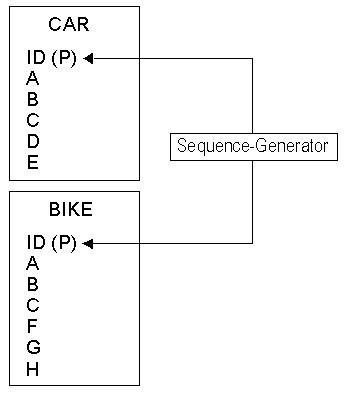
The two table solution, one table for CAR and one table for
BIKE eliminates the problem of having (many) unused attributes from the one table solution.
The disadvantage is, that the common attributes A,B,C must exist in both tables. Again, the
primary key is generated with the same sequence.
The three table solution eliminates all disadvantages from
the above solutions, but adds some overhead. The OR constraint cannot be checked with
referential integrity, therefore we need a (simple) database trigger for this.

The following code example shows solution C.
CREATE TABLE vehicle (
ID NUMBER(5) PRIMARY KEY,
A VARCHAR2(10),
B VARCHAR2(10),
C VARCHAR2(10));
CREATE TABLE car (
ID NUMBER(5) PRIMARY KEY,
D VARCHAR2(10),
E VARCHAR2(10));
ALTER TABLE car ADD (
CONSTRAINT fk_car_vehicle
FOREIGN KEY (id)
REFERENCES vehicle (id));
CREATE TABLE bike (
ID NUMBER(5) PRIMARY KEY,
F VARCHAR2(10),
G VARCHAR2(10),
H VARCHAR2(10));
ALTER TABLE bike ADD (
CONSTRAINT fk_bike_vehicle
FOREIGN KEY (id)
REFERENCES vehicle (id));
CREATE OR REPLACE TRIGGER check_or
BEFORE INSERT OR UPDATE ON bike
FOR EACH ROW
DECLARE
dummy CHAR(1);
illegal_operation EXCEPTION;
CURSOR check_or_cur (cid bike.id%TYPE) IS
SELECT 'X' FROM car
WHERE id = cid;
BEGIN
OPEN check_or_cur (:new.id);
FETCH check_or_cur INTO dummy;
IF check_or_cur%FOUND THEN
RAISE illegal_operation;
END IF;
CLOSE check_or_cur;
EXCEPTION
WHEN illegal_operation THEN
CLOSE check_or_cur;
raise_application_error(-20000, 'ID: '||
TO_CHAR(:new.id) || ' already exists');
END;
/
INSERT INTO vehicle VALUES (1,'Has Weels','Licence','Driver');
INSERT INTO car VALUES (1,'Opel','Germany');
INSERT INTO bike VALUES (1,'Honda','Japan','2 Cyl');
ERROR at line 1:
ORA-20000: ID: 1 already exists
ORA-06512: at "SCOTT.CHECK_OR", line 17
ORA-04088: error during execution of trigger 'SCOTT.CHECK_OR'
Do NOT backup temporary
tablespace
You have created a locally managed temporary tablespace and are
attempting to
do a hot backup of a datafile. You issue the statement:
SQL> ALTER TABLESPACE <TABLESPACENAME> BEGIN
BACKUP;
and you receive the following error:
ORA-03217: invalid option for alter of TEMPORARY
TABLESPACE
Cause: invalid option for alter of temporary
tablespace was
specified
Action: Specify one of the valid options: ADD
TEMPFILE
Do not back up temporary tablespaces.
This error is issued due to one of the following:
-
Locally managed tempfiles are always set to NOLOGGING mode.
-
Extents are managed by bitmap in each datafile to keep
track
of free or used status of blocks in that datafile.
-
The data dictionary does not manage the tablespace.
-
Rollback information is not generated because there is no
update
on the data dictionary.
-
Control file does not have any reference to the tempfile.
-
media recovery does not recognize tempfiles.
Alter database and alter tablespace will not work on tempfiles as they
have no reference in the data dictionary. There is no need to back up the tempfiles
as they are used and destroyed every time you start up and shut down the database.
The locally managed tempfile is a new feature in Oracle8i to avoid
recursive space management operations, which can occur in dictionary managed
tablespaces.
ORA-27146: post/wait
initialization failed on Solaris / Oracle 8.1.6
This message occures when oracle have a resource problem in
order to start the background processes. Try to specify enough memory segments and
semaphores specified in /etc/system, use the following guidelines.
| SEMMNS |
Total semaphores available on the system as a whole |
| SEMMNI |
Maximum number of SETs of semaphores (number of
identifiers) |
| SEMMSL |
Limits the maximum number of semaphores available in any
one set
(Some platforms only). |
First list out the 'processes' parameter from the
"init<SID>.ora" file.
SEMMNS
Sum the number of processes in the "init<SID>.ora"
file, this is the number of semaphores required by Oracle to start ALL databases. Add to
this any other system requirements and ensure SEMMNS is AT LEAST this value.
SEMMNS >= SUM of 'processes' for all Databases + other system requirements.
For Oracle 8.0.x and 8.1.x allocate twice as many semaphores
as are in the "init<SID>.ora" file on startup. For example, if processes = 200,
Oracle will need 400 to startup the SGA. This
needs to be part of your calculations.
Example for Oracle 8.1.6:
If you have 3 databases and the "init.ora" files have 100 150 and 200 processes allocated for each database
then you would add up the three numbers 100+150+200 = 450 and an extra 10 processes per
database 450+30 = 480. You would need to set SEMMNS to at least twice this number (480 *2 =
960 SEMMNS=960).
SEMMNI
Semaphores are allocated by Unix in 'sets' of up to SEMMSL
semaphores per set. You can have a MAXIMUM of SEMMNI sets on the system at any one time.
SEMMNI is an arbitrary figure which is best set to a round figure no smaller that the
smallest 'processes' figure for any database on the system, in our example we would set
SEMMNI=100 (see above).
SEMMSL
We usually set SEMMSL to the same value as SEMMNI.
Reboot the Solaris Machine after editing /etc/system. Do an
ipcs -s to find out what semaphores are hold by
oracle. If no oracle processes are running then no semaphores should be hold by the owner
oracle. To remove the semaphores do an iprm -s ID
where ID the semaphore identifier.
*
* Kernel Parameters for Oracle 8.1.6 (Example for three DB's)
*
set shmsys:shminfo_shmmax=4294967295
set shmsys:shminfo_shmmin=1
set shmsys:shminfo_shmmni=100
set shmsys:shminfo_shmseg=10
set semsys:seminfo_semmni=100
set semsys:seminfo_semmsl=100
set semsys:seminfo_semmns=1000
set semsys:seminfo_semopm=100
Create a CROSS MATRIX
report using DECODE
Example of a CROSS MATRIX report implemented using standard
SQL.
SELECT job,
sum(decode(deptno,10,sal)) "Dept10",
sum(decode(deptno,20,sal)) "Dept20",
sum(decode(deptno,30,sal)) "Dept30",
sum(decode(deptno,40,sal)) "Dept40"
FROM scott.emp
GROUP BY job
/
JOB
Dept10 Dept20 Dept30 Dept40
--------- --------- --------- --------- ---------
ANALYST
6000
CLERK
1300 1900 950
MANAGER 2450
2975 2850
PRESIDENT 5000
SALESMAN
5600
Storage of Oracle Data Types
Oracle supports different data types which allows the database designer
to define the length or precision of these types. Specially VARCHAR2 and NUMBER are
scalable.
One of the main advantage of the data type VARCHAR2 is the variable
length. As most database designers know, only the used number of characters up to the
defined length will be stored in the database. No spaces are padded up to the specified
size for VARCHAR2.
This behaviour can be checked easily: Two tables are defined, one with a small and another
with a larger number of bytes.
CREATE TABLE shortVar2 (shorttext
VARCHAR2(12));
CREATE TABLE longVar2 (longtext VARCHAR2(2000));
Now some records are inserted in both tables. The length of the inserted
text is equivalent, in this example 11 characters:
FOR i IN 1..25000 LOOP
INSERT INTO shortVar2 VALUES ('Hello world');
INSERT INTO longVar2 VALUES ('Hello world');
END LOOP;
Both tables can be analysed and the result is not surprising:
TABLE_NAME
NUM_ROWS BLOCKS AVG_ROW_LEN
------------------------------ --------- --------- -----------
LONGVAR2
25000
120 15
SHORTVAR2
25000
120 15
In both tables 120 blocks are used and the average row length is 15
bytes, regardless of the specified maximum row size. Some overhead bytes are used to
determine the length of the stored number of bytes and for row information.
The analyse for VARCHAR2 was not surprising. But how does Oracle stores
numbers? Does NUMBER(2) need less, equal, or more storage than NUMBER(15) or even NUMBER?
Let's do the same steps as above to analyse the result: Three tables are defined, one for
NUMBER(2) only, one for the maximum precision but filled with the same value as the first
table, and one for the maximum precision filled with very big numbers.
CREATE TABLE num2num2 (num2 NUMBER(2));
CREATE TABLE numXnum2 (numX NUMBER);
CREATE TABLE numXnumX (numX NUMBER);
Again some records are inserted in every table:
FOR i IN 1..25000 LOOP
INSERT INTO num2num2 VALUES (25);
INSERT INTO numXnum2 VALUES (25);
INSERT INTO numXnumX VALUES
(99999999123456789012345678901234567890);
END LOOP;
The result of the analyse:
TABLE_NAME
NUM_ROWS BLOCKS AVG_ROW_LEN
------------------------------ --------- --------- -----------
NUM2NUM2
25000
80 6
NUMXNUM2
25000
80 6
NUMXNUMX
25000
182 24
Both tables num2num2 and numXnum2 (filled with the same value) are using
80 blocks and have an average record length of 6 bytes. Only the storage of very big
numbers needs more blocks and increases the average record length up to 24 bytes. Some
overhead bytes are used to determine the length (one byte) and for row information.
Positive numbers are stored in the following format:
<Sign (1 bit), exponent based on 64 (7 bit)><number based on
100><number base on 100><number based on 100>...
E.g. the number 345 will be split to <3><45> and stored
within three bytes as follows:
<194><4><46>
-
194 (decimal) has the bit pattern 1100 0010. The first bit represents
the sign (positive number), the next 7 bits represent the exponent (64 plus 2). This
will be interpreted as 100 to the power of 2 (equal to 10000).
-
4 is the sum of 3 plus 1 because Oracle always adds 1 to the original
splitted
number to avoid zero.
-
46 is the sum of 45 plus 1.
So the value will be calculated for this positive number as 0.345
multiplied by 10000.
Negative numbers are stored and calculated in a similar way.
Oracle has an efficient way to store strings and numbers with variable
length. There is no reason to shorten the length. No disk space is wasted because Oracle
takes as much space as really needed.
Thanks to Oracle Software (Schweiz) for this information.
|

