
Oracle Replication Survival Guide
Martin Zahn, Akadia AG, 25.09.2005
Some Material in this Guide is overtaken from the official Oracle Replication Guide
Content
Read-Only Materialized Views
ExampleMulti-Master Replication
Overview
Concepts and Terminology
Replication UsersExample for a Multimaster Site
Create SCOTT Schemas
Create Password Files
Setup Oracle Network
Setup Users on Master CEL1.WORLD and CEL2.WORLD
Create Master Replication Group on CEL1.WORLD and CEL2.WORLD
Setup Users on Materialized View Site REP1.WORLD and REP2.WORLD
Create Materialized View Group on REP1.WORLD and REP2.WORLDMonitoring Master Sites
Monitoring the Deferred Transactions Queue
Monitoring Purges of Successfully Propagated Transactions
Monitoring the Error Queue
Monitoring Performance in a Replication Environment
Overview
If you're going to realize the full potential of Oracle's advanced replication facilities and simultaneously avoid the pitfalls, you need to
understand the architecture on which they are based.
Note that replicating data is fundamentally different from distributing data. When data is distributed, it may be accessed transparently from multiple locations, but a given table exists in only one location, and that location is responsible for its security and integrity. Replicated data, on the other hand, resides at multiple locations, each of which shares in its maintenance. Data replication implies an increased level of complexity because it introduces issues such as data synchronization and latency. This complexity is the price to pay for continuous operations when a remote data source is unavailable.
Types of Replication
Oracle's four basic types of replication. Starting from Oracle9 Read-only Snapshots are so called Read-Only Materialized Views.
Replication Type
Description
Read-only materialized views A master table is copied to one or more databases. Changes in the master table are reflected in the snapshot tables whenever the snapshot refreshes. The snapshot site determines the frequency of the refreshes; data is pulled. Updateable materialized views Similar to read-only snapshots, except that the snapshot sites are able to modify the data and send their changes back to the master. The snapshot site determines the frequency of the refreshes and the frequency with which updates are sent back to the master. Multi-master replication A table is copied to one or more databases, and each database has the ability to insert, update, or delete records from it. Modifications are pushed to the other database at an interval that the DBA sets for each replication group. The highest theoretical frequency is once per second. Procedural replication A call to a packaged procedure or function is replicated to one or more databases. As you can see, these modes of replication are quite different, and each is suited for specific kinds of uses. A single environment can utilize all of these methods; they are not mutually exclusive.
Read-Only Materialized Views
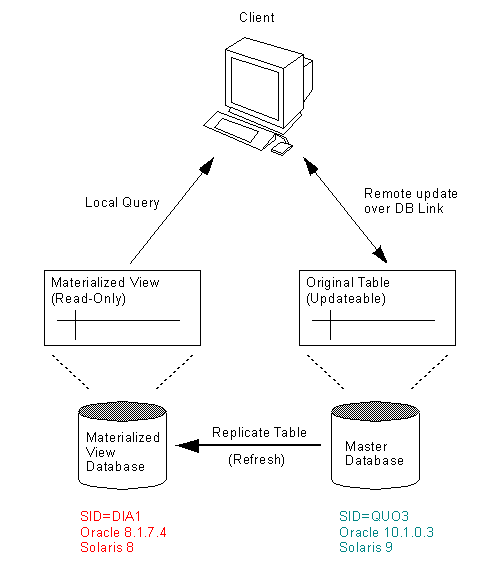
Read-only snapshot sites can be used to provide local access to remote master tables. Having a local snapshots of the data improves query response time. Updates can only be issued against the master table.
In a basic configuration, materialized views can provide read-only access to the table data that originates from a master site or master materialized view site. Applications can query data from read-only materialized views to avoid network access to the master site, regardless of network availability. However, applications throughout the system must access data at the master site to perform data manipulation language changes (DML). The master tables and master materialized views of read-only materialized views do not need to belong to a replication group.
Read-only materialized views provide the following benefits:
Eliminate the possibility of conflicts because they cannot be updated.
Support complex materialized views. Examples of complex materialized views are materialized views that contain set operations or a CONNECT BY clause.
In order to create one (or many) read-only snapshot of the master Oracle database tables, the following steps are necessary.
Master Site: Oracle 10.1.0.3, Solaris 9, SID=QUO3
Snapshot Site: Oracle 8.1.7.4, Solaris 8, SID=DIA1
Check TNSNAMES.ORA
- On Master (Host=quorum)
DIA1.WORLD =
(DESCRIPTION =
(ADDRESS = (PROTOCOL = TCP)(HOST = diamond)(PORT = 1521))
(CONNECT_DATA =
(SERVICE_NAME = DIA1)
(INSTANCE_NAME = DIA1)
(SRVR = DEDICATED)
)
)
DIA1 =
(DESCRIPTION =
(ADDRESS = (PROTOCOL = TCP)(HOST = diamond)(PORT = 1521))
(CONNECT_DATA =
(SERVICE_NAME = DIA1)
(INSTANCE_NAME = DIA1)
(SRVR = DEDICATED)
)
)On Snapshot (Host=diamond)
QUO3.WORLD =
(DESCRIPTION =
(ADDRESS = (PROTOCOL = TCP)(HOST = quorum)(PORT = 1523))
(CONNECT_DATA =
(SERVICE_NAME = QUO3)
(INSTANCE_NAME = QUO3)
(SRVR = DEDICATED)
)
)
QUO3 =
(DESCRIPTION =
(ADDRESS = (PROTOCOL = TCP)(HOST = quorum)(PORT = 1523))
(CONNECT_DATA =
(SERVICE_NAME = QUO3)
(INSTANCE_NAME = QUO3)
(SRVR = DEDICATED)
)
)
Create DB Links
On Master (Host=quorum)
sqlplus scott/tiger@QUO3
CREATE DATABASE LINK DIA1 CONNECT TO scott IDENTIFIED BY tiger using 'DIA1';
Database link created.On Snapshot (Host=diamond)
sqlplus scott/tiger@DIA1
CREATE DATABASE LINK QUO3 CONNECT TO scott IDENTIFIED BY tiger using 'QUO3';
Database link created.desc emp@QUO3;
Name Null? Type
----------------------------------------- -------- ----------------------
EMPNO NOT NULL NUMBER(4)
ENAME VARCHAR2(10)
JOB VARCHAR2(9)
MGR NUMBER(4)
HIREDATE DATE
SAL NUMBER(7,2)
COMM NUMBER(7,2)
DEPTNO NUMBER(2)
Create Snapshot Log
For each table, which should be replicated, a SNAPSHOT LOG must be created (as user, who owns the table).
A materialized view log (Snapshot Log) is a table at the materialized view's master site or master materialized view site that records all of the DML changes to the master table or master materialized view. A materialized view log is associated with a single master table or master materialized view, and each of those has only one materialized view log, regardless of how many materialized views refresh from the master. A fast refresh of a materialized view is possible only if the materialized view's master has a materialized view log. When a materialized view is fast refreshed, entries in the materialized view's associated materialized view log that have appeared since the materialized view was last refreshed are applied to the materialized view.
On Master (Host=quorum)
sqlplus scott/tiger@QUO3
DROP SNAPSHOT LOG ON emp;
CREATE SNAPSHOT LOG ON emp
TABLESPACE tab
STORAGE
(INITIAL 200K
NEXT 200K
MINEXTENTS 1
MAXEXTENTS UNLIMITED
PCTINCREASE 0);
Materialized view log created.
Create Snapshot
A snapshot contains on the remote site the data of the master table. All data changes are reflected in the snapshot after a refresh of the snapshot (either triggered manually or automatically).
On Snapshot (Host=diamond)
sqlplus scott/tiger@DIA1
CREATE SNAPSHOT emp
PCTFREE 15
STORAGE
(INITIAL 200K
NEXT 200K
PCTINCREASE 0)
TABLESPACE tab
USING INDEX
PCTFREE 0
STORAGE
(INITIAL 200K
NEXT 200K
PCTINCREASE 0)
TABLESPACE idx
REFRESH FORCE
START WITH SYSDATE NEXT SYSDATE+(1/1440) /* 60 SECONDS */
AS SELECT * FROM emp@QUO3;
Materialized view created.
Create Synonym
On Snapshot (Host=diamond)
sqlplus scott/tiger@DIA1
CREATE PUBLIC SYNONYM emp FOR scott.emp;
Synonym created.Now, you can access the table emp locally which will be automatically refreshed every 60 sec.
Refresh the Snapshot
The snapshot on the remote site must be refreshed regularily. This can be done bullet either by hand after a substantial change on the master site or in regular intervalls.
Manual Refresh
On Snapshot (Host=diamond)
sqlplus scott/tiger@DIA1
execute dbms_snapshot.refresh('scott.emp','F');
PL/SQL procedure successfully completed.The first parameter is a list of snapshots to be refreshed. The second describes the method, F stands for FAST refresh (only changes in the master table are propagated, C stands for complete refresh.
There is also a dbms_snapshot.refresh_all routine. It requires some more privileges.
execute dbms_snapshot.refresh_all;
Automatic Refresh
Automatic refresh is realized by parameters for a refresh group or by the definition of the snapshot. In order to run periodoc jobs in the database (as automatic refresh jobs), the ability to run SNP background jobs must be given.
Especially, in the file init<instance>.ora , located the parameterjob_queue_processes = 1
must be included (the default is 0) and the database must be restarted! This parameter allows background processes to be executed in one job queue.
Check Automatic Refresh
You may use the following query to check, if automatically refresh works.
SELECT SUBSTR(job,1,4) "Job", SUBSTR(log_user,1,5) "User",
SUBSTR(schema_user,1,5) "Schema",
SUBSTR(TO_CHAR(last_date,'DD.MM.YYYY HH24:MI'),1,16) "Last Date",
SUBSTR(TO_CHAR(next_date,'DD.MM.YYYY HH24:MI'),1,16) "Next Date",
SUBSTR(broken,1,2) "B", SUBSTR(failures,1,6) "Failed",
SUBSTR(what,1,20) "Command"
FROM dba_jobs;
Job User Schem Last Date Next Date B Failed Command
---- ----- ----- ---------------- ---------------- - ------ --------------------
2 SCOTT SCOTT 06.09.2005 15:05 06.09.2005 15:06 N 0 dbms_refresh.refresh
Drop Snapshots and Snapshot Logs
On Master (Host=quorum)
sqlplus scott/tiger@QUO3
spool drop_snapshot_logs.sql
select 'PROMPT Dropping Snapshot Log for '||MASTER||chr(10)
||'drop snapshot log on '||MASTER||';'
from USER_SNAPSHOT_LOGS;
spool off
@drop_snapshot_logs.sql
PROMPT Snapshot Logs DroppedOn Snapshot (Host=diamond)
sqlplus scott/tiger@DIA1
spool drop_snapshots.sql
select 'PROMPT Dropping Snapshot for '||NAME||chr(10)
||'drop snapshot '||NAME||';'
from USER_SNAPSHOTS;
@drop_snapshots.sql
PROMPT Snapshots dropped
Refresh Groups
If the snapshot must obey certain integrity rules, like referential integrity, then the refresh of the snapshot tables must be synchronized. This is achieved by creating refresh groups.
dbms_refresh.make(
name => 'MY_GRP',
list => 'emp,dept,bonus,salgrade',
next_date => SYSDATE,
interval => 'SYSDATE + (1/1440)', /* 60 seconds */
implicit_destroy => TRUE, /* delete the group if substracting
the last member */
lax => TRUE, /* delete from other group if already
existing in a group */
rollback_seg => 'RB06'
);
commit;
Multi-Master Replication
You have already seen how to create and use read-only materialized views. They offer the powerful ability to replicate data in tables across separate databases. With multi-master replication, you can replicate more than just database tables. You can replicate:
- Tables
- Indexes
- Procedures, functions, and triggers
- Packages
- User-defined types (Oracle9i)
As always, there are plusses and minuses to using multi-master replication.
The positive benefits of MMR include the following:
- Replicates more objects, including user-defined objects.
- Updates or modifies the objects being replicated. Adding a column to a table at the master definition site can be replicated to other master sites.
- Replicates with any number of other databases. Any master site can replicate with other master sites, updatable Mview sites, and read-only Mview sites.
However, there are some downsides such as:
- Potentially large network bandwidth requirements. Not only does multi-master push and pull changes between sites, it also sends acknowledgements and quite a bit of administrative data.
- Reduced Performance. Complexity and robustness comes at a price. MMR involves the use of triggers and procedures, and this can result in a database performance hit. Depending on how much data you are replicating, this performance hit can be substantial.
- Significant increases in administration requirements. When problems appear in the database, the DBA must insure that replication is not the cause or that the cause is not replicated to other databases. Database performance tuning and problem resolution becomes more complicated by an order of magnitude.
- Database changes require additional planning. Rolling out a new version of an application can be much more difficult. Each new version will require revisiting the design of the replication.
The considerations above should reinforce not to implement a higher level of replication than you need. Multi-master replication is powerful, and it is complicated to create and monitor the replication environment.
Deferred Transaction
A deferred transaction is a transaction that is queued for delivery to one or more remote databases. If you use multi-master replication with asynchronous propagation, Oracle creates deferred transactions for all local DML activity against the replicated tables.
Replication Group
A replication group is a collection of one or more replicated objects (typically tables) that are administrated together. Very generally speaking, the objects in a given replication group are logically related; for example, they are often the set of objects that a given application uses. A given replication group can contain objects from multiple schema, and a given schema can have objects in more than one replication group. However, any given object can be in only one replication group.
The most significant property of replication groups is that all objects in a given group are quiesced together. That is, DML activity is enabled and disabled for all group members simultaneously.
Quiescence
Quiescence is the act of suspending DML activity for all tables in a given replication group. This is required in order to perform certain administrative tasks on objects in a replication group, such as altering a table. The Oracle built-in package procedure call that quiesces a replication group is DBMS_REPCAT.SUSPEND_MASTER_ACTIVITY.
Master Definition Site
The master definition site of a replication group is the database instance from which the group is administered. This site is usually, but not necessarily, the site at which the replication group was originally created.
Master Site
A master site is a site that is participating in one or more replication groups but is not the master definition site.
Replication Support
Replication support refers to the packages and triggers that Oracle creates in order to propagate changes to replicated objects, to detect and resolve conflicts, and so on.
Propagation and Conflict
When Oracle propagates an update to destination tables, it expects the current data for the row at the destination to match the data at the originating site prior to the update. If the data is not the same, an update conflict results. Similarly, if an insert fails because of a primary key violation (i.e., a unique constraint violation) the result is a uniqueness conflict or violation. And, if the target row of a delete does not exist at the destination site, a delete conflict results.
Unless you are propagating changes among master sites synchronously, there is a delay between the time a DML change is applied at the originating database and the time the transaction reaches the destination databases. This lag is known as propagation latency.
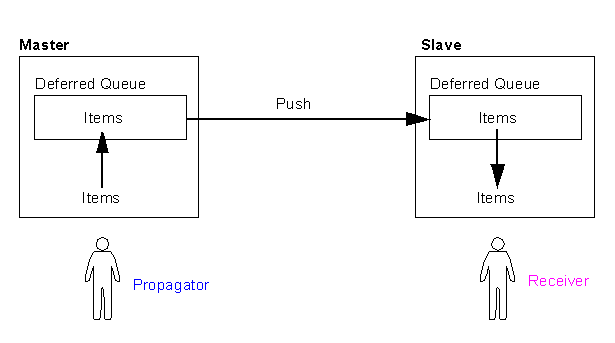
- The Administrator maintains the master group, adds or removes objects, etc.
- The Propagator is responsible for pushing items in the deferred transaction queue to all other master sites.
- The Receiver takes items that have arrived in the deferred transaction queue and applies them to the local objects.
Oracle recommends that you use the Replication Administrator to perform all three tasks when establishing your replication environment. For additional security, you can establish a separate user as the receiver and propagator.
- A master site can have only one propagator.
- A propagator has the "execute any procedure" grant.
- A master site can have multiple receivers.
- A master group can have only one receiver per master site.
- A receiver is not granted "execute any procedure".
Example for a Multimaster Site
Next, we illustrate how to set up both a master site and a materialized view replication site using the replication management API.
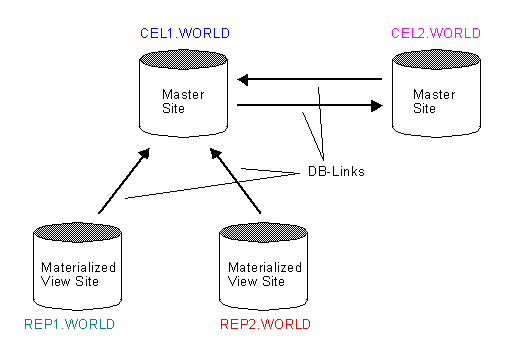
Before you build the replication environment, you need to set up the sites that will participate in the replication environment. As illustrated there are separate processes for setting up a master site versus setting up a materialized view site.
We use the following databases:
CEL1.WORLD
CEL2.WORLD
REP1.WORLD
REP2.WORLD
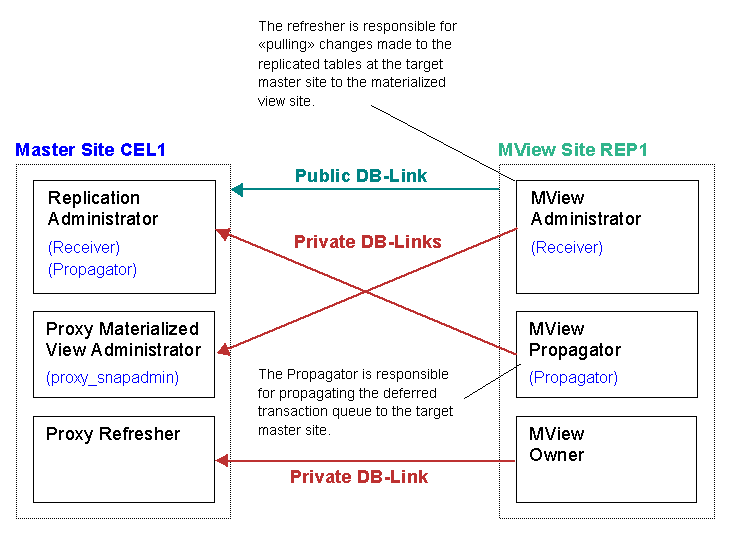
Notice that REP1.WORLD and REP2.WORLD are materialized views based on the CEL1.WORLD. The arrows in the Figure represents database links.
Important Note !
If you get an error when creating Replication Groups such as:
ERROR at line 1:
then, connect directly to the Database as follows:
ORA-04052: error occurred when looking up remote object
REPADMIN.SYS@CEL1.WORLD
ORA-00604: error occurred at recursive SQL level 2
ORA-12154: TNS:could not resolve the connect identifier specifiedexport ORACLE_SID=CEL1
sqlplus repadmin/repadminNow create the Replication Group.
We use the simple EMP/DEPT schema from SCOTT/TIGER.
sqlplus scott/tiger@CEL1.WORLD
start demobld.sql
ALTER TABLE emp ADD (CONSTRAINT pk_emp PRIMARY KEY (empno) ENABLE);
ALTER TABLE dept ADD (CONSTRAINT pk_dept PRIMARY KEY (deptno) ENABLE);
ALTER TABLE emp ADD (
CONSTRAINT fk_emp_dept FOREIGN KEY (deptno)
REFERENCES dept (deptno) ENABLE);
sqlplus scott/tiger@CEL2.WORLD
start demobld.sql
ALTER TABLE emp ADD (CONSTRAINT pk_emp PRIMARY KEY (empno) ENABLE);
ALTER TABLE dept ADD (CONSTRAINT pk_dept PRIMARY KEY (deptno) ENABLE);
ALTER TABLE emp ADD (
CONSTRAINT fk_emp_dept FOREIGN KEY (deptno)
REFERENCES dept (deptno) ENABLE);
The following sections contain step-by-step instructions for setting up the master sites in the sample replication environment: CEL1.WORLD and CEL2.WORLD. Before you set up the master sites, configure your network and Oracle Net so that all three databases can communicate with each other.
If the DBA wants to start up an Oracle instance there must be a way for Oracle to authenticate this DBA. That is if (s)he is allowed to do so. Obviously, his password can not be stored in the database, because Oracle can not access the database if the instance has not been started up. Therefore, the authentication of the DBA must happen outside of the database.
The init parameter remote_login_passwordfile specifies if a password file is used to authenticate the DBA or not. If it set either to shared or exclusive a password file will be used.
Default location and file name
The default location for the password file is:
$ORACLE_HOME/dbs/orapw$ORACLE_SID on Unix
%ORACLE_HOME%\database\PWD%ORACLE_SID%.ora on Windows.
Deleting a password file
If password file authentication is no longer needed, the password file can be deleted and the init parameter remote_login_passwordfile set to none.
Password file state
If a password file is shared or exclusive is also stored in the password file. After its creation, the state is shared. The state can be changed by setting remote_login_passwordfile and starting the database. That is, the database overwrites the state in the password file when it is started up. A password file whose state is shared can only contain SYS.
Creating a password file
Password files are created with the orapwd tool.
orapwd file=orapwCEL1 password=manager entries=5 force=y
Create a Symbolic Link from $ORACLE_HOME/dbs to the Password.
lrwxrwxrwx 1 oracle dba 39 2005-09-13 16:55 initCEL1.ora -> /home/oracle/config/10.1.0/initCEL1.ora
lrwxrwxrwx 1 oracle dba 39 2005-09-14 11:22 initCEL2.ora -> /home/oracle/config/10.1.0/initCEL2.ora
lrwxrwxrwx 1 oracle dba 39 2005-09-14 08:20 initREP1.ora -> /home/oracle/config/10.1.0/initREP1.ora
lrwxrwxrwx 1 oracle dba 39 2005-09-14 11:22 initREP2.ora -> /home/oracle/config/10.1.0/initREP2.ora
lrwxrwxrwx 1 oracle dba 36 2005-09-22 11:22 orapwCEL1 -> /home/oracle/config/10.1.0/orapwCEL1
lrwxrwxrwx 1 oracle dba 36 2005-09-22 11:22 orapwCEL2 -> /home/oracle/config/10.1.0/orapwCEL2
lrwxrwxrwx 1 oracle dba 36 2005-09-22 11:22 orapwREP1 -> /home/oracle/config/10.1.0/orapwREP1
lrwxrwxrwx 1 oracle dba 36 2005-09-22 11:22 orapwREP2 -> /home/oracle/config/10.1.0/orapwREP2
Adding Users to the password file
Users are added to the password file when they're granted the SYSDBA or SYSOPER privilege.
select * from v$pwfile_users;
USERNAME SYSDB SYSOP
------------------------------ ----- -----
SYS TRUE TRUE
grant SYSDBA to scott;
Grant succeeded.
select * from v$pwfile_users;
USERNAME SYSDB SYSOP
------------------------------ ----- -----
SYS TRUE TRUE
SCOTT TRUE FALSE
The Network must be setup for all Sites:
# Akadia AG, Fichtenweg 10, CH-3672 Oberdiessbach listener.ora
# --------------------------------------------------------------------------
# File: listener.ora
#
# Autor: Martin Zahn Akadia AG
#
# Purpose: Configuration file for Net Listener
#
# Location: $TNS_ADMIN
#
# Certified: Oracle 10.1.0.4 on Gentoo Linux (2004.0)
# --------------------------------------------------------------------------
LSNR101 =
(DESCRIPTION_LIST =
(DESCRIPTION =
(ADDRESS = (PROTOCOL = TCP)(HOST = cellar)(PORT = 1521))
)
)
SID_LIST_LSNR101 =
(SID_LIST =
(SID_DESC =
(GLOBAL_DBNAME = CEL1.WORLD)
(ORACLE_HOME = /opt/oracle/product/10.1.0)
(SID_NAME = CEL1)
)
(SID_DESC =
(GLOBAL_DBNAME = CEL2.WORLD)
(ORACLE_HOME = /opt/oracle/product/10.1.0)
(SID_NAME = CEL2)
)
(SID_DESC =
(GLOBAL_DBNAME = REP1.WORLD)
(ORACLE_HOME = /opt/oracle/product/10.1.0)
(SID_NAME = REP1)
)
(SID_DESC =
(GLOBAL_DBNAME = REP2.WORLD)
(ORACLE_HOME = /opt/oracle/product/10.1.0)
(SID_NAME = REP2)
)
)
USE_PLUG_AND_PLAY_LSNR101 = OFF
STARTUP_WAIT_TIME_LSNR101 = 0
LOG_DIRECTORY_LSNR101 = /home/oracle/config/10.1.0
TRACE_FILE_LSNR101 = listener_LSNR101.trc
CONNECT_TIMEOUT_LSNR101 = 10
TRACE_LEVEL_LSNR101 = OFF
SAVE_CONFIG_ON_STOP_LISTENER = OFF# Akadia AG, Fichtenweg 10, CH-3672 Oberdiessbach tnsnames.ora
# --------------------------------------------------------------------------
# File: tnsnames.ora
#
# Autor: Martin Zahn Akadia AG
#
# Purpose: Configuration File for all Net Clients
#
# Location: $TNS_ADMIN
#
# Certified: Oracle 10.1.0.2 on Gentoo Linux (2004.0)
# --------------------------------------------------------------------------
#
CEL1.WORLD =
(DESCRIPTION =
(ADDRESS_LIST =
(ADDRESS = (PROTOCOL = TCP)(HOST = cellar)(PORT = 1521))
)
(CONNECT_DATA =
(SERVICE_NAME = CEL1.WORLD)
)
)
CEL1 =
(DESCRIPTION =
(ADDRESS_LIST =
(ADDRESS = (PROTOCOL = TCP)(HOST = cellar)(PORT = 1521))
)
(CONNECT_DATA =
(SERVICE_NAME = CEL1)
)
)
CEL2.WORLD =
(DESCRIPTION =
(ADDRESS_LIST =
(ADDRESS = (PROTOCOL = TCP)(HOST = cellar)(PORT = 1521))
)
(CONNECT_DATA =
(SERVICE_NAME = CEL2.WORLD)
)
)
CEL2 =
(DESCRIPTION =
(ADDRESS_LIST =
(ADDRESS = (PROTOCOL = TCP)(HOST = cellar)(PORT = 1521))
)
(CONNECT_DATA =
(SERVICE_NAME = CEL2)
)
)
REP1.WORLD =
(DESCRIPTION =
(ADDRESS_LIST =
(ADDRESS = (PROTOCOL = TCP)(HOST = cellar)(PORT = 1521))
)
(CONNECT_DATA =
(SERVICE_NAME = REP1.WORLD)
)
)
REP1 =
(DESCRIPTION =
(ADDRESS_LIST =
(ADDRESS = (PROTOCOL = TCP)(HOST = cellar)(PORT = 1521))
)
(CONNECT_DATA =
(SERVICE_NAME = REP1)
)
)
REP2.WORLD =
(DESCRIPTION =
(ADDRESS_LIST =
(ADDRESS = (PROTOCOL = TCP)(HOST = cellar)(PORT = 1521))
)
(CONNECT_DATA =
(SERVICE_NAME = REP2.WORLD)
)
)
REP2 =
(DESCRIPTION =
(ADDRESS_LIST =
(ADDRESS = (PROTOCOL = TCP)(HOST = cellar)(PORT = 1521))
)
(CONNECT_DATA =
(SERVICE_NAME = REP2)
)
)# Akadia AG, Fichtenweg 10, CH-3672 Oberdiessbach sqlnet.ora
# --------------------------------------------------------------------------
# File: sqlnet.ora
#
# Autor: Martin Zahn Akadia AG
#
# Purpose: Configuration File for all Net8 Clients
#
# Location: $TNS_ADMIN
#
# Certified: Oracle 10.1.0.2 on Gentoo Linux (2004.0)
# --------------------------------------------------------------------------
#
TRACE_LEVEL_CLIENT = OFF
NAMES.DIRECTORY_PATH= (TNSNAMES)
SQLNET.CRYPTO_SEED = 4fhfguweotcadsfdsafjkdsfqp5f201p45mxskdlfdasf
AUTOMATIC_IPC = ON
NAMES.DEFAULT_DOMAIN = WORLD
BEQUEATH_DETACH = NO
SQLNET.EXPIRE_TIME = 10
NAME.DEFAULT_ZONE = WORLD
USE_DEDICATED_SERVER = ON
Setup INIT.ORA Parameters
global_names = TRUE
db_name = CEL1
db_domain = WORLD
instance_name = CEL1
service_names = CEL1.WORLD
remote_login_passwordfile = exclusive
job_queue_processes = 10
parallel_min_servers = 2
parallel_max_servers = 10
The following Figure shows the needed Steps to setup the users at the Master Sites.
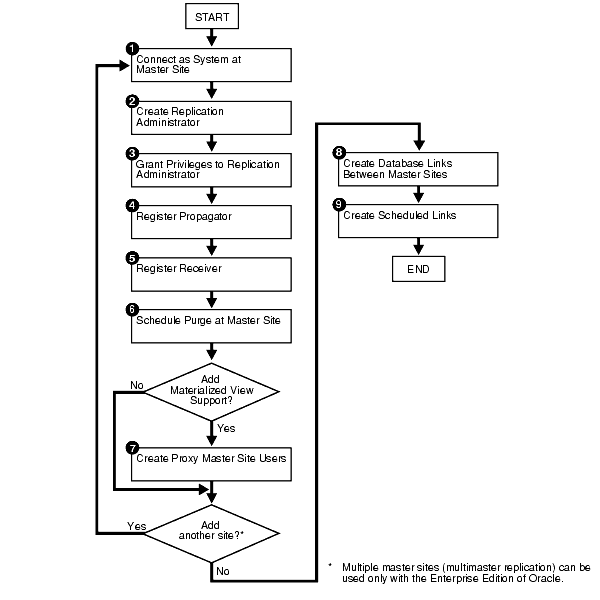
The next steps shows how to create the following Users and Database Links on the two Master Sites. The commands for CEL2.WORLD are not shown, these are the same as for CEL1.WORLD.
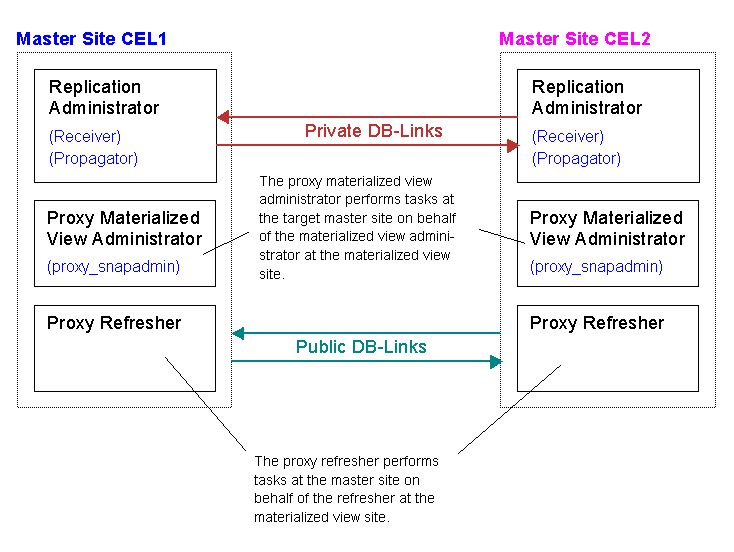
(1) Connect at Master Site CEL1.WORLD
CONNECT sys/manager@CEL1.WORLD as sysdba;
(2) Setup the Replication Administrator
The Replication Administrator on the Master has the following Privileges
Administer replication groups and schemas
Propagate changes to remote sites
CREATE USER repadmin IDENTIFIED BY repadmin
DEFAULT TABLESPACE users
TEMPORARY TABLESPACE temp
QUOTA 0 ON system
PROFILE default;GRANT CONNECT,RESOURCE TO repadmin;
Authorise the Replication Administrator to administer replication groups and schemas.
BEGIN
DBMS_REPCAT_ADMIN.GRANT_ADMIN_ANY_SCHEMA (
username => 'repadmin');
END;
/This procedure grants the necessary privileges to the Replication Administrator to administer any replication groups at the current site.
(3) Grant create, lock and select to administrator
GRANT
LOCK ANY TABLE,
COMMENT ANY TABLE,
CREATE SESSION,
SELECT ANY TABLE,
CREATE TABLE,
CREATE PROCEDURE,
CREATE SEQUENCE,
CREATE TRIGGER,
CREATE VIEW,
CREATE SYNONYM,
ALTER SESSION,
CREATE MATERIALIZED VIEW,
CREATE DATABASE LINK,
SELECT ANY DICTIONARY
TO repadmin;
(4) Register Propagator
Grant propagate privileges to the Replication Administrator, to propagate changes to remote sites. The propagator is responsible for propagating the deferred transaction queue to other master sites.
BEGIN
DBMS_DEFER_SYS.REGISTER_PROPAGATOR (
username=>'repadmin');
END;
/This procedure registers the specified user as the propagator for the local database. It also grants the following privileges to the specified user (so that the user can create wrappers):
CREATE SESSION
CREATE PROCEDURE
CREATE DATABASE LINK
EXECUTE ANY PROCEDURE
(5) Register Receiver
Register receiver, the receiver receives the propagated deferred transactions sent by the propagator from other master sites.
BEGIN
   DBMS_REPCAT_ADMIN.REGISTER_USER_REPGROUP (
      username => 'repadmin',
      privilege_type => 'receiver',
      list_of_gnames => NULL);
END;
/
This procedure assigns proxy materialized view administrator or receiver privileges at the master site or master materialized view site for use with remote sites. This procedure grants only the necessary privileges to the proxy materialized view administrator or receiver.
privilege_type
Specifies the privilege type you are assigning. Use the following values for to define your privilege_type:
- receiver for receiver privileges.
- proxy_snapadmin for proxy materialized view administration privileges
list_of_gnames
Comma-separated list of replication groups you want a user registered for receiver privileges. There must be no spaces between entries in the list. If you set list_of_gnames to NULL, then the user is registered for all replication groups, even replication groups that are not yet known when this procedure is called.
(6) Schedule a job to delete successfully replicated transactions on Master
In order to keep the size of the deferred transaction queue in check, you should purge successfully completed deferred transactions. The
SCHEDULE_PURGEprocedure automates the purge process for you. You must execute this procedure as the replication administrator.CONNECT REPADMIN/REPADMIN@CEL1.WORLD
BEGIN
DBMS_DEFER_SYS.SCHEDULE_PURGE (
next_date => sysdate,
interval => 'sysdate+1/24/30',
delay_seconds => 0);
END;
/
(7a) Setup Proxy Materialized View Administrator
The proxy materialized view administrator performs tasks at the target master site on behalf of the materialized view administrator at the materialized view site.
CONNECT sys/manager@CEL1.WORLD as sysdba;
CREATE USER proxyadmin IDENTIFIED BY proxyadmin
DEFAULT TABLESPACE users
TEMPORARY TABLESPACE temp
QUOTA 0 ON system
PROFILE default;GRANT CONNECT,RESOURCE TO proxyadmin;
Register Proxy Materialized View Administrator
BEGIN
DBMS_REPCAT_ADMIN.REGISTER_USER_REPGROUP (
username => 'proxyadmin',
privilege_type => 'proxy_snapadmin',
list_of_gnames => NULL);
END;
/GRANT
CREATE SESSION,
SELECT ANY TABLE,
SELECT_CATALOG_ROLE
TO proxyadmin;
(7b) Setup Proxy Refresher
The proxy refresher performs tasks at the master site on behalf of the refresher at the materialized view site.
CREATE USER proxyrefresher IDENTIFIED BY proxyrefresher
DEFAULT TABLESPACE users
TEMPORARY TABLESPACE temp
QUOTA 0 ON system
PROFILE default;GRANT CREATE SESSION TO proxyrefresher;
GRANT SELECT ANY TABLE TO proxyrefresher;********** Now, do exactly the same for the Master Site CEL2.WORLD (Not shown here). ***********
(8) Create the DB-Links between the master sites
The database links provide the necessary distributed mechanisms to allow the different replication sites to replicate data among themselves. Before you create any private database links, you must create the public database links that each private database link will use. You then must create a database link between all replication administrators at each of the master sites that you have set up.
CONNECT sys/manager@CEL1.WORLD as sysdba;
DROP PUBLIC DATABASE LINK CEL2.WORLD;
CREATE PUBLIC DATABASE LINK CEL2.WORLD USING '(DESCRIPTION=(ADDRESS_LIST=(ADDRESS=(COMMUNITY=TCP)(PROTOCOL=TCP)(Host=cellar)(Port=1521)))(CONNECT_DATA=(SID=CEL2)))';
CONNECT repadmin/repadmin@CEL1.WORLD;
CREATE DATABASE LINK CEL2.WORLD CONNECT TO repadmin IDENTIFIED BY repadmin;CONNECT sys/manager@CEL2.WORLD as sysdba;
DROP PUBLIC DATABASE LINK CEL1.WORLD;
CREATE PUBLIC DATABASE LINK CEL1.WORLD USING '(DESCRIPTION=(ADDRESS_LIST=(ADDRESS=(COMMUNITY=TCP)(PROTOCOL=TCP)(Host=cellar)(Port=1521)))(CONNECT_DATA=(SID=CEL1)))';
CONNECT repadmin/repadmin@CEL2.WORLD;
CREATE DATABASE LINK CEL1.WORLD CONNECT TO repadmin IDENTIFIED BY repadmin;
(9) Define a schedule for each database link
Create a scheduled link by defining a database link when you execute the SCHEDULE_PUSH procedure. The scheduled link determines how often your deferred transaction queue is propagated to each of the other master sites. You need to execute the SCHEDULE_PUSH procedure for each database link. The database link is specified in the destination parameter of the SCHEDULE_PUSH procedure.
Even when using Oracle's asynchronous replication mechanisms, you can configure a scheduled link to simulate continuous, real-time replication. The scheduled links in this example simulate continuous replication.
The following example schedules a periodic push every minute. Make sure that the refresh rate is not smalled than the time needed to refresh.
CONNECT repadmin/repadmin@CEL1.WORLD
BEGIN
DBMS_DEFER_SYS.SCHEDULE_PUSH (
destination => 'CEL2.WORLD',
interval => 'SYSDATE + (1/24/60)',
next_date => SYSDATE,
stop_on_error => FALSE,
parallelism => 1,
delay_seconds => 0);
END;
/CONNECT repadmin/repadmin@CEL2.WORLD
BEGIN
DBMS_DEFER_SYS.SCHEDULE_PUSH (
destination => 'CEL1.WORLD',
interval => 'SYSDATE + (1/24/60)',
next_date => SYSDATE,
stop_on_error => FALSE,
parallelism => 1,
delay_seconds => 0);
END;
/
Scheduling Continuous Pushes
Even when using Oracle's asynchronous replication mechanisms, you can configure a scheduled link to simulate continuous, real-time replication. To do so, use the DBMS_DEFER_SYS.SCHEDULE_PUSH procedure and specify the following settings:
Parameter Value delay_seconds
1200 interval
Lower than the delay_seconds setting parallelism
1 or higher execution_seconds
Higher than the delay_seconds setting With this configuration, Oracle continues to push transactions that enter the deferred transaction queue for the duration of the entire interval. If the deferred transaction queue has no transactions to propagate for the amount of time specified by the delay_seconds parameter, then Oracle releases the resources used by the job and starts fresh when the next job queue process becomes available.
Important Note !
We observed, that the Database cannot be shutdown with SHUTDOWN IMMEDIATE with these settings. The Database can only be shutdown with SHUTDOWN ABORT, therefore we do NOT recommend to use Continuous Pushes. The following is an example that simulates continual pushes:
BEGIN
DBMS_DEFER_SYS.SCHEDULE_PUSH (
destination => 'CEL2.WORLD',
interval => 'SYSDATE + (1/144)',
next_date => SYSDATE,
stop_on_error => FALSE,
parallelism => 1,
execution_seconds => 1500,
delay_seconds => 1200);
END;
/
|
Create Master Replication Group on CEL1.WORLD and CEL2.WORLD |
After you have set up your master sites, you are ready to build a master group.
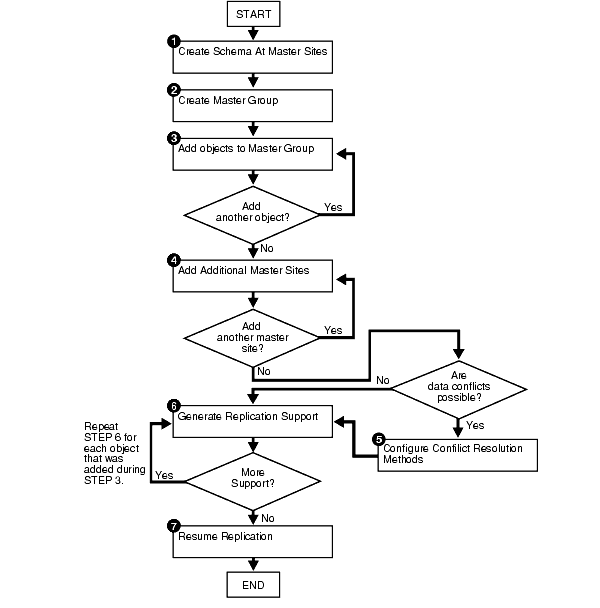
(1) Create Schema at Master Sites
It is assumed that the SCOTT schema exists at CEL1.WORLD and CEL2.WORLD.
(2) Create the Master Group
When you add an object to your master group or perform other replication administrative tasks, you reference the master group name defined during this step. This step must be completed by the replication administrator.
CONNECT repadmin/repadmin@CEL1.WORLD
BEGIN
DBMS_REPCAT.DROP_MASTER_REPGROUP (
gname => 'REPG');
END;
/
BEGIN
DBMS_REPCAT.CREATE_MASTER_REPGROUP (
gname => 'REPG');
END;
/
(3) Add objects to the Replication Group on Master
Now, add the replicated Objets (TABLE, INDEX, SYNONYM, TRIGGER, VIEW, PROCEDURE, FUNCTION, PACKAGE, and PACKAGE BODY) to the Replication Group.
BEGIN
DBMS_REPCAT.CREATE_MASTER_REPOBJECT (
gname => 'REPG',
type => 'TABLE',
oname => 'EMP',
sname => 'SCOTT',
use_existing_object => TRUE,
copy_rows => FALSE);
END;
/BEGIN
DBMS_REPCAT.CREATE_MASTER_REPOBJECT (
gname => 'REPG',
type => 'TABLE',
oname => 'DEPT',
sname => 'SCOTT',
use_existing_object => TRUE,
copy_rows => FALSE);
END;
/If Your Tables Don’t Have a Primary Key.
The DBMS_REPCAT.SET_COLUMNS procedure enables you to use an alternate column or group of columns, instead of the primary key, to determine which columns of a table to compare when using row-level replication. You must call this procedure from the master definition site.
BEGIN
DBMS_REPCAT.SET_COLUMNS (
sname => 'owner_master',
oname => 'DEPT',
column_list => '"COL1","COL2","COL3","COL4"');
END;
(4) Add Additional Master Site CEL2.WORLD
After you have defined your master group at the master definition site = CEL1.WORLD (the site where the master group was created becomes the master definition site by default), you can define the other sites that will participate in the replication environment.
In this example, the use_existing_objects parameter in the ADD_MASTER_DATABASE procedure is set to TRUE because it is assumed that the SCOTT schema already exists at all master sites. In other words, it is assumed that the objects in the SCOTT schema are precreated at all master sites. Also, the copy_rows parameter is set to FALSE because it is assumed that the identical data is stored in the tables at each master site.
CONNECT repadmin/repadmin@CEL1.WORLD
If you get an error when connection over SQL*Net for the DBMS_REPCAT.ADD_MASTER_DATABASE command such as:
ERROR at line 1:
ORA-04052: error occurred when looking up remote object
REPADMIN.SYS@CEL1.WORLD
ORA-00604: error occurred at recursive SQL level 2
ORA-12154: TNS:could not resolve the connect identifier specifiedthen, connect directly to the Database:
export ORACLE_SID=CEL1
sqlplus repadmin/repadminBEGIN
DBMS_REPCAT.ADD_MASTER_DATABASE (
gname => 'REPG',
master => 'CEL2.WORLD',
use_existing_objects => TRUE,
copy_rows => FALSE,
propagation_mode => 'ASYNCHRONOUS');
END;
/Check that Master Site CEL2.WORLD is now in the Replication Group 'REPG'.
Wait until CEL2.WORLD appears in the
DBA_REPSITESview before continuing. Execute the followingSELECTstatement in another SQL*Plus session to make sure that CEL2.WORLD has appeared:SELECT DBLINK FROM DBA_REPSITES WHERE GNAME = 'REPG';DBLINK
----------------------------------------------
CEL1.WORLD
CEL2.WORLD
(5) If conflicts are possible, then configure conflict resolution methods.
The most common data conflict occurs when the same row at two or more different sites are updated at nearly the same time, or before the deferred transaction from one site was successfully propagated to the other sites.
Before you define overwrite or discard conflict resolution methods, quiesce the master group that contains the table to which you want to apply the conflict resolution method. In a single master replication environment, quiescing the master group might not be required
BEGIN
DBMS_REPCAT.SUSPEND_MASTER_ACTIVITY (
gname => 'REPG');
END;
/All Oracle conflict resolution methods are based on logical column groupings called column groups.
BEGIN
DBMS_REPCAT.MAKE_COLUMN_GROUP (
sname => 'SCOTT',
oname => 'EMP',
column_group => 'EMPCG',
list_of_column_names => 'ename,job,mgr,hiredate,sal,comm,deptno');
END;
/This example creates an OVERWRITE conflict resolution method.
BEGIN
DBMS_REPCAT.ADD_UPDATE_RESOLUTION (
sname => 'SCOTT',
oname => 'EMP',
column_group => 'EMPCG',
sequence_no => 1,
method => 'DISCARD',
parameter_column_name => 'ename,job,mgr,hiredate,sal,comm,deptno');
END;
/
(6) Activate Replication Support for each added Table on Master
Replication support generates the triggers and packages needed to support replication for a specified object.
CONNECT repadmin/repadmin@CEL1.WORLD
BEGIN
DBMS_REPCAT.GENERATE_REPLICATION_SUPPORT (
sname => 'SCOTT',
oname => 'EMP',
type => 'TABLE',
min_communication => TRUE);
END;
/BEGIN
DBMS_REPCAT.GENERATE_REPLICATION_SUPPORT (
sname => 'SCOTT',
oname => 'DEPT',
type => 'TABLE',
min_communication => TRUE);
END;
/
min_communication
Set to false if any master site is running Oracle7 release 7.3.
Set to true when you want propagation of new and old values to be
minimized. The default is true.
(7) Start the Replication on the Master
We are now all set up and ready to replicate, so let’s do it. From the master database, start the replication process (track activity on the REPG objects).
CONNECT repadmin/repadmin@CEL1.WORLDYou should wait until the
DBA_REPCATLOGview is empty before resuming master activity.SELECT COUNT(*) FROM DBA_REPCATLOG WHERE GNAME = 'REPG';
BEGIN
DBMS_REPCAT.RESUME_MASTER_ACTIVITY (
gname => 'REPG');
END;
/The master site is now waiting for the snapshot site to begin replication. As changes are made to the master tables, they will be propagated as required.
The view dba_repgroup can be used to check the status of the replication groups that you create. After you have created the replication groups and generated the replication support for various tables within that group, you should query the dba_repgroup table to insure that REPG status field is set to "Normal".
select sname, master, status from dba_repgroup;
SNAME M STATUS
------------------------------ - ---------
REPG Y NORMAL
|
Setup Users on Materialized View Site REP1.WORLD and REP2.WORLD |
The following Figure shows the needed Steps to setup the users at the Materialized View Sites.
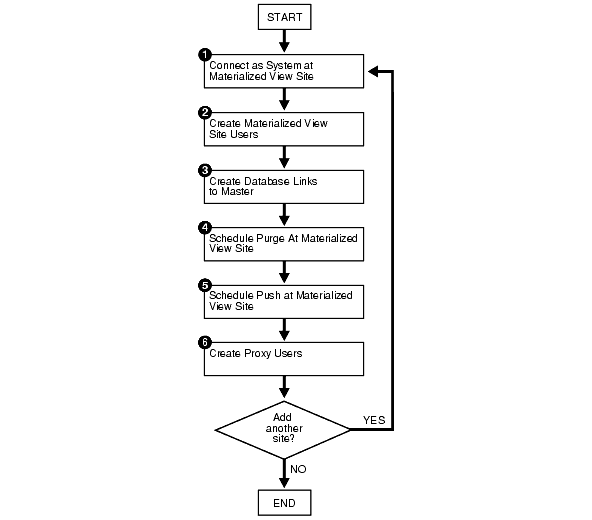
The next steps shows how to create the following Users and Database Links on the two Materialized View Sites. The commands for REP2.WORLD are not shown, these are the same as for REP1.WORLD.
(1) Connect as system at Materialized View Site REP1.WORLD
CONNECT sys/manager@REP1.WORLD as sysdba;
(2) Create Materialized View Site Users
Setup the Materialized View Administrator
DROP USER mviewadmin CASCADE;
CREATE USER mviewadmin IDENTIFIED BY mviewadmin
DEFAULT TABLESPACE users
TEMPORARY TABLESPACE temp
QUOTA 0 ON system
PROFILE default;
GRANT CONNECT,RESOURCE TO mviewadmin;Authorise the Materialized View Administrator to administer replication groups and schemas.
BEGIN
DBMS_REPCAT_ADMIN.GRANT_ADMIN_ANY_SCHEMA (
username => 'mviewadmin');
END;
/Grant create,lock and select to Materialized View Administrator
GRANT
LOCK ANY TABLE,
COMMENT ANY TABLE,
CREATE SESSION,
SELECT ANY TABLE,
CREATE TABLE,
CREATE PROCEDURE,
CREATE SEQUENCE,
CREATE TRIGGER,
CREATE VIEW,
CREATE SYNONYM,
ALTER SESSION,
CREATE MATERIALIZED VIEW,
CREATE DATABASE LINK,
SELECT ANY DICTIONARY
TO mviewadmin;Create Materialized View Propagator
The propagator is responsible for propagating the deferred transaction queue to the target master site.
DROP USER propagator CASCADE;
CREATE USER propagator IDENTIFIED BY propagator
DEFAULT TABLESPACE users
TEMPORARY TABLESPACE temp
QUOTA 0 ON system
PROFILE default;
GRANT CONNECT,RESOURCE TO propagator;Grant privs to the Materialized View Propagator, to propagate changes to remote sites
BEGIN
DBMS_DEFER_SYS.REGISTER_PROPAGATOR (
username => 'propagator');
END;
/This procedure registers the specified user as the propagator for the local database. It also grants the following privileges to the specified user (so that the user can create wrappers):
- CREATE SESSION
CREATEPROCEDURECREATEDATABASELINKEXECUTEANYPROCEDURECreate the refresher
The refresher is responsible for "pulling" changes made to the replicated tables at the target master site to the materialized view site. This user refreshes one or more materialized views. If you want the mviewadmin user to be the refresher, then this step is not required. The receiver is necessary only if the site will function as a master materialized view site for other materialized views sites.
Register Receiver to Materialized View Administrator
BEGIN
DBMS_REPCAT_ADMIN.REGISTER_USER_REPGROUP (
username => 'mviewadmin',
privilege_type => 'receiver',
list_of_gnames => NULL);
END;
/
(3) Setup Database Links to Master(s)
Create Public Database Link
CONNECT sys/manager@REP1.WORLD as sysdba;
DROP PUBLIC DATABASE LINK CEL1.WORLD;
CREATE PUBLIC DATABASE LINK CEL1.WORLD USING
'(DESCRIPTION=(ADDRESS_LIST=(ADDRESS=(COMMUNITY=TCP)(PROTOCOL=TCP)(Host=cellar)(Port=1521)))(CONNECT_DATA=(SID=CEL1)))';Create the materialized view administrator database link.
You need to create a database link from the materialized view administrator at the materialized view site to the proxy materialized view administrator at the master site.
CONNECT mviewadmin/mviewadmin@REP1.WORLD;
DROP DATABASE LINK CEL1.WORLD;
CREATE DATABASE LINK CEL1.WORLD
CONNECT TO proxyadmin
IDENTIFIED BY proxyadmin
USING 'CEL1.WORLD';Create the propagator/receiver database link.
You need to create a database link from the propagator at the materialized view site to the receiver at the master site. The receiver was defined when you created the master site.
CONNECT propagator/propagator@REP1.WORLD
DROP DATABASE LINK CEL1.WORLD;
CREATE DATABASE LINK CEL1.WORLD
CONNECT TO repadmin
IDENTIFIED BY repadmin
USING 'CEL1.WORLD';
(4) Schedule Purge at Materialized View Site (Optional)
In order to keep the size of the deferred transaction queue in check, you should purge successfully completed deferred transactions. The
SCHEDULE_PURGEprocedure automates the purge process for you. If your materialized view site only contains "read-only" materialized views, then you do not need to execute this procedure.CONNECT mviewadmin/mviewadmin@REP1.WORLD
BEGIN
DBMS_DEFER_SYS.SCHEDULE_PURGE (
next_date => SYSDATE,
interval => 'SYSDATE + 1/24',
delay_seconds => 0,
rollback_segment => '');
END;
/
(5 ) Schedule Push at Materialized View site (Optional)
If the materialized view site has a constant connection to its master site, then you optionally can schedule push at the materialized view sites. If the materialized view site is disconnected from its master site for extended periods of time, then it is typically better not to schedule push and refresh on demand, which pushes changes to the master site.
CONNECT mviewadmin/mviewadmin@REP1.WORLD
BEGIN
DBMS_DEFER_SYS.SCHEDULE_PUSH (
destination => 'CEL1.WORLD',
interval => 'SYSDATE + 1/144',
next_date => SYSDATE,
stop_on_error => FALSE,
delay_seconds => 0,
parallelism => 0);
END;
/
(6) Create the proxy materialized view administrator at Materialized View site (Optional)
The proxy materialized view administrator performs tasks at the target master materialized view site on behalf of the materialized view administrator at the materialized view sites based on this materialized view site. This user is not required if the site will not function as a master materialized view site for other materialized view sites.
In our example we do not need this step.
********** Now, do exactly the same for the Materialized View Site REP2 (Not shown here). ***********
The following Figure shows the needed Steps to setup the Materialized View Group at the Materialized View Sites.
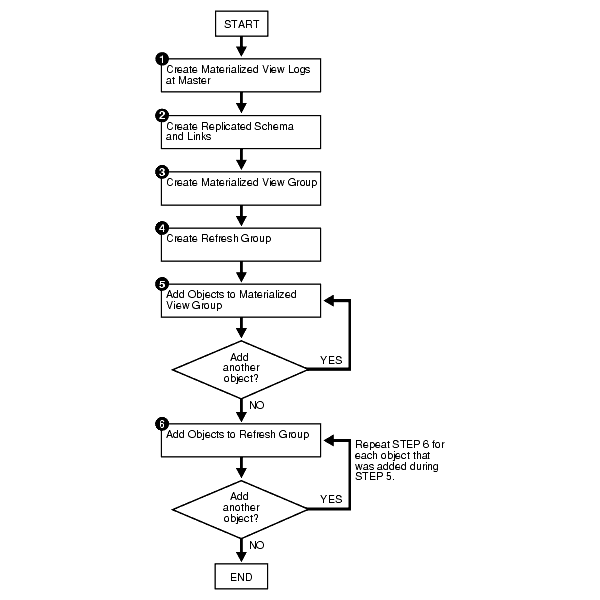
(1) Create Materialized View Logs on Master
When DML changes are made to the master table's data, Oracle stores rows describing those changes in the materialized view log and then uses the materialized view log to refresh materialized views based on the master table. This process is called an incremental or fast refresh.
Without a materialized view log, Oracle must reexecute the materialized view query to refresh the materialized view. This process is called a complete refresh. Usually, a fast refresh takes less time than a complete refresh.
A materialized view log is located in the master database in the same schema as the master table. A master table can have only one materialized view log defined on it.
CONNECT scott/tiger@CEL1.WORLD
CREATE MATERIALIZED VIEW LOG ON emp
TABLESPACE tab;CREATE MATERIALIZED VIEW LOG ON dept
TABLESPACE tab;
(2) Create the Replicated Schema and its Database Link
Before building your materialized view group, you must make sure that the replicated schema exists at the remote materialized view site and that the necessary database links have been created.
In this example, if the SCOTT schema does not exist, then create the schema.
CONNECT sys/manager@REP1.WORLD as sysdba;
GRANT
CREATE SESSION,
CREATE TABLE,
CREATE PROCEDURE,
CREATE SEQUENCE,
CREATE TRIGGER,
CREATE VIEW,
CREATE SYNONYM,
ALTER SESSION,
CREATE MATERIALIZED VIEW,
ALTER ANY MATERIALIZED VIEW,
CREATE DATABASE LINK
TO SCOTT;CONNECT scott/tiger@REP1.WORLD;
DROP DATABASE LINK CEL1.WORLD;
CREATE DATABASE LINK CEL1.WORLD
CONNECT TO proxyrefresher IDENTIFIED BY proxyrefresher
USING 'CEL1.WORLD';
(3) Create Materialized View Group
Now create a new, empty materialized view group in your slave database.
CREATE_MVIEW_REPGROUPautomatically callsREGISTER_MIEW_REPGROUP, but ignores any errors that may have happened during registration.CONNECT mviewadmin/mviewadmin@REP1.WORLD;
If you get an error when connection over SQL*Net for the DBMS_REPCAT.CREATE_MVIEW_REPGROUP command such as:
ERROR at line 1:
ORA-04052: error occurred when looking up remote object
PROXYADMIN.SYS@CEL1.WORLD
ORA-00604: error occurred at recursive SQL level 2
ORA-12154: TNS:could not resolve the connect identifier specifiedthen, connect directly to the Database:
export ORACLE_SID=REP1
sqlplus mviewadmin/mviewadminBEGIN
DBMS_REPCAT.CREATE_MVIEW_REPGROUP (
gname => 'REPG',
master => 'CEL1.WORLD',
propagation_mode => 'ASYNCHRONOUS');
END;
/
gname
Name of the replication group. This group must exist at the specified master site or master materialized view site. master
Fully qualified database name of the database in the replication environment to use as the master site or master materialized view site. propagation_mode
Method of propagation for all updatable materialized views in the replication group. Acceptable values are synchronous and asynchronous.
(4) Create a Refresh Group
Now we must create a refresh group and the time interval used to determine when the members of this group should be refreshed.
CONNECT mviewadmin/mviewadmin@REP1.WORLD;
BEGIN
DBMS_REFRESH.MAKE (
name => 'REVG',
list => '',
next_date => SYSDATE,
interval => 'SYSDATE + 1/1440',
implicit_destroy => FALSE,
rollback_seg => '',
push_deferred_rpc => TRUE,
refresh_after_errors => FALSE);
END;
/
name
Unique name used to identify the refresh group. Refresh groups must follow the same naming conventions as tables. list
Comma-separated list of snapshots that you want to refresh. (Synonyms are not supported.) These snapshots can be located in different schemas and have different master tables; however, all of the listed snapshots must be in your current database. implicit_destroy
Set this to TRUEif you want to delete the refresh group automatically when it no longer contains any members.push_deferred_rpc
Used by updatable snapshots only. Use the default value, TRUE, if you want to push changes from the snapshot to its associated master before refreshing the snapshot. Otherwise, these changes may appear to be temporarily lost.refresh_after_errors
Used by updatable snapshots only. Set this to 0 if you want the refresh to proceed even if there are outstanding conflicts logged in the DEFERRORview for the snapshot's master.
(5) Add Objects to the Materialized View Group
Now create all materialized view. - The word "snapshot" is synonymous with "materialized view".
export ORACLE_SID=REP1
sqlplus scott/tigerDROP MATERIALIZED VIEW emp;
CREATE MATERIALIZED VIEW emp
TABLESPACE tab
NOCACHE
NOPARALLEL
USING INDEX TABLESPACE idx
REFRESH FAST
WITH PRIMARY KEY
USING DEFAULT LOCAL ROLLBACK SEGMENT
DISABLE QUERY REWRITE
AS
SELECT * FROM scott.emp@CEL1.WORLD;DROP MATERIALIZED VIEW dept;
CREATE MATERIALIZED VIEW dept
TABLESPACE tab
NOCACHE
NOPARALLEL
USING INDEX TABLESPACE idx
REFRESH FAST
WITH PRIMARY KEY
USING DEFAULT LOCAL ROLLBACK SEGMENT
DISABLE QUERY REWRITE
AS
SELECT * FROM scott.dept@CEL1.WORLD;EXIT;
Add the materialized views to the Materialized View Group.
export ORACLE_SID=REP1
sqlplus mviewadmin/mviewadmin
BEGIN
DBMS_REPCAT.CREATE_MVIEW_REPOBJECT (
gname => 'REPG',
sname => 'SCOTT',
oname => 'EMP',
type => 'SNAPSHOT',
min_communication => TRUE);
END;
/BEGIN
DBMS_REPCAT.CREATE_MVIEW_REPOBJECT (
gname => 'REPG',
sname => 'SCOTT',
oname => 'DEPT',
type => 'SNAPSHOT',
min_communication => TRUE);
END;
/
(6) Add Objects to the Refresh Group
Add the materialized views to the refresh group.
BEGIN
DBMS_REFRESH.ADD (
name => 'REVG',
list => 'SCOTT.EMP',
lax => TRUE);
END;
/BEGIN
DBMS_REFRESH.ADD (
name => 'REVG',
list => 'SCOTT.DEPT',
lax => TRUE);
END;
/
lax
A materialized view can belong to only one refresh group at a time. If you are moving a materialized view from one group to another, then you must set the laxflag totrueto succeed. Oracle then automatically removes the materialized view from the other refresh group and updates its refresh interval to be that of its new group. Otherwise, the call toADDgenerates an error message.
Manually Refresh
Now manually refresh the refresh group.
BEGIN
DBMS_REFRESH.REFRESH (
name => 'REVG');
END;
/********** Now, do exactly the same for the Materialized View Site REP2 (Not shown here). ***********
Test the Replication
The Replication is now working and should be tested. Login as User SCOTT and UPDATE some rows. Check if the changed rows will appear on the other Sites.
connect scott/tiger@CEL1.WORLD
update emp set job = 'ENGINEER' where empno = 7934;
commit;select * from emp;
EMPNO ENAME JOB MGR HIREDATE SAL COMM DEPTNO
---------- ---------- --------- ---------- --------- ---------- ---------- ----------
7369 SMITH CLERK 7902 17-DEC-80 800 20
7499 ALLEN SALESMAN 7698 20-FEB-81 1600 300 30
7521 WARD SALESMAN 7698 22-FEB-81 1250 500 30
7566 JONES MANAGER 7839 02-APR-81 2975 20
7654 MARTIN SALESMAN 7698 28-SEP-81 1250 1400 30
7698 BLAKE MANAGER 7839 01-MAY-81 2850 30
7782 CLARK MANAGER 7839 09-JUN-81 2450 10
7788 SCOTT ANALYST 7566 09-DEC-82 3000 20
7839 KING PRESIDENT 17-NOV-81 5000 10
7844 TURNER SALESMAN 7698 08-SEP-81 1500 0 30
7876 ADAMS CLERK 7788 12-JAN-83 1100 20
EMPNO ENAME JOB MGR HIREDATE SAL COMM DEPTNO
---------- ---------- --------- ---------- --------- ---------- ---------- ----------
7900 JAMES CLERK 7698 03-DEC-81 950 30
7902 FORD ANALYST 7566 03-DEC-81 3000 20
7934 MILLER ENGINEER 7782 23-JAN-82 1300 10connect scott/tiger@CEL2.WORLD
select * from emp;
EMPNO ENAME JOB MGR HIREDATE SAL COMM DEPTNO
---------- ---------- --------- ---------- --------- ---------- ---------- ----------
7369 SMITH CLERK 7902 17-DEC-80 800 20
7499 ALLEN SALESMAN 7698 20-FEB-81 1600 300 30
7521 WARD SALESMAN 7698 22-FEB-81 1250 500 30
7566 JONES MANAGER 7839 02-APR-81 2975 20
7654 MARTIN SALESMAN 7698 28-SEP-81 1250 1400 30
7698 BLAKE MANAGER 7839 01-MAY-81 2850 30
7782 CLARK MANAGER 7839 09-JUN-81 2450 10
7788 SCOTT ANALYST 7566 09-DEC-82 3000 20
7839 KING PRESIDENT 17-NOV-81 5000 10
7844 TURNER SALESMAN 7698 08-SEP-81 1500 0 30
7876 ADAMS CLERK 7788 12-JAN-83 1100 20
EMPNO ENAME JOB MGR HIREDATE SAL COMM DEPTNO
---------- ---------- --------- ---------- --------- ---------- ---------- ----------
7900 JAMES CLERK 7698 03-DEC-81 950 30
7902 FORD ANALYST 7566 03-DEC-81 3000 20
7934 MILLER ENGINEER 7782 23-JAN-82 1300 10If you have any troubles or the rows do not appear, then monitor your environment.
Monitoring Master Sites
This section contains queries that you can run to display information about a master replication environment. The replication environment can be a multimaster environment, a master materialized view environment, or a hybrid environment that includes multiple master sites and materialized views.
connect sys/manager@CEL1.WORLD as sysdba;
Listing General Information About a Master Site
You can find the following general information about a master site:
The number of administrative requests.
The number of administrative request errors.
The number of unpropagated deferred transaction-destination pairs. Each deferred transaction can have multiple destinations to which it will be propagated, and each destination is a single deferred transaction-destination pair
The number of deferred transaction errors (error transactions).
The number of successfully propagated transactions that are still in the queue. These transactions should be purged from the queue.
COLUMN GLOBAL_NAME HEADING 'Database' FORMAT A25
COLUMN ADMIN_REQUESTS HEADING 'Admin|Reqests' FORMAT 9999
COLUMN STATUS HEADING 'Admin|Errors' FORMAT 9999
COLUMN TRAN HEADING 'Def|Trans|Pairs' FORMAT 9999
COLUMN ERRORS HEADING 'Def|Trans|Errors' FORMAT 9999
COLUMN COMPLETE HEADING 'Propagated|Trans' FORMAT 9999
SELECT G.GLOBAL_NAME, D.ADMIN_REQUESTS, E.STATUS, DT.TRAN, DE.ERRORS, C.COMPLETE
FROM (SELECT GLOBAL_NAME FROM GLOBAL_NAME) G,
(SELECT COUNT(ID) ADMIN_REQUESTS FROM DBA_REPCATLOG) D,
(SELECT COUNT(STATUS) STATUS FROM DBA_REPCATLOG WHERE STATUS = 'ERROR') E,
(SELECT COUNT(*) TRAN FROM DEFTRANDEST) DT,
(SELECT COUNT(*) ERRORS FROM DEFERROR) DE,
(SELECT COUNT(A.DEFERRED_TRAN_ID) COMPLETE FROM DEFTRAN A
WHERE A.DEFERRED_TRAN_ID NOT IN (
SELECT B.DEFERRED_TRAN_ID FROM DEFTRANDEST B)) C;Def Def
Admin Admin Trans Trans Propagated
Database Reqests Errors Pairs Errors Trans
------------------------- ------- ------ ----- ------ ----------
CEL1.WORLD 2 2 0 0 0
Listing the Master Sites Participating in a Master Group
Run the following query to list the master sites for each master group at a replication site and indicate which master site is the master definition site for each master group:
COLUMN GNAME HEADING 'Master Group' FORMAT A20
COLUMN DBLINK HEADING 'Sites' FORMAT A25
COLUMN MASTERDEF HEADING 'Master|Definition|Site?' FORMAT A10
SELECT GNAME, DBLINK, MASTERDEF
FROM DBA_REPSITES
WHERE MASTER = 'Y'
AND GNAME NOT IN (SELECT GNAME FROM DBA_REPSITES WHERE SNAPMASTER = 'Y')
ORDER BY GNAME;The subquery in the SELECT statement ensures that materialized view groups do not appear in the output. Your output looks similar to the following:
Master
Definition
Master Group Sites Site?
-------------------- ------------------------- ----------
REPG CEL1.WORLD Y
REPG CEL2.WORLD NThis list indicates that CEL1.WORLD is the master definition site for the PPC_REPG master group, which also includes the master sites CEL1.WORLD.
Listing General Information About Master Groups
You can use the query in this section to list the following general information about the master groups at a master site:
- The name of each master group.
- The number of unpropagated deferred transaction-destination pairs. Each deferred transaction can have multiple destinations to which it will be propagated, and each destination is a single deferred transaction-destination pair.
- The number of deferred transaction errors (error transactions) for each master group
- The number of administrative requests for each master group
- The number of administrative request errors for each master group
COLUMN GNAME HEADING 'Master Group' FORMAT A15
COLUMN deftran HEADING 'Number of|Deferred|Transaction|Pairs' FORMAT 9999
COLUMN deftranerror HEADING 'Number of|Deferred|Transaction|Errors' FORMAT 9999
COLUMN adminreq HEADING 'Number of|Administrative|Requests' FORMAT 9999
COLUMN adminreqerror HEADING 'Number of|Administrative|Request|Errors'
COLUMN adminreqerror FORMAT 9999
SELECT G.GNAME,
NVL(T.CNT1, 0) deftran,
NVL(IE.CNT2, 0) deftranerror,
NVL(A.CNT3, 0) adminreq,
NVL(B.CNT4, 0) adminreqerror
FROM
(SELECT DISTINCT GNAME FROM DBA_REPGROUP WHERE MASTER='Y') G,
(SELECT DISTINCT RO.GNAME, COUNT(DISTINCT D.DEFERRED_TRAN_ID) CNT1
FROM DBA_REPOBJECT RO, DEFCALL D, DEFTRANDEST TD
WHERE RO.SNAME = D.SCHEMANAME
AND RO.ONAME = D.PACKAGENAME
AND RO.TYPE IN ('TABLE', 'PACKAGE', 'MATERIALIZED VIEW')
AND TD.DEFERRED_TRAN_ID = D.DEFERRED_TRAN_ID
GROUP BY RO.GNAME ) T,
(SELECT DISTINCT RO.GNAME, COUNT(DISTINCT E.DEFERRED_TRAN_ID) CNT2
FROM DBA_REPOBJECT RO, DEFCALL D, DEFERROR E
WHERE RO.SNAME = D.SCHEMANAME
AND RO.ONAME = D.PACKAGENAME
AND RO.TYPE IN ('TABLE', 'PACKAGE', 'MATERIALIZED VIEW')
AND E.DEFERRED_TRAN_ID = D.DEFERRED_TRAN_ID
AND E.CALLNO = D.CALLNO
GROUP BY RO.GNAME ) IE,
(SELECT GNAME, COUNT(*) CNT3 FROM DBA_REPCATLOG GROUP BY GNAME) A,
(SELECT GNAME, COUNT(*) CNT4 FROM DBA_REPCATLOG
WHERE STATUS = 'ERROR'
GROUP BY GNAME) B WHERE G.GNAME = IE.GNAME (+)
AND G.GNAME = T.GNAME (+)
AND G.GNAME = A.GNAME (+)
AND G.GNAME = B.GNAME (+) ORDER BY G.GNAME;Number of Number of Number of
Deferred Deferred Number of Administrative
Transaction Transaction Administrative Request
Master Group Pairs Errors Requests Errors
--------------- ----------- ----------- -------------- --------------
REPG 1 0 0 0
Listing Information About Materialized Views Based on a Master
If you have materialized view sites based on a master, then you can use the query in this section to list the following information about the master:
The number of replication groups at a master. The replication groups can be either master groups or materialized view groups.
The number of registered materialized view groups based on the replication groups at the master.
The number of registered materialized views based on objects at the master. The objects can be either master tables or master materialized views.
The number of materialized view logs at the master.
The number of deployment templates at the master.
COLUMN repgroup HEADING 'Number of|Replication|Groups' FORMAT 9999
COLUMN mvgroup HEADING 'Number of|Registered|MV Groups' FORMAT 9999
COLUMN mv HEADING 'Number of|Registered MVs' FORMAT 9999
COLUMN mvlog HEADING 'Number of|MV Logs' FORMAT 9999
COLUMN template HEADING 'Number of|Templates' FORMAT 9999
SELECT A.REPGROUP repgroup,
B.MVGROUP mvgroup,
C.MV mv,
D.MVLOG mvlog,
E.TEMPLATE template
FROM (SELECT COUNT(G.GNAME) REPGROUP
FROM DBA_REPGROUP G, DBA_REPSITES S
WHERE G.MASTER = 'Y'
AND S.MASTER = 'Y'
AND G.GNAME = S.GNAME
AND S.MY_DBLINK = 'Y') A,
(SELECT COUNT(*) MVGROUP
FROM DBA_REGISTERED_MVIEW_GROUPS) B,
(SELECT COUNT(*) MV
FROM DBA_REGISTERED_MVIEWS) C,
(SELECT COUNT(*) MVLOG
FROM (SELECT 1 FROM DBA_MVIEW_LOGS
GROUP BY LOG_OWNER, LOG_TABLE)) D,
(SELECT COUNT(*) TEMPLATE FROM DBA_REPCAT_REFRESH_TEMPLATES) E;Number of Number of
Replication Registered Number of Number of Number of
Groups MV Groups Registered MVs MV Logs Templates
----------- ---------- -------------- --------- ---------
1 2 4 2 0
Listing Information About the Materialized View Logs at a Master
A materialized view log enables you to fast refresh materialized views based on a master. A master can be a master table or a master materialized view. If you have materialized view logs based at a master, then you can use the query in this section to list the following information about them:
The name of each log table that stores the materialized view log data
The owner of each materialized view log
The master on which each materialized view log is based
Whether a materialized view log is a row id materialized view log
Whether a materialized view log is a primary key materialized view log
Whether the materialized view log is an object id materialized view log
Whether a materialized view log has filter columns
COLUMN LOG_TABLE HEADING 'Log Table' FORMAT A30
COLUMN LOG_OWNER HEADING 'Log|Owner' FORMAT A5
COLUMN MASTER HEADING 'Master' FORMAT A30
COLUMN ROWIDS HEADING 'Row|ID?' FORMAT A3
COLUMN PRIMARY_KEY HEADING 'Primary|Key?' FORMAT A7
COLUMN OBJECT_ID HEADING 'Object|ID?' FORMAT A6
COLUMN FILTER_COLUMNS HEADING 'Filter|Columns?' FORMAT A8
SELECT DISTINCT LOG_TABLE,
LOG_OWNER,
MASTER,
ROWIDS,
PRIMARY_KEY,
OBJECT_ID,
FILTER_COLUMNS
FROM DBA_MVIEW_LOGS
ORDER BY 1;Log Row Primary Object Filter
Log Table Owner Master ID? Key? ID? Columns?
------------------------------ ----- ------------------------------ --- ------- ------ --------
MLOG$_DEPT SCOTT DEPT NO YES NO NO
MLOG$_EMO SCOTT EMP NO YES NO NO
Listing the Materialized Views that Use a Materialized View Log
More than one materialized view can use a materialized view log. If you have materialized view logs based at a master, then you can use the query in this section to list the following the materialized views that use each log:
- The name of each log table that stores the materialized view log data
- The owner of each materialized view log
- The master on which each materialized view log is based
- The materialized view identification number of each materialized view that uses the materialized view log
- The name of each materialized view that uses the materialized view log
COLUMN LOG_TABLE HEADING 'Mview|Log Table' FORMAT A30
COLUMN LOG_OWNER HEADING 'Mview|Log Owner' FORMAT A10
COLUMN MASTER HEADING 'Master' FORMAT A20
COLUMN MVIEW_ID HEADING 'Mview|ID' FORMAT 9999
COLUMN NAME HEADING 'Mview Name' FORMAT A20
SELECT L.LOG_TABLE, L.LOG_OWNER, B.MASTER, B.MVIEW_ID, R.NAME
FROM ALL_MVIEW_LOGS L, ALL_BASE_TABLE_MVIEWS B, ALL_REGISTERED_MVIEWS R
WHERE B.MVIEW_ID = R.MVIEW_ID
AND B.OWNER = L.LOG_OWNER
AND B.MASTER = L.MASTER;Mview Mview Mview
Log Table Log Owner Master ID Mview Name
------------------------------ ---------- -------------------- ----- --------------------
MLOG$_DEPT SCOTT DEPT 6 DEPT
MLOG$_DEPT SCOTT DEPT 4 DEPT
MLOG$_EMP SCOTT EMP 5 EMP
MLOG$_EMP SCOTT EMP 3 EMP
Listing Information About the Deployment Templates at a Master
Deployment templates enable you to create multiple materialized view environments quickly. They also enable you to use variables to customize each materialized view environment for its individual needs. You can use the query in this section to list the following information about the deployment templates at a master:
The name of each deployment template
The owner of each deployment template
Whether a deployment template is public
The number of instantiated materialized view sites based on each deployment template
The comment associated with each deployment template
COLUMN REFRESH_TEMPLATE_NAME HEADING 'Template|Name' FORMAT A10
COLUMN OWNER HEADING 'Owner' FORMAT A10
COLUMN PUBLIC_TEMPLATE HEADING 'Public?' FORMAT A7
COLUMN INSTANTIATED HEADING 'Number of|Instantiated|Sites' FORMAT 9999
COLUMN TEMPLATE_COMMENT HEADING 'Comment' FORMAT A35
SELECT DISTINCT RT.REFRESH_TEMPLATE_NAME,
OWNER,
PUBLIC_TEMPLATE,
RS.INSTANTIATED,
RT.TEMPLATE_COMMENT
FROM DBA_REPCAT_REFRESH_TEMPLATES RT,
(SELECT Y.REFRESH_TEMPLATE_NAME, COUNT(X.STATUS) INSTANTIATED
FROM DBA_REPCAT_TEMPLATE_SITES X, DBA_REPCAT_REFRESH_TEMPLATES Y
WHERE X.REFRESH_TEMPLATE_NAME(+) = Y.REFRESH_TEMPLATE_NAME
GROUP BY Y.REFRESH_TEMPLATE_NAME) RS
WHERE RT.REFRESH_TEMPLATE_NAME(+) = RS.REFRESH_TEMPLATE_NAME
ORDER BY 1
Monitoring Materialized View Sites
This section contains queries that you can run to display information about the materialized view sites.
sqlplus sys/manager@REP1.WORLD as sysdba
Listing General Information About a Materialized View Site
You can use the query in this section to list the following general information about the current materialized view site:
The number of materialized view groups at the site
The number of materialized views at the site
The number of refresh groups at the site
COLUMN MVGROUP HEADING 'Number of|Materialized|View Groups' FORMAT 9999
COLUMN MV HEADING 'Number of|Materialized|Views' FORMAT 9999
COLUMN RGROUP HEADING 'Number of|Refresh Groups' FORMAT 9999
SELECT A.MVGROUP, B.MV, C.RGROUP
FROM
(SELECT COUNT(S.GNAME) MVGROUP
FROM DBA_REPSITES S
WHERE S.SNAPMASTER = 'Y') A,
(SELECT COUNT(*) MV
FROM DBA_MVIEWS) B,
(SELECT COUNT(*) RGROUP
FROM DBA_REFRESH) C;Number of Number of
Materialized Materialized Number of
View Groups Views Refresh Groups
------------ ------------ --------------
1 2 1
Listing General Information About Materialized View Groups
You can use the query in this section to list the following general information about the materialized view groups at the current materialized view site:
- The name of each materialized view group
- The master of each materialized view group
- The method of propagation to a materialized view group's master, either asynchronous or synchronous
- The comment associated with each materialized view group
COLUMN GNAME HEADING 'Group Name' FORMAT A10
COLUMN DBLINK HEADING 'Master' FORMAT A25
COLUMN Propagation HEADING 'Propagation|Method' FORMAT A12
COLUMN SCHEMA_COMMENT HEADING 'Comment' FORMAT A30
SELECT S.GNAME,
S.DBLINK,
DECODE(S.PROP_UPDATES,
0, 'ASYNCHRONOUS',
1, 'SYNCHRONOUS') Propagation,
G.SCHEMA_COMMENT
FROM DBA_REPSITES S, DBA_REPGROUP G
WHERE S.GNAME = G.GNAME
AND S.SNAPMASTER = 'Y';Propagation
Group Name Master Method Comment
---------- ------------------------- ------------ ------------------------------
REPG CEL1.WORLD ASYNCHRONOUS
Listing Master Information For Materialized Views
The following query shows the master for each materialized view at a replication site and whether the materialized view can be fast refreshed:
COLUMN MVIEW_NAME HEADING 'Materialized|View Name' FORMAT A25
COLUMN OWNER HEADING 'Owner' FORMAT A10
COLUMN MASTER_LINK HEADING 'Master Link' FORMAT A30
COLUMN Fast_Refresh HEADING 'Fast|Refreshable?' FORMAT A16
SELECT MVIEW_NAME,
OWNER,
MASTER_LINK,
DECODE(FAST_REFRESHABLE,
'NO', 'NO',
'DML', 'YES',
'DIRLOAD', 'DIRECT LOAD ONLY',
'DIRLOAD_DML', 'YES',
'DIRLOAD_LIMITEDDML', 'LIMITED') Fast_Refresh
FROM DBA_MVIEWS;Fast
MVIEW_NAME Owner Master Link Refreshable?
------------------------------ ---------- ------------------------------ ----------------
DEPT SCOTT @CEL1.WORLD YES
EMP SCOTT @CEL1.WORLD YES
Listing the Properties of Materialized Views
You can use the query in this section to list the following information about the materialized views at the current replication site:
The name of each materialized view
The owner of each materialized view
The refresh method used by each materialized view: COMPLETE, FORCE, FAST, or NEVER
Whether a materialized view is updatable
The last date on which each materialized view was refreshed
COLUMN MVIEW_NAME HEADING 'Materialized|View Name' FORMAT A25
COLUMN OWNER HEADING 'Owner' FORMAT A10
COLUMN REFRESH_METHOD HEADING 'Refresh|Method' FORMAT A10
COLUMN UPDATABLE HEADING 'Updatable?' FORMAT A10
COLUMN LAST_REFRESH_DATE HEADING 'Last|Refresh|Date' FORMAT A25
COLUMN LAST_REFRESH_TYPE HEADING 'Last|Refresh|Type' FORMAT A15
SELECT MVIEW_NAME,
OWNER,
REFRESH_METHOD,
UPDATABLE,
TO_CHAR(LAST_REFRESH_DATE,'DD.MM.YYYY:HH24:MI:SS') LAST_REFRESH_DATE,
LAST_REFRESH_TYPE
FROM DBA_MVIEWS;Last Last
Materialized Refresh Refresh Refresh
View Name Owner Method Updatable? Date Type
------------------------- ---------- ---------- ---------- ------------------------- ---------------
DEPT SCOTT FAST N 22.09.2005:19:29:31 FAST
EMP SCOTT FAST N 22.09.2005:19:29:31 FAST
Listing Information About the Refresh Groups at a Materialized View Site
Each refresh group at a materialized view site is associated with a refresh job that refreshes the materialized views in the refresh group at a set interval. You can query the DBA_REFRESH data dictionary view to list the following information about the refresh jobs at a materialized view site:
The name of the refresh group.
The owner of the refresh group.
Whether the refresh job is broken.
The next date and time when the refresh job will run.
The current interval setting for the refresh job. The interval setting specifies the amount of time between the start of a job and the next start of the same job.
COLUMN RNAME HEADING 'Refresh|Group|Name' FORMAT A10
COLUMN ROWNER HEADING 'Refresh|Group|Owner' FORMAT A10
COLUMN BROKEN HEADING 'Broken?' FORMAT A7
COLUMN next_refresh HEADING 'Next Refresh'
COLUMN INTERVAL HEADING 'Interval' FORMAT A20
SELECT RNAME,
ROWNER,
BROKEN,
TO_CHAR(NEXT_DATE, 'DD-MON-YYYY HH:MI:SS AM') next_refresh,
INTERVAL
FROM DBA_REFRESH
ORDER BY 1;
Refresh Refresh
Group Group
Name Owner Broken? Next Refresh Interval
---------- ---------- ------- ----------------------- --------------------
REVG MVIEWADMIN Y 01-JAN-4000 12:00:00 AM SYSDATE + 1/24/4connect MVIEWADMIN/MVIEWADMIN@REP1
execute dbms_job.run(2);PL/SQL procedure successfully completed.
Refresh Refresh
Group Group
Name Owner Broken? Next Refresh Interval
---------- ---------- ------- ----------------------- --------------------
REVG MVIEWADMIN N 01-JAN-4000 12:00:00 AM SYSDATE + 1/24/4
Determining Which Materialized Views Are Currently Refreshing
The following query shows the materialized views that are currently refreshing:
COLUMN SID HEADING 'Session|Identifier' FORMAT 9999
COLUMN SERIAL# HEADING 'Serial|Number' FORMAT 999999
COLUMN CURRMVOWNER HEADING 'Owner' FORMAT A15
COLUMN CURRMVNAME HEADING 'Materialized|View' FORMAT A25
SELECT * FROM V$MVREFRESH;Session Serial Materialized
Identifier Number Owner View
---------- ------- --------------- -------------------------
96 51 SCOTT DEPT
Monitoring Administrative Requests
This section contains queries that you can run to display information about the administrative requests at a master site.
Listing General Information About Administrative Requests at the Master
You can use the query in this section to list the following general information about the administrative requests at a master site:
The identification number of each administrative request
The action requested by each administrative request
The status of each request
The master site where the request is being executed
COLUMN ID HEADING 'Admin|Request|ID' FORMAT 999999
COLUMN REQUEST HEADING 'Request' FORMAT A25
COLUMN STATUS HEADING 'Status' FORMAT A15
COLUMN MASTER HEADING 'Master|Site' FORMAT A25
SELECT ID, REQUEST, STATUS, MASTER FROM DBA_REPCATLOG;Admin
Request Master
ID Request Status Site
------- ------------------------- --------------- -------------------------
11 CREATE_MASTER_REPOBJECT ERROR CEL1.WORLD
10 CREATE_MASTER_REPOBJECT ERROR CEL1.WORLD
Determining the Cause of Administrative Request Errors at the Master
You can determine the cause of an administrative request error by displaying its error message.
COLUMN ID HEADING 'Admin|Request|ID' FORMAT 999999
COLUMN REQUEST HEADING 'Request' FORMAT A30
COLUMN ERRNUM HEADING 'Error|Number' FORMAT 999999
COLUMN MESSAGE HEADING 'Error|Message' FORMAT A32
SELECT ID, REQUEST, ERRNUM, MESSAGE
FROM DBA_REPCATLOG WHERE STATUS = 'ERROR';Admin
Request Error Error
ID Request Number Message
------- ------------------------------ ------- --------------------------------
11 CREATE_MASTER_REPOBJECT -23308 ORA-23308: object PPB.ACTIVATION
AREAPREFIX does not exist or is
invalid
10 CREATE_MASTER_REPOBJECT -23308 ORA-23308: object PPB.ACTIVATION
AREA does not exist or is invalid
Listing Information About the Job that Executes Administrative Requests at the Master
Each master group is associated with a DBMS_REPCAT.DO_DEFERRED_REPCAT_ADMIN job that executes administrative requests. You can query the DBA_JOBS data dictionary view to list the following information about this job. The DBMS_REPCAT.DO_DEFERRED_REPCAT_ADMIN porcedure executes the local outstanding deferred administrative procedures for the specified master group at the current master site, or (with assistance from job queues) for all master sites.
The job identification number of each do_deferred_repcat_admin job. Each job created by the DBMS_JOB package is assigned a unique identification number.
The privilege schema, which is the schema whose default privileges apply to the job.
The status of each do_deferred_repcat_admin job, either normal or broken.
The next date and time when each do_deferred_repcat_admin job will run.
The current interval setting for each do_deferred_repcat_admin job. The interval setting specifies the amount of time between the start of a job and the next start of the same job.
COLUMN JOB HEADING 'Job ID' FORMAT 999999
COLUMN PRIV_USER HEADING 'Privilege|Schema' FORMAT A10
COLUMN BROKEN HEADING 'Broken?' FORMAT A7
COLUMN next_start HEADING 'Next Start'
COLUMN INTERVAL HEADING 'Interval' FORMAT A20
SELECT JOB,
PRIV_USER,
BROKEN,
TO_CHAR(NEXT_DATE,'DD.MM.YYYY:HH:MI:SS AM') next_start,
INTERVAL
FROM DBA_JOBS
WHERE WHAT LIKE '%dbms_repcat.do_deferred_repcat_admin%'
ORDER BY 1;Privilege
Job ID Schema Broken? Next Start Interval
------- ---------- ------- ---------------------- --------------------
2 REPADMIN N 12.09.2005:04:25:06 PM SYSDATE + (1/144)
Checking the Definition of Each DBMS_REPCAT.DO_DEFERRED_REPCAT_ADMIN Job
You can query the DBA_JOBS data dictionary view to show the definition of each DBMS_REPCAT.DO_DEFERRED_REPCAT_ADMIN job at a replication site. The following query shows the definitions:
COLUMN JOB HEADING 'Job ID' FORMAT 999999
COLUMN WHAT HEADING 'Definitions of Admin Req Jobs' FORMAT A70
SELECT JOB, WHAT
FROM DBA_JOBS
WHERE WHAT LIKE '%dbms_repcat.do_deferred_repcat_admin%'
ORDER BY 1;Job ID Definitions of Admin Req Jobs
------- ----------------------------------------------------------------------
2 dbms_repcat.do_deferred_repcat_admin('"REPG"', FALSE);
Monitoring the Deferred Transactions Queue
This section contains queries that you can run to display information about the deferred transactions queue at a replication site.
Listing the Number of Deferred Transactions for Each Destination Master Site
You can find the number of unpropagated deferred transactions for each destination master site by running the query in this section. This query shows each master site to which the current master site is propagating deferred transactions and the number of deferred transactions to be propagated to each destination site.
CONNECT repadmin/repadmin@CEL1.WORLD
COLUMN DEST HEADING 'Destination' FORMAT A45
COLUMN TRANS HEADING 'Def Trans' FORMAT 9999
SELECT DBLINK DEST, COUNT(*) TRANS
FROM DEFTRANDEST D
GROUP BY DBLINK;Destination Def Trans --------------------------------------------- --------- CEL1.WORLD 1
Listing General Information About the Push Jobs at a Replication Site
Each scheduled link at a replication site is associated with a push job that propagates deferred transactions in the deferred transaction queue to a destination site. You can use the query in this section to list the following information about the push jobs at a replication site:
The job identification number of each push job. Each job created by the DBMS_JOB package is assigned a unique identification number.
The privilege schema, which is the schema whose default privileges apply to the job.
The destination site where the deferred transactions are pushed.
The status of the push job, either normal or broken.
CONNECT repadmin/repadmin@CEL1.WORLD
COLUMN JOB HEADING 'Job ID' FORMAT 999999
COLUMN PRIV_USER HEADING 'Privilege|Schema' FORMAT A10
COLUMN DBLINK HEADING 'Destination' FORMAT A40
COLUMN BROKEN HEADING 'Broken?' FORMAT A7
SELECT J.JOB,
J.PRIV_USER,
S.DBLINK,
J.BROKEN
FROM DEFSCHEDULE S, DBA_JOBS J
WHERE S.DBLINK != (SELECT GLOBAL_NAME FROM GLOBAL_NAME)
AND S.JOB = J.JOB
ORDER BY 1;Privilege
Job ID Schema Destination Broken?
------- ---------- ---------------------------------------- -------
6 REPADMIN CEL2.WORLD N
Determining the Next Start Time and Interval for the Push Jobs
Each scheduled link at a replication site is associated with a push job that propagates deferred transactions in the deferred transaction queue to a destination site. You can query the DEFSCHEDULE and DBA_JOBS data dictionary views to list the following information about the push jobs at a replication site:
The job identification number of each push job. Each job created by the DBMS_JOB package is assigned a unique identification number.
The destination site where the deferred transactions are pushed.
The next date and time when the push job will run.
The current interval setting for the push job. The interval setting specifies the amount of time between the start of a job and the next start of the same job.
CONNECT repadmin/repadmin@CEL1.WORLD
COLUMN JOB HEADING 'Job ID' FORMAT 999999
COLUMN DBLINK HEADING 'Destination' FORMAT A22
COLUMN next_start HEADING 'Next Start'
COLUMN INTERVAL HEADING 'Interval' FORMAT A25
SELECT JOB,
DBLINK,
TO_CHAR(NEXT_DATE, 'DD-MON-YYYY HH:MI:SS AM') next_start,
INTERVAL
FROM DEFSCHEDULE
WHERE DBLINK != (SELECT GLOBAL_NAME FROM GLOBAL_NAME)
AND JOB IS NOT NULL
ORDER BY 1;Job ID Destination Next Start Interval
------- ---------------------- ----------------------- -------------------------
6 CEL2.WORLD 25-SEP-2005 02:00:46 PM SYSDATE + (1/24/60)
Determining the Total Number of Transactions Queued for Propagation
Run the following query to display the total number of transactions in the deferred transaction queue that are waiting to be propagated:
CONNECT repadmin/repadmin@CEL1.WORLD
SELECT COUNT(DISTINCT DEFERRED_TRAN_ID) "Transactions Queued"
FROM DEFTRANDEST;Transactions Queued
-------------------
0
Monitoring Purges of Successfully Propagated Transactions
This section contains queries that you can run to display information about purges of successfully propagated transactions from the deferred transactions queue.
Listing General Information About the Purge Job
During standard setup of a replication site, you configure a purge job to remove successfully propagated transactions from the deferred transactions queue. You can query the DBA_JOBS data dictionary view to list the following information about the purge job at a replication site:
The job identification number of the purge job. Each job created by the DBMS_JOB package is assigned a unique identification number.
The privilege schema, which is the schema whose default privileges apply to the job.
The status of the job, either normal or broken.
The next date and time when the purge job will run.
The current interval setting for the purge job. The interval setting specifies the amount of time between the start of a job and the next start of the same job.
CONNECT repadmin/repadmin@CEL1.WORLD
COLUMN JOB HEADING 'Job ID' FORMAT 999999
COLUMN PRIV_USER HEADING 'Privilege|Schema' FORMAT A10
COLUMN BROKEN HEADING 'Broken?' FORMAT A7
COLUMN next_start HEADING 'Next Start'
COLUMN INTERVAL HEADING 'Interval' FORMAT A25
SELECT JOB,
PRIV_USER,
BROKEN,
TO_CHAR(NEXT_DATE, 'DD.MM.YYYY:HH:MI:SS AM') next_start,
INTERVAL
FROM DBA_JOBS
WHERE WHAT LIKE '%dbms_defer_sys.purge%'
ORDER BY 1;Privilege
Job ID Schema Broken? Next Start Interval
------- ---------- ------- ---------------------- -------------------------
1 REPADMIN N 13.09.2005:08:08:37 AM sysdate+1/24/30
Checking the Definition of the Purge Job
You can query the DBA_JOBS data dictionary view to show the definition of the purge job at a replication site. The following query shows the definition:
SELECT WHAT "Definition of the Purge Job"
FROM DBA_JOBS
WHERE WHAT LIKE '%dbms_defer_sys.purge%' ORDER BY 1;Definition of the Purge Job
---------------------------------------------------------------------------------------
declare rc binary_integer; begin rc := sys.dbms_defer_sys.purge( delay_seconds=>0); end;
Determining the Amount of Time Since the Last Purge
The following query shows the total amount of time, in minutes, since the successfully propagated transactions were purged from the deferred transactions queue:
SELECT ((SYSDATE - LAST_PURGE_TIME) / 60) "Minutes Since Last Purge"
FROM V$REPLQUEUE;Minutes Since Last Purge
------------------------
13.43333
Determining the Total Number of Purged Transactions
The following query shows the total number of successfully propagated transactions that have been purged from the deferred transaction queue since the instance was last started:
SELECT TXNS_PURGED "Transactions Purged"
FROM V$REPLQUEUE;Transactions Purged
-------------------
6541
Monitoring the Error Queue
This section contains queries that you can run to display information about the error queue at a replication site. The error queue contains deferred transactions that resulted in an error at the destination site. These error transactions are placed in the error queue at the destination site.
Listing General Information About the Error Transactions at a Replication Site
The following query lists the general information about the error transactions at a replication site:
COLUMN DEFERRED_TRAN_ID HEADING 'Deferred|Transaction|ID' FORMAT A11
COLUMN ORIGIN_TRAN_DB HEADING 'Origin|Database' FORMAT A15
COLUMN DESTINATION HEADING 'Destination|Database' FORMAT A15
COLUMN TIME_OF_ERROR HEADING 'Time of|Error' FORMAT A22
COLUMN ERROR_NUMBER HEADING 'Oracle|Error|Number' FORMAT 999999
SELECT DEFERRED_TRAN_ID,
ORIGIN_TRAN_DB,
DESTINATION,
TO_CHAR(START_TIME, 'DD-Mon-YYYY hh24:mi:ss') TIME_OF_ERROR,
ERROR_NUMBER
FROM DEFERROR ORDER BY START_TIME;Deferred Oracle
Transaction Origin Destination Time of Error
ID Database Database Error Number
----------- --------------- --------------- ---------------------- -------
1.8.2470 CEL2.WORLD CEL1.WORLD 22-Oct-2003 07:19:14 1403You can use the deferred transaction ID and the destination database to either attempt to rerun the transaction that caused the error or to delete the error.
For example, to attempt to rerun the transaction in the previous example, enter the following:
EXECUTE DBMS_DEFER_SYS.EXECUTE_ERROR('1.8.2470', 'CEL1.WORLD');
To delete the error in the previous example, enter the following:
EXECUTE DBMS_DEFER_SYS.DELETE_ERROR('1.8.2470', 'CEL1.WORLD');
Typically, you should delete an error only if you have resolved it manually.
Determining the Percentage of Error Transactions
When propagating transactions to a remote master site, some transactions are propagated and applied successfully while other transactions can result in errors at the remote master site. Transactions that result in errors are called error transactions.
Run the following query to display the percentage of error transactions that resulted from propagation to the remote master site CEL2.WORLD:
SELECT DECODE(TOTAL_TXN_COUNT, 0, 'No Transactions',
(TOTAL_ERROR_COUNT/TOTAL_TXN_COUNT)*100) "ERROR PERCENTAGE"
FROM DEFSCHEDULE
WHERE DBLINK = 'CEL2.WORLD';Error Percentage
----------------
3.265If this query returns 'No transactions', then no transactions have been propagated to the specified remote site since the statistics were last cleared.
Listing the Number of Error Transactions from Each Origin Master Site
You can find the number of transaction errors resulting from pushes by each origin master site by running the query in this section.
COLUMN SOURCE HEADING 'Origin' FORMAT A45
COLUMN ERRORS HEADING 'Def Trans Errors' FORMAT 9999
SELECT E.ORIGIN_TRAN_DB SOURCE, COUNT(*) ERRORS
FROM DEFERROR E
GROUP BY E.ORIGIN_TRAN_DB;Origin Def Trans Errors
--------------------------------------------- ----------------
CEL2.WORLD 1
Listing the Error Messages for the Error Transactions at a Replication Site
The following query lists the error messages for the error transactions at a replication site:
COLUMN DEFERRED_TRAN_ID HEADING 'Deferred|Transaction|ID' FORMAT A11
COLUMN ERROR_MSG HEADING 'Error Messages' FORMAT A68
SELECT DEFERRED_TRAN_ID, ERROR_MSG
FROM DEFERROR;Deferred
Transaction
ID Error Messages
----------- --------------------------------------------------------------------
1.8.2470 ORA-01403: no data found
Determining the Error Operations at a Replication Site
The following query lists the type of operation that was attempted for each call that caused an error at a replication site:
COLUMN CALLNO HEADING 'Call|Number' FORMAT 9999
COLUMN DEFERRED_TRAN_ID HEADING 'Deferred|Transaction|ID' FORMAT A11
COLUMN PACKAGENAME HEADING 'Package|Name' FORMAT A20
COLUMN PROCNAME HEADING 'Operation' FORMAT A15
COLUMN ORIGIN_TRAN_DB HEADING 'Origin|Database' FORMAT A15
SELECT /*+ ORDERED */
C.CALLNO,
C.DEFERRED_TRAN_ID,
C.PACKAGENAME,
C.PROCNAME, E.ORIGIN_TRAN_DB
FROM DEFERROR E, DEFCALL C
WHERE C.DEFERRED_TRAN_ID = E.DEFERRED_TRAN_ID
AND C.CALLNO = E.CALLNO
ORDER BY E.START_TIME;Deferred
Call Transaction Package Origin
Number ID Name Operation Database
------ ----------- -------------------- --------------- ---------------
0 1.8.2470 EMPLOYEES$RP REP_UPDATE CEL2.WORLD
Monitoring Performance in a Replication Environment
This section contains queries that you can run to monitor the performance of your replication environment.
Tracking the Average Number of Row Changes in a Replication Transaction
The following query shows the average number of row changes in a replication transaction since instance startup:
SELECT DECODE(TXNS_ENQUEUED, 0, 'No Transactions Enqueued',
(CALLS_ENQUEUED / TXNS_ENQUEUED)) "Average Number of Row Changes"
FROM V$REPLQUEUE;Average Number of Row Changes
-----------------------------
56.16If this query returns 'No Transactions Enqueued', then no transactions have been enqueued since the start of the instance.
Tracking the Rate of Transactions Entering the Deferred Transactions Queue
The following query shows the average number of transactions for each second entering at the deferred transactions queue at the current site since instance startup:
SELECT (R.TXNS_ENQUEUED / ((SYSDATE - I.STARTUP_TIME)*24*60*60)) "Average TPS"
FROM V$REPLQUEUE R, V$INSTANCE I;Average TPS
-----------
150
Determining the Average Network Traffic Created to Propagate a Transaction
Propagation of deferred transactions creates a certain amount of traffic on your network. Here, the network traffic created by a transaction is the number of bytes being sent and received and the number of network round trips needed to propagate the transaction.
The following query shows the average network traffic created when propagating a transaction to the CEL2.WORLD remote master site:
COLUMN AV_BYTES HEADING 'Average Bytes' FORMAT 999999999
COLUMN AV_TRIPS HEADING 'Average Round Trips' FORMAT 9999999
SELECT
DECODE(TOTAL_TXN_COUNT, 0, 'No Transactions',
((TOTAL_BYTES_SENT + TOTAL_BYTES_RECEIVED) / TOTAL_TXN_COUNT)) AV_BYTES,
DECODE(TOTAL_TXN_COUNT, 0, 'No Transactions',
(TOTAL_ROUND_TRIPS / TOTAL_TXN_COUNT)) AV_TRIPS
FROM DEFSCHEDULE WHERE DBLINK = 'CEL2.WORLD';Average Bytes Average Round Trips
---------------------- -------------------
69621.5 5If this query returns 'No transactions' in both columns, then no transactions have been propagated to the specified remote site since the statistics were last cleared.
Determining the Average Amount of Time to Apply Transactions at Remote Sites
Average latency is the average number of seconds between the first call of a transaction on the current site and the confirmation that the transaction was applied at the remote site. The first call begins when the user makes the first data manipulation language (DML) change, not when the transaction is committed.
The following query shows the average latency for applying transactions at the remote master site CEL2.WORLD:
SELECT AVG_LATENCY "Average Latency"
FROM DEFSCHEDULE
WHERE DBLINK='CEL2.WORLD';Average Latency
---------------
25.5
Determining the Percentage of Time the Parallel Propagation Job Spends Sleeping
When the parallel propagation coordinator is inactive, it is sleeping. You control the amount of time that the propagation coordinator sleeps using the delay_seconds parameter in the DBMS_DEFER_SYS.PUSH procedure.
The following query shows the percentage of time that the parallel propagation coordinator spends sleeping when propagating transactions to the CEL2.WORLD remote master site:
SELECT DECODE(AVG_THROUGHPUT, 0, NULL,
((TOTAL_SLEEP_TIME / (TOTAL_TXN_COUNT / AVG_THROUGHPUT)) * 100))
"Percent Sleep Time"
FROM DEFSCHEDULE WHERE DBLINK = 'CEL2.WORLD';Percent Sleep Time
------------------
2In this case, the parallel propagation coordinator is active 98% of the time.
If this query returns a NULL, then no transactions have been propagated to the specified remote site since the statistics were last cleared or since the last database startup.
Clearing the Statistics for a Remote Master Site in the DEFSCHEDULE View
To clear the propagation statistics in the DEFSCHEDULE view for a particular remote master site, use the CLEAR_PROP_STATISTICS procedure in the DBMS_DEFER_SYS package. For example, to clear the propagation statistics for the CEL2.WORLD remote master site, run the following procedure:
BEGIN
DBMS_DEFER_SYS.CLEAR_PROP_STATISTICS (
dblink => 'CEL1.WORLD');
END;
/
Monitoring Parallel Propagation of Deferred Transactions Using V$REPLPROP
The V$REPLPROP dynamic performance view provides information about current parallel propagation sessions.
The V$REPLPROP dynamic performance view is only relevant if you are using parallel propagation of deferred transactions. If you are using serial propagation, then this view is empty.
Determining the Databases to Which You Are Propagating Deferred Transactions
Run the following query to list the database link of each database to which you are currently propagating deferred transactions using parallel propagation:
SELECT DBLINK "Database Link"
FROM V$REPLPROP
WHERE NAME LIKE '%Coordinator%';Database Link
-----------------
CEL2.WORLD
ORC3.WORLD
Determining the Transactions Currently Being Propagated to a Remote Master
You can list the following information about the transactions that are currently being propagated to a specified remote master site using parallel propagation:
The transaction identification number of each transaction.
The number of calls in each transaction.
The percentage of processed calls in each transaction. The number in this column becomes larger as the calls in the transaction are processed. When the number reaches 100, all of the calls are processed.
SELECT /*+ ORDERED */ P.XID "Tran Being Propagated",
(MAX(C.CALLNO) + 1) "Number of Calls in Tran",
(P.SEQUENCE/MAX(C.CALLNO) + 1) * 100 "% Processed Calls"
FROM V$REPLPROP P, DEFCALL C
WHERE P.NAME LIKE '%SLAVE%'
AND P.DBLINK = 'CEL1.WORLD'
AND C.DEFERRED_TRAN_ID = P.XID
GROUP BY P.XID, P.SEQUENCE;Tran Being Propagated Number of Calls in Tran % Processed Calls
---------------------- ----------------------- -----------------
1.11.4264 43357 78
1.15.4256 23554 49The transaction identification numbers should change as existing transactions are pushed and new transactions are processed. This query can be particularly useful if the any of the following conditions apply to your replication environment:
You push a large number of transactions on a regular basis.
You have some transactions that are very large.
You are simulating continuous push using asynchronous propagation.
If the first two bullets apply to your replication environment, then you can run this query to check if the slave processes are pushing the transactions. In this type of environment, the slave processes do not exist when they are not pushing transactions.
In replication environments that are simulating continuous push, the slave processes exist whenever there are transactions to push in the deferred transactions queue. When there are no transactions to push, the slave processes might not exist. So, when there are transactions to push, you can use this query to make sure the slave processes exist and are processing the transactions.
Removing the Replication from the Database
Stop replication
CONNECT repadmin/repadmin@CEL1.WORLD;
BEGIN
DBMS_REPCAT.SUSPEND_MASTER_ACTIVITY (
gname => 'REPG');
END;
/
Drop Materialized View Group
CONNECT mviewadmin/mviewadmin@REP1.WORLD;
BEGIN
DBMS_REPCAT.DROP_MVIEW_REPGROUP (
gname => 'REPG');
END;
/
Drop Refresh Group
BEGIN
DBMS_REFRESH.DESTROY (
name => 'REVG');
END;
/
Drop materialized views
DROP MATERIALIZED VIEW scott.emp;
DROP MATERIALIZED VIEW scott.dept;
Drop Master Replication Group
CONNECT repadmin/repadmin@CEL1.WORLD;
BEGIN
DBMS_REPCAT.DROP_MASTER_REPGROUP (
gname => 'REPG');
END;
/
Drop Materialized View Logs
DROP MATERIALIZED VIEW LOG ON scott.emp;
DROP MATERIALIZED VIEW LOG ON scott.dept;
Remove Database Links
CONNECT mviewadmin/mviewadmin@REP1.WORLD;
DROP DATABASE LINK CEL1.WORLD;CONNECT sys/manager@CEL1.WORLD as sysdba;
DROP PUBLIC DATABASE LINK CEL2.WORLD;
Remove any leftover DBA_JOBS
CONNECT repadmin/repadmin@CEL1.WORLD
COLUMN JOB HEADING 'Job ID' FORMAT 999999
COLUMN PRIV_USER HEADING 'Privilege|Schema' FORMAT A10
COLUMN BROKEN HEADING 'Broken?' FORMAT A7
COLUMN next_start HEADING 'Next Start'
COLUMN INTERVAL HEADING 'Interval' FORMAT A25
SELECT JOB,
PRIV_USER,
BROKEN,
TO_CHAR(NEXT_DATE, 'DD.MM.YYYY:HH:MI:SS AM') next_start,
INTERVAL
FROM DBA_JOBS
ORDER BY 1;EXECUTE Dbms_Job.Remove(<Number>);
Remove Administrator
CONNECT sys/manager@CEL1.WORLD as sysdba;
--
BEGIN
DBMS_REPCAT_ADMIN.UNREGISTER_USER_REPGROUP (
username=>'repadmin',
privilege_type => 'receiver',
list_of_gnames => NULL);
END;
/
BEGIN
DBMS_REPCAT_ADMIN.UNREGISTER_USER_REPGROUP (
username=>'proxyadmin',
privilege_type => 'proxy_snapadmin',
list_of_gnames => NULL);
END;
/CONNECT sys/manager@REP1.WORLD as sysdba;
BEGIN
DBMS_REPCAT_ADMIN.UNREGISTER_USER_REPGROUP (
username=>'mviewadmin',
privilege_type => 'receiver',
list_of_gnames => NULL);
END;
/
Unregister Propagator
CONNECT sys/manager@REP1.WORLD as sysdba;
BEGIN
Dbms_Defer_Sys.Unregister_Propagator (
username=>'propagator');
END;
/
Revoke Admin Any Schema Privilage from Replication Administrator
CONNECT sys/manager@CEL1.WORLD as sysdba;
BEGIN
Dbms_Repcat_Admin.Revoke_Admin_Any_Schema (
username=>'repadmin');
END;
/