
Loosing Country Specific Chars in Windows Cmd Utilities
Overview
On Windows 2000 you use Command Line utilities like SQLPLUS in a CMD-Shell or even better under the CYGWIN Bash-Shell and you noticed that you lose country specific characters like german umlaute (äöü). The NLS setting in the registry and source/destination database have the correct and identical characerset e.g. WE8ISO8859P1.
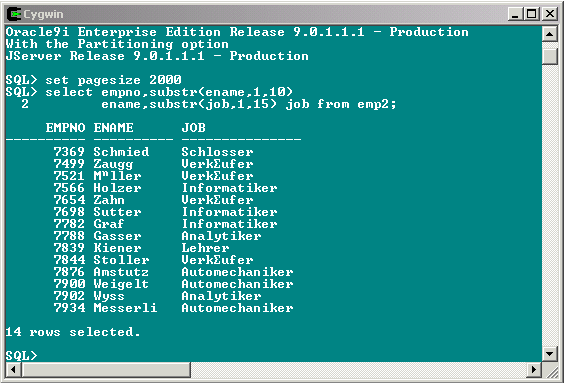
You can see, that the Characters "ä" and "ü" are not correct displayed.
Solution
1. Verify the NLS variables
To verify, if a specific NLS related value has been set, you can query the NLS_SESSION_PARAMETERS view once you are connected from your client session. This view will give you the current session settings of the NLS related parameters, with one exception: the character set part of NLS_LANG. You can simply issue:
SELECT * FROM NLS_SESSION_PARAMETERS;
PARAMETER VALUE
------------------------------ ------------------
NLS_LANGUAGE AMERICAN
NLS_TERRITORY AMERICA
NLS_CURRENCY $
NLS_ISO_CURRENCY AMERICA
NLS_NUMERIC_CHARACTERS .,
NLS_CALENDAR GREGORIAN
NLS_DATE_FORMAT DD-MON-RR
NLS_DATE_LANGUAGE AMERICAN
NLS_SORT BINARY
NLS_TIME_FORMAT HH.MI.SSXFF AM
NLS_TIMESTAMP_FORMAT DD-MON-RR HH.MI.SSXFF AM
NLS_TIME_TZ_FORMAT HH.MI.SSXFF AM TZR
NLS_TIMESTAMP_TZ_FORMAT DD-MON-RR HH.MI.SSXFF AM TZR
NLS_DUAL_CURRENCY $
NLS_COMP BINARY
NLS_LENGTH_SEMANTICS BYTE
NLS_NCHAR_CONV_EXCP FALSETo get the characterset part, depending on how your platform is, you can issue:
On Windows 2000 / NT:
SQL>@ .[%NLS_LANG%]
SP2-0310: unable to open file ".[AMERICAN_AMERICA.WE8ISO8859P1]"
Altough you will get an error message like the one in the above example, the entry in the brackets represents the current session specific NLS_LANG value including the character set part.
If you get:
SP2-0310: unable to open file ".[%NLS_LANG%]"
The variable was not set either as an environment variable or in the registry and the default AMERICAN_AMERICA.US7ASCII is used.
On Unix:
SQL> ! echo $NLS_LANG
AMERICAN_AMERICA.WE8ISO8859P1
If you get:
NLS_LANG: Undefined variable
The variable was not set and the default AMERICAN_AMERICA.US7ASCII is used.
2. Set the correct NLS_LANG Variable for your ORACLE_HOME
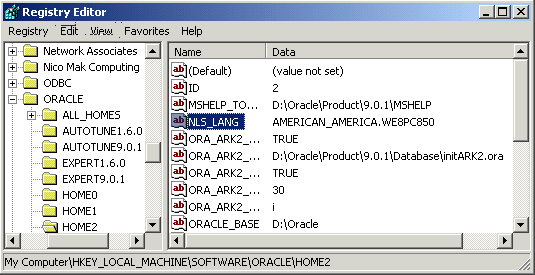
On the Windows 2000 / NT environment variables are usually set in the Registry. Every ORACLE_HOME has its own entry in the form:
HKEY_LOCAL_MACHINE -> SOFTWARE -> ORACLE -> HOMEn
HOMEn, is the value you took out of the Oracle.Key-File (eg: HOME2)
To find out, which HOMEn is the correct one for the ORACLE_HOME your
application uses, check the ORACLE.KEY file that is located in the
$ORACLE_HOME/bin directory. This text file will contain an entry with
the relevant HOMEn.For the Windows 2000 / NT environment you must set the WE8PC850 characterset. The CMD Utilities in Windows 2000 environment doesn't understand the ISO-8859 characterset.
3. Check your Commandline Tool Output
Start your Commandline Tool (Shell) again and check your Output
SQL> @ .[%NLS_LANG%]
SP2-0310: unable to open file ".[AMERICAN_AMERICA.WE8PC850]"

You can see, that the Characters "ä" and "ü" are now correct displayed.