
SQL Server Survival Guide
Content
Physical Database Files and Filegroups
Truncating the Transaction Log
Log truncation occurs at these points
The size of a transaction log is therefore controlled in one of these ways
Shrinking the Transaction Log
Example Truncating / Shrinking the Transaction Log
Database is in FULL Recovery Mode
Database is in SIMPLE Recovery ModeSystem and User Databases (= Oracle Schema)
SQL Server Services
Referring Objects
Metadata (Data Dictionary)
SQL Server Logon and Database Access
SQL Server Query Designer
SQL Server Batch Utility (osql)SQL Server Programming Overview
Local Variables
Distributed Queries
Formatting Dates
CASE function (similar to Oracle DECODE)
Dynamically constructing SQL Statements
Transactions
TOP n Queries
Show User Tables for specified Database
Show Primary- and Foreign Key of a TableCreating and Managing Databases
Database Properties
Change a property
Create a Database
Information on Databases
Data Structures
Database Recovery Model
Check Extents, Pages
Traceflags
Backup a Database
Restore a DatabaseUser defined Data Types
BLOBS
Computed Columns
Generate Column Value with Identity Property
Generate Column Value with NEWID Function
Create Table in specified File Group
Generating Transact-SQL Scripts
Logged and Nonlogged Bulk CopiesDEFAULT Constraint
CHECK Constraint
PRIMARY KEY Constraint
FOREIGN KEY Constraint
DEFAULT Object
RULE Object
Disabling and Enabling ConstraintsNonclustered Indexes
Clustered Indexes
Sysindexes Table
Verify the sysindexes Table
Full Table Scan
Non Clustered Index Read
Clustered Index Read
Clustered Index with Non Clustered Index Read
Page Splits in an Index
Page Splits do not occur in a Heap
Determining Selectitivity
Determine Table Structures
Optimizer Statistics
Manually Creating Statistics
Create Statistics for whole Database
View Index Statistics and evaluating Index SelectivityCreating Views
Encrypt / Decrypt Views
Updateable Views
Indexed ViewsPopulate Table with a Stored Procedure
Check Stored Procedure Properties
Recompile all Stored Procedures, Trigger that reference a Table
Using Input Parameters
Returning Values Using Output Parameters
Process OUTPUT Value and RETURN Parameter
Using last insert @@identity for Foreign Key Value
Custom Messages from Stored Procedures added to Eventlog
EMail Interface
Extended Stored ProceduresScalar User Defined Function
Multi-Statement Table-valued Function
SQL Server Architecture
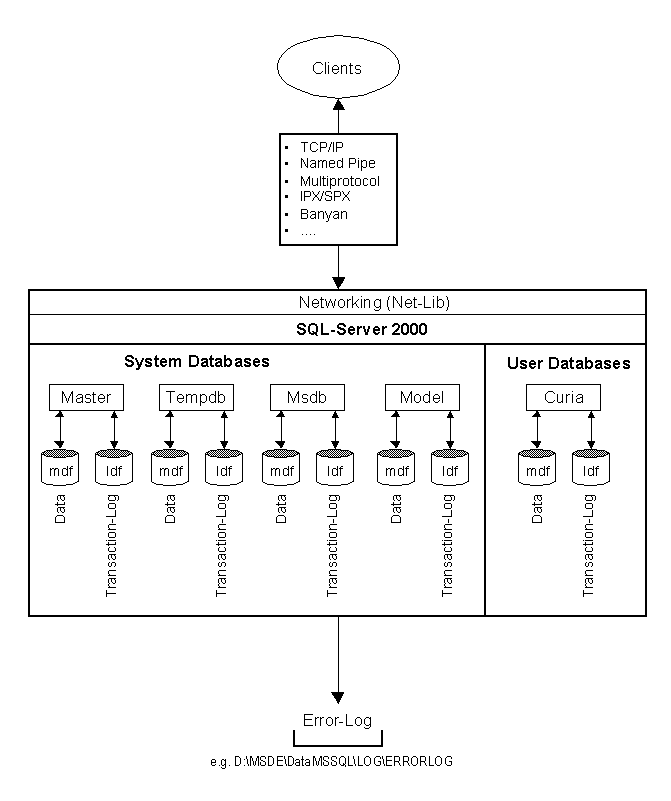
Microsoft® SQL Server data is stored in databases. The data in a database is organized into the logical components visible to users. A database is also physically implemented as two or more files on disk.
When using a database, you work primarily with the logical components such as tables, views, procedures, and users. The physical implementation of files is largely transparent. Typically, only the database administrator needs to work with the physical implementation.
Each instance of SQL Server has four system databases (master, model, tempdb, and msdb) and one or more user databases. Some organizations have only one user database, containing all the data for their organization. Some organizations have different databases for each group in their organization, and sometimes a database used by a single application. For example, an organization could have one database for sales, one for payroll, one for a document management application, and so on. Sometimes an application uses only one database; other applications may access several databases.
It is not necessary to run multiple copies of the SQL Server database engine to allow multiple users to access the databases on a server. An instance of the SQL Server is capable of handling thousands of users working in multiple databases at the same time. Each instance of SQL Server makes all databases in the instance available to all users that connect to the instance, subject to the defined security permissions.
When connecting to an instance of SQL Server, your connection is associated with a particular database on the server. This database is called the current database. You are usually connected to a database defined as your default database by the system administrator.
SQL Server allows you to detach databases from an instance of SQL Server, then reattach them to another instance, or even attach the database back to the same instance. If you have a SQL Server database file, you can tell SQL Server when you connect to attach that database file with a specific database name.
Physical Database Files and Filegroups
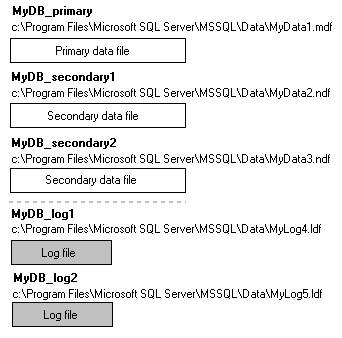
Microsoft® SQL Server maps a database over a set of operating-system files. Data and log information are never mixed on the same file, and individual files are used only by one database.
SQL Server databases have three types of files:
- Primary data files
The primary data file is the starting point of the database and points to the other files in the database. Every database has one primary data file. The recommended file name extension for primary
data files is .mdf.
- Secondary data files
Secondary data files comprise all of the data files other than the primary data file. Some databases may not have any secondary data files, while others have multiple secondary data files. The recommended file name extension for secondary data files is .ndf.
- Log files
Log files hold all of the log information used to recover the database. There must be at least one log file for each database, although there can be more than one. The recommended file name extension for log files is .ldf.
SQL Server does not enforce the .mdf, .ndf, and .ldf file name extensions, but these extensions are recommended to help identify the use of the file.
In SQL Server, the locations of all the files in a database are recorded in both the master database and the primary file for the database. Most of the time the database engine uses the file location information from the master database. For some operations, however, the database engine uses the file location information from the primary file to initialize the file location entries in the master database.
SQL Server files have two names:
- logical_file_name is a name used to refer to the file in all Transact-SQL statements.
The logical file name must conform to the rules for SQL Server identifiers and must be unique to the database.
- os_file_name is the name of the physical file.
It must follow the rules for Microsoft Windows NT® or Microsoft Windows® Me, and Microsoft Windows 98 file names.
These are examples of the logical file names and physical file names of a database created on a default instance of SQL Server:
SQL Server data and log files can be placed on either FAT or NTFS file systems, but cannot be placed on compressed file systems.
Use the following SQL Statement to list the logical and physical file names:
USE MyDb
SELECT SUBSTRING(name,1,20) Name,
SUBSTRING(filename,1,50) Filename
FROM dbo.sysfilesName Filename
-------------------- ------------------------------------
MyDb_System E:\MsSQLServer\Data\MyDb_System.MDF
MyDb_Log_1 E:\MsSQLServer\Data\MyDb_Log_1.LDF
MyDb_Data_1 E:\MsSQLServer\Data\MyDb_Data_1.NDF
MyDb_Index_1 E:\MsSQLServer\Data\MyDb_Index_1.NDFIf you have a Backup and you would know, the logical and physical file names within this Backup, then you can use RESTORE FILELISTONLY
RESTORE FILELISTONLY FROM
DISK = N'E:\MsSQLServer\Backup\MyDb.bak'
WITH FILE = 7LogicalName PhysicalName ---------------------------------------------------------------- MyDb D:\sql2005\MSSQL.1\MSSQL\Data\MyDb.mdf MyDb_log C:\DATA\MyDb_log.ldf
Recovery Model
SQL Server offers three recovery models for each database: full recovery, simple recovery and bulk-logged recovery. The recovery models determine how much data loss is acceptable in case of a failure and what types of backup and restore functions are allowed.
Most people either select full or simple for all of their databases and just stick with the same option across the board. In most cases, selecting the full recovery model is the smartest option, because it gives you the greatest flexibility and minimizes data loss in the event a restore has to take place.
Although using the full recovery model makes logical sense, there are reasons why the other two options are available. We will further define why there are three options and when you might want to use the different options to protect your databases. First, let's take a closer look at each model.
Simple
The simple recovery model allows you to recover data only to the most recent full database or differential backup. Transaction log backups are not available because the contents of the transaction log are truncated each time a checkpoint is issued for the database.
Full
The full recovery model uses database backups and transaction log backups to provide complete protection against failure. Along with being able to restore a full or differential backup, you can recover the database to the point of failure or to a specific point in time. All operations, including bulk operations such as SELECT INTO, CREATE INDEX and bulk-loading data, are fully logged and recoverable.
Bulk-Logged
The bulk-logged recovery model provides protection against failure combined with the best performance. In order to get better performance, the following operations are minimally logged and not fully recoverable: SELECT INTO, bulk-load operations, CREATE INDEX as well as text and image operations. Under the bulk-logged recovery model, a damaged data file can result in having to redo work manually based on the operations that are not fully logged. In addition, the bulk-logged recovery model only allows the database to be recovered to the end of a transaction log backup when the log backup contains bulk changes.
So once again, based on the information above it looks like the Full Recovery model is the way to go. Given the flexibility of the full recovery model, why would you ever select any other model? The following factors will help you determine when another model could work for you:
Select Simple if:
- Your data is not critical.
- Losing all transactions since the last full or differential backup is not an issue.
- Data is derived from other data sources and is easily recreated.
- Data is static and does not change often.
Select Bulk-Logged if:
- Data is critical, but logging large data loads bogs down the system.
- Most bulk operations are done off hours and do not interfere
with normal transaction processing.- You need to be able to recover to a point in time.
Select Full if:
- Data is critical and no data can be lost.
- You always need the ability to do a point-in-time recovery.
- Bulk-logged activities are intermixed with normal transaction processing.
- You are using replication and need the ability to resynchronize all
databases involved in replication to a specific point in time.
Switching recovery models
For some databases, you may need to use a combination of these recovery models. Let's say you have a critical system and you cannot afford to lose any data during daily operations; but during off hours there are maintenance tasks and data loads that use way too much transaction log space to log every transaction. In a case like this, you may want to switch recovery models prior to your maintenance tasks. This can be automated using T-SQL in the job that runs your maintenance or data load tasks. After the maintenance task is completed, the recovery model can be switched back again.
Switching between full and bulk-logged models is probably the best scenario for changing recovery models and also the safest and easiest. You can switch from any recovery model to another recovery model, but prior to or after the switch, you may need to issue additional transaction log or full backups to ensure you have a complete backup set.
ALTER DATABASE Northwind SET RECOVERY FULL
GO
Transaction Log Architecture
Every Microsoft® SQL Server™ 2000 database has a transaction log that records all transactions and the database modifications made by each transaction. This record of transactions and their modifications supports three operations:
- Recovery of individual transactions
If an application issues a ROLLBACK statement, or if SQL Server detects an error such as the loss of communication with a client, the log records are used to roll back the modifications made by an incomplete transaction.
- Recovery of all incomplete transactions when SQL Server is started.
If a server running SQL Server fails, the databases may be left in a state where some modifications were never written from the buffer cache to the data files, and there may be some modifications from incomplete transactions in the data files. When a copy of SQL Server is started, it runs a recovery of each database. Every modification recorded in the log which may not have been written to the data files is rolled forward. Every incomplete transaction found in the transaction log is then rolled back to ensure the integrity of the database is preserved.
- Rolling a restored database forward to the point of failure
After the loss of a database, as is possible if a hard drive fails on a server that does not have RAID drives, you can restore the database to the point of failure. You first restore the last full or differential database backup, and then restore the sequence of transaction log backups to the point of failure. As you restore each log backup, SQL Server reapplies all the modifications recorded in the log to roll forward all the transactions. When the last log backup is restored, SQL Server then uses the log information to roll back all transactions that were not complete at that point.
Truncating the Transaction Log
If log records were never deleted from the transaction log, the logical log would grow until it filled all the available space on the disks holding the physical log files. At some point in time, old log records no longer necessary for recovering or restoring a database must be deleted to make way for new log records. The process of deleting these log records to reduce the size of the logical log is called truncating the log.
The active portion of the transaction log can never be truncated. The active portion of the log is the part of the log needed to recover the database at any time, so must have the log images needed to roll back all incomplete transactions. It must always be present in the database in case the server fails because it will be required to recover the database when the server is restarted. The record at the start of the active portion of the log is identified by the minimum recovery log sequence number (MinLSN).
The recovery model chosen for a database determines how much of the transaction log in front of the active portion must be retained in the database. Although the log records in front of the MinLSN play no role in recovering active transactions, they are required to roll forward modifications when using log backups to restore a database to the point of failure. If you lose a database for some reason, you can recover the data by restoring the last database backup, and then restoring every log backup since the database backup. This means that the sequence of log backups must contain every log record that was written since the database backup. When you are maintaining a sequence of transaction log backups, no log record can be truncated until after it has been written to a log backup.
The log records before the MinLSN are only needed to maintain a sequence of transaction log backups.
In the simple recovery model, a sequence of transaction logs is not being maintained. All log records before the MinLSN can be truncated at any time, except while a BACKUP statement is being processed. NO_LOG and TRUNCATE_ONLY are the only BACKUP LOG options that are valid for a database that is using the simple recovery model.
In the full and bulk-logged recovery models, a sequence of transaction log backups is being maintained. The part of the logical log before the MinLSN cannot be truncated until those log records have been copied to a log backup.
Log truncation occurs at these points
- At the completion of any BACKUP LOG statement.
- Every time a checkpoint is processed, provided the database is using the simple recovery model. This includes both explicit checkpoints resulting from a CHECKPOINT statement and implicit checkpoints generated by the system. The exception is that the log is not truncated if the checkpoint occurs when a BACKUP statement is still active
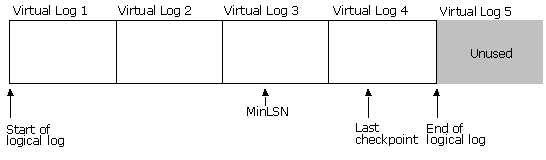
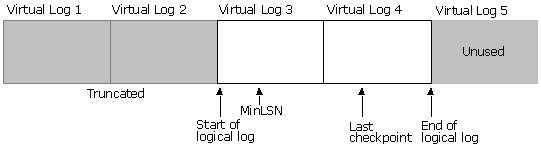
Transaction logs are divided internally into sections called virtual log files. Virtual log files are the unit of truncation. When a transaction log is truncated, all log records before the start of the virtual log file containing the MinLSN are deleted
The size of a transaction log is therefore controlled in one of these ways
- When a log backup sequence is being maintained, schedule BACKUP LOG statements to occur at intervals that will keep the transaction log from growing past the desired size.
- When a log backup sequence is not maintained, specify the simple recovery model.
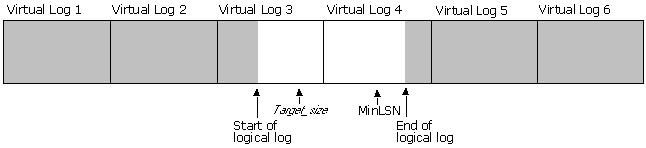
This illustration shows a transaction log that has four virtual logs. The log has not been truncated after the database was created. The logical log starts at the beginning of the first virtual log and the part of virtual log 4 beyond the end of the logical file has never been used.
This illustration shows how the log looks after truncation. The rows before the start of the virtual log containing the MinLSN record have been truncated.
Truncation does not reduce the size of a physical log file, it reduces the size of the logical log file.
The size of the log files are physically reduced when:
- A DBCC SHRINKDATABASE statement is executed.
- A DBCC SHRINKFILE statement referencing a log file is executed.
- An autoshrink operation occurs
Shrinking a log is dependent on first truncating the log. Log truncation does not reduce the size of a physical log file, it reduces the size of the logical log and marks as inactive the virtual logs that do not hold any part of the logical log. A log shrink operation removes enough inactive virtual logs to reduce the log file to the requested size.
The unit of size reduction is a virtual log. For example, if you have a 600 MB log file that has been divided into six 100 MB virtual logs, the size of the log file can only be reduced in 100 MB increments. The file size can be reduced to sizes such as 500 MB or 400 MB, but it cannot be reduced to sizes such as 433 MB or 525 MB.
Virtual logs that hold part of the logical log cannot be freed. If all the virtual logs in a log file hold parts of the logical log, the file cannot be shrink until a truncation marks one or more of the virtual logs at the end of the physical log as inactive.
When any file is shrunk, the space freed must come from the end of the file. When a transaction log file is shrunk, enough virtual logs from the end of the file are freed to reduce the log to the size requested by the user. The target_size specified by the user is rounded to the next highest virtual log boundary. For example, if a user specifies a target_size of 325 MB for our sample 600 MB file with 100 MB virtual log files, the last two virtual log files are removed and the new file size is 400 MB.
In SQL Server, a DBCC SHRINKDATABASE or DBCC SHRINKFILE operation attempts to shrink the physical log file to the requested size (subject to rounding) immediately:
- If no part of the logical log is in the virtual logs beyond the target_size mark, the virtual logs after the target_size mark are freed and the successful DBCC statement completes with no messages.
- If part of the logical log is in the virtual logs beyond the target_size mark, SQL Server frees as much space as possible and issues an informational message. The message tells you what actions you need to perform to get the logical log out of the virtual logs at the end of the file. After you perform this action, you can then reissue the DBCC statement to free the remaining space.
For example, assume that a 600 MB log file with six virtual logs has a logical log starting in virtual log 3 and ending in virtual log 4, when you execute a DBCC SHRINKFILE statement with a target_size of 275 MB:
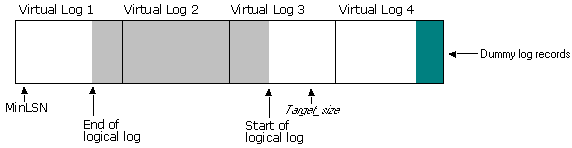
Virtual logs 5 and 6 are freed immediately because they hold no portion of the logical log. To meet the specified target_size, however, virtual log 4 should also be freed, but cannot because it holds the end portion of the logical log. After freeing virtual logs 5 and 6, SQL Server fills the remaining part of virtual log 4 with dummy records. This forces the end of the log file to virtual log 1. In most systems, all transactions starting in virtual log 4 will be committed within seconds, meaning that all of the active portion of the log moves to virtual log 1, and the log file now looks like this:
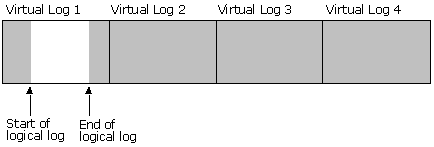
The DBCC SHRINKFILE statement also issues an informational message that it could not free all the space requested, and indicate that you can execute a BACKUP LOG statement to make it possible to free the remaining space. Once the active portion of the log moves to virtual log 1, a BACKUP LOG statement will truncate the entire logical log that is in virtual log 4:
Because virtual log 4 no longer holds any portion of the logical log, if you now execute the same DBCC SHRINKFILE statement with a target_size of 275 MB, virtual log 4 will be freed and the size of the physical log file reduced to the size requested.
Example Shrinking the Transaction Log
Here is an example how boths steps can be performed:
Database is in FULL Recovery Mode
# For this example we switch to FULL Mode
USE master
ALTER DATABASE MyDb SET RECOVERY FULL;
GO
The command(s) completed successfully.# Add logical Devices for the Backup (The directories must exist!)
EXEC sp_addumpdevice 'disk', 'MyDb_dat',
'C:\Program Files\Microsoft SQL Server\MSSQL\BACKUP\MyDb_dat.dat'
GO
(1 row(s) affected)
'Disk' device added.
EXEC sp_addumpdevice 'disk', 'MyDb_log',
'C:\Program Files\Microsoft SQL Server\MSSQL\BACKUP\MyDb_log.dat'
GO
(1 row(s) affected)
'Disk' device added.
# Create a Backup before Truncating / Shrinking
BACKUP DATABASE MyDb TO MyDb_dat
GO
Processed 26392 pages for database 'MyDb', file 'MigrationBasisplus_Data' on file 9.
Processed 1 pages for database 'MyDb', file 'MigrationBasisplus_Log' on file 9.
BACKUP DATABASE successfully processed 26393 pages in 9.756 seconds (22.161 MB/sec).
BACKUP LOG MyDb TO MyDb_log
GO
Processed 1 pages for database 'MyDb', file 'MigrationBasisplus_Log' on file 5.
BACKUP LOG successfully processed 1 pages in 0.065 seconds (0.039 MB/sec).
# Truncate the Transaction Log
BACKUP LOG MyDb WITH TRUNCATE_ONLY
GO
The command(s) completed successfully.
# Drop logical Devices
sp_dropdevice 'MyDb_dat'
GO
Device dropped.
sp_dropdevice 'MyDb_log'
GO
Device dropped.
# Get the Name of the Transaction Log
USE MyDb
SELECT name FROM dbo.sysfiles
GO
# Shrink the physical Size of the Transaction Log to 20MB
USE MyDb
DBCC SHRINKFILE (MigrationBasisplus_Log, 20)
GO
# Avoid a transaction log grows unexpectedly
USE [master]
GO
ALTER DATABASE [MyDb] MODIFY FILE
(NAME = N'MyDb_Log_1', SIZE = 772096KB,
MAXSIZE = 921600KB , FILEGROWTH = 10240KB)
GO
Database is in SIMPLE Recovery Mode
# For this example we switch to SIMPLE Mode
USE master
ALTER DATABASE MyDb SET RECOVERY SIMPLE;
GO
The command(s) completed successfully.
# Add logical Device for the Backup (The directories must exist!)
EXEC sp_addumpdevice 'disk', 'MyDb_dat',
'C:\Program Files\Microsoft SQL Server\MSSQL\BACKUP\MyDb_dat.dat'
GO
(1 row(s) affected)
'Disk' device added.
# Create a Backup before Truncating / Shrinking
BACKUP DATABASE MyDb TO MyDb_dat
GO
Processed 26392 pages for database 'MyDb', file 'MigrationBasisplus_Data' on file 9.
Processed 1 pages for database 'MyDb', file 'MigrationBasisplus_Log' on file 9.
BACKUP DATABASE successfully processed 26393 pages in 9.756 seconds (22.161 MB/sec).
# Truncate the Transaction Log
BACKUP LOG MyDb WITH TRUNCATE_ONLY
GO
The command(s) completed successfully.
# Drop logical Device
sp_dropdevice 'MyDb_dat'
GO
Device dropped.
# Get the Name of the Transaction Log
USE MyDb
SELECT name FROM dbo.sysfiles
GO
The command(s) completed successfully.
# Shrink the physical Size of the Transaction Log to 20MB
USE MyDb
DBCC SHRINKFILE (MigrationBasisplus_Log, 20)
GO
SQL Server Overview
System and User Databases (= Oracle Schema)
Master (Controls other Databases)
Model (Template for new Databases)
Tempdb (Temporary Storage)
Msdb (Scheduling and Job Information)
Distribution (Replication Information)
SQL Server includes four services
MSSQLServer (Database Engine)
SQLServerAgent (Job Scheduling)
MS DTC, Distributed Transaction Coordinater (Distributed Queries, 2P Commit)
Microsoft Search (Full Text Engine)
select * from <server>.<database>.<owner>.object
select * from Northwind..customer (Owner is missing)
System Stored Procedures ( sp_ )
sp_helpdb [db_name]
Infos for Database sp_help [any object]
Infos an Tables, Procedures, etc sp_helpindex [table_name]
Show Indexes for table_name sp_who
Show System Activity SELECT @@spid
Which is my Server Process ID ? select user_name(),db_name(), @@servername
Database User Name, Database, Server ? sp_helpdb Northwind
sp_help Employees
System Tables ( sys... )
master..syslogins
Available login Accounts master..sysmessages
Available System Error / Warnings master..sysdatabases
Available Databases on SQL Server sysusers
Available Win 2000 Users, SQL Server Users sysobjects
Available Objects in the Database use master
select * from sysdatabasesuse northwind
select * from sysobjects
where xtype = 'U'
System Functions ( see QA: Common Objects )
DB_ID(DbName)
Get Database ID USER_NAME (id)
Get UserName GETDATE()
Get SystemDate use master
select * from sysdatabasesuse northwind
select * from sysobjects
where xtype = 'U'
Schema Views ( System Table Independent Views)
select * from information_schema.tables
Tables in a Database select * from information_schema.columns
Columns in a Database select * from information_schema.table_privileges
Privileges on Tables
SQL Server Logon and Database Access
Login Authentication (Windows Authentication or Mixed Mode)
Mapping of OS User to Database User Accounts and Roles
All W2K Administrators are automatically allowed to logon. This can be disabled by deleting the \BUILTIN\Administrators in the Security Tab on SQL Server Level.
Windows Authentication is the Default (Trusted Connection)
Database Users
Specific to SQL-Server, not the same as the Windows User or Login Account !
Normally dbo is used, mapping is done on Database Level (EM: Users)
Roles
Fixed Server Roles (e.g. System Administrators = DBA) on SQL-Server Level
Fixed Database Role (e.g. db_owner = Has all permissions in the database)
Fixed server role Description sysadmin Can perform any activity in SQL Server. serveradmin Can set serverwide configuration options, shut down the server. setupadmin Can manage linked servers and startup procedures. securityadmin Can manage logins and CREATE DATABASE permissions, also read error logs and change passwords. processadmin Can manage processes running in SQL Server. dbcreator Can create, alter, and drop databases. diskadmin Can manage disk files. bulkadmin Can execute BULK INSERT statements. You can get a list of the fixed server roles from sp_helpsrvrole, and get the specific permissions for each role from sp_srvrolepermission.
Fixed database role Description db_owner Has all permissions in the database. db_accessadmin Can add or remove user IDs. db_securityadmin Can manage all permissions, object ownerships, roles and role memberships. db_ddladmin Can issue ALL DDL, but cannot issue GRANT, REVOKE, or DENY statements. db_backupoperator Can issue DBCC, CHECKPOINT, and BACKUP statements. db_datareader Can select all data from any user table in the database. db_datawriter Can modify any data in any user table in the database. db_denydatareader Cannot select any data from any user table in the database. db_denydatawriter Cannot modify any data in any user table in the database. Example
USE Northwind
GO
sp_addlogin @loginame = 'Akadia', @passwd = 'Akadia', @defdb = 'Northwind'
GO
sp_grantdbaccess 'Akadia'
GO
sp_addrole 'Masters'
GO
sp_addrolemember 'Masters', 'Akadia'
GO
GRANT SELECT ON Employees TO Masters
GO
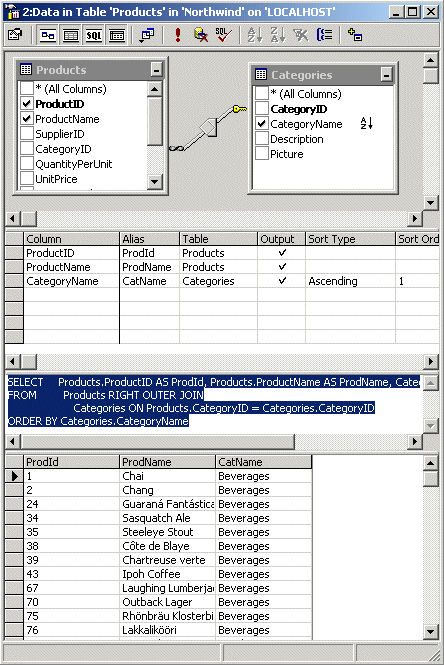
Query Designer can be used to graphicaly build a SQL statement, for example the syntax for an ANSI OUTER Join Syntax. Follow the following steps:
Open Enterprise Manager
Select a table in the desired Database / Tables
Right-Click an select "Open Table / Query", the Query Designer opens.
Right-Click an empty area on the diagram oane, and then click "Add Table"
Choose another table, in the SQL Pane you can now see the generated SQL statement
For an OUTER Join, right-click the Relation and choose "All rows from <table>"
SQL Server Batch Utility (osql)
The utility osql is a command line tool to run batches. For example you can create the CREDIT database as follows:
osql /E /S<ServerName> /n /i creabase.sql >> credit.log
/*
**  CREABASE.SQL
**
**  Drop and Recreate the credit database.
*/
PRINT 'Begin CREABASE.SQL'
GO
USE master
SET nocount ON
GO
IF db_id('credit') IS NOT NULL
   DROP DATABASE credit
GO
CREATE DATABASE [credit]
   ON PRIMARY (NAME = N'credit_Data',
      FILENAME = N'E:\MSSQL\Data\credit_Data.MDF',
               SIZE = 50,
               FILEGROWTH = 10%)
   LOG ON (NAME = N'credit_Log',
      FILENAME = N'E:\MSSQL\Data\credit_Log.LDF',
           SIZE = 1,
           FILEGROWTH = 10%)
GO
ALTER DATABASE credit
   ADD FILEGROUP CreditTablesFG
GO
ALTER DATABASE credit
   ADD FILEGROUP CreditIndexesFG
GO
ALTER DATABASE credit
   ADD FILE (
      NAME = CreditTables,
      FILENAME = 'E:\MSSQL\Data\CreditTables.ndf',
      SIZE = 8MB,
      MAXSIZE = UNLIMITED,
      FILEGROWTH = 50MB )
   TO FILEGROUP CreditTablesFG
ALTER DATABASE credit
   ADD FILE (
      NAME = CreditIndexes,
      FILENAME = 'E:\MSSQL\Data\CreditIndexes.ndf',
      SIZE = 8MB,
      MAXSIZE = UNLIMITED,
      FILEGROWTH = 50MB )
   TO FILEGROUP CreditIndexesFG
GO
PRINT ' '
IF db_id('credit') IS NOT NULL
   PRINT 'CREATED DATABASE "credit"'
ELSE
   PRINT 'CREATE DATABASE "credit" FAILED'
PRINT ' '
GO
osql -S localhost -U zahn -P soladur -n -i Sample_Script2.sqlUSE Northwind IF EXISTS (SELECT * FROM sysobjects WHERE type = 'U' AND name = 'Sample1') DROP TABLE sample1 IF EXISTS (SELECT * FROM sysobjects WHERE type = 'V' AND name = 'Sample_View') DROP VIEW Sample_View GO CREATE TABLE Sample1 ( cust_no int NOT NULL, fname char(10) NOT NULL, lname char(15) NOT NULL ) GO CREATE VIEW Sample_View AS SELECT cust_no, lname FROM Sample1 GO INSERT Sample1 VALUES ( 100, 'Adam' , 'Barr' ) INSERT Sample1 VALUES ( 200, 'John' , 'Chen' ) INSERT Sample1 VALUES ( 300, 'Cindy' , 'Durkin' ) INSERT Sample1 VALUES ( 400, 'Roger' , 'Harui' ) INSERT Sample1 VALUES ( 500, 'Ryan' , 'LaBrie' ) SELECT * FROM Sample_View
SQL Server Programming Overview
use northwind
go
declare @lastname varchar(20)
declare @firstname varchar(20)
set @lastname = 'Dodsworth'
select @firstname = FirstName
from employees
where lastname = @lastname
print @firstname + ' ' + @lastname
go
Perform a distributed query to retrieve information from the EMP table on Oracle 9.2.0 usind MAG1 as the TNSNAMES.ORA connection string.
1. Create the linked Server
Specify Remote Login/Password (system/manager) in Linked Server Properties.
EXEC sp_addlinkedserver
@server = 'MAG1',
@srvproduct = 'Oracle 9.2.0',
@provider = 'MSDAORA',
@datasrc = 'MAG1'
GO2. Start Distributed Query using the SQL Pass Trough Function OPENQUERY
SELECT * FROM OPENQUERY
(MAG1,'SELECT * FROM scott.emp')
GO
Use CONVERT() with date format number, see CONVERT()
select convert(varchar(30), getdate, 104)
--> 19.10.2002SET DATEFORMAT
Sets the order of the dateparts (month/day/year) for entering datetime or smalldatetime data.
SET DATEFORMAT mdy
GO
DECLARE @datevar smalldatetime
SET @datevar = '12/31/02 12:30:00'
SELECT @datevar
GO
--> 2002-12-31 12:30:00
CASE function (similar to Oracle DECODE)
Within a SELECT statement, a simple CASE function allows only an equality check; no other comparisons are made. This example uses the CASE function to alter the display of book categories to make them more understandable.
USE pubs
GO
SELECT Category =
       CASE type
         WHEN 'popular_comp' THEN 'Popular Computing'
         WHEN 'mod_cook' THEN 'Modern Cooking'
         WHEN 'business' THEN 'Business'
         WHEN 'psychology' THEN 'Psychology'
         WHEN 'trad_cook' THEN 'Traditional Cooking'
         ELSE 'Not yet categorized'
       END,
   CAST(title AS varchar(25)) AS 'Shortened Title',
   price AS Price
FROM titles
WHERE price IS NOT NULL
ORDER BY type, price
COMPUTE AVG(price) BY type
GO
Category Shortened Title Price ------------------- ------------------------- --------------------- Business You Can Combat Computer S 2.9900 Business Cooking with Computers: S 11.9500 Business The Busy Executive's Data 19.9900 Business Straight Talk About Compu 19.9900 avg ===================== 13.7300SELECT au_fname, au_lname,
CASE state
WHEN 'CA' THEN 'California'
WHEN 'KS' THEN 'Kansas'
WHEN 'TN' THEN 'Tennessee'
WHEN 'OR' THEN 'Oregon'
WHEN 'MI' THEN 'Michigan'
WHEN 'IN' THEN 'Indiana'
WHEN 'MD' THEN 'Maryland'
WHEN 'UT' THEN 'Utah'
END AS StateName
FROM pubs.dbo.authors
ORDER BY au_lnameSELECT statement with simple and searched CASE function
Within a SELECT statement, the searched CASE function allows values to be replaced in the result set based on comparison values. This example displays the price (a money column) as a text comment based on the price range for a book.
USE pubs
GO
SELECT  'Price Category' =
      CASE
         WHEN price IS NULL THEN 'Not yet priced'
         WHEN price < 10 THEN 'Very Reasonable Title'
         WHEN price >= 10 and price < 20 THEN 'Coffee Table Title'
         ELSE 'Expensive book!'
      END,
   CAST(title AS varchar(20)) AS 'Shortened Title'
FROM titles
ORDER BY price
GO
Price Category Shortened Title
--------------------- --------------------
Not yet priced The Psychology of Co
Not yet priced Net Etiquette
Very Reasonable Title The Gourmet Microwav
Very Reasonable Title You Can Combat Compu
Dynamically constructing SQL Statements
Use EXECUTE with Literals and Variables
Change Ownership of Tables in Database Northwind to dbo:
use Northwind
select 'EXECUTE sp_changeobjectowner ''' + name + ''', ''dbo''' from sysobjects
where type = 'U'Dynamically construct and run a SELECT statement
declare @dbname varchar(30)
declare @tblname varchar(30)
set @dbname = 'Northwind'
set @tblname = 'Products'
EXECUTE
('USE ' + @dbname + ' SELECT * FROM ' + @tblname)
Transactions must be included in a BEGIN TRAN, COMMIT TRAN Block. Updated Rows in the block are locked for other sessions as long as the transaction is not commited. Open another QA and try to select, the select waits!
USE Northwind
BEGIN TRAN
-- Lock Rows
UPDATE Customers SET ContactName = 'Howard Snyder_Updated'
WHERE CustomerID ='GREAL'
IF (@@ERROR <> 0)
BEGIN
RAISERROR ('Transaction failed',16,-1)
ROLLBACK TRANSACTION
END
COMMIT TRANSACTION
SELECT ContactName FROM Customers WHERE CustomerID = 'GREAL'
The TOP keyword specifies that the first n rows of the result set are returned. If ORDER BY is specified, the rows are selected after the result set is ordered. n is the number of rows to return, unless the PERCENT keyword is specified. PERCENT specifies that n is the percentage of rows in the result set that are returned. For example, this SELECT statement returns the first 10 cities, in alphabetic sequence, from the Orders table:
SELECT DISTINCT TOP 10 ShipCity, ShipRegion
FROM Orders
ORDER BY ShipCity
Show User Tables for specified Database
use northwind
select * from information_schema.tables
where table_type = 'BASE TABLE'
Show Primary- and Foreign Key of a Table
select * from information_schema.key_column_usage
where table_name = 'Orders'
Creating and Managing Databases
SELECT DATABASEPROPERTYEX('Northwind', 'IsAutoShrink')
Value Description Value returned Collation
Default collation name for the database. Collation name IsAnsiNullDefault
Database follows SQL-92 rules for allowing null values. 1 = TRUE
0 = FALSE
NULL = Invalid inputIsAnsiNullsEnabled
All comparisons to a null evaluate to unknown. 1 = TRUE
0 = FALSE
NULL = Invalid inputIsAnsiPaddingEnabled
Strings are padded to the same length before comparison or insert. 1 = TRUE
0 = FALSE
NULL = Invalid inputIsAnsiWarningsEnabled
Error or warning messages are issued when standard error conditions occur. 1 = TRUE
0 = FALSE
NULL = Invalid inputIsArithmeticAbortEnabled
Queries are terminated when an overflow or divide-by-zero error occurs during query execution. 1 = TRUE
0 = FALSE
NULL = Invalid inputIsAutoClose
Database shuts down cleanly and frees resources after the last user exits. 1 = TRUE
0 = FALSE
NULL = Invalid inputIsAutoCreateStatistics
Existing statistics are automatically updated when the statistics become out-of-date because the data in the tables has changed. 1 = TRUE
0 = FALSE
NULL = Invalid inputIsAutoShrink
Database files are candidates for automatic periodic shrinking. 1 = TRUE
0 = FALSE
NULL = Invalid inputIsAutoUpdateStatistics
Auto update statistics database option is enabled. 1 = TRUE
0 = FALSE
NULL = Invalid inputIsCloseCursorsOnCommitEnabled
Cursors that are open when a transaction is committed are closed. 1 = TRUE
0 = FALSE
NULL = Invalid inputIsFulltextEnabled
Database is full-text enabled. 1 = TRUE
0 = FALSE
NULL = Invalid inputIsInStandBy
Database is online as read-only, with restore log allowed. 1 = TRUE
0 = FALSE
NULL = Invalid inputIsLocalCursorsDefault
Cursor declarations default to LOCAL. 1 = TRUE
0 = FALSE
NULL = Invalid inputIsMergePublished
The tables of a database can be published for replication, if replication is installed. 1 = TRUE
0 = FALSE
NULL = Invalid inputIsNullConcat
Null concatenation operand yields NULL. 1 = TRUE
0 = FALSE
NULL = Invalid inputIsNumericRoundAbortEnabled
Errors are generated when loss of precision occurs in expressions. 1 = TRUE
0 = FALSE
NULL = Invalid inputIsQuotedIdentifiersEnabled
Double quotation marks can be used on identifiers. 1 = TRUE
0 = FALSE
NULL = Invalid inputIsRecursiveTriggersEnabled
Recursive firing of triggers is enabled. 1 = TRUE
0 = FALSE
NULL = Invalid inputIsSubscribed
Database can be subscribed for publication. 1 = TRUE
0 = FALSE
NULL = Invalid inputIsTornPageDetectionEnabled
Microsoft® SQL Server™ detects incomplete I/O operations caused by power failures or other system outages. 1 = TRUE
0 = FALSE
NULL = Invalid inputRecovery
Recovery model for the database. FULL = full recovery model
BULK_LOGGED = bulk logged model
SIMPLE = simple recovery modelSQLSortOrder
SQL Server sort order ID supported in previous versions of SQL Server. 0 = Database is using Windows collation
>0 = SQL Server sort order IDStatus
Database status. ONLINE = database is available for query
OFFLINE = database was explicitly taken offline
RESTORING = database is being restored
RECOVERING = database is recovering and not yet ready for queries
SUSPECT = database cannot be recoveredUpdateability
Indicates whether data can be modified. READ_ONLY = data can be read but not modified
READ_WRITE = data can be read and modifiedUserAccess
Indicates which users can access the database. SINGLE_USER = only one db_owner, dbcreator, or sysadmin user at a time
RESTRICTED_USER = only members of db_owner, dbcreator, and sysadmin roles
MULTI_USER = all usersVersion
Internal version number of the Microsoft SQL Server code with which the database was created. For internal use only by SQL Server tools and in upgrade processing. Version number = Database is open
NULL = Database is closed
USE master
EXEC sp_dboption 'ClassNorthwind', 'auto create statistics', 'TRUE'
USE master
/* Drop the ClassNorthwind Database if it already exists */
IF DB_ID('ClassNorthwind') IS NOT NULL
BEGIN
DROP DATABASE ClassNorthwind
END
/* Create the Database */
CREATE DATABASE ClassNorthwind ON PRIMARY
(
NAME = ClassNorthwind_SYS,
FILENAME = 'C:\ClassNorthwind_SYS.mdf',
SIZE = 5MB,
MAXSIZE = 100MB,
FILEGROWTH=10%
)
LOG ON
(
NAME = ClassNorthwind_LOG,
FILENAME = 'C:\ClassNorthwind_LOG.ldf',
SIZE = 15MB,
MAXSIZE = 40MB,
FILEGROWTH = 10%
)
/* Create additional Filegroups */
ALTER DATABASE ClassNorthwind
ADD FILEGROUP TAB
ALTER DATABASE ClassNorthwind
ADD FILEGROUP IDX
ALTER DATABASE ClassNorthwind
ADD FILE (
NAME = ClassNorthwind_TAB01,
FILENAME = 'C:\ClassNorthwind_TAB01.ndf',
SIZE = 1MB,
MAXSIZE = UNLIMITED,
FILEGROWTH = 50MB )
TO FILEGROUP TAB
ALTER DATABASE ClassNorthwind
ADD FILE (
NAME = ClassNorthwind_IDX01,
FILENAME = 'C:\ClassNorthwind_IDX01.ndf',
SIZE = 1MB,
MAXSIZE = UNLIMITED,
FILEGROWTH = 50MB )
TO FILEGROUP IDX
/* Alter Default Filegroup */
ALTER DATABASE ClassNorthwind
MODIFY FILEGROUP [TAB] DEFAULT
GO
USE ClassNorthwind
dbcc sqlperf (logspace)
sp_helpfilegroup [TAB]EXEC sp_spaceused '<table_name>'
- All Databases have a primary data file (.MDF) and one or more Transaction log files (.LDF)
- A Database can have secondary data files (.NDF)
- Data is stored in 8KB blocks = Pages
- Rows cannot span Pages, thus the maximum amount of data in a single row is 8KB
- Extents are 8 contiguous Pages = 8x8 = 64KB
Extents
- Mixed Extents = contains data of two or more tables
- Uniform Extents = contains data of one single table
Secial Pages (in first extent of each file as mixed extent)
- File Header Page: File Attributs
- Page Free Space (PFS): Free Space in Page
- Global Allocation Map (GAM): Location of free Pages
- Secondary Global Allocation Map (SGAM)
- Index Allcation Map (IAM): Information about Extents that a Table or Index uses.
- Data Page: Normal Row Data other than text, ntext, image
- Text/Image Page: BLOBs
- Index Page: Index Structures
- SIMPLE: Transaction Log is overwritten when full
- FULL: Transaction Log must be backed up
alter database ClassNorthwind set recovery simple
alter database ClassNorthwind set recovery full
dbcc traceon(3604) /* Output to Screen */
dbcc extentinfo (ClassNorthwind)
dbcc page (ClassNorthwind,1,75) /* 1=FileId, 75=PageId */
Trace flags are used to customize certain characteristics controlling how Microsoft® SQL Server™ operates. Trace flags remain enabled in the server until disabled by executing a DBCC TRACEOFF statement. New connections into the server do not see any trace flags until a DBCC TRACEON statement is issued. Then, the connection will see all trace flags currently enabled in the server, even those enabled by another connection.
osql -S <server> -U <db_user> -P <db_password> -i backup.sql
USE master
EXEC sp_dropdevice 'MyDb_dat'
EXEC sp_dropdevice 'MyDb_log'
EXEC sp_addumpdevice 'disk', 'MyDb_dat',
'C:\Program Files\Microsoft SQL Server\MSSQL\BACKUP\MyDb_dat.dat'
EXEC sp_addumpdevice 'disk', 'MyDb_log',
'C:\Program Files\Microsoft SQL Server\MSSQL\BACKUP\MyDb_log.dat'
BACKUP DATABASE MyDb TO MyDb_dat
BACKUP LOG MyDb WITH TRUNCATE_ONLY
GODevice dropped.
Device dropped.
(1 row affected)
'Disk' device added.
(1 row affected)
'Disk' device added.
Processed 26392 pages for database 'MyDb', file 'MigrationBasisplus_Data'
Processed 1 pages for database 'MyDb', file 'MigrationBasisplus_Log' on file 3.
BACKUP DATABASE successfully processed 26393 pages in 9.719 seconds (22.245 MB/sec).
osql -S <server> -U <db_user> -P <db_password> -i restore.sql
USE master
RESTORE DATABASE Credit
FROM DISK = 'C:\CreditDB.BAK'
WITH REPLACE
GOProcessed 112 pages for database 'Credit', file 'credit_Data' on file 1.
Processed 984 pages for database 'Credit', file 'CreditTables' on file 1.
Processed 144 pages for database 'Credit', file 'CreditIndexes' on file 1.
Processed 1 pages for database 'Credit', file 'credit_Log' on file 1.
RESTORE DATABASE successfully processed 1241 pages in 2.408 seconds (4.220 MB/sec)
Creating Tables
User defined Data Types should not be used !
Text: CLOB (0-2 GB)
NTEXT: Unicode CLOB (0-2GB)
Image: BLOB (0-2GB)
Blobs are nOT stored within row data, however this can accomplished with
use Northwind
EXEC sp_tableoption N'Employees', 'text in row', 'ON'
EXEC sp_tableoption N'Employees', 'text in row', '1000' /* 1000 Chars in Row */
Virtual Column that is not physically stored in the table, it is based on other Columns within the table.
CREATE TABLE mylogintable (
date_in datetime,
user_id int,
remark varchar(20),
remark_upper AS UPPER(RTRIM(remark)),
user_name AS USER_NAME()
)
Generate Column Value with Identity Property
Creates an identity column in a table. This property is used with the CREATE TABLE and ALTER TABLE Transact-SQL statements (similar to Sequence in Oracle).
Use @@IDENTITY to determine most recent value just after an INSERT.
SCOPE_IDENTITY returns the last IDENTITY value inserted into an identitiy column in the same scope. A scope is a stored procedure, trigger function or batch.
IDENT_CURRENT returns the last IDENTITY value inserted for a specified table in any session and any scope.
Example
USE ClassNorthwind
GO
CREATE TABLE table1(id int IDENTITY)
CREATE TABLE table2(id int IDENTITY(100,1))
GO
CREATE TRIGGER table1ins ON table1 FOR INSERT
AS
BEGIN
INSERT table2 DEFAULT VALUES
END
GO
-- end of trigger definition
SELECT * FROM table1
-- id is empty.
SELECT * FROM table2
-- id is empty.
-- Do the following in Session 1
INSERT table1 DEFAULT VALUES
SELECT @@IDENTITY
100
-- Returns the value 100, which was inserted by the trigger.
SELECT SCOPE_IDENTITY()
1
-- Returns the value 1, which was inserted by the
-- INSERT stmt 2 statements before this query.*/
SELECT IDENT_CURRENT('table2')
100
-- Returns value inserted into table2, i.e. in the trigger.
SELECT IDENT_CURRENT('table1')
1
-- Returns value inserted into table1, which was
-- the INSERT statement 4 stmts before this query.
-- Do the following in Session 2
SELECT @@IDENTITY
-- Returns NULL since there has been no INSERT action
-- so far in this session.
SELECT SCOPE_IDENTITY()
-- Returns NULL since there has been no INSERT action
-- so far in this scope in this session.
SELECT IDENT_CURRENT('table2')
100
-- Returns the last value inserted into table2SET IDENTITY_INSERT
Allows explicit values to be inserted into the identity column of a table.
USE ClassNorthwind
GO
-- Create products table.
CREATE TABLE products (id int IDENTITY(1,1) PRIMARY KEY,
product varchar(40))
GO
-- Inserting values into products table.
INSERT INTO products (product) VALUES ('screwdriver')
INSERT INTO products (product) VALUES ('hammer')
INSERT INTO products (product) VALUES ('saw')
INSERT INTO products (product) VALUES ('shovel')
GO
-- Get last inserted key
SELECT @@identity
-- Create a gap in the identity values.
DELETE products
WHERE product = 'saw'
GO
SELECT *
FROM products
GO
-- Attempt to insert an explicit ID value of 3;
-- should return a warning:
-- Cannot insert explicit value for identity column in table 'products'
-- when IDENTITY_INSERT is set to OFF.
INSERT INTO products (id, product) VALUES(3, 'garden shovel')
GO
-- SET IDENTITY_INSERT to ON.
SET IDENTITY_INSERT products ON
GO
-- Attempt to insert an explicit ID value of 3
-- Successfull
INSERT INTO products (id, product) VALUES(3, 'garden shovel')
GO
SELECT *
FROM products
GO
Generate Column Value with NEWID Function
Creates a unique value of type uniqueidentifier.
-- Creating a local variable with DECLARE/SET syntax.
USE ClassNorthwind
DECLARE @myid uniqueidentifier
SET @myid = NEWID()
PRINT 'Value of @myid is: '+ CONVERT(varchar(255), @myid)
GO
-- Create Table using NEWID()
CREATE TABLE cust
(
cust_id uniqueidentifier NOT NULL DEFAULT newid(),
company varchar(30) NOT NULL,
contact_name varchar(60) NOT NULL,
address varchar(30) NOT NULL,
city varchar(30) NOT NULL,
state_province varchar(10) NULL,
postal_code varchar(10) NOT NULL,
country varchar(20) NOT NULL,
telephone varchar(15) NOT NULL,
fax varchar(15) NULL
)
GO
-- Inserting data into cust table.
INSERT cust
(cust_id, company, contact_name, address, city, state_province,
postal_code, country, telephone, fax)
VALUES
(newid(), 'Wartian Herkku', 'Pirkko Koskitalo', 'Torikatu 38', 'Oulu', NULL,
'90110', 'Finland', '981-443655', '981-443655')
Create Table in specified File Group
USE ClassNorthwind
-- Check if Table exists
IF OBJECT_ID('Employees') IS NOT NULL
DROP TABLE dbo.Employees
GO
-- Create Table in TAB Filegroup
CREATE TABLE Employees (
EmployeeID int IDENTITY (1, 1) NOT NULL ,
LastName nvarchar (20) NOT NULL ,
FirstName nvarchar (10) NOT NULL ,
) ON [TAB]
GO
Generating Transact-SQL Scripts
- Open EM
- Select a Database
- Right-Click, All Tasks, Generate SQL Script
select * from dbo.sysobjects
where id = object_id(N'[dbo].[Region]')
and OBJECTPROPERTY(id, N'IsUserTable') = 1
Logged and Nonlogged Bulk Copies
The difference between logged and nonlogged bulk copy operations is how much information is logged. Both logged and nonlogged bulk copy operations can be rolled back, but only a logged bulk copy operation can be rolled forward.
In a logged bulk copy all row insertions are logged, which can generate many log records in a large bulk copy operation. These log records can be used to both roll forward and roll back the logged bulk copy operation. In a nonlogged bulk copy, only the allocations of new pages to hold the bulk copied rows are logged.
USE master
GO
exec sp_dboption ClassNorthwind,'select into/bulkcopy',true
GO
USE ClassNorthwind
SET NOCOUNT ON
GO
... Do Bulk Insert
Data Integrity
USE ClassNorthwind
/* Drop the constraint if it already exists */
IF OBJECT_ID('DF_Region') IS NOT NULL
BEGIN
ALTER TABLE Employees DROP CONSTRAINT DF_Region
END
GO
/* Add the constraint */
ALTER TABLE Employees
ADD CONSTRAINT DF_Region DEFAULT 'NY' FOR Region
GO
/*
Adds a CHECK CONTSTRAINT to verify that the employee
birth date is less than today's date.
*/
USE ClassNorthwind
ALTER TABLE Employees
ADD CONSTRAINT CK_BirthDate CHECK (BirthDate < GETDATE())
GO
A UNIQUE Index is automatically created. You can specify a clustered or nonclustered index (clustered is the default). A clustered index is the same as a IOT (index organized Table) in Oracle. Table data is physically sorted. Only one clustered index is possible per table.
/*
Adds a PRIMARY KEY CONTSTRAINT to the Cumtomers table.
*/
USE ClassNorthwind
ALTER TABLE Customers
ADD CONSTRAINT PK_Customers PRIMARY KEY NONCLUSTERED (CustomerID)
GO
/*
Adds a foreign key constraint to the Orders table in
the ClassNorthwind database.
If this is a rerun (and the constraint already exists), first
drop the constraint.
Use the ClassNorthwind database and set NOCOUNT on to eliminate
the message indicating the number of rows affected.
*/
USE ClassNorthwind
SET NOCOUNT ON
GO
IF EXISTS
(SELECT * FROM INFORMATION_SCHEMA.TABLE_CONSTRAINTS
WHERE CONSTRAINT_SCHEMA = 'dbo' AND CONSTRAINT_NAME = 'FK_Orders_Customers'
AND CONSTRAINT_TYPE = 'FOREIGN KEY')
ALTER TABLE dbo.Orders DROP CONSTRAINT FK_Orders_Customers
GO
ALTER TABLE dbo.Orders
ADD CONSTRAINT FK_Orders_Customers
FOREIGN KEY(CustomerID) REFERENCES dbo.Customers(CustomerID)
GO
/* Reset NOCOUNT */
SET NOCOUNT ON
GO
Independent of a Table, can be attached to any Table
/*
Creates a default for the ClassNorthwind database.
*/
USE ClassNorthwind
/* If the default object already exists, drop it */
IF OBJECT_ID('DF_Country') IS NOT NULL
BEGIN
EXEC sp_unbindefault 'dbo.Suppliers.Country'
DROP DEFAULT DF_Country
END
GO
/* Create the Default Object */
CREATE DEFAULT DF_Country AS 'Singapore'
GO
/* Bind the Default Object to the Suppliers.Country column */
EXEC sp_bindefault DF_Country, 'dbo.Suppliers.Country'
GO
Independent of a Table, can be attached to any Table. Rules uses variables, because column name is not known when you create the rule.
/*
Creates the phone number rule for the ClassNorthwind database.
*/
USE ClassNorthwind
-- If the rule already exists, unbind and drop it.
IF OBJECT_ID('R_PhotoPath') IS NOT NULL
BEGIN
EXEC sp_unbindrule 'dbo.Employees.PhotoPath'
DROP RULE R_PhotoPath
END
GO
-- Create and bind the Rule.
CREATE RULE R_PhotoPath
AS @PhotoPath LIKE 'http://www.akadia.%'
GO
EXEC sp_bindrule R_PhotoPath, 'dbo.Employees.PhotoPath'
GO
-- OK
UPDATE Employees
SET PhotoPath = 'https://www.akadia.com'
WHERE LastName = 'Fuller'
GO
-- OK
UPDATE Employees
SET PhotoPath = 'https://www.akadia.com'
WHERE LastName = 'Fuller'
GO
-- NOT OK
UPDATE Employees
SET PhotoPath = 'http://www.arkum.com'
WHERE LastName = 'Fuller'
GO
Disabling and Enabling Constraints
Applies to CHECK and FOREIGN KEY Constraints only.
USE ClassNorthwind
GO
ALTER TABLE Orders
NOCHECK CONSTRAINT FK_Orders_Customers
GO
ALTER TABLE Orders
CHECK CONSTRAINT FK_Orders_Customers
GO
Table Structure
The actual data in your table is stored in Pages, except BLOB data. If a column contain BLOB data then a 16 byte pointer is used to reference the BLOB page. The Page is the smallest unit of data storage in Microsoft SQL Server. A page contains the data in the rows. A row can only reside in one page. Each Page can contain 8KB of information, due to this, the maximum size of a Row is 8KB. A group of 8 adjacent pages is called an extent. A heap is a collection of data pages.
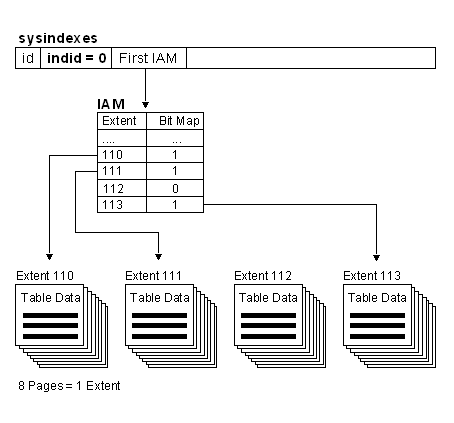
Heaps and the Index Allocation Map (IAM)
Heaps have one row in sysindexes with indid = 0. The column sysindexes.FirstIAM points to the first IAM page in the chain of IAM pages that manage the space allocated to the heap. Microsoft® SQL Server™ 2000 uses the IAM (Index Allocation Map) pages to navigate through the heap. The data pages and the rows within them are not in any specific order, and are not linked together. The only logical connection between data pages is that recorded in the IAM pages.
Index Structure
All SQL Server indexes are B-Trees. There is a single root page at the top of the tree, branching out into N number of pages at each intermediate level until it reaches the bottom, or leaf level, of the index. The index tree is traversed by following pointers from the upper-level pages down through the lower-level pages. In addition, each index level is a separate page chain.There may be many intermediate levels in an index. The number of levels is dependent on the index key width, the type of index, and the number of rows and/or pages in the table. The number of levels is important in relation to index performance.
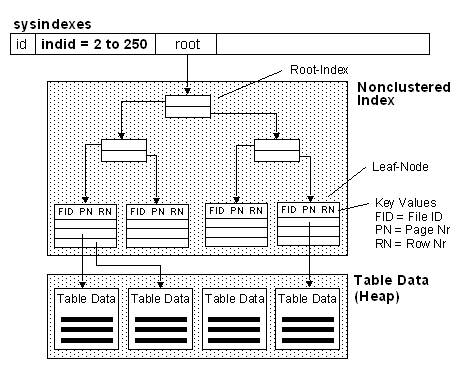
A nonclustered index is analogous to an index in a textbook. The data is stored in one place, the index in another, with pointers to the storage location of the data. The items in the index are stored in the order of the index key values, but the information in the table is stored in a different order (which can be dictated by a clustered index). If no clustered index is created on the table, the rows are not guaranteed to be in any particular order.
Similar to the way you use an index in a book, Microsoft® SQL Server™ 2000 searches for a data value by searching the nonclustered index to find the location of the data value in the table and then retrieves the data directly from that location. This makes nonclustered indexes the optimal choice for exact match queries because the index contains entries describing the exact location in the table of the data values being searched for in the queries. If the underlying table is sorted using a clustered index, the location is the clustering key value; otherwise, the location is the row ID (RID) comprised of the file number, page number, and slot number of the row. For example, to search for an employee ID (emp_id) in a table that has a nonclustered index on the emp_id column, SQL Server looks through the index to find an entry that lists the exact page and row in the table where the matching emp_id can be found, and then goes directly to that page and row.
Considerations
Consider using nonclustered indexes for:
- Columns that contain a large number of distinct values, such as a combination of last name and first name (if a clustered index is used for other columns). If there are very few distinct values, such as only 1 and 0, most queries will not use the index because a table scan is usually more efficient.
- Queries that do not return large result sets.
- Columns frequently involved in search conditions of a query (WHERE clause) that return exact matches.
- Decision-support-system applications for which joins and grouping are frequently required. Create multiple nonclustered indexes on columns involved in join and grouping operations, and a clustered index on any foreign key columns.
- Covering all columns from one table in a given query. This eliminates accessing the table or clustered index altogether.
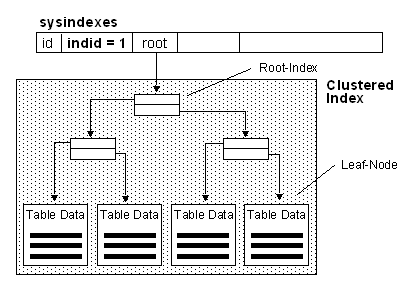
A clustered index determines the physical order of data in a table. A clustered index is analogous to a telephone directory, which arranges data by last name. Because the clustered index dictates the physical storage order of the data in the table, a table can contain only one clustered index. However, the index can comprise multiple columns (a composite index), like the way a telephone directory is organized by last name and first name. Clustered Indexes are very similar to Oracle's IOT's (Index-Organized Tables).
A clustered index is particularly efficient on columns that are often searched for ranges of values. After the row with the first value is found using the clustered index, rows with subsequent indexed values are guaranteed to be physically adjacent. For example, if an application frequently executes a query to retrieve records between a range of dates, a clustered index can quickly locate the row containing the beginning date, and then retrieve all adjacent rows in the table until the last date is reached. This can help increase the performance of this type of query. Also, if there is a column(s) that is used frequently to sort the data retrieved from a table, it can be advantageous to cluster (physically sort) the table on that column(s) to save the cost of a sort each time the column(s) is queried.
Clustered indexes are also efficient for finding a specific row when the indexed value is unique. For example, the fastest way to find a particular employee using the unique employee ID column emp_id is to create a clustered index or PRIMARY KEY constraint on the emp_id column.
Note PRIMARY KEY constraints create clustered indexes automatically if no clustered index already exists on the table and a nonclustered index is not specified when you create the PRIMARY KEY constraint.
Considerations
It is important to define the clustered index key with as few columns as possible. If a large clustered index key is defined, any nonclustered indexes that are defined on the same table will be significantly larger because the nonclustered index entries contain the clustering key.
Consider using a clustered index for:
- Columns that contain a large number of distinct values.
- Queries that return a range of values using operators such as BETWEEN, >, >=, <, and <=.
- Columns that are accessed sequentially.
- Queries that return large result sets.
- Columns that are frequently accessed by queries involving join or GROUP BY clauses; typically these are foreign key columns. An index on the column(s) specified in the ORDER BY or GROUP BY clause eliminates the need for SQL Server to sort the data because the rows are already sorted. This improves query performance.
- OLTP-type applications where very fast single row lookup is required, typically by means of the primary key. Create a clustered index on the primary key.
Clustered indexes are not a good choice for:
- Columns that undergo frequent changes
This results in the entire row moving (because SQL Server must keep the data values of a row in physical order). This is an important consideration in high-volume transaction processing systems where data tends to be volatile.
- Wide keys
The key values from the clustered index are used by all nonclustered indexes as lookup keys and therefore are stored in each nonclustered index leaf entry.
The sysindexes table is a central location for information about tables and indexes. It contains statistical information, such as the number of rows and data pages in each table. It describes how to find information stored in a data table.
Contains one row for each index and table in the database. This table is stored in each database.
Column name Data type Description id
int
ID of table (for indid = 0 or 255). Otherwise, ID of table to which the index belongs. status
int
Internal system-status information. first
binary(6)
Pointer to the first or root page. indid
smallint
ID of index: 0 = Heap = Table Data (not Index)
1 = Clustered Index
2 ... 254 = Nonclustered Index
255 = Entry for tables that have text or image dataroot
binary(6)
For indid >= 1 and < 255, root is the pointer to the root page. For indid = 0 or indid = 255, root is the pointer to the last page. minlen
smallint
Minimum size of a row. keycnt
smallint
Number of keys. groupid
smallint
Filegroup ID on which the object was created. dpages
int
For indid = 0 or indid = 1, dpages is the count of data pages used. For indid=255, it is set to 0. Otherwise, it is the count of index pages used. reserved
int
For indid = 0 or indid = 1, reserved is the count of pages allocated for all indexes and table data. For indid = 255, reserved is a count of the pages allocated for text or image data. Otherwise, it is the count of pages allocated for the index. used
int
For indid = 0 or indid = 1, used is the count of the total pages used for all index and table data. For indid = 255, used is a count of the pages used for text or image data. Otherwise, it is the count of pages used for the index. rowcnt
bigint
Data-level rowcount based on indid = 0 and indid = 1. For indid = 255, rowcnt is set to 0. rowmodctr
int
Counts the total number of inserted, deleted, or updated rows since the last time statistics were updated for the table. xmaxlen
smallint
Maximum size of a row. maxirow
smallint
Maximum size of a nonleaf index row. OrigFillFactor
tinyint
Original fillfactor value used when the index was created. This value is not maintained; however, it can be helpful if you need to re-create an index and do not remember what fillfactor was used. reserved1
tinyint
Reserved. reserved2
int
Reserved. FirstIAM
binary(6)
Reserved. impid
smallint
Reserved. Index implementation flag. lockflags
smallint
Used to constrain the considered lock granularities for an index. For example, a lookup table that is essentially read-only could be set up to do only table level locking to minimize locking cost. pgmodctr
int
Reserved. keys
varbinary(816)
List of the column IDs of the columns that make up the index key. name
sysname
Name of table (for indid = 0 or 255). Otherwise, name of index. statblob
image
Statistics BLOB. maxlen
int
Reserved. rows
int
Data-level rowcount based on indid = 0 and indid = 1, and the value is repeated for indid >1. For indid = 255, rows is set to 0. Provided for backward compatibility.
/*
** Create a nonclustered index on the CustomerID column
** in the Orders table of the ClassNorthwind database.
**
** This script checks for the existance of the
** Orders_Customers_link index.
** If it exists we will drop it first then create it.
*/
USE ClassNorthwind
SET NOCOUNT ON
GO
/*
** If the objects already exist (i.e. if this is a rebuild), drop them.
*/
IF EXISTS (SELECT name FROM sysindexes WHERE name = 'Orders_Customers_link')
DROP INDEX Orders.Orders_Customers_link
GO
/* Create the Index with a FILLFACTOR of 75 */
CREATE NONCLUSTERED INDEX Orders_Customers_link ON Orders(CustomerID)
WITH FILLFACTOR = 75
GO
SET NOCOUNT OFF
GO
/*
** This script queries the sysindexes system table.
** It joins to the sysobjects table to get the table names.
** It selects only the user defined tables (those with
** an id greater than 100.)
*/
USE ClassNorthwind
GO
SELECT t.name AS [Table Name], i.name AS [Index Name], i.*
FROM sysobjects AS t JOIN sysindexes AS i ON t.id = i.id
WHERE t.id > 100
ORDER BY t.name
SELECT t.name AS [Table Name], i.name AS [Index Name], i.*
FROM sysobjects AS t JOIN sysindexes AS i ON t.id = i.id
WHERE i.name = 'Orders_Customers_link'TableName = Orders
IndexName = Orders_Customers_link
id = 869578136
indid = 3
minlen = 19
keycnt = 2
groupid = 2
dpages = 4
reserved = 6
used = 6
rowcnt = 830
xmaxlen = 36
maxirow = 42
OrigFillFactor = 75
FirstIAM = 0x7E0000000300
Lookup SYSINDEXES Table for given Table
INDID = 0, FirstIAM points to IAM
Lookup Extents with BitMap = 1 for this Table in IAM
Read all Extents on Disk, Rows are returned unsorted
Lookup SYSINDEXES Table for given Table
INDID = 2 ... 254, read ROOT column for Root Index to find Non-Leaf Level of Non Clustered Index
Lookup RID (RowId) in Leaf Level (Key Values). Each RID consists of File-ID, Page-No, Row-No (4:706:02)
Read only those Rows from Heap which are needed.
Lookup SYSINDEXES Table for given Table
INDID = 1, read ROOT column for Root Index to find Non-Leaf Level of Clustered Index
Read needed Leaf Level Rows. The data rows of a clustered index are sorted and stored in a sequential order based on their clustered key.
Clustered Index with Non Clustered Index Read
When a nonclustered index is added to a table that already has a clustered index, the row locator of each nonclustered index contains the clustered key index value for the row.
Lookup SYSINDEXES Table for given Table
INDID = 2 ... 254, read ROOT column for Root Index to find Non-Leaf Level of Non Clustered Index
Lookup Clustered Key Value in Leaf Level of Non-clustered Index
Lookup Root Index to find Non-Leaf Level of Clustered Index
Read needed Leaf Level Rows. The data rows of a clustered index are sorted and stored in a sequential order based on their clustered key.
Occurs if data page or index page does not have enough room to accommodate the data, a new page is added in a process known as a page split.
Approximately half of the data remains on the old page and the other half is moved to the new page.
Page Splits do not occur in a Heap
Forwarding Pointers handles updates to a row in a heap which needs more room than is currently available on that page. The row is moved to a new data page.
The row leaves a forwarding pointer in its original location.
High Selectivity: Low Value in % for Number of Rows meeting criteria / Total number of Rows in Table (e.g. 5%)
Low Selectivity: High Value in % for Number of Rows meeting criteria / Total number of Rows in Table (e.g. 90%)Density is another concept for measuring the selectivity:
High Selectivity = Low Density
Low Selectivity = High Density
Determine Table Structures (e.g. tablename = 'member')
Number of Rows
EXEC sp_spaceused 'member'
10'000Displays fragmentation information for the data and indexes of the specified table
DBCC SHOWCONTIG ('member')
DBCC SHOWCONTIG scanning 'member' table...
Table: 'member' (2025058250); index ID: 0, database ID: 9
TABLE level scan performed.
- Pages Scanned................................: 145
- Extents Scanned..............................: 19
- Extent Switches..............................: 18
- Avg. Pages per Extent........................: 7.6
- Scan Density [Best Count:Actual Count].......: 100.00% [19:19]
- Extent Scan Fragmentation ...................: 0.00%
- Avg. Bytes Free per Page.....................: 95.6
- Avg. Page Density (full).....................: 98.82%Number of Rows per Page
= Number of Rows / Pages Scanned = 10'000 / 145 = 68
Number of Extens
Extent Switches = 18
Number of Indexes
SELECT * FROM sysindexes WHERE id = OBJECT_ID('member')
Number of clustered Index Pages (sysindexes: used)
/* create a clustered index on the member table and note the changes */
CREATE UNIQUE CLUSTERED INDEX mem_no_CL ON member (member_no)
SELECT * FROM sysindexes WHERE id = OBJECT_ID('member')used: 147
Number of data pages in the clustered index (sysindexes: dpages)
dpages = 145
Number of non-data pages in the clustered index (used - dpages)
used - dpages = 147 - 145 = 2
Number of pages in non-clustered index (used for index: indid = 2)
/* Now create a nonclustered index and note the changes */
CREATE NONCLUSTERED INDEX indx_fname ON member(firstname)
SELECT * FROM sysindexes WHERE id = OBJECT_ID('member')used: 35
Number of pages in the leaf level for non-clustered index (dpages for index: indid = 2)
dpages: 33
Approximate number of rows per leaf page for non-clustered index
# rows in table/# leaf-level pages = 10'000 / 33 = 303
Can be created on indexes and on Table Columns
Sampling Statistics is randomly selecting data pages from a table
FULLSCAN gathers all data
Statistics are stored in the statblob column of the sysindexes system table
Usually Statistics are collected automatically (see: Database Options, Auto create statistics)
Can be useful when you have a column that may not benefit from an index, but statistics on that column may be useful for creating more optimal execution plans. Having statistics on those columns eliminates the overhead of an index.
SET ClassNorthwind
GO
CREATE STATISTICS ST_Company
ON Customers (CompanyName, ContactName)
WITH SAMPLE 50 PERCENT
GO
CREATE STATISTICS ST_Contact
ON Customers (ContactName)
WITH FULLSCAN
GO
SELECT * FROM sysindexes WHERE id = OBJECT_ID('Customers')
GO
DROP STATISTICS Customers.ST_Contact
GO
DROP STATISTICS Customers.ST_Company
GO
Create Statistics for whole Database
Creates single-column statistics for all eligible columns for all user tables in the current database. The Stored Procedure index_cleanup is used because there is no sp_dropstats.
USE ClassNorthwind
GO
/* Remove Statistics from each Table in the database */
EXEC index_cleanup Categories
EXEC index_cleanup CustomerCustomerDemo
EXEC index_cleanup CustomerDemographics
EXEC index_cleanup Customers
EXEC index_cleanup Employees
EXEC index_cleanup EmployeeTerritories
EXEC index_cleanup [Order Details]
EXEC index_cleanup Orders
EXEC index_cleanup Products
EXEC index_cleanup Region
EXEC index_cleanup Shippers
EXEC index_cleanup Suppliers
EXEC index_cleanup Territories
GO
/* Create Statistics */
sp_createstats
/* Show created statistics*/
sp_helpstats EmployeesThe created statistic has the same name as the column on which it is created. Computed columns and columns of the ntext, text, or image data types cannot be specified as statistics columns.
View Index Statistics and evaluating Index Selectivity
/* Cleanup Statistics */
EXEC index_cleanup member
/* Create UNIQUE index */
CREATE UNIQUE INDEX indx_member_no ON member (member_no)
GO
/* View Index Statistics and evaluating Index Selectivity */
DBCC SHOW_STATISTICS (member,indx_member_no)Rows = 10000
Density = 9.9.E-5 (Very selective, due to UNIQUE index on column)
All Density = 9.9.E-5
- Density: [ 0 ... 1 ], 0 = High Selectivity, 1 = Low Selectivity
- All Density: Over more columns
Views
CREATE VIEW [Orders Qry] AS
SELECT O.OrderID, O.CustomerID, O.EmployeeID, O.OrderDate, O.RequiredDate,
O.ShippedDate, O.ShipVia, O.Freight, O.ShipName, O.ShipAddress, O.ShipCity,
O.ShipRegion, O.ShipPostalCode, O.ShipCountry,
C.CompanyName, C.Address, C.City, C.Region, C.PostalCode, C.Country
FROM Customers C INNER JOIN Orders O ON C.CustomerID = O.CustomerIDCREATE VIEW MyTopCities AS
SELECT DISTINCT TOP 10 PERCENT ShipCity, ShipRegion
FROM Orders
ORDER BY ShipCity
CREATE VIEW MyTopCities
WITH ENCRYPTION
AS
SELECT DISTINCT TOP 10 PERCENT ShipCity, ShipRegion
FROM Orders
ORDER BY ShipCitysp_helptext MyTopCities
The object comments have been encrypted.
Decrypt the View with the Public Domain Stored Procedure DECRYPT2K
EXEC dbo.DECRYPT2K MyTopCities,'V'
CREATE VIEW FormaggiProductsView
AS
SELECT ProductID, ProductName, SupplierID
FROM Products
WHERE SupplierID = 14
WITH CHECK OPTION
See here
Stored Procedures
- System Stored Procedures, identified by the sp_ prefix
- Temporary Stored Procedures have names start with a single number sign (#)
- Extended Stored Procedures are implemented as DLLs (xp_)
- Name of SP is in sysobjects table, code in syscomments table
-- Create Stored Procedure
USE ClassNorthwind
GO
IF EXISTS (SELECT * FROM dbo.sysobjects
WHERE id = object_id(N'[dbo].[MyOrders]')
AND OBJECTPROPERTY(id, N'IsProcedure') = 1)
DROP PROCEDURE [dbo].[MyOrders]
GO
CREATE PROCEDURE MyOrders
AS
SELECT * FROM Orders
WHERE RequiredDate < GETDATE() AND ShippedDate IS NULL
GO
-- Execute Stored Procedure by Itself
EXEC MyOrders
GO
Populate Table with a Stored Procedure
The INSERT statemant can populate a local table with a result set that is returned from a local or remote stored procedure. SQL Server loads the table with data that is returned from SELECT statements in the stored procedure. Tha table mus exist.
-- Excecute Stored Procedure within an INSERT Statement
INSERT INTO MyTable EXEC MyOrders
GO
-- Help on Stored Procedures
sp_help MyOrders
sp_helptext MyOrders
sp_depends MyOrders
sp_stored_procedures
Check Stored Procedure Properties
Use OBJECT_ID() and OBJECTPROPERTY()
DECLARE @obid INTEGER
SELECT @obid = OBJECT_ID('MyOrders')
SELECT OBJECTPROPERTY(@obid,'ExecIsAnsiNullsOn')
Recompile all Stored Procedures, Trigger that reference a Table
Causes stored procedures and triggers to be recompiled the next time they are run.
sp_recompile <TableName>
USE ClassNorthwind
GO
CREATE PROCEDURE YearSales
@Start datetime,
@End datetime = NULL
AS
IF (@Start IS NULL OR @End IS NULL)
BEGIN
RAISERROR('NULL Values are not allowed',14,1)
RETURN
END
SELECT ShippedDate,
OrderID
FROM Orders
WHERE DATENAME (yyyy,ShippedDate) BETWEEN @Start AND @End
GO
EXEC YearSales @Start = '1997', @End = '1998'
Returning Values Using Output Parameters
CREATE PROCEDURE MathTutor
@m1 smallint,
@m2 smallint,
@result smallint OUTPUT
AS
SET @result = @m1 * @m2
GO
DECLARE @answer smallint
EXECUTE MathTutor 5,6,@answer OUTPUT
SELECT 'Result = ', @answer
Process OUTPUT Value and RETURN Parameter
USE ClassNorthwind
GO
/* Create Procedure with OUTPUT Parameter */
CREATE PROC dbo.OrderCount
    @CustomerID nchar (5),
    @OrderCount int OUTPUT
AS
IF EXISTS
  (SELECT * FROM Orders WHERE CustomerID = @CustomerID AND ShippedDate IS Null)
  BEGIN
     SELECT @OrderCount=COUNT(*)
     FROM Orders
     WHERE CustomerID = @CustomerID
     RETURN (@@ROWCOUNT)
  END
ELSE RETURN (0)
GO
/* Process Return Value and OUTPUT Parameter */
DECLARE
 @CustomerID    nchar (5),
 @Message       varchar(80),
 @ReturnCode    int,
 @NumberOrders  int
SET @CustomerID = 'LILAS'
EXEC @ReturnCode = OrderCount @CustomerID, @NumberOrders OUTPUT

IF @ReturnCode = 1
BEGIN
  SELECT @Message =
    'Customer ' +
    RTRIM(CONVERT(char(8),@CustomerID)) +
    ' has ' +
    RTRIM(CONVERT(char(8),@NumberOrders)) +
    ' unfilled order(s).'
  RAISERROR (@Message, 10 ,1)
END
ELSE
BEGIN
  SELECT @Message =
    'Customer ' +
    RTRIM(convert(char(8),@CustomerID)) +
    ' has NO unfilled order(s).'
  RAISERROR (@Message, 10 ,1)
END
GO
Using last insert @@identity for Foreign Key Value
USE ClassNorthwind
GO/* If the object already exists in the database, drop it. */
IF OBJECT_ID('SupplierProductInsert') IS NOT NULL
DROP PROCEDURE SupplierProductInsert
GO/* Create SP to INSERT Values in Supplier Table */
CREATE PROCEDURE SupplierProductInsert
@CompanyName nvarchar (40) = NULL,
@ContactName nvarchar (40) = NULL,
@ContactTitle nvarchar (40)= NULL,
@Address nvarchar (60) = NULL,
@City nvarchar (15) = NULL,
@Region nvarchar (40) = NULL,
@PostalCode nvarchar (10) = NULL,
@Country nvarchar (15) = NULL,
@Phone nvarchar (24) = NULL,
@Fax nvarchar (24) = NULL,
@HomePage ntext = NULL,
@ProductName nvarchar (40) = NULL,
@CategoryID int = NULL,
@QuantityPerUnit nvarchar (20) = NULL,
@UnitPrice money = NULL,
@UnitsInStock smallint = NULL,
@UnitsOnOrder smallint = NULL,
@ReorderLevel smallint = NULL,
@Discontinued bit = NULL
AS
IF @CompanyName IS NULL OR
@ContactName IS NULL OR
@Address IS NULL OR
@City IS NULL OR
@Region IS NULL OR
@PostalCode IS NULL OR
@Country IS NULL OR
@Phone IS NULL OR
@ProductName IS NULL OR
@CategoryID IS NULL OR
@QuantityPerUnit IS NULL OR
@Discontinued IS NULL
BEGIN
PRINT 'You must provide Company Name, Contact Name, Address, City'
PRINT 'Region, Postal Code, Country, Phone, Product Name, and Discontinued.'
PRINT '(Contact Title, Fax, Home Page, Unit Price, Units in Stock
Units on Order and Reorder Level can be null.)'
RETURN
END
BEGIN TRANSACTION
INSERT Suppliers (
CompanyName,
ContactName,
Address,
City,
Region,
PostalCode,
Country,
Phone)
VALUES (
@CompanyName,
@ContactName,
@Address,
@City,
@Region,
@PostalCode,
@Country,
@Phone)
IF @@error <> 0
BEGIN
ROLLBACK TRAN
RETURN
END/* Get just inserted IDENTITY Value */
DECLARE @InsertSupplierID int
SELECT @InsertSupplierID=@@identity/* Insert Values including just inserted IDENTITY Value */
INSERT Products (
ProductName,
SupplierID,
CategoryID,
QuantityPerUnit,
Discontinued)
VALUES (
@ProductName,
@InsertSupplierID,
@CategoryID,
@QuantityPerUnit,
@Discontinued)
IF @@error <> 0
BEGIN
ROLLBACK TRAN
RETURN
END
PRINT '*** New Product and Supplier added *** '
COMMIT TRANSACTION
GO
Custom Messages from Stored Procedures added to Eventlog
The system stored procedure sp_addmessage adds a new error message to the sysmessages table and the Windows 2000 event log of the SQL Server System (not on the SQL Client). You can also use SQL Server Agent under Management in EM.
USE ClassNorthwind
GO
/* Specify custom message for the event log */
EXEC sp_addmessage @msgnum = 50018,
@severity = 16,
@msgtext = N'Supplier %d was inserted by %s',
@lang = 'us_english',
@with_log = 'true',
@replace = 'replace'
GO/* If the object already exists in the database, drop it. */
IF OBJECT_ID('SupplierProductInsert') IS NOT NULL
DROP PROCEDURE SupplierProductInsert
GO/* Create Procedure to INSERT new Record in SUPPLIER Table */
CREATE PROCEDURE SupplierProductInsert
@CompanyName nvarchar (40) = NULL,
@ContactName nvarchar (40) = NULL,
@ContactTitle nvarchar (40)= NULL,
@Address nvarchar (60) = NULL,
@City nvarchar (15) = NULL,
@Region nvarchar (40) = NULL,
@PostalCode nvarchar (10) = NULL,
@Country nvarchar (15) = NULL,
@Phone nvarchar (24) = NULL,
@Fax nvarchar (24) = NULL,
@HomePage ntext = NULL,
@ProductName nvarchar (40) = NULL,
@CategoryID int = NULL,
@QuantityPerUnit nvarchar (20) = NULL,
@UnitPrice money = NULL,
@UnitsInStock smallint = NULL,
@UnitsOnOrder smallint = NULL,
@ReorderLevel smallint = NULL,
@Discontinued bit = NULL
AS
IF @CompanyName IS NULL OR
@ContactName IS NULL OR
@Address IS NULL OR
@City IS NULL OR
@Region IS NULL OR
@PostalCode IS NULL OR
@Country IS NULL OR
@Phone IS NULL OR
@ProductName IS NULL OR
@CategoryID IS NULL OR
@QuantityPerUnit IS NULL OR
@Discontinued IS NULL
BEGIN
PRINT 'You must provide Company Name, Contact Name, Address, City'
PRINT 'Region, Postal Code, Country, Phone, Product Name, and Discontinued'
PRINT '(Contact Title, Fax, Home Page, Unit Price, Units in Stock
Units on Order and Reorder Level can be null.)'
RETURN
END
/* Store the login identification name for use in custom message */
DECLARE @UserName nvarchar (60)
SELECT @UserName = suser_sname()
/* Start the INSERT */
BEGIN TRANSACTION
INSERT Suppliers (
CompanyName,
ContactName,
Address,
City,
Region,
PostalCode,
Country,
Phone)
VALUES (
@CompanyName,
@ContactName,
@Address,
@City,
@Region,
@PostalCode,
@Country,
@Phone)
IF @@error <> 0
BEGIN
ROLLBACK TRAN
RETURN
END
/* Get just inserted @@identity value */
DECLARE @InsertSupplierID int
SELECT @InsertSupplierID=@@identity
/* Insert Record in PRODUCTS for this SupplierID */
INSERT Products (
ProductName,
SupplierID,
CategoryID,
QuantityPerUnit,
Discontinued)
VALUES (
@ProductName,
@InsertSupplierID,
@CategoryID,
@QuantityPerUnit,
@Discontinued)
IF @@error <> 0
BEGIN
ROLLBACK TRAN
RETURN
END
/* Send custom message to event log */
RAISERROR (50018, 16, 1, @InsertSupplierID, @UserName)
COMMIT TRANSACTION
GO
/* Execute the Stored Procedure */
EXEC SupplierProductInsert
@CompanyName = 'Akadia',
@ContactName = 'Martin Zahn',
@Address = 'Arvenweg 4',
@City = 'Thun',
@Region = 'Bern',
@PostalCode = '3604',
@Country = 'CH',
@Phone = '0333358620',
@ProductName = 'Transtec',
@CategoryID = '1',
@QuantityPerUnit = '1',
@UnitPrice = 1,
@Discontinued = 0Server: Msg 50018, Level 16, State 1, Procedure SupplierProductInsert, Line 98
Supplier 34 was inserted by zahn
Microsoft® SQL Server™ provides a set of extended stored procedures that allow SQL Server to operate as a workgroup post office for a MAPI-enabled e-mail system.
The computer running SQL Server must be set up as an e-mail client. SQL Server Enterprise Manager is used to assign an e-mail account and password to the SQL Server installation. The mail component of SQL Server can then be enabled to start automatically when the SQL Server Agent service is started. Alternatively, the mail component can be started and stopped at will using either SQL Server Enterprise Manager, or the xp_startmail, xp_stopmail, and xp_sendmail stored procedures.To setup the mail infrastructure you must create a mail profile and SQL Server Service Pack 2 must be installed.
Send Mail
EXEC master..xp_startmail
EXEC master..xp_sendmail
@recipients = 'martin dot zahn at akadia dot ch',
@subject = 'SQL Server Report',
@message = 'Hello Martin'
EXEC master..xp_stopmail
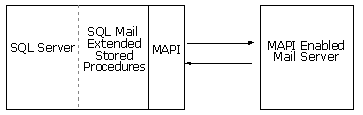
Execute CMD-Shell Commands
EXEC master..xp_cmdshell 'dir c:\'
EXEC master..xp_cmdshell 'net start'
EXEC master..sp_helptext xp_cmdshell
User Defined Functions
Returns a single value of the type defined in a RETURNS clause.
USE ClassNorthwind
GO
CREATE FUNCTION myDateFormat
(@indate datetime, @separator char(1))
RETURNS Nchar(20)
AS
BEGIN
RETURN
CONVERT (Nvarchar(20), datepart(dd,@indate))
+ @separator
+ CONVERT (Nvarchar(20), datepart(mm,@indate))
+ @separator
+ CONVERT (Nvarchar(20), datepart(yy,@indate))
END
GO
SELECT dbo.myDateFormat(GETDATE(),'.')This scalar user-defined function uses a case statement to provide a multiplier for three different tax rates (0%, 5%, and 10%) that vary depending on the CategoryID if the product.
USE ClassNorthwind
GO
CREATE FUNCTION fn_TaxRate
(@ProdID INT)
RETURNS numeric(5,4)
AS
BEGIN
RETURN
(SELECT
CASE CategoryID
WHEN 1 THEN 1.10
WHEN 2 THEN 1
WHEN 3 THEN 1.10
WHEN 4 THEN 1.05
WHEN 5 THEN 1
WHEN 6 THEN 1.05
WHEN 7 THEN 1
WHEN 8 THEN 1.05
END
FROM Products
WHERE ProductID = @ProdID)
END
GO
SELECT ProductName,
UnitPrice,
CategoryID,
ClassNorthwind.dbo.fn_TaxRate(ProductID) AS TaxRate,
UnitPrice * ClassNorthwind.dbo.fn_TaxRate(ProductID) AS PriceWithTax
FROM Products
Multi-Statement Table-valued Function
A Multi-Statement Table-valued Function is a combination of a view and a stored procedure. The RETURNS clause specifies a table as the data type returned.
/*
** This Example creates a multi-statement table-value function
** that returns the last name or both the first names
*/
CREATE FUNCTION fn_Employees (@InLength nvarchar(9))
RETURNS @EmpTab TABLE
(EmployeeID INT PRIMARY KEY,
Name NVARCHAR(61) NOT NULL)
AS
BEGIN
IF (@InLength = 'ShortName')
BEGIN
-- Initialize @EmpTab with LastName
INSERT @EmpTab SELECT EmployeeID, LastName FROM employees
END
ELSE IF (@InLength = 'LongName')
BEGIN
-- Initialize @EmpTab FirstName LastName
INSERT @EmpTab SELECT EmployeeID, (FirstName + ' ' + LastName) FROM employees
END
RETURN -- Provides the value of @EmpTab as the result
END
GO/* Call the Function */
SELECT * FROM dbo.fn_Employees('ShortName')This multi-statement table-valued user-defined function takes an EmplyeeID number as its parameter
and provides information about all employees who report to that person./*
** As a multi-statement table-valued user-defined
** function it starts with the function name,
** input parameter definition and defines the output
** table.
*/
CREATE FUNCTION fn_FindReports (@InEmployeeID char(5))
RETURNS @reports TABLE
(EmployeeID char(5) PRIMARY KEY,
Name nvarchar(40) NOT NULL,
Title nvarchar(30),
MgrEmployeeID int,
processed tinyint default 0)
-- Returns a result set that lists all the employees who
-- report to a given employee directly or indirectly
AS
BEGIN
DECLARE @RowsAdded int
-- Initialize @reports with direct reports of the given employee
INSERT @reports
SELECT EmployeeID, Name = FirstName + ' ' + LastName, Title, ReportsTo, 0
FROM EMPLOYEES
WHERE ReportsTo = @InEmployeeID
SET @RowsAdded = @@rowcount
-- While new employees were added in the previous iteration
WHILE @RowsAdded > 0
BEGIN
-- Mark all employee records whose direct reports are going to be
-- found in this iteration
UPDATE @reports
SET processed = 1
WHERE processed = 0
-- Insert employees who report to employees marked 1
INSERT @reports
SELECT e.EmployeeID, Name=FirstName + ' ' + LastName, e.Title, e.ReportsTo, 0
FROM employees e, @reports r
WHERE e.ReportsTo = r.EmployeeID
AND r.processed = 1
SET @RowsAdded = @@rowcount
-- Mark all employee records whose direct reports has been
-- found in this iteration
UPDATE @reports
SET processed = 2
WHERE processed = 1
END
RETURN -- Provides the value of @reports as the result
END
GO/* Call the function */
SELECT EmployeeID, [Name], Title, MgrEmployeeID FROM dbo.fn_FindReports(5)
Triggers
The trigger and the statement that fires it are treated as a single transaction that can be rolled back from anywhere within the trigger. If a ROLLBACK TRANSACTION is encontered, the entire transaction is roled back. Minimize or avoid the use of ROLLBACK TRANSACTION in triggers. You must have permission to perform all statements that define triggers, this is different from stored procedures.
There are no Row Level Trigger
All Triggers are AFTER Triggers
Triggersd are part of the Transaction
Use INSTEAD OF Triggers to perform a BEFORE Trigger.
/*
** This file creates an insert trigger on the Order Details
** table. When a row is inserted into Order Details the
** Products table UnitsInStock column is updated to
** reduce the amount of stock on hand.
*/
USE ClassNorthwind
/*
** If the object already exists (i.e., if this is a rebuild), drop it.
*/
IF EXISTS ( SELECT name FROM sysobjects
WHERE type = 'TR' AND name = 'OrdDet_Insert' )
DROP TRIGGER OrdDet_Insert
GO
/* Create the INSERT Triger, Inserted is an internal Table
** which can only be used in INSERT Triggers
*/
CREATE TRIGGER OrdDet_Insert
ON [Order Details] FOR INSERT
AS
UPDATE P SET UnitsInStock = (P.UnitsInStock - I.Quantity)
FROM Products AS P INNER JOIN Inserted AS I
ON P.ProductID = I.ProductID
GO
/*
** Display results.
*/
SELECT name FROM sysobjects
WHERE type = 'TR'
ORDER BY type, name
GO
/*
** Execute sp_helptrigger on the Order Details table
*/
sp_helptrigger [Order Details]
/*
** Check the value of the Products table before the trigger fires
*/
SELECT * FROM Products WHERE ProductID = 22
/*
** Insert an Order Details record for product 16
*/
INSERT [Order Details]
(OrderID, ProductID, UnitPrice, Quantity, Discount)
VALUES (11077, 22, 21.00, 50, 0.0)
GO
/*
** Check the value of the Products table to see if it changed
*/
SELECT * FROM Products WHERE ProductID = 22
USE ClassNorthwind
GO
CREATE TRIGGER emp_delete ON Employees
FOR DELETE
AS
IF (SELECT COUNT(*) FROM Deleted) > 1
BEGIN
RAISERROR ( 'You cannot delete more than one employee at a time.',16,1)
ROLLBACK TRANSACTION
END
DELETE FROM EmployeesThe Deleted Table is an internal Table
You can define a trigger to monitor data updates on a specific column by using the IF UPDATE statement.
USE ClassNorthwind
GO
CREATE TRIGGER emp_update
ON Employees
FOR UPDATE
AS
IF UPDATE(LastName)
BEGIN
RAISERROR ('LastName cannot be updated',10,1)
ROLLBACK TRANSACTION
END
Update Employees SET LastName = 'Hallo' where EmployeeID = 5
==> LastName cannot be updated
Transact SQL Examples
Here are some typical examples, which shows the use of T-SQL.
SET NOCOUNT ON
DECLARE @LogicalFileName sysname,
@MaxMinutes INT,
@NewSize INT
-- *** MAKE SURE TO CHANGE THE NEXT 4 LINES WITH YOUR CRITERIA. ***
USE [MyDb] -- This is the name of the database
-- for which the log will be shrunk.
SELECT @LogicalFileName = 'MyDb_Log', -- Use sp_helpfile to
-- identify the logical file
-- name that you want to shrink.
@MaxMinutes = 10, -- Limit on time allowed to wrap log.
@NewSize = 10 -- in MB
-- Setup / initialize
DECLARE @OriginalSize int
SELECT @OriginalSize = size -- in 8K pages
FROM sysfiles
WHERE name = @LogicalFileName
SELECT 'Original Size of ' + db_name() + ' LOG is ' +
CONVERT(VARCHAR(30),@OriginalSize) + ' 8K pages or ' +
CONVERT(VARCHAR(30),(@OriginalSize*8/1024)) + 'MB'
FROM sysfiles
WHERE name = @LogicalFileName
CREATE TABLE DummyTrans
(DummyColumn char (8000) not null)
-- Wrap log and truncate it.
DECLARE @Counter INT,
@StartTime DATETIME,
@TruncLog VARCHAR(255)
SELECT @StartTime = GETDATE(),
@TruncLog = 'BACKUP LOG ['+ db_name() + '] WITH TRUNCATE_ONLY'
-- Try an initial shrink.
DBCC SHRINKFILE (@LogicalFileName, @NewSize)
EXEC (@TruncLog)
-- Wrap the log if necessary.
WHILE @MaxMinutes > DATEDIFF (mi, @StartTime, GETDATE()) -- time has
-- not expired
AND @OriginalSize = (SELECT size
FROM sysfiles
WHERE name = @LogicalFileName) -- the log has not shrunk
AND (@OriginalSize * 8 /1024) > @NewSize
-- The value passed in for new size is
-- smaller than the current size.
BEGIN -- Outer loop.
SELECT @Counter = 0
WHILE ((@Counter < @OriginalSize / 16) AND (@Counter < 50000))
BEGIN -- update
INSERT DummyTrans VALUES ('Fill Log') -- Because it is a char field it
-- inserts 8000 bytes.
DELETE DummyTrans
SELECT @Counter = @Counter + 1
END -- update
EXEC (@TruncLog) -- See if a trunc of the log shrinks it.
END -- outer loop
SELECT 'Final Size of ' + db_name() + ' LOG is ' +
CONVERT(VARCHAR(30),size) + ' 8K pages or ' +
CONVERT(VARCHAR(30),(size*8/1024)) + 'MB'
FROM sysfiles
WHERE name = @LogicalFileName
DROP TABLE DummyTrans
PRINT '*** Perform a full database backup ***'
SET NOCOUNT OFF
Handling NULLs
Most aggregate functions eliminate null values in calculations; one exception is the COUNT function. When using the COUNT function against a column containing null values, the null values will be eliminated from the calculation. However, if the COUNT function uses an asterisk, it will calculate all rows regardless of null values being present.
If you want the COUNT function to count all rows of a given column, including the null values, use the ISNULL function. The ISNULL function can replace the null value with a valid value.
In fact, the ISNULL function is very valuable for aggregate functions where null values affect the results in an erroneous fashion. Remember that when using an asterisk, the COUNT function will calculate all rows. The following is sample code that illustrates the impact of null values in the AVG and COUNT aggregate functions:
SET NOCOUNT ON
GO
CREATE TABLE TestTab (
Pkey INT IDENTITY NOT NULL CONSTRAINT pk_TestTab PRIMARY KEY,
Col1 INT NULL
)
GO
INSERT TestTab (Col1) VALUES (10)
GO
INSERT TestTab (Col1) VALUES (15)
GO
INSERT TestTab (Col1) VALUES (20)
GO
INSERT TestTab (Col1) VALUES (NULL)
GO
SELECT AVG(Col1) A,
AVG(ISNULL(Col1,0)) B,
COUNT(Col1) C,
COUNT(ISNULL(Col1,0)) D,
COUNT(*) E
FROM TestTab
GO
DROP TABLE TestTab
GOA B C D E
----------- ----------- ----------- ----------- -----------
15 11 3 4 4As you can see, COUNT(*) has counted all rows!
When you have two columns that comprise the primary key, and a child table inherits the primary keys as nullable foreign keys, you may have bad data. You can insert a valid value into one of the foreign key columns and null into the other foreign key column. Then, you can add a table-check constraint that checks for valid data in the nullable foreign keys.
This anomaly may occur for any multicolumn foreign key. So you will need to add a check constraint to test for the anomaly. Initially, the check constraint will check for nullable values in all columns, which comprise the foreign key. The check constraint will also check for non-nullable values within these columns. If both checks pass, the anomaly should be circumvented.
SET NOCOUNT ON
GO
CREATE TABLE Adresses (
pkey1 INT IDENTITY NOT NULL,
pkey2 INT NOT NULL,
Col1 INT NULL,
CONSTRAINT pk_Adresses PRIMARY KEY NONCLUSTERED (pkey1, pkey2)
)
GO
INSERT Adresses (pkey2) VALUES (2)
INSERT Adresses (pkey2) VALUES (85)
INSERT Adresses (pkey2) VALUES (41)
INSERT Adresses (pkey2) VALUES (11)
GO
CREATE TABLE Contact (
pkey INT IDENTITY NOT NULL CONSTRAINT pk_Contact PRIMARY KEY NONCLUSTERED,
fkey1 INT NULL,
fkey2 INT NULL,
col1 INT NULL,
CONSTRAINT fk_Adresses_Contact FOREIGN KEY (fkey1, fkey2)
REFERENCES Adresses (pkey1, pkey2))
GO
This is now possible and surely wrong!
INSERT Contact (fkey1, fkey2) VALUES (NULL, 85)
GO
SELECT * FROM Contact
GO
DELETE FROM Contact
GO
Add the Check Constraint on the Foreign Key
ALTER TABLE Contact WITH NOCHECK
ADD CONSTRAINT ck_fk_Adresses_Contact
CHECK ((fkey1 IS NOT NULL AND fkey2 IS NOT NULL)
OR (fkey1 IS NULL AND fkey2 IS NULL))
GO
INSERT Contact (fkey1, fkey2) VALUES (NULL, 85)
GO
The INSERT statement conflicted with the CHECK constraint "ck_fk_Adresses_Contact".
DROP TABLE Contact, Adresses
GO