
The Power of Subqueries
Plain Subqueries
Subqueris
A subquery is a SELECT statement that is nested within another T-SQL statement. A subquery SELECT statement if executed independently of the T-SQL statement, in which it is nested, will return a result set. Meaning a subquery SELECT statement can standalone and is not depended on the statement in which it is nested. A subquery SELECT statement can return any number of values, and can be found in, the column list of a SELECT statement, a FROM, GROUP BY, HAVING, and/or ORDER BY clauses of a T-SQL statement. A Subquery can also be used as a parameter to a function call. Basically a subquery can be used anywhere an expression can be used.
Joining Virtual Tables
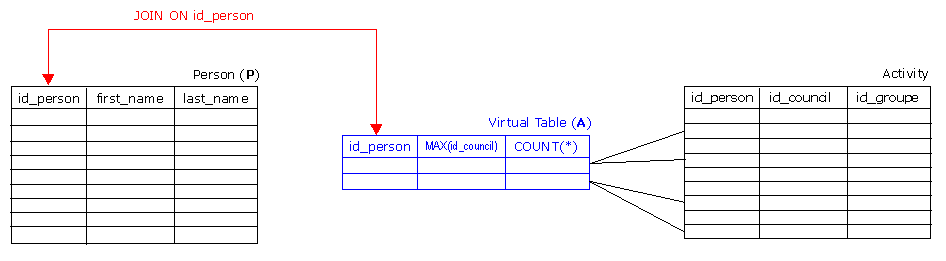
Joining virtual Tables is one of the most powerful solution you can build with subqueries. Virtual means in this context, that the result set you are joining is build on the fly. The following example shows, how to join a GROUP BY result set with another, real table (Person).
SELECT P.id_person,
P.first_name,
P.last_name,
CONVERT(varchar(30), P.birth, 104),
A.id_council,
A.id_groupe,
A.numActivities
FROM Person P JOIN (SELECT id_person,
MIN(id_council) id_council,
MIN(id_groupe) id_groupe,
COUNT(*) numActivities
FROM Activity
GROUP BY id_person) A ON (A.id_person = P.id_person)
WHERE P.id_person NOT IN (SELECT id_person
FROM Activity
WHERE id_council != 5)The virtual Table is referenced in the outer query by the alias A and is joined with person_id. You can use the virtual table columns in the outer query using the alias A. for example A.numActivities.
Joining more than one virtual Table (SQL Server)
The next example shows a very complex query using more than one virtual table.
--
-- Declare Variables
--
DECLARE @LaufID BIGINT
DECLARE @AbrDatum DATETIME
DECLARE @CountLauf INT
--
-- Fill Variables
--
SELECT @LaufID = MAX(LaufID),
@AbrDatum = MAX(AbrDatum),
@CountLauf = COUNT(*)
FROM AbrLauf
WHERE BuchDatum >= CONVERT(datetime, @DatumVon, 104)
AND BuchDatum < DATEADD(day, 1, CONVERT(datetime, @DatumBis, 104))
--
-- Generate Report
--
SELECT P.Nr,
P.Name,
P.Vorname,
CASE R.Rat WHEN 1 THEN 'NR' WHEN 2 THEN 'SR' ELSE NULL END Rat,
ISNULL(Entschaedigung.Betrag, 0) EntschaedigungBetrag,
ISNULL(Vorsorge.Betrag, 0) VorsorgeBetrag,
ISNULL(Entschaedigung.Betrag, 0) + ISNULL(Vorsorge.Betrag, 0) Total,
CONVERT(varchar(30), @DatumVon, 104) DatumVon,
CONVERT(varchar(30), @DatumBis, 104) DatumBis,
@LaufID LaufID,
CONVERT(varchar(30), @AbrDatum, 104) AbrDatum,
@CountLauf CountLauf
FROM Person P
--
-- Now join the real Table P with the virtaul Table R ...
--
LEFT OUTER JOIN (SELECT M.PersonID,
M.Rat
FROM Ratsmitglied M
WHERE M.Eintritt = (SELECT MAX(MI.Eintritt)
FROM Ratsmitglied MI
WHERE MI.PersonID = M.PersonID)) R
ON (P.PersonID = R.PersonID)
--
-- ... then join Table P with the virtaul Table 'Entschaedigung'
--
LEFT OUTER JOIN (SELECT PersonID,
SUM(Betrag) Betrag
FROM ExportKreditor
WHERE ExportKreditorID IN (SELECT EAEK.ExportKreditorID
FROM EntAbrExportKreditor EAEK
JOIN EntAbr EA ON (EA.EntAbrID = EAEK.EntAbrID)
JOIN Abr A ON (A.AbrID = EA.AbrID)
JOIN AbrArt AA ON (AA.AbrArtID = A.AbrArtID)
WHERE AA.Abk = 'A')
AND SollHabenBez = 'H'
AND BuchDatum >= CONVERT(datetime, @DatumVon, 104)
AND BuchDatum < DATEADD(day, 1, CONVERT(datetime, @DatumBis, 104))
GROUP BY PersonID) Entschaedigung
ON (P.PersonID = Entschaedigung.PersonID)
--
-- ... then join Table P with the virtaul Table 'Vorsorge'
--
LEFT OUTER JOIN (SELECT PersonID,
SUM(Betrag) Betrag
FROM ExportKreditor
WHERE ExportKreditorID IN (SELECT EAEK.ExportKreditorID
FROM EntAbrExportKreditor EAEK
JOIN EntAbr EA ON (EA.EntAbrID = EAEK.EntAbrID)
JOIN Abr A ON (A.AbrID = EA.AbrID)
JOIN AbrArt AA ON (AA.AbrArtID = A.AbrArtID)
WHERE AA.Abk = 'V')
AND SollHabenBez = 'H'
AND BuchDatum >= CONVERT(datetime, @DatumVon, 104)
AND BuchDatum < DATEADD(day, 1, CONVERT(datetime, @DatumBis, 104))
GROUP BY PersonID) Vorsorge
ON (P.PersonID = Vorsorge.PersonID)
--
-- ... then the final WHERE Clause, based on the virtual Tables
--
WHERE ISNULL(Entschaedigung.Betrag, 0) + ISNULL(Vorsorge.Betrag, 0) > 0
ORDER BY P.Name, P.Vorname, R.Rat
Use of a Subquery in the Column List of a SELECT Statement
Suppose you would like to see the last OrderID and the OrderDate for the last order that was shipped to Paris. Along with that information, say you would also like to see the OrderDate for the last order shipped regardless of the ShipCity. In addition to this, you would also like to calculate the difference in days between the two different OrderDates. Here is my T-SQL SELECT statement to accomplish this:
SELECT TOP 1 OrderId,
CONVERT(CHAR(10), OrderDate,121) Last_Paris_Order,
(SELECT CONVERT(CHAR(10),MAX(OrderDate),121)
FROM Northwind.dbo.Orders) Last_OrderDate,
DATEDIFF(dd,OrderDate,(SELECT MAX(OrderDate)
FROM Northwind.dbo.Orders)) Day_Diff
FROM Northwind.dbo.Orders
WHERE ShipCity = 'Paris'
ORDER BY OrderDate DESCThe above code contains two subqueries. The first subquery gets the OrderDate for the last order shipped regardless of ShipCity, and the second subquery calculates the number of days between the two different OrderDates. Here we used the first subquery to return a column value in the final result set. The second subquery was used as a parameter in a function call. This subquery passed the "max(OrderDate)" date to the DATEDIFF function.
Use of a Subquery in the WHERE clause
A subquery can be used to control the records returned from a SELECT by controlling which records pass the conditions of a WHERE clause. In this case the results of the subquery would be used on one side of a WHERE clause condition. Here is an example:
SELECT DISTINCT country
FROM Northwind.dbo.Customers
WHERE country NOT IN (SELECT DISTINCT country
FROM Northwind.dbo.Suppliers)Here we have returned a list of countries where customers live, but there is no supplier located in that country. We suppose if you where trying to provide better delivery time to customers, then you might target these countries to look for additional suppliers.
Suppose a company would like to do some targeted marketing. This targeted marketing would contact customers in the country with the fewest number of orders. It is hoped that this targeted marketing will increase the overall sales in the targeted country. Here is an example that uses a subquery to return the customer contact information for the country with the fewest number of orders:
SELECT Country,
CompanyName,
ContactName,
ContactTitle,
Phone
FROM Northwind.dbo.Customers
WHERE country = (SELECT TOP 1 country
FROM Northwind.dbo.Customers C
JOIN Northwind.dbo.Orders O
ON C.CustomerId = O.CustomerID
GROUP BY country
ORDER BY count(*))Here we have written a subquery that joins the Customer and Orders Tables to determine the total number of orders for each country. The subquery uses the "TOP 1" clause to return the country with the fewest number of orders. The country with the fewest number of orders is then used in the WHERE clause to determine which Customer Information will be displayed.
Use of a Subquery in the FROM clause
The FROM clause normally identifies the tables used in the T-SQL statement. You can think of each of the tables identified in the FROM clause as a set of records. Well, a subquery is just a set of records, and therefore can be used in the FROM clause just like a table. Here is an example where a subquery is used in the FROM clause of a SELECT statement:
SELECT au_lname,
       au_fname,
       title FROM (SELECT au_lname, au_fname, au_id
                    FROM pubs.dbo.authors
                    WHERE state = 'CA') as A
             JOIN pubs.dbo.titleauthor ta ON A.au_id = ta.au_id
             JOIN pubs.dbo.titles t ON ta.title_id = t.title_id
Here we have used a subquery to select only the author record information, if the author's record has a state column equal to "CA." We have named the set returned from this subquery with a table alias of "A". WeI can then use this alias elsewhere in the T-SQL statement to refer to the columns from the subquery by prefixing them with an "A", as we did in the "ON" clause of the "JOIN" criteria. Sometimes using a subquery in the FROM clause reduces the size of the set that needs to be joined. Reducing the number of records that have to be joined enhances the performance of joining rows, and therefore speeds up the overall execution of a query.
Subquery in the FROM clause of an UPDATE statement:
SET NOCOUNT ON
CREATE TABLE x(
  i INT IDENTITY,
  a CHAR(1))
INSERT INTO x VALUES ('A')
INSERT INTO x VALUES ('B')
INSERT INTO x VALUES ('C')
INSERT INTO x VALUES ('D')
SELECT * FROM x
UPDATE x
   SET a = b.a
  FROM (SELECT MAX(a) AS a FROM x) b
  WHERE I > 2

SELECT * FROM x
DROP TABLE x
Here we created a table named "x" that has four rows. Then we proceeded to update the rows where "i" was greater than 2 with the max value in column "a". We used a subquery in the FROM clause of the UPDATE statement to identity the max value of column "a."
Use of a Subquery in the HAVING clause
In the following example, we used a subquery to find the number of books a publisher has published where the publisher is not located in the state of California. To accomplish this we used a subquery in a HAVING clause. Here is the code:
SELECT pub_name,
COUNT(*) bookcnt
FROM pubs.dbo.titles t
JOIN pubs.dbo.publishers p on t.pub_id = p.pub_id
GROUP BY pub_name
HAVING p.pub_name IN (SELECT pub_name
FROM pubs.dbo.publishers
WHERE state <> 'CA')Here the subquery returns the pub_name values for all publishers that have a state value not equal to "CA." The HAVING condition then checks to see if the pub_name is in the set returned by my subquery.
Correlated Subqueries
A correlated subquery is a SELECT statement nested inside another T-SQL statement, which contains a reference to one or more columns in the outer query. Therefore, the correlated subquery can be said to be dependent on the outer query. This is the main difference between a correlated subquery and just a plain subquery. A plain subquery is not dependent on the outer query, can be run independently of the outer query, and will return a result set. A correlated subquery, since it is dependent on the outer query will return a syntax errors if it is run by itself.
A correlated subquery will be executed many times while processing the T-SQL statement that contains the correlated subquery. The correlated subquery will be run once for each candidate row selected by the outer query. The outer query columns, referenced in the correlated subquery, are replaced with values from the candidate row prior to each execution. Depending on the results of the execution of the correlated subquery, it will determine if the row of the outer query is returned in the final result set.
Using a Correlated Subquery in a WHERE Clause
Suppose you want a report of all "OrderID's" where the customer did not purchase more than 10% of the average quantity sold for a given product. This way you could review these orders, and possibly contact the customers, to help determine if there was a reason for the low quantity order. A correlated subquery in a WHERE clause can help you produce this report. Here is a SELECT statement that produces the desired list of "OrderID's":
SELECT DISTINCT OrderId
FROM Northwind.dbo.[Order Details] OD
WHERE Quantity > (SELECT AVG(Quantity) * .1
FROM Northwind.dbo.[Order Details]
WHERE OD.ProductID = ProductID)The correlated subquery in the above command is contained within the parenthesis following the greater than sign in the WHERE clause above. Here you can see this correlated subquery contains a reference to "OD.ProductID". This reference compares the outer query's "ProductID" with the inner query's "ProductID". When this query is executed, the SQL engine will execute the inner query, the correlated subquery, for each "[Order Details]" record. This inner query will calculate the average "Quantity" for the particular "ProductID" for the candidate row being processed in the outer query. This correlated subquery determines if the inner query returns a value that meets the condition of the WHERE clause. If it does, the row identified by the outer query is placed in the record set that will be returned from the complete T-SQL SELECT statement.
The code below is another example that uses a correlated subquery in the WHERE clause to display the top two customers, based on the dollar amount associated with their orders, per region. You might want to perform a query like this so you can reward these customers, since they buy the most per region.
SELECT C1.CompanyName,
C1.ContactName,
C1.Address,
C1.City,
C1.Country,
C1.PostalCode
FROM Northwind.dbo.Customers C1
WHERE C1.CustomerID IN (SELECT TOP 2 C2.CustomerId
FROM Northwind.dbo.[Order Details] OD
JOIN Northwind.dbo.Orders O on OD.OrderId = O.OrderID
JOIN Northwind.dbo.Customers C2 on O.CustomerID = C2.CustomerId
WHERE C2.Region = C1.Region
GROUP BY C2.Region, C2.CustomerId
ORDER BY SUM(OD.UnitPrice * OD.Quantity * (1 - OD.Discount)) DESC)
ORDER BY C1.RegionHere you can see the inner query is a correlated subquery because it references "C1", which is the table alias for the "Northwind.DBO.Customers" table in the outer query. This inner query uses the "Region" value to calculate the top two customers for the region associated with the row being processed from the outer query. If the "CustomerID" of the outer query is one of the top two customers, then the record is placed in the record set to be returned.
Correlated Subquery in the HAVING Clause
Say your organizations wants to run a yearlong incentive program to increase revenue. Therefore, they advertise to your customers that if each order they place, during the year, is over $750 you will provide them a rebate at the end of the year at the rate of $75 per order they place. Below is an example of how to calculate the rebate amount. This example uses a correlated subquery in the HAVING clause to identify the customers that qualify to receive the rebate.
SELECT C.CustomerID,
COUNT(*) * 75 Rebate
FROM Northwind.DBO.Customers C
JOIN Northwind.DBO.Orders O ON C.CustomerID = O.CustomerID
WHERE DATEPART(yy,OrderDate) = '1998'
GROUP BY C.CustomerId
HAVING 750 < ALL(SELECT SUM(UnitPrice * Quantity * (1 - Discount))
FROM Northwind.DBO.Orders O
JOIN Northwind.DBO.[Order Details] OD ON O.OrderID = OD.OrderID
WHERE O.CustomerID = C.CustomerId
AND DATEPART(yy,O.OrderDate) = '1998'
GROUP BY O.OrderId)By reviewing this query, you can see the correlated query in the HAVING clause to calculate the total order amount for each customer order. We use the "CustomerID" from the outer query and the year of the order "Datepart(yy,OrderDate)", to help identify the Order records associated with each customer, that were placed the year '1998'. For these associated records I am calculating the total order amount, for each order, by summing up all the "[Order Details]" records, using the following formula: sum(UnitPrice * Quantity * (1-Discount)). If each and every order for a customer, for year 1998 has a total dollar amount greater than 750, I then calculate the Rebate amount in the outer query using this formula "Count(*) * 75 ".
SQL Server's query engine will only execute the inner correlated subquery in the HAVING clause for those customer records identified in the outer query, or basically only those customer that placed orders in "1998".
Performing an Update Statement Using a Correlated Subquery
A correlated subquery can even be used in an update statement. Here is an example:
create table A(A int, S int)
create table B(A int, B int)
set nocount on
insert into A(A) values(1)
insert into A(A) values(2)
insert into A(A) values(3)
insert into B values(1,1)
insert into B values(2,1)
insert into B values(2,1)
insert into B values(3,1)
insert into B values(3,1)
insert into B values(3,1)
update A
set S = (select sum(B)
from B
where A.A = A group by A)
select * from A
drop table A,BA S
----------- -----------
1 1
2 2
3 3In the query above, I used the correlated subquery to update column A in table A with the sum of column B in table B for rows that have the same value in column A as the row being updated.
Conclusion
A subquery and a correlated subquery are SELECT queries coded inside another query, known as the outer query. The correlated subquery and the subquery help determine the outcome of the result set returned by the complete query. A subquery, when executed independent of the outer query, will return a result set, and is therefore not dependent on the outer query. Where as, a correlated subquery cannot be executed independently of the outer query because it uses one or more references to columns in the outer query to determine the result set returned from the correlated subquery. I hope that you now understand the different of subqueries and correlated subqueries, and how they can be used in your T-SQL code.