Oracle Database Links Survival Guide
Martin Zahn, 16.12.2008
More Information can be found in the Oracle Distributed Database Management Guide
Overview
A database link is a schema object in one database that enables you to access objects on another database. The other database need not be an Oracle Database system. However, to access non-Oracle systems you must use Oracle Heterogeneous Services.
Once you have created a database link, you can use it to refer to tables and views on the other database. In SQL statements, you can refer to a table or view on the other database by appending @dblink to the table or view name. You can query a table or view on the other database with the SELECT statement. You can also access remote tables and views using any INSERT, UPDATE, DELETE, or LOCK TABLE statement.
Prerequisites
- You must have the CREATE DATABASE LINK system privilege.
- You must have the CREATE SESSION system privilege on the remote Oracle database.
- You must be able to connect to the remote database.
- Check GLOBAL_NAMES - to setup the name of the database link.
DB_NAME
The DB_NAME parameter is the SID of the database and is the name used when creating the database. It is specified within the INIT.ORA parameter file or in the CREATE DATABASE command.
select name, value from v$parameter where name = 'db_name';
DB_DOMAN
The DB_DOMAIN parameter is the value of the domain to which the database belongs. It can be the same as defined in the DNS - and is usually the company name. However you can set a DB_DOMAIN value which is not part of the DNS.
select name, value from v$parameter where name = 'db_domain';
GLOBAL_NAMES
GLOBAL_NAMES dictates how you might connect to a database. This variable is either TRUE or FALSE and if it is set to TRUE it enforces database links to have the same name as the remote database to which they are connecting. Usually GLOBAL_NAMES is set to TRUE.
select name, value from v$parameter where name = 'global_names';
Setting the Name of the Database Link
You can query GLOBAL_NAME on the remote database to find out how the name of the database name has to be on the local database.
mallard> sqlplus system/...@WOMBAT
SQL> select global_name from global_name;
WOMBAT.ACS_INC.COMSo you have to set the database link name to WOMBAT.ACS_INC.COM if GLOBAL_NAMES is TRUE.
SQLNET
Setup your TNSNAMES.ORA so you can connect to the remote database.
WOMBAT =
(DESCRIPTION =
(ADDRESS = (PROTOCOL = TCP)(HOST = mupa.acsintra.local)(PORT = 25000))
(CONNECT_DATA =
(SERVER = DEDICATED)
(SERVICE_NAME = WOMBAT.ACS_INC.COM)
)
)
MALLARD =
(DESCRIPTION =
(ADDRESS = (PROTOCOL = TCP)(HOST = mupa.acsintra.local)(PORT = 25001))
(CONNECT_DATA =
(SERVER = DEDICATED)
(SERVICE_NAME = MALLARD.ACS_INC.COM)
)
)
Refer to Remote Table(s)
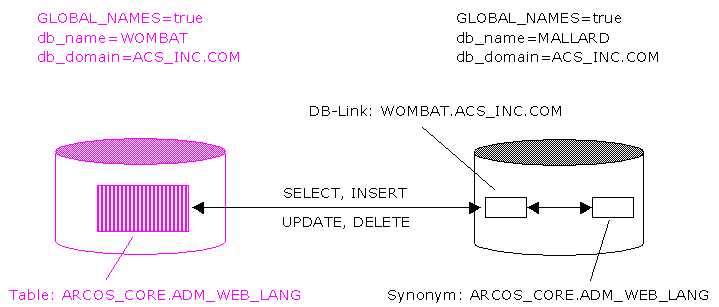
Suppose you want to refer to the table ARCOS_CORE.ADM_WEB_LANG on WOMBAT from MALLARD. On MALLARD the same name ARCOS_CORE.ADM_WEB_LANG should be used - so you don't have to change any code.
sqlplus system/....@MALLARD
SQL> CREATE DATABASE LINK wombat.acs_inc.com
CONNECT TO arcos IDENTIFIED BY .....
USING 'WOMBAT';
Database link created.SQL> DESC arcos_core.adm_web_lang@wombat.acs_inc.com;
Name Null? Type
----------------------------------------- -------- --------------
LANGUAGE NOT NULL VARCHAR2(2)
ACTIVE NOT NULL NUMBER
TEXT VARCHAR2(20)SQL> SELECT * FROM arcos_core.adm_web_lang@wombat.acs_inc.com;
no rows selectedSQL> CREATE SYNONYM arcos_core.adm_web_lang FOR arcos_core.adm_web_lang@wombat.acs_inc.com;
Synonym created.SQL> SELECT * from arcos_core.adm_web_lang;
no rows selectedSQL> INSERT INTO arcos_core.adm_web_lang(language, active, text) VALUES ('de',1,'german');
SQL> INSERT INTO arcos_core.adm_web_lang(language, active, text) VALUES ('en',1,'english');
SQL> INSERT INTO arcos_core.adm_web_lang(language, active, text) VALUES ('fr',1,'french');
SQL> INSERT INTO arcos_core.adm_web_lang(language, active, text) VALUES ('it',1,'italian');
SQL> INSERT INTO arcos_core.adm_web_lang(language, active, text) VALUES ('ru',0,'russian');
SQL> COMMIT;SQL> select * from arcos_core.adm_web_lang;
LANGUA ACTIVE TEXT
------ ---------- -------------------------
de 1 german
en 1 english
fr 1 french
it 1 italian
ru 0 russian
As you can see, accessing the remote table is fully transparent to the application. Exactly the same syntax can be used for the remote table if you create a synonym for the remote table.
Executing Remote Procedures
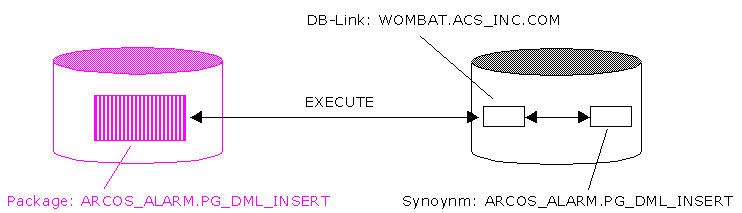
You can also execute remote procedures ...
... here an example without synonym.
sqlplus system/....@MALLARD
SQL> desc arcos_alarm.pg_dml_insert@WOMBAT.ACS_INC.COM;
PROCEDURE PR_USER_FILTER
Argument Name Type In/Out Default?
------------------------------ ----------------------- ------ --------
PI_USER_ID NUMBER(10) IN
PI_FILTER_NAME VARCHAR2(32) IN
PI_FILTER_CONTENTS VARCHAR2(4000) IN
PI_DEFAULT_FILTER NUMBER(1) INSQL> execute arcos_alarm.pg_dml_insert.PR_USER_FILTER@WOMBAT.ACS_INC.COM(1,'Test','Test',0); PL/SQL procedure successfully completed.SQL> desc arcos_alarm.pg_dml_delete@WOMBAT.ACS_INC.COM;
PROCEDURE PR_USER_FILTER
Argument Name Type In/Out Default?
------------------------------ ----------------------- ------ --------
PI_USER_ID NUMBER(10) IN
PI_FILTER_NAME VARCHAR2(32) INSQL> execute arcos_alarm.pg_dml_delete.PR_USER_FILTER@WOMBAT.ACS_INC.COM(1,'Test'); PL/SQL procedure successfully completed.And now the same with synonyms.
SQL> create synonym arcos_alarm.pg_dml_insert for arcos_alarm.pg_dml_insert@WOMBAT.ACS_INC.COM;
Synonym created.
SQL> create synonym arcos_alarm.pg_dml_delete for arcos_alarm.pg_dml_delete@WOMBAT.ACS_INC.COM;
Synonym created.
SQL> execute arcos_alarm.pg_dml_insert.PR_USER_FILTER(1,'Test','Test',0);
PL/SQL procedure successfully completed.
SQL> execute arcos_alarm.pg_dml_delete.PR_USER_FILTER(1,'Test');
PL/SQL procedure successfully completed.
As you can see, executing remote procedures is fully transparent to the application. Exactly the same syntax can be used for the remote package if you create a synonym for the remote package.
Distributed / In-Doubt Transactions
A distributed transaction includes one or more statements that, individually or as a group, update data on two or more distinct nodes of a distributed database.
The two-phase commit mechanism ensures that all nodes either commit or perform a rollback together. What happens if the transaction fails because of a system or network error? The transaction becomes in-doubt.
Distributed transactions can become in-doubt in the following ways:
- A server machine running Oracle software crashes.
- A network connection between two or more Oracle databases involved in distributed processing is disconnected.
- An unhandled software error occurs.
The RECO process automatically resolves in-doubt transactions when the machine, network, or software problem is resolved. Until RECO can resolve the transaction, the data is locked for both reads and writes. Oracle blocks reads because it cannot determine which version of the data to display for a query.
Manually Committing an In-Doubt Transaction
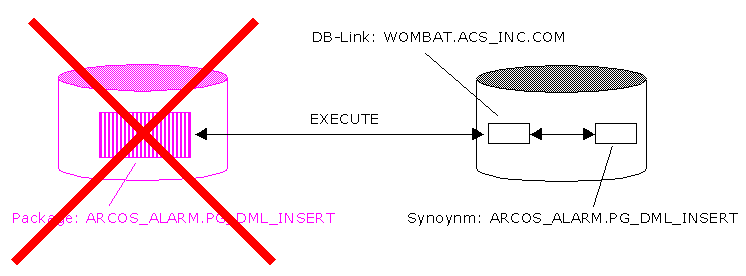
Suppose, the database server WOMBAT crashes during a distributed transaction.
Prepare distributed transaction
SQL> CREATE SYNONYM arcos_core.adm_web_lang FOR arcos_core.adm_web_lang@wombat.acs_inc.com;
SQL> SELECT * from arcos_core.adm_web_lang;
SQL> CREATE TABLE arcos_core.test (count NUMBER);Start the distributed transaction
SQL> insert into arcos_core.test (count) values (1);
SQL> insert into arcos_core.test (count) values (2);
SQL> insert into arcos_core.test (count) values (3);
SQL> insert into arcos_core.test (count) values (4);
SQL> insert into arcos_core.test (count) values (5);
SQL> INSERT INTO arcos_core.adm_web_lang(language, active, text) VALUES ('de',1,'german');
SQL> INSERT INTO arcos_core.adm_web_lang(language, active, text) VALUES ('en',1,'english');
SQL> INSERT INTO arcos_core.adm_web_lang(language, active, text) VALUES ('fr',1,'french');
SQL> INSERT INTO arcos_core.adm_web_lang(language, active, text) VALUES ('it',1,'italian');
SQL> INSERT INTO arcos_core.adm_web_lang(language, active, text) VALUES ('ru',0,'russian');
SQL> UPDATE arcos_core.test SET count = 2 WHERE count = 1;Now shutdown the distributed database
wombat> sqlplus / as sysdba;
shutdown abort;Now try to COMMIT the distributed transaction
SQL> commit;
ERROR at line 1:
ORA-02054: transaction 1.37.5070 in-doubt
ORA-02068: following severe error from WOMBAT
ORA-03113: end-of-file on communication channelNow check the DBA_2PC_PENDING view for the LOCAL_TRAN_ID.
SET LINESIZE 500;
COL LOCAL_TRAN_ID FORMAT A13
COL GLOBAL_TRAN_ID FORMAT A50
COL STATE FORMAT A8
COL MIXED FORMAT A3
COL HOST FORMAT A10
COL COMMIT# FORMAT A10
SELECT LOCAL_TRAN_ID, GLOBAL_TRAN_ID, STATE, MIXED, HOST, COMMIT#
FROM DBA_2PC_PENDING
/LOCAL_TRAN_ID GLOBAL_TRAN_ID STATE MIX HOST COMMIT#
------------- -------------------------------------------------- -------- --- ---------- ---------
1.37.5070 MALLARD.ACS_INC.COM.a05b1b48.1.37.5070 prepared no mupa 15508150Now manually commit or rollback force the in-doubt transaction as user SYS
SQL> exit;
sqlplus / as sysdba
SQL> COMMIT FORCE '1.37.5070';
Commit complete.Manually remove an entry from the data dictionary
SQL> EXECUTE DBMS_TRANSACTION.PURGE_LOST_DB_ENTRY('1.37.5070');
PL/SQL procedure successfully completed.More Information to Distributed Transactions can be found here
Database Link Types
When you create a database link, you must decide who will have access to it. The following sections describe how to create the basic types of links.
Following are examples of private database links
SQL Statement
Result
CREATE DATABASE LINK link_name;A private link using the global database name to the remote database. The link uses the userid/password of the connected user. So if
scottuses the link in a query, the link establishes a connection to the remote database asscott.
CREATE DATABASE LINK link_name
 CONNECT TO user
                IDENTIFIED BY ...

                USING 'service';
A private fixed user link to the database with service name service. The link connects to the remote database with the userid/password regardless of the connected user.
CREATE DATABASE LINK link_name
 CONNECT TO
                CURRENT_USER USING 'service';
A private link to the database with service name service. The link uses the userid/password of the current user to log onto the remote database.
Following are examples of public database links
SQL Statement Result CREATE PUBLIC DATABASE LINK link_name;A public link to the remote database. The link uses the userid/password of the connected user. So if scottuses the link in a query, the link establishes a connection to the remote database asscott.CREATE PUBLIC DATABASE LINK link_name
CONNECT TO CURRENT_USER USING 'service';A public link to the database with service name service. The link uses the userid/password of the current user to log onto the remote database. CREATE PUBLIC DATABASE LINK link_name
CONNECT TO user IDENTIFIED BY ....;A public fixed user link. The link connects to the remote database with the userid/password.