Oracle Dependency Survival Guide
Martin Zahn, 09.03.2009
Overview
Some types of schema objects can reference other objects as part of their definition. For example:
a view is defined by a query that references tables or other views.
A procedure's body can include SQL statements that reference other objects of a database.
An object that references another object as part of its definition is called a dependent object, while the object being referenced is a referenced object.
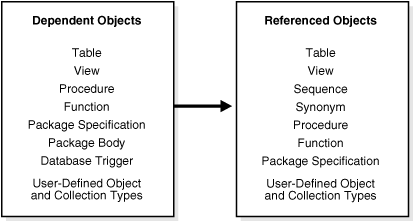
Altering referenced objects
If you alter the definition of a referenced object, dependent objects may or may not continue to function without error, depending on the type of alteration. For example if you drop a table, no view based on the dropped table is usable.
Oracle automatically records dependencies among objects to alleviate the complex job of dependency management for the database administrator and users. For example, if you alter a table on which several stored procedures depend, Oracle automatically recompiles the dependent procedures the next time the procedures are referenced (run or compiled against).
Valid or Invalid Status
To manage dependencies among schema objects, all of the schema objects in a database have a status; VALID or INVALID.
Only dependent objects can be invalid. Tables, sequences, and synonyms are always valid. If a view, procedure, function, or package is invalid, Oracle may have attempted to compile it, but errors relating to the object occurred.
For example, when compiling a view, one of its base tables might not exist, or the correct privileges for the base table might not be present.
When compiling a package, there might be a PL/SQL or SQL syntax error, or the correct privileges for a referenced object might not be present. Schema objects with such problems remain invalid.
Oracle automatically tracks specific changes in the database and records the appropriate status for related objects in the data dictionary.
Status recording is a recursive process. Any change in the status of a referenced object changes the status not only for directly dependent objects, but also for indirectly dependent objects.
For example, consider a stored procedure that directly references a view. In effect, the stored procedure indirectly references the base tables of that view. Therefore, if you alter a base table, the view is invalidated, which then invalidates the stored procedure.
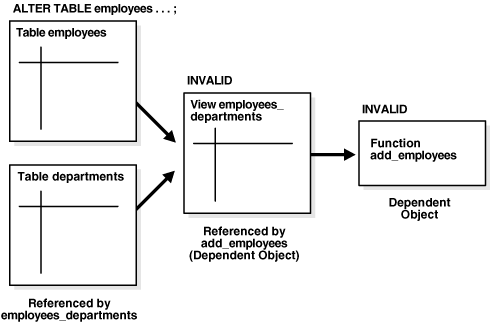
Display Dependencies
Here is a script to display all ARCOS tables which have dependencies upon other tables using the DBA_DEPENDENCIES view.
set linesize 500;
set pagesize 1000;
column c1 heading "object|level" format a10
column c2 heading "object|name" format a60
column c3 heading "referencing|object" format a60
select distinct
lpad (' ', 2 * (level - 1)) || to_char (level, '999') as c1,
owner || '.' || name || ' (' || type || ')' as c2,
referenced_owner || '.' || referenced_name || ' (' || referenced_type || ')' as c3
from
dba_dependencies
start with
owner like ('ARCOS%')
and referenced_owner <> owner
and referenced_owner not in ('SYS','SYSTEM','PUBLIC')
connect by prior
referenced_owner = owner
and prior
referenced_name = name
and prior
referenced_type = type
and
type = 'TABLE'
order by 2;
exit;object object referencing
level name object
---------- -------------------------------------------------------- ----------------------------------------------
1 ARCOS_ASSET_MGNT_TMP.TR_UPDATE_CURRENT_STATUS (TRIGGER) ARCOS_CONFIG.VU_ASSET_MGNT_TERM_LOC (VIEW)
1 ARCOS_CONFIG.ALV_API (PACKAGE BODY) ARCOS_BASE.ALARM_ALARM (TABLE)
1 ARCOS_CONFIG.ALV_API (PACKAGE BODY) ARCOS_TERMINAL_REMOTE_CMD.FUNCTION_MAP (TABLE)
1 ARCOS_CONFIG.ALV_API (PACKAGE) ARCOS_TERMINAL_REMOTE_CMD.FUNCTION_MAP (TABLE)
1 ARCOS_CONFIG.CONFIG_API (PACKAGE BODY) ARCOS_TERMINAL_REMOTE_CMD.MONEY_STATUS (TABLE)
1 ARCOS_CONFIG.CONFIG_API (PACKAGE BODY) ARCOS_TERMINAL_REMOTE_CMD.PAPER_STATUS (TABLE)
1 ARCOS_LOG.TR_ADD_DIRECTION (TRIGGER) ARCOS_CONFIG.TERMINAL (TABLE)
1 ARCOS_REPORT.PG_STANDARD_REPORTS (PACKAGE BODY) ARCOS_BASE.ALARM_ALARM (TABLE)
1 ARCOS_REPORT.PG_STANDARD_REPORTS (PACKAGE BODY) ARCOS_CONFIG.ALARM (TABLE)
1 ARCOS_REPORT.PG_STANDARD_REPORTS (PACKAGE BODY) ARCOS_CONFIG.ALARM_COMPONENT (TABLE)
1 ARCOS_REPORT.PG_STANDARD_REPORTS (PACKAGE BODY) ARCOS_CONFIG.TERMINAL (TABLE)
1 ARCOS_REPORT.PG_STANDARD_REPORTS (PACKAGE BODY) ARCOS_LOG.BALANCE (TABLE)
1 ARCOS_REPORT.PG_STANDARD_REPORTS (PACKAGE BODY) ARCOS_LOG.CASH_UNIT (TABLE)
Object Visibility
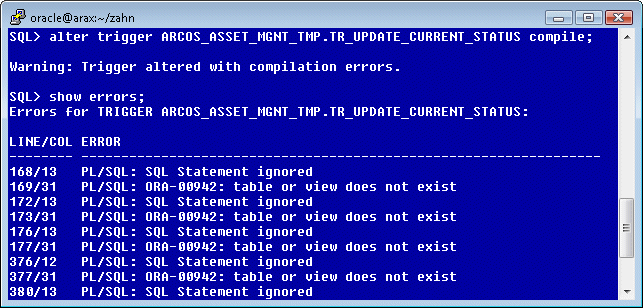
Sometime when you compile an object or package or view in Oracle, or execute some PL/SQL statements on Oracle table, or when running an Oracle program or application the following error my occur: ORA-00942: table or view does not exist.
For example you may recompile the Trigger ARCOS_ASSET_MGNT_TMP.TR_UPDATE_CURRENT_STATUS and the ORA-00942 Error:
So, the question is how to resolve ORA-00942?
Rescue from ORA-00942 Error
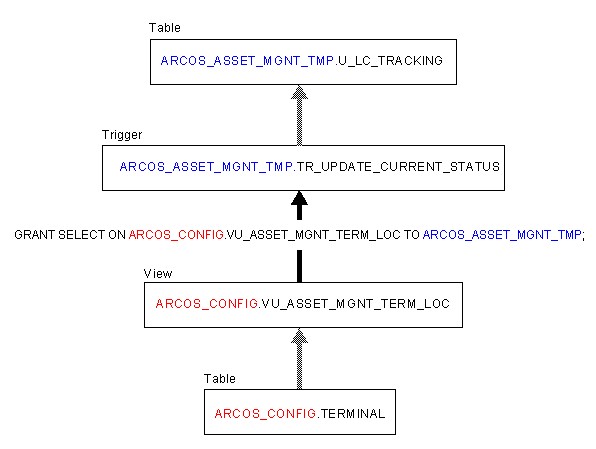
First of all you should verify the complete dependency Tree. Verify the Code and you will be able to construct the dependency Tree.
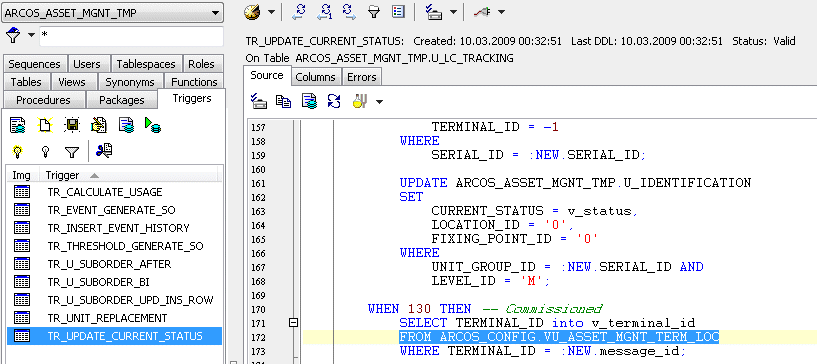
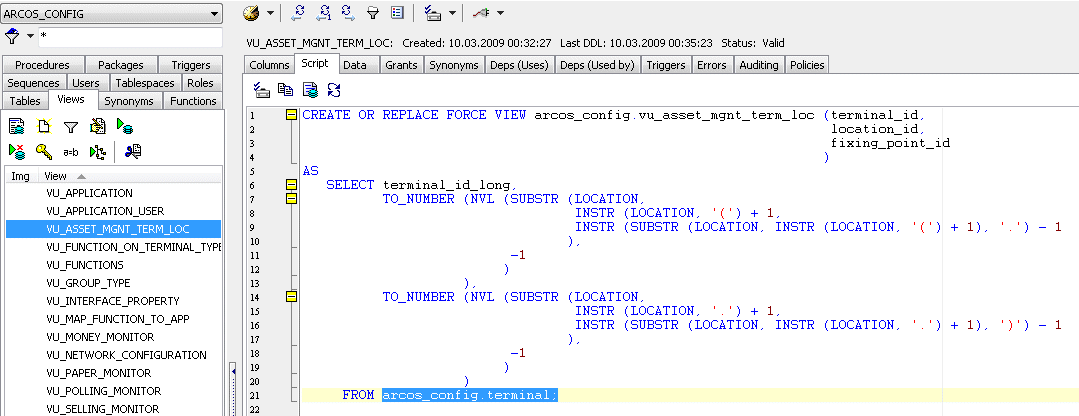
In the ARCOS_ASSET_MGNT_TMP Trigger TR_UPDATE_CURRENT_STATUS you find the Line 172 where the View ARCOS_CONFIG.VU_ASSET_MGMT_TERM_LOC is used. Now go to this View and locate the Table which is referenced.
You see on Line 21, that the ARCOS_CONFIG.TERMINAL Table is referenced. So we have the following Dependency Tree.
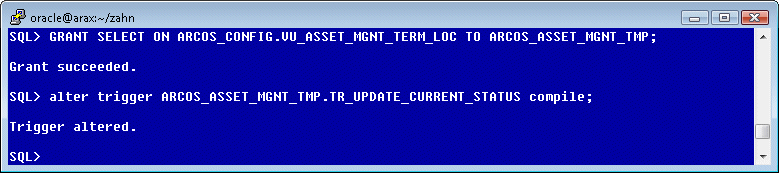
So, to resolve the ORA-00942: table or view does not exist Error, you must grant the SELECT Privilege on the View VU_ASSET_MGMT_TERM_LOC to the Schema Owner ARCOS_ASSET_MGMT_TMP as follows.
Common Guidelines to resolve from ORA-00942 Error
The cause or reason for ORA-00942 error message is because of Oracle tries to execute an SQL statement that references a table or view that
either does not exist
or because of a synonym that is not allowed here was used
or because of you do not have access rights to the particular object.
Other possible cause is that the table or view belongs to another schema and you didn’t reference the table by the schema name, or a view was referenced where a table is required.
Depending on what’s the cause of the problem, there are several resolutions or remedies to resolve this error. And due to several possible reasons that may cause the error, there are several actions or steps that you can take to identify where is the error and take the appropriate workaround or solution.
1. Check existing user tables and views if they exists ...
... in Oracle by querying the data dictionary by executing the following SQL statement:
select *
from all_objects
where object_type in ('TABLE','VIEW')
and object_name = '<OBJECT_NAME>';Replace OBJECT_NAME with the name of the table or view that you want to verify its existence.
If this error occurred because the table or view does not exist, take the following actions:
Check and ensure that the spelling of the table (does not misspell) or view name is correct.
Check and ensure that a view is not specified where a table is required.
If no such table or view exists, create the table or view, or use another table or view.
2. If the table or view exists ...
... check and verify if the user has the necessary permissions and rights to read and access (select) from the table, as certain privileges may be required to access the table. In this case, you will need to have the owner of the table or view, or a Oracle DBA to grant the appropriate privileges, permissions or rights to this object.
3. If the table or view exists but is in a different schema ...
... from the current schema where the SQL is executing (in other word, the table doesn’t own by you, but owned by other user), the ORA-00942 error will return too. Resolve this by explicitly reference the table or view by specifying the schema name, i.e. schema_name.table_name.
Granting via Roles
As seen above, roles are not meant to be used by application developers, because the privileges to access schema objects within stored programmatic constructs need to be granted directly. This is the case if you can select from the view without problem but then get this error when trying to create a view on it.
Grants on Oracle System Views (e.g. V$SESSION)
If you reference one of Oracle's System Views, for example V$SESSION you must grant the SELECT privilege to the User or Role. Each User belongs automatically to the PUBLIC Role - so often the SELECT Privilege is granted to the PUBLIC Role.
GRANT SELECT ON SYS.V_$SESSION TO PUBLIC; /* Due to Security Reason this should NOT be used */
Loopholes in Grant Security
There are several issues with grant security that can create loopholes.
- Assigning grants to PUBLIC.
- Assigning roles using the WITH ADMIN option.
- Overlapping unplanned access roles.
- Assigning system privileges (select any table) to roles.
- Creating public synonyms.
For example, within Oracle you can explicitly grant to PUBLIC all tables that you wish to have general read-only access.
connect pubs/pubs
create table test_table as
select object_name, object_type
from dba_objects;select count(*) from test_table;
COUNT(*)
----------
31350Now, when you connect as the user, SCOTT, he is unable to see the table rows, as in the example:
connect scott/tiger
select count(*) from test_table
ERROR at line 1:
ORA-00942: table or view does not existIn this case, you know that the table exists, but Oracle considers only the fully-qualified table name.
Connect pubs/pubs
create public synonym test_table for pubs.test_table;Connect scott/tiger
select count(*) from test_table;
COUNT(*)
----------
31350
Display Invalid Objects
set pause off
set feed off;
set pagesize 20000;
set wrap off;
set linesize 200;
set heading on;
set tab on;
set trimspool on;
set scan on;
set verify off;
column object_type format a25 wrap heading 'Object|Type'
column object_name format a50 wrap heading 'Object|Name'
column status format a8 heading 'Status'
column owner format a20 wrap heading 'Owner'
SELECT owner, object_name, object_type, status
FROM dba_objects
WHERE status != 'VALID';Object Object
Owner Name Type Status
-------------------- -------------------------------------------------- ------------------------- --------
ARCOS_CONFIG ALV_API PACKAGE INVALID
ARCOS_CONFIG ALV_API PACKAGE BODY INVALID
ARCOS_CONFIG CONFIG_API PACKAGE BODY INVALID
ARCOS_CONFIG TR_ALV_UPDATE_TERM TRIGGER INVALID
ARCOS_CONFIG TR_ALV_TERM_GROUP_SELLING TRIGGER INVALID
ARCOS_CONFIG TR_ALV_DELETE_PERMISSION TRIGGER INVALID
ARCOS_CONFIG TR_ALV_TERM_GROUP_TECH TRIGGER INVALID
ARCOS_CONFIG TR_ALV_UPDATE_TERM_GROUP TRIGGER INVALID
Recompile Invalid Objects
Using Custom Script
In some situations you may have to compile many invalid objects. One approach is to write a custom script to identify and compile the invalid objects. The following example identifies and recompiles invalid packages and package bodies.
set pause off
set feed off;
set pagesize 0;
set wrap off;
set linesize 200;
set heading on;
set tab on;
set trimspool on;
set scan on;
set verify off;
select decode (OBJECT_TYPE, 'PACKAGE BODY',
'ALTER PACKAGE ' || OWNER|| '.'|| OBJECT_NAME || ' compile body;',
'ALTER ' || OBJECT_TYPE || ' ' || OWNER|| '.' || OBJECT_NAME || ' compile;')
from dba_objects
where status = 'INVALID'
and object_type in ('PACKAGE','FUNCTION','PROCEDURE','VIEW','PACKAGE BODY');ALTER PACKAGE ARCOS_CONFIG.ALV_API compile;
ALTER PACKAGE ARCOS_CONFIG.ALV_API compile body;
ALTER PACKAGE ARCOS_CONFIG.CONFIG_API compile body;
ALTER PACKAGE ARCOS_REPORT.PG_STANDARD_REPORTS compile;
ALTER VIEW ARCOS_REPORT.VU_MONEY_STATUS compile;
ALTER VIEW ARCOS_REPORT.VU_PAPER_STOCK_STATUS compile;
ALTER VIEW ARCOS_REPORT.VU_SALES compile;
ALTER VIEW ARCOS_REPORT.VU_CASH_ON_HAND compile;
ALTER PACKAGE ARCOS_REPORT.PG_STANDARD_REPORTS compile body;
Using DBMS_UTILITY.compile_schema
The COMPILE_SCHEMA procedure in the DBMS_UTILITY package compiles all procedures, functions, packages, and triggers in the specified schema.
EXEC DBMS_UTILITY.compile_schema(schema => 'ARCOS_CONFIG');
Using UTLRP.SQL
The utlrp.sql and utlprp.sql scripts are provided by Oracle to recompile all invalid objects in the database. They are typically run after major database changes such as upgrades or patches. They are located in the $ORACLE_HOME/rdbms/admin directory and provide a wrapper on the UTL_RECOMP package. The utlrp.sql script simply calls the utlprp.sql script. Both scripts must be run as the SYS user, or another user with SYSDBA, to work correctly.