Load and transform external data into Oracle
Martin Zahn, 15.03.2009
Overview
Up until Oracle9i, SQL*Loader was the tool to load a lot of data into an Oracle database from external sources. Oracle9i introduces several interesting new features that change the way you look at the data-loading and transformation process. These is performed by the ETL toolkit (Extraction, Transformation, and Loading) and collectively provide you with a powerful ETL toolkit. Three ETL features are particularly interesting
Typical Loading Scenario
In the following example we use external tables and table functions, two of these powerful ETL features. Let's assume that you have the following revenue data to load into a database and that you want to normalize it so you end up with one row for each person/month combination:
Person Jan Feb Mar Apr Mai Jun Jul Aug Sep Oct Nov Dez
--------------------------------------------------------
Schnyder,345,223,122,345,324,244,123,123,345,121,345,197
Weber,234,234,123,457,456,287,234,123,678,656,341,567
Keller,596,276,347,134,743,545,216,456,124,753,346,456
Meyer,987,345,645,567,834,567,789,234,678,973,456,125
Holzer,509,154,876,347,146,788,174,986,568,246,324,987
Müller,456,125,678,235,878,237,567,237,788,237,324,778
Binggeli,487,347,458,347,235,864,689,235,764,964,624,347
Stoller,596,237,976,876,346,567,126,879,125,568,124,753
Marty,094,234,235,763,054,567,237,457,325,753,577,346
Studer,784,567,235,753,124,575,864,235,753,864,634,678
Person Month Revenue
-------------------------
Schnyder Jan 345
Schnyder Feb 223
Schnyder Mar 122
Schnyder Apr 345
Schnyder Mai 324
Schnyder Jun 244
Schnyder Jul 123
Schnyder Aug 123
Schnyder Sep 345
Schnyder Oct 121
Schnyder Nov 345
Schnyder Dez 197
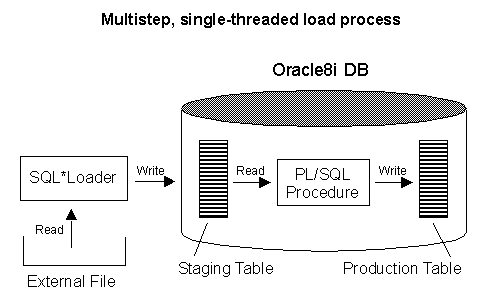
........ ... ...Using Oracle8i, you would need to use at least two discrete steps to load and transform this data. The first step is to load the the data into a staging table using SQL*LOADER, the next step is to transform and insert the data in the final table using a PL/SQL procedure.
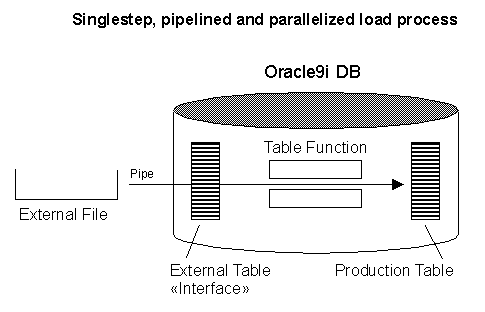
Oracles ETL features, however, allow for a more interesting approach to the task, one that loads and transforms in just one step.
External Tables
New in Oracle is the concept of an external table. This is a table that you define in the database's data dictionary, but for which the data itself is stored outside of the database. It's possible, for example, to define an external table that derives its data from the type of text file you would load using SQL*Loader. This is great, because the revenue data in the above example you need to load resides in just such a text file. Before you can create an external table, you need to create an Oracle directory object that points to the operating system directory in which your text file resides.
CONNECT sys/manager AS SYSDBA;
CREATE OR REPLACE DIRECTORY dat_dir AS '/export/home/oracle/zahn/etl/Data';
CREATE OR REPLACE DIRECTORY log_dir AS '/export/home/oracle/zahn/etl/Log';
CREATE OR REPLACE DIRECTORY bad_dir AS '/export/home/oracle/zahn/etl/Bad';GRANT READ ON DIRECTORY dat_dir TO scott;
GRANT WRITE ON DIRECTORY log_dir TO scott;
GRANT WRITE ON DIRECTORY bad_dir TO scott;You can now use a new form of the CREATE TABLE statement that looks like a cross between a SQL statement and a SQL*Loader control file:
CONNECT scott/tiger;
CREATE TABLE revext (person VARCHAR2(20),
rev_jan NUMBER(4),
rev_feb NUMBER(4),
rev_mar NUMBER(4),
rev_apr NUMBER(4),
rev_mai NUMBER(4),
rev_jun NUMBER(4),
rev_jul NUMBER(4),
rev_aug NUMBER(4),
rev_sep NUMBER(4),
rev_oct NUMBER(4),
rev_nov NUMBER(4),
rev_dez NUMBER(4))
ORGANIZATION EXTERNAL
(
TYPE ORACLE_LOADER
DEFAULT DIRECTORY dat_dir
ACCESS PARAMETERS
(
records delimited by newline
badfile bad_dir:'revext%a_%p.bad'
logfile log_dir:'revext%a_%p.log'
fields terminated by ','
missing field values are null
(
person,
rev_jan,
rev_feb,
rev_mar,
rev_apr,
rev_mai,
rev_jun,
rev_jul,
rev_aug,
rev_sep,
rev_oct,
rev_nov,
rev_dez
)
)
LOCATION ('revext.dat')
)
PARALLEL 4
REJECT LIMIT UNLIMITED;When you create an external table, you're really only creating some data dictionary entries. Nothing exciting happens until you query the table. Realize though, that you can query the table as you would any other SQL table. Let's assume you had the following production table:
CREATE TABLE revenue (
person VARCHAR2(20),
month VARCHAR2(3),
revenue NUMBER,
CONSTRAINT revenue_pk PRIMARY KEY (person,month));Given this table, you can use the following INSERT ... SELECT FROM statement to extract revenue data from your external file in a normalized format and insert it into your production table.
INSERT INTO revenue (person,month,revenue)
SELECT person,'Jan',rev_jan
FROM revext
WHERE rev_jan IS NOT NULL
UNION ALL
SELECT person,'Feb',rev_feb
FROM revext
WHERE rev_feb IS NOT NULL
UNION ALL
SELECT person,'Mar',rev_mar
FROM revext
WHERE rev_mar IS NOT NULL
UNION ALL
SELECT person,'Apr',rev_apr
FROM revext
WHERE rev_apr IS NOT NULL
UNION ALL
SELECT person,'Mai',rev_mai
FROM revext
WHERE rev_mai IS NOT NULL
UNION ALL
SELECT person,'Jun',rev_jun
FROM revext
WHERE rev_jun IS NOT NULL
UNION ALL
SELECT person,'Jul',rev_jul
FROM revext
WHERE rev_jul IS NOT NULL
UNION ALL
SELECT person,'Aug',rev_aug
FROM revext
WHERE rev_aug IS NOT NULL
UNION ALL
SELECT person,'Sep',rev_sep
FROM revext
WHERE rev_sep IS NOT NULL
UNION ALL
SELECT person,'Oct',rev_oct
FROM revext
WHERE rev_oct IS NOT NULL
UNION ALL
SELECT person,'Nov',rev_nov
FROM revext
WHERE rev_nov IS NOT NULL
UNION ALL
SELECT person,'Dez',rev_dez
FROM revext
WHERE rev_dez IS NOT NULL;
120 rows created.Because you set the degree of parallelism to four when you created the external table, the database will divide the file to be read by four processes running in parallel. This parallelism happens automatically, with no additional effort on your part, and is really quite convenient. To parallelize this load using SQL*Loader, you would have had to manually divide your input file into multiple smaller files.
Table Functions
Disadvantage of UNION ALL
The INSERT statement shown previously works off the union of 12 SELECT statements. This means that the external data file gets read 12 times, once for each SELECT. Reading the input file 12 times isn't desirable, especially if the file is very large. Fortunately, this happens to be just the type of problem that you can solve using table functions. You can think of a table function as a highly streamlined transformation engine. A table function takes a set of rows as input and returns a different set of rows as output. Unlike traditional functions, table functions are designed to be invoked from a SELECT statement's FROM clause.
Table Function as highly streamlined transformation engine
For the revenue data, we want to take each input row and transform it into 12 output rows. Each input row holds data from 12 different revenue months. Your normalized destination table, however, requires that each month get its own row, so your table function must transform the 12 population counts from each input row into 12 separate output rows.
Table functions always return a collection of records
Before creating the table function, you need to create some types. Table functions always return a collection of records, so to begin, create a table type that corresponds to the definition of your ultimate destination table. To do this, first create an object type to define the record, and then create a table type based on that object type.
connect scott/tiger;
CREATE TYPE revenue_row AS OBJECT (
person VARCHAR2(20),
month VARCHAR2(3),
revenue NUMBER
);
/CREATE TYPE revenue_tab
AS TABLE OF revenue_row;
/The input to your function will be rows returned by a SELECT statement against the external table REVEXT, so you'll need an appropriate REF CURSOR type. The following statement creates a package containing a REF CURSOR type REVENUE_CUR that matches the record structure of the REVEXT table. The package also defines a table function that takes such a cursor as an input parameter. Note that you have to create the table type REVENUE_TAB first, so you can use that type in your table function's RETURN clause:
CREATE OR REPLACE PACKAGE revenue_pkg
AS
TYPE revenue_cur IS REF CURSOR RETURN revext%ROWTYPE;
FUNCTION revenue_fun (revenue_arg IN revenue_cur)
RETURN revenue_tab
PARALLEL_ENABLE (PARTITION revenue_arg BY ANY)
PIPELINED;
END;
/The PARALLEL_ENABLE clause in the function specification allows the database to parallelize the function's execution. The PARTITION revenue_arg BY ANY clause indicates that the input rows can be arbitrarily divided into any number of buckets, all of which can then be processed in parallel. The PIPELINED clause enables the function to return the result set incrementally while other input data is still being processed. Think of the rows as «flowing through» the function during the execution of a query invoking the function. The function code defined in the package body takes care of transforming each input row into the desired 12 output rows.
CREATE OR REPLACE PACKAGE BODY revenue_pkg AS
FUNCTION revenue_fun (revenue_arg IN revenue_cur)
RETURN revenue_tab
PARALLEL_ENABLE (PARTITION revenue_arg BY ANY)
PIPELINED IS revenue_rec revext%ROWTYPE;
outrow_jan revenue_row := revenue_row('','',0);
outrow_feb revenue_row := revenue_row('','',0);
outrow_mar revenue_row := revenue_row('','',0);
outrow_apr revenue_row := revenue_row('','',0);
outrow_mai revenue_row := revenue_row('','',0);
outrow_jun revenue_row := revenue_row('','',0);
outrow_jul revenue_row := revenue_row('','',0);
outrow_aug revenue_row := revenue_row('','',0);
outrow_sep revenue_row := revenue_row('','',0);
outrow_oct revenue_row := revenue_row('','',0);
outrow_nov revenue_row := revenue_row('','',0);
outrow_dez revenue_row := revenue_row('','',0);
BEGIN
LOOP
FETCH revenue_arg INTO revenue_rec;
EXIT WHEN revenue_arg%NOTFOUND;
IF revenue_rec.rev_jan IS NOT NULL THEN
outrow_jan.person := revenue_rec.person;
outrow_jan.month := 'Jan';
outrow_jan.revenue := revenue_rec.rev_jan;
PIPE ROW (outrow_jan);
END IF;
IF revenue_rec.rev_feb IS NOT NULL THEN
outrow_feb.person := revenue_rec.person;
outrow_feb.month := 'Feb';
outrow_feb.revenue := revenue_rec.rev_feb;
PIPE ROW (outrow_feb);
END IF;
IF revenue_rec.rev_mar IS NOT NULL THEN
outrow_mar.person := revenue_rec.person;
outrow_mar.month := 'Mar';
outrow_mar.revenue := revenue_rec.rev_mar;
PIPE ROW (outrow_mar);
END IF;
IF revenue_rec.rev_apr IS NOT NULL THEN
outrow_apr.person := revenue_rec.person;
outrow_apr.month := 'Apr';
outrow_apr.revenue := revenue_rec.rev_apr;
PIPE ROW (outrow_apr);
END IF;
IF revenue_rec.rev_mai IS NOT NULL THEN
outrow_mai.person := revenue_rec.person;
outrow_mai.month := 'Mai';
outrow_mai.revenue := revenue_rec.rev_mai;
PIPE ROW (outrow_mai);
END IF;
IF revenue_rec.rev_jun IS NOT NULL THEN
outrow_jun.person := revenue_rec.person;
outrow_jun.month := 'Jun';
outrow_jun.revenue := revenue_rec.rev_jun;
PIPE ROW (outrow_jun);
END IF;
IF revenue_rec.rev_jul IS NOT NULL THEN
outrow_jul.person := revenue_rec.person;
outrow_jul.month := 'Jul';
outrow_jul.revenue := revenue_rec.rev_jul;
PIPE ROW (outrow_jul);
END IF;
IF revenue_rec.rev_aug IS NOT NULL THEN
outrow_aug.person := revenue_rec.person;
outrow_aug.month := 'Aug';
outrow_aug.revenue := revenue_rec.rev_aug;
PIPE ROW (outrow_aug);
END IF;
IF revenue_rec.rev_sep IS NOT NULL THEN
outrow_sep.person := revenue_rec.person;
outrow_sep.month := 'Sep';
outrow_sep.revenue := revenue_rec.rev_sep;
PIPE ROW (outrow_sep);
END IF;
IF revenue_rec.rev_oct IS NOT NULL THEN
outrow_oct.person := revenue_rec.person;
outrow_oct.month := 'Oct';
outrow_oct.revenue := revenue_rec.rev_oct;
PIPE ROW (outrow_oct);
END IF;
IF revenue_rec.rev_nov IS NOT NULL THEN
outrow_nov.person := revenue_rec.person;
outrow_nov.month := 'Nov';
outrow_nov.revenue := revenue_rec.rev_nov;
PIPE ROW (outrow_nov);
END IF;
IF revenue_rec.rev_dez IS NOT NULL THEN
outrow_dez.person := revenue_rec.person;
outrow_dez.month := 'Dez';
outrow_dez.revenue := revenue_rec.rev_dez;
PIPE ROW (outrow_dez);
END IF;
END LOOP;
RETURN;
END;
END;
/By enabling parallel DML and then using the table function, it's now possible to load and transform the revenue data in one operation:
ALTER SESSION ENABLE PARALLEL DML;
INSERT /*+ APPEND PARALLEL (t,4) */ INTO revenue t
SELECT *
FROM TABLE (revenue_pkg.revenue_fun (
CURSOR(SELECT person,
rev_jan,
rev_feb,
rev_mar,
rev_apr,
rev_mai,
rev_jun,
rev_jul,
rev_aug,
rev_sep,
rev_oct,
rev_nov,
rev_dez
FROM revext)));
120 rows created.select * from revenue;
ORA-12838: cannot read/modify an object after modifying it in parallel
commit;
select * from revenue;
PERSON MON REVENUE
-------------------- --- ----------
Schnyder Mar 122
Schnyder Jul 123
Schnyder Nov 345
Weber Mar 123
...The revenue data will be read from the external table. That process will be parallelized, using intrafile parallelism. The output from each of those parallel operations will feed into separate processes, also running in parallel, that transform each input row into the 12 output rows you desire. Because the table function handles the transformation, only one pass through the external file is necessary. It's not necessary to stage the data in any sort of work table. The data is pipelined from the external data file, through the table function, and directly into the destination table. Fewer copies of the data results in less disk space being consumed.
Multitable Insert
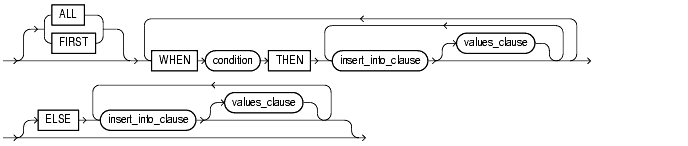
In a multitable insert, you insert computed rows derived from the rows returned from the evaluation of a subquery into one or more tables.

ALL into_clause
Specify ALL followed by multiple insert_into_clauses to perform an unconditional multitable insert. Oracle executes each insert_into_clause once for each row returned by the subquery.
conditional_insert_clause
Specify the conditional_insert_clause to perform a conditional multitable insert. Oracle filters each insert_into_clause through the corresponding WHEN condition, which determines whether that insert_into_clause is executed. A single multitable insert statement can contain up to 127 WHEN clauses.
ALL
If you specify ALL, Oracle evaluates each WHEN clause regardless of the results of the evaluation of any other WHEN clause. For each WHEN clause whose condition evaluates to true, Oracle executes the corresponding INTO clause list.
FIRST
If you specify FIRST, Oracle evaluates each WHEN clause in the order in which it appears in the statement. For the first WHEN clause that evaluates to true, Oracle executes the corresponding INTO clause and skips subsequent WHEN clauses for the given row.
ELSE clause
For a given row, if no WHEN clause evaluates to true:
- If you have specified an ELSE clause Oracle executes the INTO clause list associated with the ELSE clause.
- If you did not specify an else clause, Oracle takes no action for that row.
Subquery
Specify a subquery that returns rows that are inserted into the table. The subquery can refer to any table, view, or materialized view, including the target tables of the INSERT statement. If the subquery selects no rows, Oracle inserts no rows into the table.
Example 1
Read from the external table and insert result into the normalized REVENUE table. You end up with one row for each person/month combination:
PERSON MON REVENUE
-------------------- --- ----------
Schnyder 01 345
Weber 01 234
Keller 01 596
Meyer 01 987
Holzer 01 509
Müller 01 456
Binggeli 01 487
Stoller 01 596
Marty 01 94
Studer 01 784
Schnyder 02 223
Weber 02 234
Keller 02 276
Meyer 02 345
Holzer 02 154
Müller 02 125
Binggeli 02 347
Stoller 02 237
........ .. ...CREATE TABLE revenue (
person VARCHAR2(20),
month VARCHAR2(3),
revenue NUMBER,
CONSTRAINT revenue_pk PRIMARY KEY (person,month));INSERT ALL
INTO revenue (person, month, revenue)
VALUES (person, '01', rev_jan)
INTO revenue (person, month, revenue)
VALUES (person, '02', rev_feb)
INTO revenue (person, month, revenue)
VALUES (person, '03', rev_mar)
INTO revenue (person, month, revenue)
VALUES (person, '04', rev_apr)
INTO revenue (person, month, revenue)
VALUES (person, '05', rev_mai)
INTO revenue (person, month, revenue)
VALUES (person, '06', rev_jun)
INTO revenue (person, month, revenue)
VALUES (person, '07', rev_jul)
INTO revenue (person, month, revenue)
VALUES (person, '08', rev_aug)
INTO revenue (person, month, revenue)
VALUES (person, '09', rev_sep)
INTO revenue (person, month, revenue)
VALUES (person, '10', rev_oct)
INTO revenue (person, month, revenue)
VALUES (person, '11', rev_nov)
INTO revenue (person, month, revenue)
VALUES (person, '12', rev_dez)
SELECT person,
rev_jan,
rev_feb,
rev_mar,
rev_apr,
rev_mai,
rev_jun,
rev_jul,
rev_aug,
rev_sep,
rev_oct,
rev_nov,
rev_dez
FROM revext;
120 rows created.
Example 2
In this example you insert each month in one separate table, all in one transaction.
create table revenue_jan (person VARCHAR2(20) NOT NULL, revenue NUMBER);
create table revenue_feb (person VARCHAR2(20) NOT NULL, revenue NUMBER);
create table revenue_mar (person VARCHAR2(20) NOT NULL, revenue NUMBER);
create table revenue_apr (person VARCHAR2(20) NOT NULL, revenue NUMBER);
create table revenue_mai (person VARCHAR2(20) NOT NULL, revenue NUMBER);
create table revenue_jun (person VARCHAR2(20) NOT NULL, revenue NUMBER);
create table revenue_jul (person VARCHAR2(20) NOT NULL, revenue NUMBER);
create table revenue_aug (person VARCHAR2(20) NOT NULL, revenue NUMBER);
create table revenue_sep (person VARCHAR2(20) NOT NULL, revenue NUMBER);
create table revenue_oct (person VARCHAR2(20) NOT NULL, revenue NUMBER);
create table revenue_nov (person VARCHAR2(20) NOT NULL, revenue NUMBER);
create table revenue_dez (person VARCHAR2(20) NOT NULL, revenue NUMBER);INSERT ALL
INTO revenue_jan (person, revenue)
VALUES (person, rev_jan)
INTO revenue_feb (person, revenue)
VALUES (person, rev_feb)
INTO revenue_mar (person, revenue)
VALUES (person, rev_mar)
INTO revenue_apr (person, revenue)
VALUES (person, rev_apr)
INTO revenue_mai (person, revenue)
VALUES (person, rev_mai)
INTO revenue_jun (person, revenue)
VALUES (person, rev_jun)
INTO revenue_jul (person, revenue)
VALUES (person, rev_jul)
INTO revenue_aug (person, revenue)
VALUES (person, rev_aug)
INTO revenue_sep (person, revenue)
VALUES (person, rev_sep)
INTO revenue_oct (person, revenue)
VALUES (person, rev_oct)
INTO revenue_nov (person, revenue)
VALUES (person, rev_nov)
INTO revenue_dez (person, revenue)
VALUES (person, rev_dez)
SELECT person,
rev_jan,
rev_feb,
rev_mar,
rev_apr,
rev_mai,
rev_jun,
rev_jul,
rev_aug,
rev_sep,
rev_oct,
rev_nov,
rev_dez
FROM revext;
Example 3
In this example you filter the input data in three ranges:
- Revenue <= 150
- 150 < Revenue <= 300
- Revenue > 300
and insert the results in three corresponding tables:
CREATE TABLE revenue_low (person VARCHAR2(20) NOT NULL,
month VARCHAR2(3) NOT NULL, revenue NUMBER);
CREATE TABLE revenue_med (person VARCHAR2(20) NOT NULL,
month VARCHAR2(3) NOT NULL, revenue NUMBER);
CREATE TABLE revenue_top (person VARCHAR2(20) NOT NULL,
month VARCHAR2(3) NOT NULL, revenue NUMBER);INSERT ALL
WHEN (rev_jan <= 150) THEN
INTO revenue_low (person, month, revenue)
VALUES (person, '01', rev_jan)
WHEN (rev_feb <= 150) THEN
INTO revenue_low (person, month, revenue)
VALUES (person, '02', rev_feb)
WHEN (rev_mar <= 150) THEN
INTO revenue_low (person, month, revenue)
VALUES (person, '03', rev_mar)
WHEN (rev_apr <= 150) THEN
INTO revenue_low (person, month, revenue)
VALUES (person, '04', rev_apr)
WHEN (rev_mai <= 150) THEN
INTO revenue_low (person, month, revenue)
VALUES (person, '05', rev_mai)
WHEN (rev_jun <= 150) THEN
INTO revenue_low (person, month, revenue)
VALUES (person, '06', rev_jun)
WHEN (rev_jul <= 150) THEN
INTO revenue_low (person, month, revenue)
VALUES (person, '07', rev_jul)
WHEN (rev_aug <= 150) THEN
INTO revenue_low (person, month, revenue)
VALUES (person, '08', rev_aug)
WHEN (rev_sep <= 150) THEN
INTO revenue_low (person, month, revenue)
VALUES (person, '09', rev_sep)
WHEN (rev_oct <= 150) THEN
INTO revenue_low (person, month, revenue)
VALUES (person, '10', rev_oct)
WHEN (rev_nov <= 150) THEN
INTO revenue_low (person, month, revenue)
VALUES (person, '11', rev_nov)
WHEN (rev_dez <= 150) THEN
INTO revenue_low (person, month, revenue)
VALUES (person, '12', rev_dez)
WHEN (rev_jan > 150 AND rev_jan < 300) THEN
INTO revenue_med (person, month, revenue)
VALUES (person, '01', rev_jan)
WHEN (rev_feb > 150 AND rev_feb < 300) THEN
INTO revenue_med (person, month, revenue)
VALUES (person, '02', rev_feb)
WHEN (rev_mar > 150 AND rev_mar < 300) THEN
INTO revenue_med (person, month, revenue)
VALUES (person, '03', rev_mar)
WHEN (rev_apr > 150 AND rev_apr < 300) THEN
INTO revenue_med (person, month, revenue)
VALUES (person, '04', rev_apr)
WHEN (rev_mai > 150 AND rev_mai < 300) THEN
INTO revenue_med (person, month, revenue)
VALUES (person, '05', rev_mai)
WHEN (rev_jun > 150 AND rev_jun < 300) THEN
INTO revenue_med (person, month, revenue)
VALUES (person, '06', rev_jun)
WHEN (rev_jul > 150 AND rev_jul < 300) THEN
INTO revenue_med (person, month, revenue)
VALUES (person, '07', rev_jul)
WHEN (rev_aug > 150 AND rev_aug < 300) THEN
INTO revenue_med (person, month, revenue)
VALUES (person, '08', rev_aug)
WHEN (rev_sep > 150 AND rev_sep < 300) THEN
INTO revenue_med (person, month, revenue)
VALUES (person, '09', rev_sep)
WHEN (rev_oct > 150 AND rev_oct < 300) THEN
INTO revenue_med (person, month, revenue)
VALUES (person, '10', rev_oct)
WHEN (rev_nov > 150 AND rev_nov < 300) THEN
INTO revenue_med (person, month, revenue)
VALUES (person, '11', rev_nov)
WHEN (rev_dez > 150 AND rev_dez < 300) THEN
INTO revenue_med (person, month, revenue)
VALUES (person, '12', rev_dez)
WHEN (rev_jan > 300) THEN
INTO revenue_low (person, month, revenue)
VALUES (person, '01', rev_jan)
WHEN (rev_feb > 300) THEN
INTO revenue_low (person, month, revenue)
VALUES (person, '02', rev_feb)
WHEN (rev_mar > 300) THEN
INTO revenue_low (person, month, revenue)
VALUES (person, '03', rev_mar)
WHEN (rev_apr > 300) THEN
INTO revenue_low (person, month, revenue)
VALUES (person, '04', rev_apr)
WHEN (rev_mai > 300) THEN
INTO revenue_low (person, month, revenue)
VALUES (person, '05', rev_mai)
WHEN (rev_jun > 300) THEN
INTO revenue_low (person, month, revenue)
VALUES (person, '06', rev_jun)
WHEN (rev_jul > 300) THEN
INTO revenue_low (person, month, revenue)
VALUES (person, '07', rev_jul)
WHEN (rev_aug > 300) THEN
INTO revenue_low (person, month, revenue)
VALUES (person, '08', rev_aug)
WHEN (rev_sep > 300) THEN
INTO revenue_low (person, month, revenue)
VALUES (person, '09', rev_sep)
WHEN (rev_oct > 300) THEN
INTO revenue_low (person, month, revenue)
VALUES (person, '10', rev_oct)
WHEN (rev_nov > 300) THEN
INTO revenue_low (person, month, revenue)
VALUES (person, '11', rev_nov)
WHEN (rev_dez > 300) THEN
INTO revenue_low (person, month, revenue)
VALUES (person, '12', rev_dez)
SELECT person,
rev_jan,
rev_feb,
rev_mar,
rev_apr,
rev_mai,
rev_jun,
rev_jul,
rev_aug,
rev_sep,
rev_oct,
rev_nov,
rev_dez
FROM revext;
Example 4
In this example the summary over all months are calculated. If the sum is less or eqal to 6000 then the sum is inserted in table SUMMARY_LOW, else in table SUMMARY_TOP, again all in one transaction.
CREATE TABLE summary_low (person VARCHAR2(20) NOT NULL, sum NUMBER);
CREATE TABLE summary_top (person VARCHAR2(20) NOT NULL, sum NUMBER);INSERT FIRST
WHEN ((rev_jan + rev_feb + rev_mar + rev_apr + rev_mai + rev_jun + rev_jul
+ rev_aug + rev_sep + rev_oct + rev_nov + rev_dez) <= 6000) THEN
INTO summary_low (person, sum)
VALUES (person, rev_jan + rev_feb + rev_mar + rev_apr + rev_mai + rev_jun
+ rev_jul + rev_aug + rev_sep + rev_oct + rev_nov + rev_dez)
ELSE
INTO summary_top (person, sum)
VALUES (person, rev_jan + rev_feb + rev_mar + rev_apr + rev_mai + rev_jun
+ rev_jul + rev_aug + rev_sep + rev_oct + rev_nov + rev_dez)
SELECT person,
rev_jan,
rev_feb,
rev_mar,
rev_apr,
rev_mai,
rev_jun,
rev_jul,
rev_aug,
rev_sep,
rev_oct,
rev_nov,
rev_dez
FROM revext;
The MERGE Statement
The MERGE statement solves the long-standing problem of reloading data that you have loaded previously. Prior to Oracle9, you needed to write procedural code to detect whether a row existed, and to issue an INSERT or UPDATE statement as appropriate. In Oracle, you can simply use the MERGE statement and let the database handle the details.
INPUT or UPDATE is the Question
Let's consider one final, and very common, data loading problem with respect to our scenario. Let's assume that we had previously loaded revenue data into the REVENUE table, and that our current input file contained both new data and updates to existing data. In cases where data in the file represents an update, we want to update existing rows in the REVENUE table. When data in the file represents new data, we want to insert new rows into the REVENUE table. This is a common problem, and one that's often handled by implementing some procedural logic using PL/SQL. For example, the following PL/SQL code reads rows one at a time from REVEXT, and issues either UPDATE or INSERT statements as appropriate.
The Procedural Solution (Oracle 8i)
DECLARE
BEGIN
FOR inrec IN (
SELECT person,rev_jan,rev_feb,rev_mar,rev_apr,rev_mai,rev_jun,
rev_jul,rev_aug,rev_sep,rev_oct,rev_nov,rev_dez
FROM revext
) LOOP
/* Jan Data */
IF inrec.rev_jan IS NOT NULL THEN
UPDATE revenue
SET revenue = inrec.rev_jan
WHERE person = inrec.person
AND month = 'Jan';
IF SQL%ROWCOUNT = 0 THEN
INSERT INTO revenue
(person, month, revenue)
VALUES (inrec.person, 'Jan', inrec.rev_jan);
END IF;
END IF;
/* Feb Data */
IF inrec.rev_feb IS NOT NULL THEN
UPDATE revenue
SET revenue = inrec.rev_feb
WHERE person = inrec.person
AND month = 'Feb';
IF SQL%ROWCOUNT = 0 THEN
INSERT INTO revenue
(person, month, revenue)
VALUES (inrec.person, 'Feb', inrec.rev_feb);
END IF;
END IF;
/* Mar Data */
IF inrec.rev_mar IS NOT NULL THEN
UPDATE revenue
SET revenue = inrec.rev_mar
WHERE person = inrec.person
AND month = 'Mar';
IF SQL%ROWCOUNT = 0 THEN
INSERT INTO revenue
(person, month, revenue)
VALUES (inrec.person, 'Mar', inrec.rev_mar);
END IF;
END IF;
/* Apr Data */
IF inrec.rev_apr IS NOT NULL THEN
UPDATE revenue
SET revenue = inrec.rev_apr
WHERE person = inrec.person
AND month = 'Apr';
IF SQL%ROWCOUNT = 0 THEN
INSERT INTO revenue
(person, month, revenue)
VALUES (inrec.person, 'Apr', inrec.rev_apr);
END IF;
END IF;
/* Mai Data */
IF inrec.rev_mai IS NOT NULL THEN
UPDATE revenue
SET revenue = inrec.rev_mai
WHERE person = inrec.person
AND month = 'Mai';
IF SQL%ROWCOUNT = 0 THEN
INSERT INTO revenue
(person, month, revenue)
VALUES (inrec.person, 'Mai', inrec.rev_mai);
END IF;
END IF;
/* Jun Data */
IF inrec.rev_jun IS NOT NULL THEN
UPDATE revenue
SET revenue = inrec.rev_jun
WHERE person = inrec.person
AND month = 'Jun';
IF SQL%ROWCOUNT = 0 THEN
INSERT INTO revenue
(person, month, revenue)
VALUES (inrec.person, 'Jun', inrec.rev_jun);
END IF;
END IF;
/* Jul Data */
IF inrec.rev_jul IS NOT NULL THEN
UPDATE revenue
SET revenue = inrec.rev_jul
WHERE person = inrec.person
AND month = 'Jul';
IF SQL%ROWCOUNT = 0 THEN
INSERT INTO revenue
(person, month, revenue)
VALUES (inrec.person, 'Jul', inrec.rev_jul);
END IF;
END IF;
/* Aug Data */
IF inrec.rev_aug IS NOT NULL THEN
UPDATE revenue
SET revenue = inrec.rev_aug
WHERE person = inrec.person
AND month = 'aug';
IF SQL%ROWCOUNT = 0 THEN
INSERT INTO revenue
(person, month, revenue)
VALUES (inrec.person, 'Aug', inrec.rev_aug);
END IF;
END IF;
/* Sep Data */
IF inrec.rev_sep IS NOT NULL THEN
UPDATE revenue
SET revenue = inrec.rev_sep
WHERE person = inrec.person
AND month = 'Sep';
IF SQL%ROWCOUNT = 0 THEN
INSERT INTO revenue
(person, month, revenue)
VALUES (inrec.person, 'Sep', inrec.rev_sep);
END IF;
END IF;
/* Oct Data */
IF inrec.rev_oct IS NOT NULL THEN
UPDATE revenue
SET revenue = inrec.rev_oct
WHERE person = inrec.person
AND month = 'Oct';
IF SQL%ROWCOUNT = 0 THEN
INSERT INTO revenue
(person, month, revenue)
VALUES (inrec.person, 'Oct', inrec.rev_oct);
END IF;
END IF;
/* Nov Data */
IF inrec.rev_nov IS NOT NULL THEN
UPDATE revenue
SET revenue = inrec.rev_nov
WHERE person = inrec.person
AND month = 'Nov';
IF SQL%ROWCOUNT = 0 THEN
INSERT INTO revenue
(person, month, revenue)
VALUES (inrec.person, 'Nov', inrec.rev_nov);
END IF;
END IF;
/* Dez Data */
IF inrec.rev_dez IS NOT NULL THEN
UPDATE revenue
SET revenue = inrec.rev_dez
WHERE person = inrec.person
AND month = 'Dez';
IF SQL%ROWCOUNT = 0 THEN
INSERT INTO revenue
(person, month, revenue)
VALUES (inrec.person, 'Dez', inrec.rev_dez);
END IF;
END IF;
END LOOP;
END;
/An approach like this has several problems. For one, we're no longer using table functions, so we've just destroyed our ability to parallelize the transformation part of our load process. We're also forced to issue up to 12 DML statements for each input record, and we have to worry about whether the most likely case will be an UPDATE or an INSERT. Finally, it's a downright pain to have to code this type of logic. Wouldn't it be nice of there were a single statement to do all this work for us? Starting with Oracle9, there is such a statement. It's the MERGE statement, and it's designed to either INSERT new rows or UPDATE existing row as appropriate.
Merging (Starting from Oracle 9)
When writing a MERGE statement, you must specify the following items:
- The name of the destination table
- A SELECT statement to serve as the source of the data
- A condition for use in identifying input rows that represent updates to existing data
- UPDATE and INSERT clauses
The following MERGE statement will properly merge data from our external table REVEXT (src) into the REVENUE (dest) table. The ON clause references the primary key columns for the destination table. When the database reads a row from the source query, it evaluates the ON condition against each row in the destination table (via the primary key index in this case). If a row is found in the destination table for which the ON condition evaluates to TRUE, then the database treats the source row as an update.
MERGE INTO revenue dest
USING (SELECT * FROM TABLE (revenue_pkg.revenue_fun(
CURSOR(SELECT person,
rev_jan,
rev_feb,
rev_mar,
rev_apr,
rev_mai,
rev_jun,
rev_jul,
rev_aug,
rev_sep,
rev_oct,
rev_nov,
rev_dez
FROM revext)))) src
ON (dest.person = src.person
AND dest.month = src.month)
WHEN MATCHED THEN
UPDATE SET dest.revenue = src.revenue
WHEN NOT MATCHED THEN
INSERT (person, month, revenue)
VALUES (src.person, src.month, src.revenue);
COMMIT;With one statement, we can read data from our external data file, pass it through our table function REVENUE_FUN in order to transform it to match our database table, and then either update existing rows or insert new rows into our database table as appropriate. What's more, no temporary staging tables are needed, and all of this work can easily be parallelized to any degree.