Oracle Indexing Survival Guide
Martin Zahn, 09.03.2009
Overview
Oracle includes many indexing algorithms that increase the speed with which Oracle queries are performed. Oracle uses indexes to avoid the need
for large-table, full-table scans and disk sorts, which are required when the SQL optimizer cannot find an efficient way to service the SQL query.
Although Oracle allows an unlimited number of indexes on a table, the indexes only help if they are used to speed up queries. Otherwise, they just take up space and add overhead when the indexed columns are updated.
You should use the EXPLAIN PLAN feature to determine how the indexes are being used in your queries. Sometimes, if an index is not being used by default, you can use a query hint so that the index is used.
Index Benefits
The main benefit of having an index on a table is that it allows table rows with specific values to be located more quickly than would be possible if the entire table had to be read searching for the rows.
Unique indexes, including primary key indexes, also have the valuable effect of maintaining «guaranteed addressability» by ensuring that each possible value of the key on which they are based will appear either zero or one times in the underlying table.
Index Costs
Indexes must be created and maintained, which both uses CPU time and causes additional physical I/O. Except in the special case of operations conducted with NOLOGGING in effect, the additional physical I/O extends beyond the index blocks themselves to rollback segments and the redo log.
As a very general rule of thumb, if it is one unit of work to insert a row into a simple table then it will be three units of work to insert an index entry for the row into a B-TREE index. Indexes also consume space on disk, and they must be included within backups unless their re-creation is part of the restore process.
Finally, for any given index, there may be certain queries for which the index might be used that will perform better if it is not used. This is much more of a problem for applications still running under Oracle's rule-based optimizer than it is for applications using Oracle's cost-based optimizer (CBO).
This guide explores Oracle indexing
Standard B-TREE index
Bitmap index
Function-based index
Index-only tables (IOTs)
Bitmap Join Indexes
How to measure Index Selectivity
Histograms and the DBMS_STATS Package
Monitoring Unused Indexes
Reversing Indexes
The Standard B-TREE Index
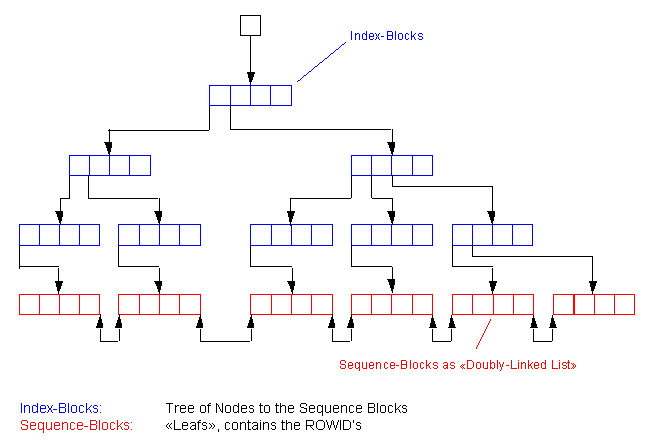
The oldest and most popular type of Oracle indexing is a standard B-TREE index. The B-TREE index was introduced in the earliest releases of Oracle and remains widely used with Oracle.
Oracle offers several options when creating an index using the default B-TREE structure. It allows you to index on multiple columns (concatenated indexes) to improve access speeds. Also, it allows for individual columns to be sorted in different orders. For example, we could create a B-TREE index on a column called name in ascending order and have a second column within the index that displays the sal column in descending order.CREATE INDEX idx_name ON emp (
name ASC,
sal DESC
);While B-TREE indexes are great for simple queries, they are not very good for the following situations:
Low-cardinality columns. Columns with less than 200 distinct values do not have the selectivity required in order to benefit from standard B-TREE index structures.
No support for SQL functions. B-TREE indexes are not able to support SQL queries using Oracle's built-in functions.
Online Index Rebuilds
Online index rebuilds allow DML operations on the base table during index creation.
The syntax for an online rebuild is:ALTER INDEX idx_name REBUILD ONLINE;
When the ONLINE keyword is used as part of the CREATE or ALTER syntax the current index is left intact while a new copy of the index is built, allowing DML to access the old index. Any alterations to the old index are recorded in a Index Organized Table known as a «journal table». Once the rebuild is complete the alterations from the journal table are merged into the new index. The process will skip any locked rows and commit every 20 rows. Once the merge operation is complete the data dictionary is updated and the old index is dropped. DML access is only blocked during the data dictionary updates, which complete very quickly.
Ein B-TREE Index kann in den folgenden Fällen nicht verwendet werden
NULL Werte sind nicht im Index gespeichert und können nur in der Tabelle mittels Full Table Scan gefunden werden.
... WHERE column IS NULL;
(Index)
... WHERE column IS NOT NULL;(Index)Alle Funktionen direkt auf der Column verhindern den Indexzugriff
... WHERE SUBSTR(ename,1,7) = 'CAPITAL';
(Index)
... WHERE ename LIKE 'CAPITAL'; (Index OK)
... WHERE TRUNC(edate) = TRUNC(sysdate)(Index)
... WHERE edate BETWEEN TRUNC(sysdate) (Index OK)
AND TRUNC(sysdate) + .99999;Ungleich Operator verhindert Indexzugriff
... WHERE amount != Wildcard0;
(Index)
... WHERE amount > 0; (Index OK)Berechnungen verhindern den Indexzugriff
... WHERE amount + 3000 < 5000;
(Index)
... WHERE amount < 2000; (Index OK)Wildcard % auf erstem Zeichen verhindert Indexzugriff
... WHERE ename LIKE '%ueller';
(Index)Gleiche Columns auf beiden Seiten verhindern Indexzugriff
... WHERE ename = NVL(var, ename);
(Index)
... WHERE ename LIKE NVL(var, '%'); (Index OK)String Concatenierung verhindert den Indexzugriff
... WHERE ename || vname = 'XYZ';
(Index)
... WHERE ename = 'XY' AND vname = 'Z'; (Index OK)Mehr als ein Index (auf ename und deptno) pro Tabelle kann nur verwendet werden, wenn alles Equality-Searches mit NON-UNIQUE Indexes sind. Hier führt Oracle einen Index-Merge durch.
... WHERE ename LIKE 'XY%' AND deptno = 10; (ein Index)
... WHERE ename = 'XY' AND deptno = 10; (beide Indexe)Oracle erlaubt einen Index über mehrere Attribute in der gleichen Tabelle zu erstellen. Ein solcher concatenated Index eröffnet dem Optimizer ideale Zugriffe, die von zwei einzelnen Indexes nicht zu lösen sind. Im folgenden Beispiel ist ein Index über (deptno, ename) vorhanden.
SELECT ename, sal, deptno
FROM emp
WHERE ename LIKE 'KIN%'
AND deptno = 10; (Index OK)
SELECT ename, sal, deptno
FROM emp
WHERE deptno = 10; (Index OK)
SELECT ename, sal, deptno
FROM emp
WHERE ename LIKE 'KIN%';(Index)Im dritten Beispiel kann der Index nicht benutzt werden, da das Attribut ename im Index an zweiter Stelle steht.
NOT verhindert den Indexzugriff
SELECT ename, sal, deptno
FROM emp
WHERE deptno NOT = 0(Index)
SELECT ename, sal, deptno
FROM emp
WHERE deptno > 0 (Index OK)Manchmal will man einen Indexzugriff explizit verhindern. Dies wird mit einer Addition von 0 oder einer Concatenierung eines Leerstrings erreicht.
SELECT ename, sal, deptno
FROM emp
WHERE deptno + 0 = 10(Index)
SELECT ename, sal, deptno
FROM emp
WHERE ename || '' = 'MU%'(Index)
Bitmapped Indexes
Oracle bitmap indexes are very different from standard B-TREE indexes. In bitmap structures, a two-dimensional array is created with one column for every row in the table being indexed. Each column represents a distinct value within the bitmapped index.
This two-dimensional array represents each value within the index multiplied by the number of rows in the table. At row retrieval time, Oracle decompresses the bitmap into the RAM data buffers so it can be rapidly scanned for matching values. These matching values are delivered to Oracle in the form of a Row-ID list, and these Row-ID values may directly access the required information.
The real benefit of bitmapped indexing occurs when one table includes multiple bitmapped indexes. Each individual column may have low cardinality. The creation of multiple bitmapped indexes provides a very powerful method for rapidly answering difficult SQL queries.
Bitmap Indexes and Deadlocks (Example)
Bitmap indexes are not appropriate for tables that have lots of single row DML operations (inserts) and especially concurrent single row DML operations. Deadlock situations are the result of concurrent inserts as the following example shows: Open two windows, one for Session 1 and one for Session 2
Session 1 Session 2 create table bitmap_index_demo (
value varchar2(20)
);
insert into bitmap_index_demo
select decode(mod(rownum,2),0,'M','F')
from all_objects;create bitmap index
bitmap_index_demo_idx
on bitmap_index_demo(value);
insert into bitmap_index_demo
values ('M');
1 row created.
insert into bitmap_index_demo
values ('F');
1 row created.insert into bitmap_index_demo
values ('F');
...... waiting ......
ERROR at line 1:
ORA-00060: deadlock detected while waiting for resourceinsert into bitmap_index_demo
values ('M');
...... waiting ......
Eigenschaften von Bitmapped Indexen
Nur der neue Optimizer CBO kann Bitmapped Indexe verwenden.
Verknüpfte Bitmapped Indexes sind möglich.
NULL Werte können ebenfalls im Bitmapped Index gefunden werden. Das heisst also, das Abfragen auf NULL und IS NULL möglich sind.
Bitmapped Indexe können auch != Abfragen lösen.
Bitmapped Indexe eignen sich für SELECT COUNT(*) Abfragen.
Das Nachführen von Bitmapped Indexen ist aufwendig.
Das Locking eines Bit ist nicht möglich, deshalb lockt Oracle einen gesamten Index-Block, was zu Locking Problemen führen kann. Bitmapped Indexe sollten also in OLTP Datenbanken mit gleichzeitigen DML Befehlen auf der gleichen Tabelle nicht eingesetzt werden. In DataWareHouse Anwendungen bieten sie sehr grosse Vorteile.
Function-based Indexes
One of the most important advances in Oracle indexing is the introduction of function-based indexing. Function-based indexes allow creation of indexes on expressions, internal functions, and user-written functions in PL/SQL and Java. Function-based indexes ensure that the Oracle designer is able to use an index for its query.
Select * from customer where substr(cust_name,1,4) = ‘BURL';
Select * from customer where to_char(order_date,'MM') = '01;
Select * from customer where upper(cust_name) = ‘JONES';
Select * from customer where initcap(first_name) = ‘Mike';Oracle always interrogates the where clause of the SQL statement to see if a matching index exists. By using function-based indexes, the Oracle designer can create a matching index that exactly matches the predicates within the SQL where clause. This ensures that the query is retrieved with a minimal amount of disk I/O and the fastest possible speed.
How to enable Function Based Indexes
The following is a list of what needs to be done to use function based indexes:
- You must have the system privilege query rewrite to create function based indexes on tables in your own schema.
- You must have the system privilege global query rewrite to create function based indexes on tables in other schemas
- For the optimizer to use function based indexes, the following session or system variables must be set:
QUERY_REWRITE_ENABLED=TRUE
QUERY_REWRITE_INTEGRITY=TRUSTEDYou may enable these at either the session level with ALTER SESSION or at the system level via ALTER SYSTEM or by setting them in the init.ora parameter file. The meaning of query_rewrite_enabled is to allow the optimizer to rewrite the query allowing it to use the function based index. The meaning of is to tell the optimizer to «trust» that the code marked deterministic by the programmer is in fact deterministic. If the code is in fact not deterministic (that is, it returns different output given the same inputs), the resulting rows from the index may be incorrect.
- Use the Cost Based Optimizer. Function based indexes are only visible to the Cost Based Optimizer and will not be used by the Rule Based Optimizer ever.
- Use substr() to constrain return values from user written functions that return VARCHAR2 or RAW types. Optionally hide the substr in a view (recommended).
Once the above list has been satisfied, it is as easy as «CREATE INDEX» from there on in. The optimizer will find and use your indexes at runtime for you.
|
Simple Example: UPPER
Simple Example: Calculation
Advanced Example: Modified «soundex» routine in PL/SQL
The important things to note here are that:
Advanced Example: Extend Constraints using Function Based Indexes
Advanced Example: How to enforce a unique condition selectively
Example
Conclusion
Advanced Example: How to Index only some Rows in a Table
Testing the Function Based Index
Simulate some processing
Conclusion on Function Based Indexes
|
Index-organized tables
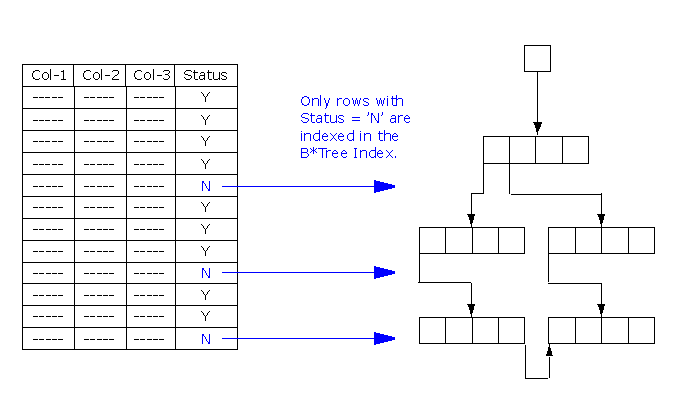
Index-organized tables are tables with data rows grouped according to the primary key. The attributes of index-organized tables are stored entirely within the physical data structures for the index. Index-organized tables provide fast key-based access to table data for queries involving exact match and range searches. Changes to the table data (such as adding new rows, updating rows, or deleting rows) result only in updating the index structure (because there is no separate table storage area). Also, storage requirements are reduced because key columns are not duplicated in the table and index. The remaining non-key columns are stored in the index structure.
Index-organized tables are particularly useful when you are using applications that must retrieve data based on a primary key such as intersection tables.
Note the following important constraints
The data in an index-organized table is not duplicated.
Index-organized tables can be reorganized with the ALTER TABLE
statement MOVE clauseIndex-organized table must have a Primary Key
Index-organized tables may not have unique constraints.
Cannot contain LONGs or LOBs.
The DBA_TABLES data dictionary view contains two new columns, IOT_NAME and IOT_TYPE, to provide information on index-organized tables.
Here is an example
CREATE TABLE my_intersection (
id1 NUMBER(15) NOT NULL,
id2 NUMBER(15) NOT NULL,
job VARCHAR2(500) NULL,
CONSTRAINT pk_my_intersection
PRIMARY KEY (id1,id2)
)
ORGANIZATION INDEX
STORAGE (INITIAL 256K NEXT 256K PCTINCREASE 0)
TABLESPACE idx
INCLUDING job
OVERFLOW TABLESPACE tab;
Bitmap Join Indexes
Overview
A join index is an index structure which spans multiple tables and improves the performance of joins of those tables. With materialized views, Bitmap join indexes can be particularly useful for star queries. Due to their space-efficient compressed storage, bitmap join indexes also take up little disk space.
Bitmap join indexes represent the join of columns in two or more tables. With a bitmap join index, the value of a column in one table (generally a dimension table) is stored with the associated ROWIDs of the like value in other tables that the index is defined on. This provides fast join access between the tables, if that query uses the columns of the bitmap join index.
Example
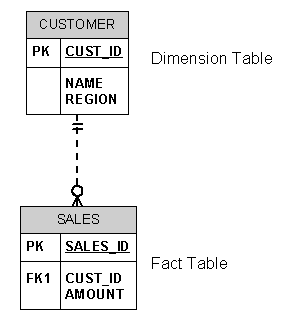
Bitmap join indexes are best understood by examining a simple example. Suppose that a data warehouse contains a star schema with a fact table named SALES and a dimension table named CUSTOMER which holds each customer's home location. A bitmap join index can be created which indexes SALES by customer home locations.
Create the tables first:
DROP TABLE sales;
CREATE TABLE sales (
sales_id NUMBER(4) NOT NULL,
cust_id NUMBER(4) NOT NULL,
amount NUMBER(6) NOT NULL
)
/
DROP TABLE customer;
CREATE TABLE customer (
cust_id NUMBER(4) NOT NULL,
name VARCHAR2(20) NOT NULL,
region VARCHAR2(100) NOT NULL
)
/
ALTER TABLE customer ADD (
CONSTRAINT pk_customer
PRIMARY KEY (cust_id)
)
/
ALTER TABLE sales ADD (
CONSTRAINT pk_sales
PRIMARY KEY (sales_id)
)
/
ALTER TABLE sales ADD (
CONSTRAINT fk_sales_customer
FOREIGN KEY (cust_id)
REFERENCES customer (cust_id)
)
/
INSERT INTO customer VALUES (1,'Müller','Thun');
INSERT INTO customer VALUES (2,'Meier','Bern');
INSERT INTO customer VALUES (3,'Holzer','Münsigen');
INSERT INTO customer VALUES (4,'Ammann','Interlaken');
INSERT INTO customer VALUES (5,'Glaus','Gunten');
INSERT INTO customer VALUES (6,'Keller','Oberhofen');
INSERT INTO customer VALUES (7,'Indermühle','Gwatt');
INSERT INTO customer VALUES (8,'Stoller','Wimmis');
INSERT INTO customer VALUES (9,'Marty','Noflen');
INSERT INTO customer VALUES (10,'Schweizer','Seftigen');
COMMIT;
INSERT INTO sales VALUES (1,1,570);
INSERT INTO sales VALUES (2,10,1300);
COMMIT;Usually the dimension table (e.g. CUSTOMER table) is large (and customer-based dimension tables can reach tens of millions of records), then the bitmap join index can vastly improve performance by not requiring any access to the CUSTOMER table. In addition, bitmap join indexes can eliminate some of the key iteration and bitmap merge work which is often present in star queries with bitmap indexes on the fact table.
CREATE BITMAP INDEX cus_sal
ON sales (customer.region)
FROM sales, customer
WHERE sales.cust_id = customer.cust_id;Now, let's create the corresponding query for the created bitmap join index. In this example we added the hint /*+ INDEX_COMBINE (sales cus_sal) */, because we have only a few records in the CUSTOMER table.
set autotrace on
SELECT /*+ INDEX_COMBINE (sales cus_sal) */
SUM (sales.amount)
FROM sales, customer
WHERE sales.cust_id = customer.cust_id
AND customer.region = 'Thun';Execution Plan ---------------------------------------------------------- 0 SELECT STATEMENT Optimizer=CHOOSE 1 0 SORT (AGGREGATE) 2 1 TABLE ACCESS (BY INDEX ROWID) OF 'SALES' 3 2 BITMAP CONVERSION (TO ROWIDS) 4 3 BITMAP INDEX (SINGLE VALUE) OF 'CUS_SAL'The execution plan shows that no access to the (large) CUSTOMER table was necessary for this query!
Bitmap Join Index Restrictions
Join results must be stored, therefore, bitmap join indexes have the following restrictions:
Parallel DML is currently only supported on the fact table. Parallel DML on one of the participating dimension tables will mark the index as unusable.
Only one table can be updated concurrently by different transactions when using the bitmap join index.
No table can appear twice in the join.
You cannot create a bitmap join index on an index-organized table or a temporary table.
The columns in the index must all be columns of the dimension tables.
The dimension table join columns must be either primary key columns or have unique constraints.
If a dimension table has composite primary key, each column in the primary key must be part of the join.
How to measure Index Selectivity
Index Selectivity
B-TREE Indexes improve the performance of queries that select a small percentage of rows from a table. As a general guideline, we should create indexes on tables that are often queried for less than 15% of the table's rows. This value may be higher in situations where all data can be retrieved from an index, or where the indexed columns can be used for joining to other tables.
The ratio of the number of distinct values in the indexed column / columns to the number of records in the table represents the selectivity of an index. The ideal selectivity is 1. Such a selectivity can be reached only by unique indexes on NOT NULL columns.
Example with good Selectivity
A table having 100'000 records and one of its indexed column has 88000 distinct values, then the selectivity of this index is 88'000 / 10'0000 = 0.88.
Oracle implicitly creates indexes on the columns of all unique and primary keys that you define with integrity constraints. These indexes are the most selective and the most effective in optimizing performance. The selectivity of an index is the percentage of rows in a table having the same value for the indexed column. An index's selectivity is good if few rows have the same value.
Example with bad Selectivity
lf an index on a table of 100'000 records had only 500 distinct values, then the index's selectivity is 500 / 100'000 = 0.005 and in this case a query which uses the limitation of such an index will return 100'000 / 500 = 200 records for each distinct value. It is evident that a full table scan is more efficient as using such an index where much more I/O is needed to scan repeatedly the index and the table.
How to Measure Index Selectivity
Manually measure index selectivity
The ratio of the number of distinct values to the total number of rows is the selectivity of the columns. This method is useful to estimate the selectivity of an index before creating it.
select count (distinct job) "Distinct Values" from emp;
Distinct Values
---------------
5select count(*) "Total Number Rows" from emp;
Total Number Rows
-----------------
14
Selectivity = Distinct Values / Total Number Rows
= 5 / 14
= 0.35Automatically measure index selectivity
We can determine the selectivity of an index by dividing the number of distinct indexed values by the number of rows in the table.
create index idx_emp_job on emp(job);
analyze table emp compute statistics;
select distinct_keys from user_indexes
where table_name = 'EMP'
and index_name = 'IDX_EMP_JOB';
DISTINCT_KEYS
-------------
5select num_rows from user_tables
where table_name = 'EMP';
NUM_ROWS
---------
14
Selectivity = DISTINCT_KEYS / NUM_ROWS = 0.35
Selectivity of each individual Column
Assuming that the table has been analyzed it is also possible to query USER_TAB_COLUMNS to investigate the selectivity of each column individually.
select column_name, num_distinct
from user_tab_columns
where table_name = 'EMP';COLUMN_NAME NUM_DISTINCT
------------------------------ ------------
EMPNO 14
ENAME 14
JOB 5
MGR 2
HIREDATE 13
SAL 12
COMM 4
DEPTNO 3
Histograms and the DBMS_STATS Package
The ANALYZE statement
The ANALYZE statement should no more be used to collect optimizer statistics. The COMPUTE and ESTIMATE clauses of ANALYZE statement are supported solely for backward compatibility and may be removed in a future release. The DBMS_STATS package collects a broader, more accurate set of statistics, and gathers statistics more efficiently.
You may continue to use ANALYZE statement to for other purposes not related to optimizer statistics collection:
To use the VALIDATE or LIST CHAINED ROWS clauses
To collect information on free list blocks
Gathering Statistics with DBMS_STATS Procedures
Statistics are gathered using the DBMS_STATS package. This PL/SQL package is also used to modify, view, export, import, and delete statistics.
The DBMS_STATS package can gather statistics on table and indexes, and well as individual columns and partitions of tables.
When you generate statistics for a table, column, or index, if the data dictionary already contains statistics for the object, then Oracle updates the existing statistics. The older statistics are saved and can be restored later if necessary.
When statistics are updated for a database object, Oracle invalidates any currently parsed SQL statements that access the object. The next time such a statement executes, the statement is re-parsed and the optimizer automatically chooses a new execution plan based on the new statistics.
Collect Statistics on Table Level
sqlplus scott/tiger
exec dbms_stats.gather_table_stats ( -
ownname => 'SCOTT', -
tabname => 'EMP', -
estimate_percent => dbms_stats.auto_sample_size, -
method_opt => 'for all columns size auto', -
cascade => true, -
degree => 5 -
)
/
PL/SQL procedure successfully completed.
ownname
Schema of table to analyze. tabname
Name of table. estimate_percent
Percentage of rows to estimate (NULL means compute). Use the constant DBMS_STATS.AUTO_SAMPLE_SIZE to have Oracle determine the appropriate sample size for good statistics. This is the default. method_opt
The default is FOR ALL COLUMNS SIZE AUTO. cascade
Gather statistics on the indexes for this table. Index statistics gathering is not parallelized. Using this option is equivalent to running the GATHER_INDEX_STATS Procedure on each of the table's indexes. Use the constant DBMS_STATS.AUTO_CASCADE to have Oracle determine whether index statistics to be collected or not. degree
Degree of parallelism. The default for degree is NULL. All Parameters / Options can be found in the Oracle Manual
Collect Statistics on Schema Level
sqlplus scott/tiger
exec dbms_stats.gather_schema_stats ( -
ownname => 'SCOTT', -
options => 'GATHER', -
estimate_percent => dbms_stats.auto_sample_size, -
method_opt => 'for all columns size auto', -
cascade => true, -
degree => 5 -
)
/
PL/SQL procedure successfully completed.
ownname
Schema to analyze (
NULLmeans current schema).options
gather
Reanalyzes the whole schema gather empty
Only analyzes tables that have no existing statistics gather stale
Only reanalyzes tables with more than 10% modifications (inserts, updates, deletes). gather auto
Reanalyzes objects which currently have no statistics and objects with stale statistics (Using gather auto is like combining gather stale and gather empty.) Note that both gather stale and gather auto require monitoring. If you issue the alter table xxx monitoring command, Oracle tracks changed tables with the dba_tab_modifications view, which allows you to see the exact number of inserts, updates, and deletes tracked since the last analysis of statistics.
estimate_percent
Percentage of rows to estimate (NULL means compute). Use the constant DBMS_STATS.AUTO_SAMPLE_SIZE to have Oracle determine the appropriate sample size for good statistics. This is the default. method_opt
The default is FOR ALL COLUMNS SIZE AUTO. cascade
Gather statistics on the indexes for this table. Index statistics gathering is not parallelized. Using this option is equivalent to running the GATHER_INDEX_STATS Procedure on each of the table's indexes. Use the constant DBMS_STATS.AUTO_CASCADE to have Oracle determine whether index statistics to be collected or not. degree
Degree of parallelism. The default for degree is NULL. All Parameters / Options can be found in the Oracle Manual
Collect Statistics on Other Levels
DBMS_STATS can collect optimizer statistics on the following levels, see Oracle Manual
GATHER_DATABASE_STATS
GATHER_DICTIONARY_STATS
GATHER_FIXED_OBJECTS_STATS
GATHER_INDEX_STATS
GATHER_SCHEMA_STATS
GATHER_SYSTEM_STATS
GATHER_TABLE_STATS
Statistics for Partitioned Schema Objects
Partitioned schema objects may contain multiple sets of statistics. They can have statistics which refer to the entire schema object as a whole (global statistics), they can have statistics which refer to an individual partition, and they can have statistics which refer to an individual sub-partition of a composite partitioned object.
Unless the query predicate narrows the query to a single partition, the optimizer uses the global statistics. Because most queries are not likely to be this restrictive, it is most important to have accurate global statistics. Therefore, actually gathering global statistics with the DBMS_STATS package is highly recommended.
Oracle Histogram Statistics
If DBMS_STATS discovers an index whose columns are unevenly distributed, it will create histograms for that index to aid the cost-based SQL optimizer in making a decision about index versus full-table scan access.
Example
First we set up a table with some very skewed data - so skewed that when we query WHERE ID=1, Oracle Database will want to use an index on ID, and when we query WHERE ID=99, Oracle Database will not want to use an index.
sqlplus scott/tiger
CREATE TABLE skewed_data
AS
SELECT DECODE(ROWNUM,1,1,99) id,
all_objects.*
FROM all_objects
/
Table created.
CREATE INDEX idx_skewed_data ON skewed_data (id);
Index created.
begin
dbms_stats.gather_table_stats
( ownname => USER,
tabname => 'SKEWED_DATA',
method_opt => 'for all indexed columns size 254',
cascade => TRUE
);
end;
/
PL/SQL procedure successfully completed.
set autotrace traceonly explain
SELECT * FROM skewed_data WHERE id=1;
Execution Plan
----------------------------------------------------------
Plan hash value: 1799207757
-----------------------------------------------------------------------------------------------
| Id | Operation | Name | Rows | Bytes | Cost (%CPU)| Time |
-----------------------------------------------------------------------------------------------
| 0 | SELECT STATEMENT | | 1 | 96 | 2 (0)| 00:00:01 |
| 1 | TABLE ACCESS BY INDEX ROWID| SKEWED_DATA | 1 | 96 | 2 (0)| 00:00:01 |
|* 2 | INDEX RANGE SCAN | IDX_SKEWED_DATA | 1 | | 1 (0)| 00:00:01 |
-----------------------------------------------------------------------------------------------
SELECT * FROM skewed_data WHERE id=99;
Execution Plan
----------------------------------------------------------
Plan hash value: 746880940
---------------------------------------------------------------------------------
| Id | Operation | Name | Rows | Bytes | Cost (%CPU)| Time |
---------------------------------------------------------------------------------
| 0 | SELECT STATEMENT | | 51545 | 4832K| 190 (3)| 00:00:03 |
|* 1 | TABLE ACCESS FULL| SKEWED_DATA | 51545 | 4832K| 190 (3)| 00:00:03 |
---------------------------------------------------------------------------------The Table skewed_data contains a column ID, which is very much skewed most of the values are 99, with one record containing a value of 1. After we index and gather statistics on the table (generating histograms on that indexed column, so the optimizer knows that the data is skewed), we can see that the optimizer prefers an index range scan over a full scan when ID=1 is used and vice versa for ID=99.
Use Histograms
The cost-based optimizer uses data value histograms to get accurate estimates of the distribution of column data. Histograms provide improved selectivity estimates in the presence of data skew, resulting in optimal execution plans with non-uniform data distributions.
Histograms can affect performance and should be used only when they substantially improve query plans. They are useful only when they reflect the current data distribution of a given column. If the data distribution of a column changes frequently, you must re-compute its histogram frequently.
Number of Histograms
The number of Histograms to used is specified with the SIZE parameter in method_opt:
method_opt => 'for all indexed columns size 254',
What are Histograms
Histograms are bands of column values, so that each band contains approximately the same number of rows. The useful information that the histogram provides is where in the range of values the endpoints fall.
Consider the following table column with values between 1 and 100 and a histogram with 10 buckets. If the data in the column is uniformly distributed, then the histogram looks as follows, where the numbers are the endpoint values.
Histogram with Uniform Distribution
The number of rows in each bucket is 1/10 of the total number of rows in the table.
If the data is not uniformly distributed, then the histogram might look as follows:
Histogram with Non-Uniform Distribution
In this case, most of the rows have the value 5 for the column. Only 1/10 of the rows have values between 60 and 100.


Conclusion
The package DBMS_STATS can be used to gather global statistics. It is most important to have accurate global statistics for partitioned schema objects. Histograms can affect performance and should be used only when they substantially improve query plans.
Monitoring Unused Indexes
Overview
Oracle 8 introduced table-usage monitoring to help streamline the process of statistics collection. To automatically gather statistics for a particular table, enable the monitoring attribute using the MONITORING keyword. This keyword is part of the CREATE TABLE and ALTER TABLE statement syntax.
After it is enabled, Oracle monitors the table for DML activity. This includes the approximate number of inserts, updates, and deletes for that table since the last time statistics were gathered. Oracle uses this data to identify tables with stale statistics.
View the data Oracle obtains from monitoring these tables by querying the USER_TAB_MODIFICATIONS view.
With Oracle 9, you can now also monitor the usage of indexes. Unused indexes are, of course, a waste of space, and also can cause performance problems, as Oracle is required to maintain the index each time the table associated with the index is involved in a DML operation.
Index Monitoring
Use ALTER INDEX index_name MONITORING USAGE clause to begin the collection of statistics on index usage. This clause is useful in determining whether an index is being used.
Example
Create an index on the EMP table, issue a SELECT statement which will use the index (check this with AUTOTRACE) and monitor the index during this operation.
CONNECT scott/tiger
ALTER TABLE emp ADD CONSTRAINT pk_emp PRIMARY KEY (empno);
ALTER INDEX pk_emp MONITORING USAGE;
SET AUTOTRACE ON;
SELECT ename FROM emp WHERE empno = 7900;
Execution Plan
-------------------------------------------------------
0 SELECT STATEMENT Optimizer=CHOOSE
1 0 TABLE ACCESS (BY INDEX ROWID) OF 'EMP'
2 1 INDEX (UNIQUE SCAN) OF 'PK_EMP' (UNIQUE)
COLUMN index_name FORMAT A10
COLUMN table_name FORMAT A10
COLUMN start_monitoring FORMAT A10
COLUMN end_monitoring FORMAT A10
SELECT * FROM v$object_usage;
INDEX_NAME TABLE_NAME MON USE START_MONI END_MONITO
---------- ---------- --- --- ---------- ----------
PK_EMP EMP YES YES 03/30/2002
ALTER INDEX pk_emp NOMONITORING USAGE;While the index is in monitoring mode, you can use the V$OBJECT_USAGE view to determine whether the index has been used. Note that the view will show usage information only when queried by the index owner. The V$OBJECT_USAGE column USED can be queried. If the columns value is NO, then the index has not been used. If the columns value is YES, then the index has been used.
Reversing Indexes
Creating a reverse key index, compared to a standard index, reverses the bytes of each column indexed (except the rowid) while keeping the column order.
In general, an Oracle reverse key index relieve data block contention (buffer busy waits) when inserting into any index where the index key is a monotonically increasing value which must be duplicated in the higher-level index nodes.
With the index key reversal, only the lowest-level index node is changed, and not all of the high-order index nodes, resulting in far faster insert speed. For updates, Oracle updates the index nodes with each update statement.
Reverse Benefits
- By reversing the keys of the index, the insertions become distributed across all leaf keys in the index.
- Reverse key indexes are also used to reduce contention in high concurrent insert situations
- Reverse-key indexes reduce «hot spots» in indexes, especially primary key indexes, by reversing the bytes of the leaf blocks and thus eliminating the contention for leaf blocks across instances.
Reverse Costs
One of the things to be careful about reverse key indexes is that you cannot perform range scans on them. Because the entries are stored as reversed you lose the capability to range scan on that index.
Example: Table with a number based reverse key index
Create the Test Table
CREATE TABLE reverse_number (id NUMBER, name VARCHAR2(20));
Next, create a Reverse Key Index on the id column, non-unique index is being used
CREATE INDEX reverse_index ON reverse_number(id) REVERSE;
Let's insert a whole bunch of rows and collect statistics
INSERT INTO reverse_number
SELECT rownum, 'Your Message'
FROM dual CONNECT BY LEVEL <= 1000000;
COMMIT;
EXEC dbms_stats.gather_table_stats (
ownname=>'TEST',
tabname=>'REVERSE_NUMBER',
estimate_percent=>null,
cascade=>TRUE,
method_opt=>'FOR ALL COLUMNS SIZE 1'
);Let's attempt a very simple, innocent looking range scan predicate
set timing on
set autotrace on explain
SELECT * FROM reverse_number WHERE id BETWEEN 42 AND 43;Execution Plan
------------------------------------------------------------------------------------
| Id | Operation | Name | Rows | Bytes | Cost (%CPU)| Time |
------------------------------------------------------------------------------------
| 0 | SELECT STATEMENT | | 3 | 51 | 643 (2)| 00:00:08 |
|* 1 | TABLE ACCESS FULL| REVERSE_NUMBER | 3 | 51 | 643 (2)| 00:00:08 |
------------------------------------------------------------------------------------No good, Oracle performed a Full Table Scan even though we were only after 2 rows. You can try to hint the thing as much as you want but the CBO does not consider Index Range Scans with Range Predicates.
SELECT /*+ INDEX(rd) */ * FROM reverse_number rd WHERE id BETWEEN 42 AND 43;
Execution Plan
----------------------------------------------------------------------------------------------
| Id | Operation | Name | Rows | Bytes | Cost (%CPU)| Time |
----------------------------------------------------------------------------------------------
| 0 | SELECT STATEMENT | | 3 | 51 | 3027 (1)| 00:00:37 |
| 1 | TABLE ACCESS BY INDEX ROWID| REVERSE_NUMBER | 3 | 51 | 3027 (1)| 00:00:37 |
|* 2 | INDEX FULL SCAN | REVERSE_INDEX | 43 | | 2984 (1)| 00:00:36 |
----------------------------------------------------------------------------------------------Equality conditions are not a problem.
SELECT * FROM reverse_number WHERE id = 42;
Execution Plan
----------------------------------------------------------------------------------------------
| Id | Operation | Name | Rows | Bytes | Cost (%CPU)| Time |
----------------------------------------------------------------------------------------------
| 0 | SELECT STATEMENT | | 1 | 17 | 4 (0)| 00:00:01 |
| 1 | TABLE ACCESS BY INDEX ROWID| REVERSE_NUMBER | 1 | 17 | 4 (0)| 00:00:01 |
|* 2 | INDEX RANGE SCAN | REVERSE_INDEX | 1 | | 3 (0)| 00:00:01 |
----------------------------------------------------------------------------------------------If a range predicate can be rewritten as an IN condition Oracle can convert the predicate to separate OR equality conditions and can use the Reverse Key Index
SELECT * FROM reverse_number WHERE id IN (42, 43);
Execution Plan
-----------------------------------------------------------------------------------------------
| Id | Operation | Name | Rows | Bytes | Cost (%CPU)| Time |
-----------------------------------------------------------------------------------------------
| 0 | SELECT STATEMENT | | 2 | 34 | 6 (0)| 00:00:01 |
| 1 | INLIST ITERATOR | | | | | |
| 2 | TABLE ACCESS BY INDEX ROWID| REVERSE_NUMBER | 2 | 34 | 6 (0)| 00:00:01 |
|* 3 | INDEX RANGE SCAN | REVERSE_INDEX | 2 | | 4 (0)| 00:00:01 |
-----------------------------------------------------------------------------------------------
Example: Table with a text based reverse key index
CREATE TABLE reverse_text AS SELECT * FROM dba_objects;
CREATE INDEX idx_reverse_text ON reverse_text(object_name) REVERSE;
EXEC dbms_stats.gather_table_stats (
ownname=>'TEST',
tabname=>'REVERSE_TEXT',
estimate_percent=> null,
cascade=> TRUE,
method_opt=>'FOR ALL COLUMNS SIZE 1'
);SELECT * FROM reverse_text WHERE object_name LIKE 'ARCOS%';Execution Plan
----------------------------------------------------------------------------------
| Id | Operation | Name | Rows | Bytes | Cost (%CPU)| Time |
----------------------------------------------------------------------------------
| 0 | SELECT STATEMENT | | 2 | 186 | 146 (1)| 00:00:02 |
|* 1 | TABLE ACCESS FULL| REVERSE_TEXT | 2 | 186 | 146 (1)| 00:00:02 |
----------------------------------------------------------------------------------Index access path not even considered by the CBO. However, again Oracle can pick up on when a LIKE is really equivalent to an equality predicate.
SELECT * FROM reverse_text WHERE object_name LIKE 'ARCOS';Execution Plan ------------------------------------------------------------------------------------------------ | Id | Operation | Name | Rows | Bytes | Cost (%CPU)| Time | ------------------------------------------------------------------------------------------------ | 0 | SELECT STATEMENT | | 2 | 186 | 2 (0)| 00:00:01 | | 1 | TABLE ACCESS BY INDEX ROWID| REVERSE_TEXT | 2 | 186 | 2 (0)| 00:00:01 | |* 2 | INDEX RANGE SCAN | IDX_REVERSE_TEXT | 2 | | 1 (0)| 00:00:01 | ------------------------------------------------------------------------------------------------The index is considered in this example.