Oracle Partitioning Survival Guide
Martin Zahn, 24.03.2009
Overview
Anyone with un-partitioned databases over 500 gigabytes is a disaster. Databases become unmanageable, and ...
... serious problems occur like
SQL queries with full-table scans take hours to complete
Recovery - Files recovery takes days, not minutes
Maintenance - Rebuilding indexes may last very long
There are many compelling reasons to implement Oracle partitioning for larger databases, and Oracle partitioning has become the de-facto standard for systems over 500 gigabytes.
Key Issues
Partitioning addresses key issues in supporting very large tables and indexes by
Letting you decompose them into smaller and more manageable pieces called partitions.
SQL queries and DML statements do not need to be modified in order to access partitioned tables.
Partitioning is entirely transparent to applications.
Each partition of a table or index must have the same logical attributes, such as column names, datatypes, and constraints, but each partition can have separate physical attributes such as pctfree
Partitioning Methods
Oracle provides the following partitioning methods
Range Partitioning
List Partitioning
Hash Partitioning
Composite Partitioning
Partition Key
Each row in a partitioned table is unambiguously assigned to a single partition. The partition key is a set of one or more columns that determines the partition for each row. Oracle automatically directs insert, update, and delete operations to the appropriate partition through the use of the partition key.
Index Partitioning
Just like partitioned tables, partitioned indexes improve manageability, availability, performance, and scalability. They can either be
- Partitioned independently (global indexes)
- Automatically linked to a table's partitioning method (local indexes).
Whenever possible, you should try to use local indexes because they are easier to manage.
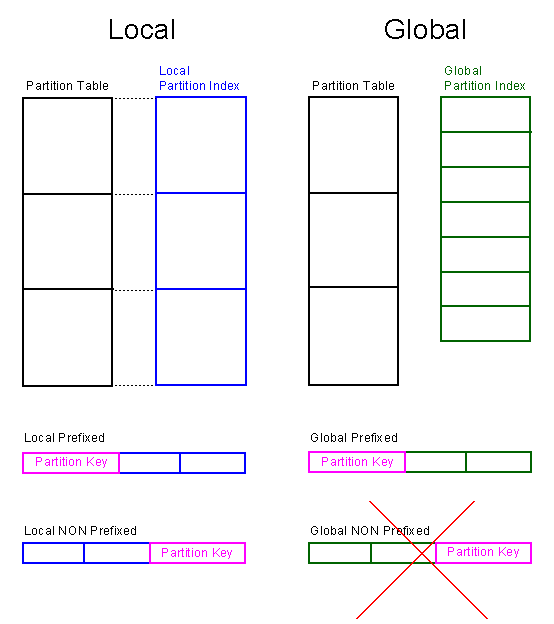
Local prefixed Index
- 1 Index per table partition
- Leftmost attribute of the index is the partition key
- UNIQUE index is possible
Local NON prefixed Index
- 1 Index per table partition
- Leftmost attribute of the index is NOT the partition key
- UNIQUE possible if partition key is part of the index.
Global prefixed Index
- Independent of table partition
- Number of index partitions must not correspond with number of table partitions.
- Establish fast search over all table partitions, but index rebuild necessary if table partition are changed. This must be done manually.
Global NON prefixed Index
- Oracle10 does not support global NON prefixed indexes.
ORA-14038: GLOBAL partitioned index must be prefixed
Range Partitioning
Range partitioning maps data to partitions based on ranges of partition key values that you establish for each partition. It is the most common type of partitioning and is often used with dates. For example, you might want to partition sales data into monthly partitions.
When using range partitioning, consider the following rules:
Each partition has a VALUES LESS THAN clause, which specifies a noninclusive upper bound for the partitions. Any values of the partition key equal to or higher than this literal are added to the next higher partition.
All partitions, except the first, have an implicit lower bound specified by the VALUES LESS THAN clause on the previous partition.
A MAXVALUE literal can be defined for the highest partition. MAXVALUE represents a virtual infinite value that sorts higher than any other possible value for the partition key, including the null value.
A typical example is given below. The statement creates a table (sales) that is range partitioned on the sdate field which is the partition key.
CREATE TABLE sales
(
sid NUMBER(5),
sdate DATE,
name VARCHAR2(30),
amount NUMBER(10)
)
PARTITION BY RANGE (sdate)
(
PARTITION sales_jan2009 VALUES LESS THAN(TO_DATE('02/01/2009','MM/DD/YYYY')),
PARTITION sales_feb2009 VALUES LESS THAN(TO_DATE('03/01/2009','MM/DD/YYYY')),
PARTITION sales_mar2009 VALUES LESS THAN(TO_DATE('04/01/2009','MM/DD/YYYY')),
PARTITION sales_apr2009 VALUES LESS THAN(TO_DATE('05/01/2009','MM/DD/YYYY')),
PARTITION sales_max VALUES LESS THAN(MAXVALUE)
)
ENABLE ROW MOVEMENT;
MAXVALUE
What happens when an incoming record in an INSERT statement has a value in the partitioning key column, for which no partitions have been defined? The INSERT will fail. However, if you have defined a default partition by, for example, using the MAXVALUE clause, the INSERT will not fail and the new record will go into the default partition.
Row Movement
The row movement clause, either ENABLE ROW MOVEMENT or DISABLE ROW MOVEMENT can be specified. This clause either enables or disables the migration of a row to a new partition if its key is updated. The default is DISABLE ROW MOVEMENT.
ORA-14039
The index used to enforce the primary key can be local if and only if the partition key is, in fact, contained in the primary key. Otherwise, you will receive an ORA-14039 error (partitioning columns must form a subset of key columns of a unique index).
Local NON Prefixed Index
ALTER TABLE sales ADD
(
CONSTRAINT pk_sales
PRIMARY KEY (sid,sdate)
USING INDEX
LOCAL
(
PARTITION sales_jan2009 TABLESPACE users PCTFREE 20,
PARTITION sales_feb2009 TABLESPACE users PCTFREE 50,
PARTITION sales_mar2009 TABLESPACE users PCTFREE 20,
PARTITION sales_apr2009 TABLESPACE users PCTFREE 20,
PARTITION sales_max TABLESPACE users PCTFREE 20
)
);
Local Prefixed Index
ALTER TABLE sales ADD
(
CONSTRAINT pk_sales
PRIMARY KEY (sdate,sid)
USING INDEX
LOCAL
(
PARTITION sales_jan2009 TABLESPACE users PCTFREE 20,
PARTITION sales_feb2009 TABLESPACE users PCTFREE 50,
PARTITION sales_mar2009 TABLESPACE users PCTFREE 20,
PARTITION sales_apr2009 TABLESPACE users PCTFREE 20,
PARTITION sales_max TABLESPACE users PCTFREE 20
)
);
Global Prefixed Index
ALTER TABLE sales ADD
(
CONSTRAINT pk_sales
PRIMARY KEY (sid)
USING INDEX
GLOBAL PARTITION BY RANGE (sid)
(
PARTITION p1 VALUES LESS THAN (10000),
PARTITION p2 VALUES LESS THAN (20000),
PARTITION p3 VALUES LESS THAN (30000),
PARTITION p4 VALUES LESS THAN (40000),
PARTITION p5 VALUES LESS THAN (50000),
PARTITION max VALUES LESS THAN (MAXVALUE)
)
);CREATE INDEX sales_idx ON sales (sid,amount)
GLOBAL PARTITION BY RANGE (sid)
(
PARTITION p1 VALUES LESS THAN (10000),
PARTITION p2 VALUES LESS THAN (20000),
PARTITION p3 VALUES LESS THAN (30000),
PARTITION p4 VALUES LESS THAN (40000),
PARTITION p5 VALUES LESS THAN (50000),
PARTITION max VALUES LESS THAN (MAXVALUE)
);
Global NON Prefixed Index
CREATE INDEX sales_idx ON sales (amount,sid)
GLOBAL PARTITION BY RANGE (sid)
(
PARTITION p1 VALUES LESS THAN (10000),
PARTITION p2 VALUES LESS THAN (20000),
PARTITION p3 VALUES LESS THAN (30000),
PARTITION p4 VALUES LESS THAN (40000),
PARTITION p5 VALUES LESS THAN (50000),
PARTITION max VALUES LESS THAN (MAXVALUE)
);GLOBAL PARTITION BY RANGE (sid)
ORA-14038: GLOBAL partitioned index must be prefixed
Hash Partitioning
Hash partitioning enables easy partitioning of data that does not lend itself to range or list partitioning. It does this with a simple syntax and is easy to implement. The number of partitions must be a power of 2 (2, 4, 8, 16...) and can be specified by the PARTITIONS ... STORE IN clause:
It is a better choice than range partitioning when:
- You do not know beforehand how much data maps into a given range
- The sizes of range partitions would differ quite substantially or would be difficult to balance manually
CREATE TABLE sales
(
sid NUMBER(5),
sdate DATE,
name VARCHAR2(30),
amount NUMBER(10)
)
PARTITION BY HASH (name)
PARTITIONS 4
STORE IN
(
users,
users,
users,
users
);or:
CREATE TABLE sales
(
sid NUMBER(5),
sdate DATE,
name VARCHAR2(30),
amount NUMBER(10)
)
PARTITION BY HASH (name)
(
PARTITION p1 TABLESPACE users,
PARTITION p2 TABLESPACE users,
PARTITION p3 TABLESPACE users,
PARTITION p4 TABLESPACE users
);
List Partitioning
List partitioning enables you to explicitly control how rows map to partitions. You do this by specifying a list of discrete values for the partitioning key in the description for each partition. This is different from range partitioning, where a range of values is associated with a partition and from hash partitioning, where a hash function controls the row-to-partition mapping. The advantage of list partitioning is that you can group and organize unordered and unrelated sets of data in a natural way.
The details of list partitioning can best be described with an example. In this case, let's say you want to partition a sales table by region.
CREATE TABLE sales
(
sid NUMBER(5),
sdate DATE,
region VARCHAR2(30),
amount NUMBER(10)
)
PARTITION BY LIST (region)
(
PARTITION sales_region1 VALUES ('BE','ZH','VS'),
PARTITION sales_region2 VALUES ('GR','SO','TG','JU'),
PARTITION sales_region3 VALUES ('GE','NE','VD'),
PARTITION sales_other VALUES(DEFAULT)
);
insert into sales (sid,sdate,region,amount) values(1,'05-JAN-2009','BE',200);
insert into sales (sid,sdate,region,amount) values(1,'05-JAN-2009','TI',500);
commit;
select count(*) from sales partition (sales_region1);
COUNT(*)
----------
1
select count(*) from sales partition (sales_region2);
COUNT(*)
----------
0
select count(*) from sales partition (sales_region3);
COUNT(*)
----------
0
select count(*) from sales partition (sales_other);
COUNT(*)
----------
1
Composite partitioning
Composite partitioning partitions data using the range method, and within each partition, subpartitions it using the hash or list method.
Range-Hash Example
This statement creates a table sales that is range partitioned
on the sdate field and hash subpartitioned on sid.CREATE TABLE SALES
(
sid NUMBER(5),
sdate DATE,
region VARCHAR2(30 BYTE),
amount NUMBER(10)
)
PARTITION BY RANGE (sdate)
SUBPARTITION BY HASH (sid)
(
PARTITION sales01 VALUES LESS THAN(TO_DATE('01/01/2000','MM/DD/YYYY'))
TABLESPACE USERS
(
SUBPARTITION sales01_01 TABLESPACE USERS,
SUBPARTITION sales01_02 TABLESPACE USERS
),
PARTITION sales02 VALUES LESS THAN(TO_DATE('02/01/2000','MM/DD/YYYY'))
TABLESPACE USERS
(
SUBPARTITION sales02_01 TABLESPACE USERS,
SUBPARTITION sales02_02 TABLESPACE USERS
),
PARTITION sales03 VALUES LESS THAN(TO_DATE('03/01/2000','MM/DD/YYYY'))
TABLESPACE USERS
(
SUBPARTITION sales03_01 TABLESPACE USERS,
SUBPARTITION sales03_02 TABLESPACE USERS
),
PARTITION sales04 VALUES LESS THAN(TO_DATE('04/01/2000','MM/DD/YYYY'))
TABLESPACE USERS
(
SUBPARTITION sales04_01 TABLESPACE USERS,
SUBPARTITION sales04_02 TABLESPACE USERS
),
PARTITION sales05 VALUES LESS THAN (MAXVALUE)
TABLESPACE USERS
(
SUBPARTITION sales05_01 TABLESPACE USERS,
SUBPARTITION sales05_02 TABLESPACE USERS
)
)
ENABLE ROW MOVEMENT;
Range-List Example
This statement creates a table sales that is range partitioned on the sdate field and list subpartitioned on region. When you use a template, Oracle names the subpartitions by concatenating the partition name, an underscore, and the subpartition name from the template. Oracle places this subpartition in the tablespace specified in the template.
CREATE TABLE SALES
(
sid NUMBER(5),
sdate DATE,
region VARCHAR2(30 BYTE),
amount NUMBER(10)
)
PARTITION BY RANGE (sdate)
SUBPARTITION BY LIST (region)
SUBPARTITION TEMPLATE
(
SUBPARTITION east VALUES('NY','VA','FL') TABLESPACE users,
SUBPARTITION west VALUES('CA','OR','HI') TABLESPACE users,
SUBPARTITION cent VALUES('IL','TX','MO') TABLESPACE users
)
(
PARTITION sales01 VALUES LESS THAN(TO_DATE('01/01/2000','MM/DD/YYYY')),
PARTITION sales02 VALUES LESS THAN(TO_DATE('02/01/2000','MM/DD/YYYY')),
PARTITION sales03 VALUES LESS THAN(TO_DATE('03/01/2000','MM/DD/YYYY')),
PARTITION sales04 VALUES LESS THAN(TO_DATE('04/01/2000','MM/DD/YYYY')),
PARTITION sales05 VALUES LESS THAN(TO_DATE('05/01/2000','MM/DD/YYYY')),
PARTITION sales06 VALUES LESS THAN(TO_DATE('06/01/2000','MM/DD/YYYY')),
PARTITION sales07 VALUES LESS THAN (MAXVALUE)
);
Alter Partitions
Some Maintenance Operations on Partitions include
Adding Partitions
Coalescing Partitions
Dropping Partitions
Exchanging Partitions
Merging Partitions
Moving Partitions
Renaming Partitions
Splitting Partitions
Truncating Partitions
Some operations are show next, first create the following Partition Table
CREATE TABLE req (
bkg_id NUMBER(15) NOT NULL, -- Primary Key
req_id NUMBER(15) NOT NULL, -- Primary Key
date_req DATE NOT NULL, -- Partition Key
status NUMBER(2) NOT NULL)
PARTITION BY RANGE (date_req)
(
PARTITION req_01_2009 VALUES LESS THAN (TO_DATE('01.02.2009','DD.MM.YYYY')),
PARTITION req_02_2009 VALUES LESS THAN (TO_DATE('01.03.2009','DD.MM.YYYY')),
PARTITION req_03_2009 VALUES LESS THAN (TO_DATE('01.04.2009','DD.MM.YYYY')),
PARTITION req_04_2009 VALUES LESS THAN (TO_DATE('01.05.2009','DD.MM.YYYY')),
PARTITION req_05_2009 VALUES LESS THAN (MAXVALUE)
);
CREATE UNIQUE INDEX pk_req ON req (bkg_id,req_id)
GLOBAL
PARTITION BY RANGE (bkg_id,req_id)
(
PARTITION pk_req_01 VALUES LESS THAN (100000,100000),
PARTITION pk_req_02 VALUES LESS THAN (200000,200000),
PARTITION pk_req_03 VALUES LESS THAN (300000,300000),
PARTITION pk_req_04 VALUES LESS THAN (MAXVALUE,MAXVALUE)
);
ALTER TABLE req ADD
(
CONSTRAINT pk_req
PRIMARY KEY (bkg_id,req_id)
);Create a local Prefixed Index
CREATE INDEX idx_req1 ON req (date_req,req_id)
LOCAL
(
PARTITION req_01_2009,
PARTITION req_02_2009,
PARTITION req_03_2009,
PARTITION req_04_2009,
PARTITION req_05_2009
);Create a Bitmap Index
CREATE BITMAP INDEX idx_req2 ON req (status)
LOCAL
(
PARTITION req_01_2009,
PARTITION req_02_2009,
PARTITION req_03_2009,
PARTITION req_04_2009,
PARTITION req_05_2009
);Insert some Values
INSERT INTO req (bkg_id,req_id,date_req,status)
VALUES (100001,100001,TO_DATE('02.02.2009','DD.MM.YYYY'),1);
INSERT INTO req (bkg_id,req_id,date_req,status)
VALUES (200001,200001,TO_DATE('02.03.2009','DD.MM.YYYY'),1);
INSERT INTO req (bkg_id,req_id,date_req,status)
VALUES (300001,300001,TO_DATE('02.04.2009','DD.MM.YYYY'),1);
INSERT INTO req (bkg_id,req_id,date_req,status)
VALUES (400001,400001,TO_DATE('02.05.2009','DD.MM.YYYY'),1);
INSERT INTO req (bkg_id,req_id,date_req,status)
VALUES (500001,500001,TO_DATE('02.06.2009','DD.MM.YYYY'),1);
COMMIT;
Split / Rename Table Partition
ALTER TABLE req
SPLIT PARTITION req_05_2009 AT (TO_DATE('31.05.2009','DD.MM.YYYY'))
INTO (PARTITION req_05_2009_1, PARTITION req_05_2009_2);
ALTER TABLE req
RENAME PARTITION req_05_2009_1 TO req_05_2009;
ALTER TABLE req
RENAME PARTITION req_05_2009_2 TO req_06_2009;ALTER INDEX idx_req1
RENAME PARTITION req_05_2009_1 TO req_05_2009;
ALTER INDEX idx_req1
RENAME PARTITION req_05_2009_2 TO req_06_2009;
ALTER INDEX idx_req2
RENAME PARTITION req_05_2009_1 TO req_05_2009;
ALTER INDEX idx_req2
RENAME PARTITION req_05_2009_2 TO req_06_2009;
Split / Rename Index Partition
ALTER INDEX pk_req
SPLIT PARTITION pk_req_04 AT (400000,400000)
INTO (PARTITION pk_req_04_1, PARTITION pk_req_04_2);
ALTER INDEX pk_req RENAME PARTITION pk_req_04_1 TO pk_req_04;
ALTER INDEX pk_req RENAME PARTITION pk_req_04_2 TO pk_req_05;
Move Partition
ALTER TABLE req MOVE PARTITION req_01_2009 TABLESPACE index;
Drop Partition
ALTER TABLE req DROP PARTITION req_06_2009;
Add Partition
ALTER TABLE req ADD PARTITION req_06_2009
VALUES LESS THAN (TO_DATE('01.06.2009','DD.MM.YYYY'));
Check / Rebuild Index Partitions
Some operations, such as ALTER TABLE DROP PARTITION, mark all Oracle partitions of a partition index unusable. These Indexes must be rebuild.
Check Status
SELECT index_name, partition_name, status
  FROM user_ind_partitions
 WHERE status = 'UNUSABLE'
ORDER BY 1,2;
INDEX_NAME PARTITION_NAME STATUS ------------------------------ ------------------------------ -------- IDX_REQ1 REQ_05_2009 UNUSABLE IDX_REQ2 REQ_05_2009 UNUSABLE PK_REQ PK_REQ_01 UNUSABLE PK_REQ PK_REQ_02 UNUSABLE PK_REQ PK_REQ_03 UNUSABLE PK_REQ PK_REQ_04 UNUSABLE PK_REQ PK_REQ_05 UNUSABLERebuild Index
select 'ALTER INDEX ' || index_name
                      || ' REBUILD PARTITION '
                      || partition_name
                      || ' ONLINE;'
  from user_ind_partitions
  where status = 'UNUSABLE';

ALTER INDEX PK_REQ REBUILD PARTITION PK_REQ_01 ONLINE;
ALTER INDEX PK_REQ REBUILD PARTITION PK_REQ_04 ONLINE;
ALTER INDEX PK_REQ REBUILD PARTITION PK_REQ_02 ONLINE;
ALTER INDEX PK_REQ REBUILD PARTITION PK_REQ_05 ONLINE;
ALTER INDEX IDX_REQ2 REBUILD PARTITION REQ_05_2009 ONLINE;
ALTER INDEX PK_REQ REBUILD PARTITION PK_REQ_03 ONLINE;
ALTER INDEX IDX_REQ1 REBUILD PARTITION REQ_05_2009 ONLINE;
Very fast Data Load using Partition Exchange
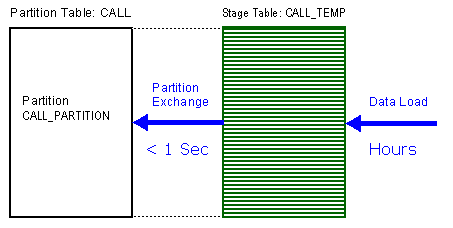
One of the great features about partitioning, and most specifically range-based partitioning, is the ability to load data quickly and easily with minimal impact on the current users using:
alter table call exchange partition data_2007 with table call_temp;
This command swaps over the definitions of the named partition and the CALL table, so that the data suddenly exists in the right place in the partitioned table. Moreover, with the inclusion of the two optional extra clauses, index definitions will be swapped and Oracle will not check whether the data actually belongs in the partition - so the exchange is very quick.
Example with no Parent Child Relation
In this example, the primary key and the partition key in the partitioned table CALL both are build on the same column «id». Therefore the primary key on CALL can be a LOCAL index and the indexes doesn't become UNUSABLE (must not be rebuild) after the EXCHANGE.
-- Create the Partition Table (Destination Table)
CREATE TABLE call (
id NUMBER(12,6),
v1 VARCHAR2(10),
data VARCHAR2(100)
)
PARTITION BY RANGE(id) ( -- Partion Key = Primary Key
PARTITION call_partition VALUES LESS THAN (MAXVALUE)
);-- Next, create the temporary Table which is used to load the Data offline
CREATE TABLE call_temp (
id NUMBER(12,6),
v1 VARCHAR2(10),
data VARCHAR2(100)
);-- Load 1'000'000 Rows into the offline Table
INSERT /*+ append ordered full(s1) use_nl(s2) */
INTO call_temp
SELECT
TRUNC((ROWNUM-1)/500,6),
TO_CHAR(ROWNUM),
RPAD('X',100,'X')
FROM all_tables s1,
all_tables s2
WHERE ROWNUM <= 1000000;-- Add LOCAL Primary Key to the Partition Table as a local Index
ALTER TABLE call
ADD CONSTRAINT pk_call PRIMARY KEY(id)
USING INDEX (CREATE INDEX pk_call ON CALL(id) NOLOGGING LOCAL);-- Add Primary Key to the offline Table
ALTER TABLE call_temp
ADD CONSTRAINT pk_call_temp PRIMARY KEY(id)
USING INDEX (CREATE INDEX pk_call_temp ON call_temp(id) NOLOGGING);-- Now swap the offline Table into the Partition
ALTER TABLE CALL
EXCHANGE PARTITION call_partition WITH TABLE call_temp
INCLUDING INDEXES
WITHOUT VALIDATION;Elapsed: 00:00:00.01Oracle is checking that the exchange won’t cause a uniqueness problem. The query is searching the entire CALL table (excluding the partition we are exchanging) to see if there are any duplicates of the rows which we are loading. This is particularly daft, since the unique constraint is maintained through a local index, so it must include the partitioning key ID, which means there is only one legal partition in which a row can be, and we have already promised (through the without validation clause) that all the rows belong where we are putting them.
-- For the next load, first truncate the CALL Table, then process the next load.
TRUNCATE TABLE call;
ALTER TABLE CALL
EXCHANGE PARTITION call_partition WITH TABLE call_temp
INCLUDING INDEXES
WITHOUT VALIDATION;
Example with Parent Child Relation
In this example, the primary key and the partition key in the partitioned table CALL are NOT the same. The primary key is build on the column «id», but the partition key is build on «created_date». Therefore the primary key on CALL must be a GLOBAL index and the indexes must be maintained using the clause
UPDATE GLOBAL INDEXESin the EXCHANGE.
-- Create and populate a small lookup table
CREATE TABLE lookup (
id NUMBER(10),
description VARCHAR2(50)
);
ALTER TABLE lookup ADD (
CONSTRAINT pk_lookup PRIMARY KEY (id)
);
INSERT INTO lookup (id, description) VALUES (1, 'ONE');
INSERT INTO lookup (id, description) VALUES (2, 'TWO');
INSERT INTO lookup (id, description) VALUES (3, 'THREE');
COMMIT;
-- Create and populate a temporary table to load the data
CREATE TABLE call_temp (
id NUMBER(10),
created_date DATE,
lookup_id NUMBER(10),
data VARCHAR2(50)
);
-- Load the temporary table
DECLARE
l_lookup_id lookup.id%TYPE;
l_create_date DATE;
BEGIN
FOR i IN 1 .. 1000000 LOOP
IF MOD(i, 3) = 0 THEN
l_create_date := ADD_MONTHS(SYSDATE, -24);
l_lookup_id := 2;
ELSIF MOD(i, 2) = 0 THEN
l_create_date := ADD_MONTHS(SYSDATE, -12);
l_lookup_id := 1;
ELSE
l_create_date := SYSDATE;
l_lookup_id := 3;
END IF;
INSERT INTO call_temp (id, created_date, lookup_id, data)
VALUES (i, l_create_date, l_lookup_id, 'Loaded Data for ' || i);
END LOOP;
COMMIT;
END;
/
-- Apply Primary Key to the CALL_TEMP table.
ALTER TABLE call_temp ADD (
CONSTRAINT pk_call_temp PRIMARY KEY (id)
);
-- Add Key and Foreign Key Constraint to the CALL_TEMP table.
CREATE INDEX idx_call_temp_created_date ON call_temp(created_date);
CREATE INDEX idx_call_temp_lookup_id ON call_temp(lookup_id);
ALTER TABLE call_temp ADD (
CONSTRAINT fk_call_temp_lookup_id
FOREIGN KEY (lookup_id)
REFERENCES lookup(id)
);
-- Next we create a new table with the appropriate partition structure
-- to act as the destination table. The destination must have the
-- same constraints and indexes defined.
CREATE TABLE call (
id NUMBER(10),
created_date DATE,
lookup_id NUMBER(10),
data VARCHAR2(50)
)
PARTITION BY RANGE (created_date)
(PARTITION call_temp_created_date VALUES LESS THAN (MAXVALUE));
-- Add Primary Key to CALL which must be GLOBAL
-- With LOCAL Index you get: ORA-14196: Specified index
-- cannot be used to enforce the constraint
ALTER TABLE call ADD
CONSTRAINT pk_call PRIMARY KEY (id)
USING INDEX (CREATE INDEX pk_call ON CALL(id) GLOBAL
);
-- Add Keys and Foreign Key Constraint to the CALL table
-- which can be LOCAL
CREATE INDEX idx_call_created_date ON call(created_date) LOCAL;
CREATE INDEX idx_call_lookup_id ON call(lookup_id) LOCAL;
ALTER TABLE call ADD (
CONSTRAINT fk_call_lookup_id
FOREIGN KEY (lookup_id)
REFERENCES lookup(id)
);
-- With this destination table in place we can start the conversion.
-- We now switch the segments associated with the source table and the
-- partition in the destination table using EXCHANGE PARTITION
SET TIMING ON;
ALTER TABLE call
EXCHANGE PARTITION call_temp_created_date
WITH TABLE call_temp
WITHOUT VALIDATION
UPDATE GLOBAL INDEXES;Elapsed: 00:00:27.19
This is significantly slower than in the previous example!
The
UPDATE GLOBAL INDEXESis needed because without it that would leave the global indexes associated with the partition in anUNUSABLEstate. If theUPDATE GLOBAL INDEXESclause is added, the performance is reduced since the index rebuild is part of the issued DDL. The index updates are logged and it should only be used when the number of rows is low and data must stay available. For larger numbers of rows index rebuilds are more efficient and allow index reorganization.