Oracle Segment Space Management
Martin Zahn, 15.03.2009
Overview
When Oracle allocates space to a segment (like a table or index), a group of contiguous free blocks, called an extent, is added to the segment. Metadata regarding extent allocation and unallocated extents are either stored in the data dictionary, or in the tablespace itself.
Tablespaces that record extent allocation in the dictionary,
are called dictionary managed tablespaces
Tablespaces that record extent allocation in the tablespace header,
are called locally managed tablespaces.
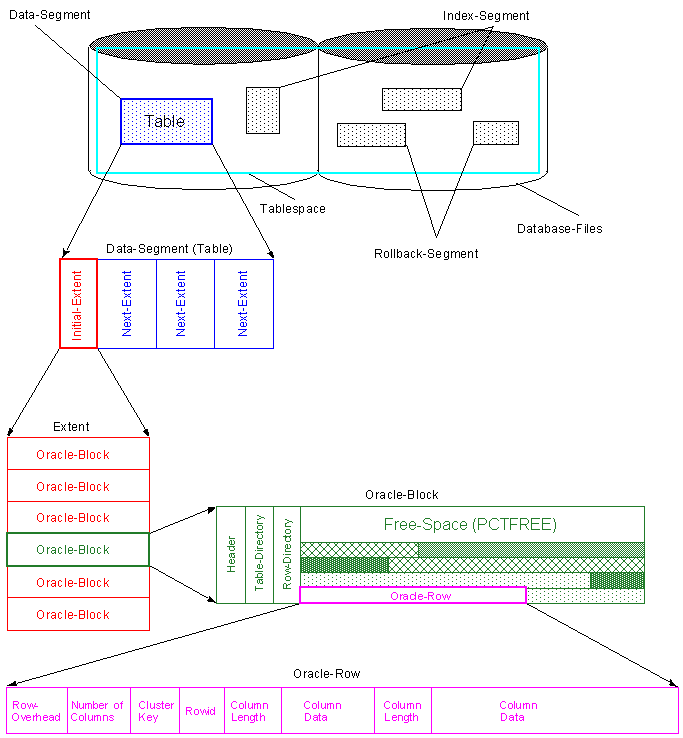
Dictionary Managed Tablespaces (obsolete)
Oracle use the data dictionary (tables in the SYS schema) to track allocated and free extents for tablespaces that is in «dictionary manage» mode. Free space is recorded in the SYS.FET$ table, and used space in the SYS.UET$ table. Whenever space is required in one of these tablespaces, the ST (space transaction) enqueue latch must be obtained to do inserts and deletes against these tables. As only one process can acquire the ST enqueue at a given time, this often lead to contention.
CREATE TABLESPACE dm_ts DATAFILE '....' SIZE 50M
EXTENT MANAGEMENT DICTIONARY
DEFAULT STORAGE (INITIAL 50K
NEXT 50K
MINEXTENTS 2
MAXEXTENTS 50
PCTINCREASE 0);
Locally Managed Tablespaces
Using LMT, each tablespace manages it's own free and used space within a bitmap structure stored in one of the tablespace's data files. Each bit corresponds to a database block or group of blocks.
Execute one of the following statements to create a locally managed tablespace:
CREATE TABLESPACE lmt_autoallocate
DATAFILE '....' SIZE 50M
EXTENT MANAGEMENT LOCAL AUTOALLOCATE;CREATE TABLESPACE lmt_uniform
DATAFILE '....' SIZE 50M
EXTENT MANAGEMENT LOCAL UNIFORM SIZE 128K;
AUTOALLOCATE specifies that extent sizes are system managed. Oracle will choose «optimal» next extent sizes starting with 64KB. As the segment grows larger extent sizes will increase to 1MB, 8MB, and eventually to 64MB. This is the recommended option for a low or unmanaged environment.
UNIFORM specifies that the tablespace is managed with uniform extents of SIZE bytes (use K or M to specify the extent size in kilobytes or megabytes). The default size is 1M. The uniform extent size of a locally managed tablespace cannot be overridden when a schema object, such as a table or an index, is created.
Also not, if you specify, LOCAL, you cannot specify DEFAULT STORAGE, MINIMUM EXTENT or TEMPORARY.


Advantages of Locally Managed Tablespaces
Eliminates the need for recursive SQL operations against the data
dictionary (UET$ and FET$ tables)
Reduce contention on data dictionary tables (single ST enqueue)
Locally managed tablespaces eliminate the need to periodically
coalesce free space (automatically tracks adjacent free space)
Changes to the extent bitmaps do not generate rollback information
Segment Space Management Manual
This option uses free lists for managing free space within segments. Free lists are lists of data blocks that have space available for inserting new rows.
CREATE TABLESPACE lmt_manual
DATAFILE '/export/home/oracle/data2/MALLARD/lmt_manual.dbf' SIZE 50M
EXTENT MANAGEMENT LOCAL
SEGMENT SPACE MANAGEMENT MANUAL;
select tablespace_name as Name,
extent_management as ExtMgmt,
segment_space_management as SpaceMgmt,
allocation_type as AllocType
from dba_tablespaces;
NAME EXTMGMT SPACEMGMT ALLOCTYPE
------------------------------ ---------- --------- ---------
SYSTEM LOCAL MANUAL SYSTEM
UNDO LOCAL MANUAL SYSTEM
SYSAUX LOCAL AUTO SYSTEM
TEMP LOCAL MANUAL UNIFORM
LMT_MANUAL LOCAL MANUAL SYSTEMCREATE TABLE t1 (A NUMBER)
PCTFREE 20
PCTUSED 50
INITRANS 2
MAXTRANS 5
STORAGE (INITIAL 10K
NEXT 10K
PCTINCREASE 50
MINEXTENTS 2
MAXEXTENTS 10
FREELISTS 7
FREELIST GROUPS 7)
TABLESPACE lmt_manual;column Name format a5;
column %Free format 99;
column %Used format 99;
column ITran format 9999;
column MTran format 9999;
column IExt format 99999;
column NExt format 99999;
column MinExt format 99999;
column MaxExt format 9999999999;
column %inc format 99;
column Flst format 999;
column FlstGr format 999;
select table_name as "Name",
pct_free as "%Free",
pct_used as "%Used",
ini_trans as "ITran",
max_trans as "MTran",
initial_extent as "IExt",
next_extent as "NExt",
min_extents as "MinExt",
max_extents as "MaxExt",
pct_increase as "%Inc",
freelists as "Flst",
freelist_groups as "FlstGr"
from user_tables where table_name = 'T1';Name %Free %Used ITran MTran IExt NExt MinExt MaxExt %Inc Flst FlstGr ----- ----- ----- ----- ----- ------ ------ ------ ----------- ---- ---- ------ T1 20 50 2 255 90112 1 2147483645 7 7
That means, if you use LMT with Segment Space Management Manual, the Storage Parameters are still used - this is the pre Oracle9 behavior.
Segment Space Management Auto
From Oracle 9, you can not only have bitmap managed tablespaces, but also bitmap managed segments when setting Segment Space Management to AUTO for a tablespace.
CREATE TABLESPACE lmt_auto
DATAFILE '/export/home/oracle/data2/MALLARD/lmt_auto.dbf' SIZE 50M
EXTENT MANAGEMENT LOCAL
SEGMENT SPACE MANAGEMENT AUTO;
select tablespace_name as Name,
extent_management as ExtMgmt,
segment_space_management as SpaceMgmt,
allocation_type as AllocType
from dba_tablespaces;
NAME EXTMGMT SPACEMGMT ALLOCTYPE
------------------------------ ---------- --------- ---------
SYSTEM LOCAL MANUAL SYSTEM
UNDO LOCAL MANUAL SYSTEM
SYSAUX LOCAL AUTO SYSTEM
TEMP LOCAL MANUAL UNIFORM
LMT_AUTO LOCAL AUTO SYSTEM
Obsolete Storage Parameters
Some of the storage parameter are obsolete with LMT.
CREATE TABLE t2 (A NUMBER)
PCTFREE 20
PCTUSED 50
INITRANS 2
MAXTRANS 5
STORAGE (INITIAL 10K
NEXT 10K
PCTINCREASE 50
MINEXTENTS 2
MAXEXTENTS 10
FREELISTS 7
FREELIST GROUPS 7)
TABLESPACE lmt_auto;column Name format a5; column %Free format 99; column %Used format 99; column ITran format 99; column MTran format 9999; column IExt format 99999; column NExt format 99999; column MinExt format 99999; column MaxExt format 9999999999; column %inc format 99; column Flst format 99; column FlstGr format 99; select table_name as "Name", pct_free as "%Free", pct_used as "%Used", ini_trans as "ITran", max_trans as "MTran", initial_extent as "IExt", next_extent as "NExt", min_extents as "MinExt", max_extents as "MaxExt", pct_increase as "%Inc", freelists as "Flst", freelist_groups as "FlstGr" from user_tables where table_name = 'T2'; Name %Free %Used ITran MTran IExt NExt MinExt MaxExt %Inc Flst FlstGr ----- ----- ----- ----- ----- ------ ------ ------ ----------- ---- ---- ------ T2 20 2 255 32768 1 2147483645
The Parameters for PCTUSED, NEXT, PCTINCREASE, FREELISTS and FREELIST GROUPS are ignored and are obsolete.
MINEXTENTS is set to 1, MAXEXTENTS is set to unlimited, INITIAL is internally calculated.
PCT_FREE, INI_TRANS and MAX_TRANS are still used in LMT
That means, if you use LMT with Segment Space Management Auto, only the Parameters PCTFREE, INITRANS und MAXTRANS are used.
Comparing Space Management
We create one table in each of the above tablespaces and fill the tables with 10000 rows. Then we build the statistics and compare the space allocation.
create table tab_auto (
a number primary key,
b char(100)
)
tablespace lmt_auto;
create table tab_manu (
a number primary key,
b char(100)
)
tablespace lmt_manual;
begin
for i in 1 .. 10000 loop
insert into tab_auto values (i, 'test' || i);
insert into tab_manu values (i, 'test' || i);
end loop;
end;
/
commit;
analyze table tab_auto compute statistics;
analyze table tab_manu compute statistics;
select table_name,num_rows,blocks,empty_blocks
from user_tables
where table_name in ('TAB_AUTO','TAB_MANU');
TABLE_NAME NUM_ROWS BLOCKS EMPTY_BLOCKS
------------------------------ ---------- ---------- ------------
TAB_AUTO 10000 244 12
TAB_MANU 10000 152 103The table tab_auto allocated more blocks (244 compared with 152) than tab_manu. That means, the blocks in MANUAL space management are initially better filled than in AUTO space management.
How does this change, if we delete and re-insert some rows?
delete from tab_auto where mod(a,4) = 0;
delete from tab_manu where mod(a,4) = 0;
commit;
begin
for i in 10001 .. 12500 loop
insert into tab_auto
values (i, 'test' || i);
insert into tab_manu
values (i, 'test' || i);
end loop;
end;
/
commit;
analyze table tab_auto compute statistics;
analyze table tab_manu compute statistics;
TABLE_NAME NUM_ROWS BLOCKS EMPTY_BLOCKS
------------------------------ ---------- ---------- ------------
TAB_AUTO 10000 244 12
TAB_MANU 10000 192 63In the AUTO space management the freed blocks due to the delete are reused, we the same space allocation. However in the MANUAL method, more blocks are used, existing free space is not immediately used, the tablespace will become more fragmented.
Initial Transaction Slots Waits (ITL)
The INITTRANS setting controls Initial Transaction Slots (ITLs). A transaction slot is required for any session that needs to modify a block in an object. For tables INITRANS defaults to 1 for indexes, 2.
The MAXTRANS setting controls the maximum number of ITLs that a block can allocate (usually defaults to 255). If a block is sparsely populated then Oracle will dynamically increase the number of ITLs up to MAXTRANS.
ITL's and Block Waits
However, if the block has little or no free space then transactions will serialize waiting on a free ITL. This is one cause for data base block waits. By setting INITRANS to the number of expected simultaneous DML (data manipulation language – insert, update and delete) transaction for a single block, you can avoid serialization for ITL slots.
The maximum value suggested for INITRANS is 100 and settings over this size rarely improve performance. Therefore a setting of INITRANS to the average number of simultaneous DML users and setting MAXTRANS to 100 will most likely result in the best utilization of resources and performance. Remember, each ITL requires approximately 23 bytes in the block header.
dbms_space.space_usage
Use the Oracle procedure dbms_space.space_usage to provide the space usage ratio within each block in the Bitmap Managed Block (BMB) segments. It provides information regarding the number of blocks in a segment with the following range of free space.
0-25% free space within a block
25-50% free space within a block
50-75% free space within a block
75-100% free space within a blockCREATE OR REPLACE PROCEDURE analyze_object(
p_owner in VARCHAR2,
p_name in VARCHAR2,
p_type in VARCHAR2 DEFAULT 'TABLE',
p_freelist_group IN NUMBER DEFAULT 0,
p_partition_name IN VARCHAR2 DEFAULT NULL)
IS
v_unf_by NUMBER;
v_unf_bl NUMBER;
v_25_by NUMBER;
v_25_bl NUMBER;
v_50_by NUMBER;
v_50_bl NUMBER;
v_75_by NUMBER;
v_75_bl NUMBER;
v_100_by NUMBER;
v_100_bl NUMBER;
v_full_by NUMBER;
v_full_bl NUMBER;
BEGIN
DBMS_SPACE.SPACE_USAGE(
p_owner,
p_name,
p_type,
v_unf_bl,
v_unf_by,
v_25_bl,
v_25_by,
v_50_bl,
v_50_by,
v_75_bl,
v_75_by,
v_100_bl,
v_100_by,
v_full_bl,
v_full_by,
p_partition_name
);
DBMS_OUTPUT.PUT_LINE('free blocks .....................: '||v_unf_bl);
DBMS_OUTPUT.PUT_LINE('0-25% free space within a block: '||v_25_bl);
DBMS_OUTPUT.PUT_LINE('25-50% free space within a block: '||v_50_bl);
DBMS_OUTPUT.PUT_LINE('50-75% free space within a block: '||v_75_bl);
DBMS_OUTPUT.PUT_LINE('75-100% free space within a block: '||v_100_bl);
DBMS_OUTPUT.PUT_LINE('filled blocks ...................: '||v_full_bl);
END;
/exec analyze_object('SCOTT','TAB_AUTO');
free blocks .....................: 62
0-25% free space within a block: 0
25-50% free space within a block: 103
50-75% free space within a block: 1
75-100% free space within a block: 3
filled blocks ...................: 75