Oracle introduced powerful queuing mechanisms where messages can be
exchanged between different programs. They called it Advanced Queuing AQ.
Exchanging messages and communicating between different application modules is a key
functionally becoming important as soon as we leave the database servers SQL and PL/SQL
programming domain.
If we have to do different jobs simultaneously, for instance to
communicate with external systems and evaluate complex queries at the same time, it might
be a design decision to uncouple "request for service" and "supply for service". In one
case an application module deals with all external systems and requests a certain query
by posting a message on a queue. In the other case an application gets the message,
performs the query and supplies the result back on the queue in between.
While using Oracle Advanced Queuing we do not have to install
additional middle-ware dealing with inter-process communication and transaction
monitoring. We can directly use an existing and well-known database and can benefit from
given functionalities like online backup or transaction processing. Alternatively other
simple and non queue based messaging techniques can be used like the Java RMI, which is
limited to Java. Or more complex approaches like CORBA, where the complexity lies more in
design and conceptual decisions.
The Point-to-Point Model
In a simple system we could think about two applications that like to
use one or more queues together. This approach is called the Point-to-Point
Model:
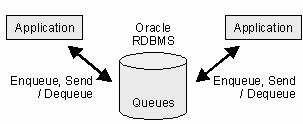
The process to put messages on a queue is called
enqueue or send whereas the opposite is called dequeue. There may be more
than two consumer applications but a single message can only be dequeued once. Consumers
may browse the queue without dequeuing messages.
In a more advanced system we may like to have different
applications that publish messages and others that subscribe to certain queues from where
they like to consume messages. There is no more strict connection between applications.
This is called the Publish-Subscribe Model and is covered by Part II of these
articles.
Queue Creation
For database queue creation we should have an AQ
administrator user with the required privileges. It can be used as object owner too. All
created queues and message object types will belong to this administrator. Afterwards we
can create as many queue users as we like or grant the required privileges to existing
users who want to access the queues. To avoid maintaining privileges for every single
user, we will create two roles in this sample. One for the AQ administrator and another
for all AQ users.
In these samples the administrator role is called
"my_aq_adm_role" and the corresponding user "aqadm". We grant Oracle's AQ role
"aq_administrator_role" to our administrator role.
CREATE ROLE my_aq_adm_role;
GRANT CONNECT, RESOURCE, aq_administrator_role
TO my_aq_adm_role;
The user role is called "my_aq_user_role" and the corresponding sample
user "aquser". Here we grant Oracle's AQ role "aq_user_role" and additional system
privileges required for basic operations.
CREATE ROLE my_aq_user_role;
GRANT CREATE SESSION, aq_user_role TO my_aq_user_role;
EXEC DBMS_AQADM.GRANT_SYSTEM_PRIVILEGE(
privilege => 'ENQUEUE_ANY',
grantee => 'my_aq_user_role',
admin_option => FALSE);
EXEC DBMS_AQADM.GRANT_SYSTEM_PRIVILEGE(
privilege => 'DEQUEUE_ANY',
grantee => 'my_aq_user_role',
admin_option => FALSE);
Now we're ready to create the AQ administration user:
CREATE USER aqadm IDENTIFIED BY aqadm
DEFAULT TABLESPACE tab
TEMPORARY TABLESPACE temp;
GRANT my_aq_adm_role TO aqadm;
And the queue user for our samples:
CREATE USER aquser IDENTIFIED BY aquser
DEFAULT TABLESPACE tab
TEMPORARY TABLESPACE temp;
GRANT my_aq_user_role TO aquser;
For our first queue we will use an object type instead of a base data
type like NUMBER or VARCHAR2 as payload. The payload is the data type and
structure used for every message. To use an object type is more realistic than sending
single numbers or strings around but a bit more complicated. In a message we might have
an identification number, a title and a message text or content.
It's time now to change to the AQ administration user where the
previous operations could be performed by any DBA.
CONNECT aqadm/aqadm;
CREATE TYPE queue_message_type AS OBJECT(
no NUMBER,
title VARCHAR2(30),
text VARCHAR2(2000) );
/
GRANT EXECUTE ON queue_message_type TO my_aq_user_role;
Let's create a queue called "message_queue" with a corresponding queue
table "queue_message_table". We start the queue so that it can be used from now on.
EXEC DBMS_AQADM.CREATE_QUEUE_TABLE(
queue_table => 'queue_message_table',
queue_payload_type =>
aqadm.queue_message_type');
EXEC DBMS_AQADM.CREATE_QUEUE(
queue_name => 'message_queue',
queue_table => 'queue_message_table');
EXEC DBMS_AQADM.START_QUEUE(
queue_name => 'message_queue');
Now we have a complete queue that is ready to use. All the
administrative PL/SQL operations shown are available in Java too. However it's a handy
idea to do these steps in a SQL shell.
Using a Queue
with PL/SQL in a Point-to-Point Model
To work with queues we connect with our AQ sample user:
CONNECT aquser/aquser;
Now we like to enqueue a message. We have to name the queue, give some
default options and pass our message "my_message" as payload, which is made by our own
defined message. Remember, we live in a transactional environment. We must issue a final
COMMIT.
CONNECT aquser/aquser;
DECLARE
queue_options
DBMS_AQ.ENQUEUE_OPTIONS_T;
message_properties DBMS_AQ.MESSAGE_PROPERTIES_T;
message_id
RAW(16);
my_message
aqadm.queue_message_type;
BEGIN
my_message := aqadm.queue_message_type(
1,
'This is a sample
message',
'This message has been
posted on ' ||
TO_CHAR(SYSDATE,'DD.MM.YYYY HH24:MI:SS'));
DBMS_AQ.ENQUEUE(
queue_name => 'aqadm.message_queue',
enqueue_options => queue_options,
message_properties =>
message_properties,
payload => my_message,
msgid => message_id);
COMMIT;
END;
/
We can dequeue the recently enqueued message. The
DBMS_AQ.DEQUEUE statement waits until there is a message to dequeue. The shown
code looks very similar to the one above.
SET SERVEROUTPUT ON;
DECLARE
queue_options
DBMS_AQ.DEQUEUE_OPTIONS_T;
message_properties DBMS_AQ.MESSAGE_PROPERTIES_T;
message_id
RAW(2000);
my_message
aqadm.queue_message_type;
BEGIN
DBMS_AQ.DEQUEUE(
queue_name => 'aqadm.message_queue',
dequeue_options => queue_options,
message_properties =>
message_properties,
payload => my_message,
msgid => message_id );
COMMIT;
DBMS_OUTPUT.PUT_LINE(
'Dequeued no: ' || my_message.no);
DBMS_OUTPUT.PUT_LINE(
'Dequeued title: ' || my_message.title);
DBMS_OUTPUT.PUT_LINE(
'Dequeued text: ' || my_message.text);
END;
/
The PL/SQL samples were easy and straightforward. Not a lot to do.
Every kind of application and programming environment could use it like this, assuming
they are able to connect to the database and execute PL/SQL stored procedures. However,
it is more convenient and is better practise to use the programming languages' own way to
deal with messages. That's the point where we should have a look what Java offers...
Introducing the Java
Samples
While using Java, it's not only the different programming syntax we use
but also the way we design programs. We leave the procedural area and enter into the
object oriented world. In these samples we use an abstract base class
AQApplication to hide all the steps we must perform before we are able to start
working with queues.
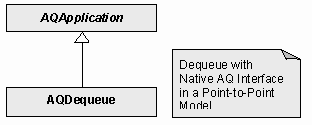
This UML diagram shows our sample class AQDequeue derived from
AQApplication. We will focus down to those statements we must know about, in order
to work with queues. It's not necessarily required to understand the whole object
oriented concept.
Using
JPublisher to Prepare an Oracle Object Type for Java
When we created our queue we created also an Oracle object type to be
used for messages. Because we cannot use Oracle data types in Java we must have a Java
class to fill the dequeued message in. JPublisher can do this job for us. It connects to
the database and creates a Java class matching the specified Oracle object type.
set CLASSPATH=
D:\Oracle\Product\8.1.7\jdbc\lib\classes12.zip;
D:\Oracle\Product\8.1.7\sqlj\lib\translator.zip;
D:\Oracle\Product\8.1.7\sqlj\lib\runtime.zip
jpub -user=aqadm/aqadm
-sql=QUEUE_MESSAGE_TYPE
-usertypes=oracle
-methods=false
-user=aqadm/aqadm
Object owner and password to which the to be translated objects
belong.
-sql=QUEUE_MESSAGE_TYPE
One or more object types and packages that you want JPublisher to
translate. Use commas for separation.
-usertypes=oracle
The oracle mapping maps Oracle datatypes to their corresponding Java
classes.
-methods=false
If true, JPublisher generates SQLJ classes for PL/SQL packages and
wrapper methods for methods in packages and object types. SQLJ wraps static SQL
operations in Java code. We do not use SQLJ here, thus we pass false.
JPublisher connects to the database and creates a Java class
QUEUE_MESSAGE_TYPE for us. We can use this class now as a Java data type to receive
messages posted by another Java or PL/SQL client.
Dequeue a
Point-to-Point Message with Oracle's
Native AQ Interface for Java
We use the previously shown PL/SQL sample and replace the dequeue
functionality by Java to show the similarities. Additionally it can be used to show
message exchanging between PL/SQL and Java. Enqueuing in Java is very similar again to
dequeuing and is therefore not shown here.
Before we can start using Oracle's Native AQ Interface for Java we must
connect to the database via JDBC. As a connection string we use a host name for HOST and
an Oracle database SID for SID. Between these two values the listener port address must
be specified, e.g. 1521.
Class.forName(
"oracle.jdbc.driver.OracleDriver");
aq.connection = DriverManager.getConnection(
"jdbc:oracle:thin:@HOST:1521:SID,
"aquser", "aquser");
aq.connection.setAutoCommit(false);
Afterwards we create a so-called AQ session passing the AQ
connection:
Class.forName("oracle.AQ.AQOracleDriver");
aq.session = AQDriverManager.createAQSession(aq.connection);
Now we're ready to get a reference to the queue we like to use. To do
so, we pass the queue owner and the queue name:
AQQueue queue = aq.session.getQueue(
"aqadm", "MESSAGE_QUEUE");
For dequeuing we create default options and pass them along with an
instance of JPublisher's created message data type QUEUE_MESSAGE_TYPE.
AQDequeueOption dequeueOption = new AQDequeueOption();
System.out.println("Waiting for message to dequeue...");
AQMessage message = ((AQOracleQueue)queue).dequeue(
dequeueOption,
QUEUE_MESSAGE_TYPE.getFactory());
To get the message content we convert the raw payload into our message
type.
AQObjectPayload payload = message.getObjectPayload();
QUEUE_MESSAGE_TYPE messageData =
(QUEUE_MESSAGE_TYPE) payload.getPayloadData();
aq.connection.commit();
System.out.println("Dequeued no: " +
messageData.getNo());
System.out.println("Dequeued title: " +
messageData.getTitle());
System.out.println("Dequeued text: " +
messageData.getText());
Like in PL/SQL, we need a final COMMIT.
Conclusion
Oracle Advanced Queuing is a powerful and rather simple way of working
with queues. The libraries available for Java offer a smart way to enqueue and dequeue
messages without too much programming overhead.
In more sophisticated projects Advanced Queuing's whole functionality
can be taken into account. Oracle's Advanced Queuing developer's guide exceeds thousand
pages. This might be seen as an indication that in advanced projects a reasonable amount
of time is required to understand the different concepts and possibilities. This should
not be seen as a disadvantage for Oracle's Advanced Queuing, the same is true for other
similar communication or queuing technologies.
Only essential issues and aspects have been covered by this article.
Part II of these articles will cover somewhat more sophisticated concepts such as
publishing and subscribing a message with Oracle's Java Message Service JMS Interface to
AQ.
Oracle Advanced Queuing AQ is a powerful queuing mechanism for message
exchanging between different applications. Part I of these articles introduced AQ and
explained how to create queues in the database, use PL/SQL in a Point-to-Point Model,
JPublisher and Oracle's Native AQ Interface for Java.
In Part II complete samples are available, showing all the required
statements, environment variables, imports, JAR files, error processing's along with
Windows batch files to compile and run etc.
The Publish-Subscribe Model
In a more sophisticated system we may like to have different
applications that publish messages and others that subscribe to certain queues from where
they like to consume messages. The Publish-Subscribe Model uses multi-consumer
queues:
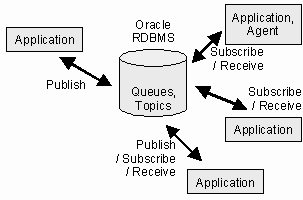
Publisher applications propagate messages to queues which are called
topics here. These messages can be either addressed for specific applications or they
will be received by all destinations. Applications receiving messages are also called
agents. We talk about broadcast if the message can be consumed by all applications and
about multicast if a subscription is required for consummation.
To explain broadcast and multicast more clearly the following parallel
cases are often used: Broadcast is similar to radio and TV broadcasting received by
everybody. Multicast can be seen like a newspaper where you need a subscription. Many
people have a subscription but not everybody.
The Java Message Service JMS
Different enterprise messaging vendors lead by Sun Microsystems, Inc.
defined a common API for reliable and flexible message exchange in distributed systems
throughout an enterprise. Oracle is one of the companies that implemented JMS and decided
to do it by their own Advanced Queuing feature. Other companies implement JMS using
another technology. The underlying technology remains exchangeable and developers do not
need to learn always proprietary messaging API's.
We will use Oracle's JMS Interface to AQ that implements an interface
for Advanced Queuing.
Other Words for Same Things
If we talk about queues while using Advanced Queuing, we call the same
Topics if we are in the world of JMS. The same is true for enqueue and dequeue.
They're called Publish and Receive in JMS. Additionally applications are
often called Agents in JMS.
Queue Creation
Required database users creation and granting of needed privileges has
been described in Part I of these articles. We created an AQ administration user "aqadm"
and a AQ application user called "aquser" for the samples.
A queue table "multi_message_table" with a special object type
AQ$_JMS_OBJECT_MESSAGE will be created now. This object type is a reference only and does
not yet define the message structure. It gives us the freedom to define later the payload
of our messages we like to transfer. The payload is the data type and structure used for
every message.
Creating and starting the queue "multi_queue" works in the same way as
for the Point-to-Point connection, except that the parameter "multiple_consumers" is set
to true.
We use the AQ administration user "aqadm":
CONNECT aqadm/aqadm;
EXEC DBMS_AQADM.CREATE_QUEUE_TABLE(
queue_table => 'multi_message_table',
queue_payload_type => 'SYS.AQ$_JMS_OBJECT_MESSAGE',
multiple_consumers => TRUE);
EXEC DBMS_AQADM.CREATE_QUEUE(
queue_name => 'multi_queue',
queue_table => 'multi_message_table');
EXEC DBMS_AQADM.START_QUEUE(
queue_name => 'multi_queue');
Introducing the Java
Samples
When using Java we leave the procedural area and step into the object
oriented world. The abstract base class AQApplication offers all required steps we must
perform before we are able to start working with queues.
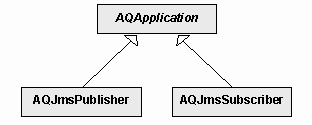
The UML diagram shows our sample classes AQJmsPublisher and
AQJmsSubscriber derived from AQApplication. They will be used to act as publishers and
subscribers.
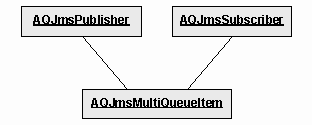
Both classes instantiate the payload class AQJmsMultiQueueItem as
message data type.
We will focus down to those statements we must know about, in order to
work with queues. It's not necessarily required to understand the whole object oriented
concept.
Create Class for Message
Content
In our sample application the following class is used as payload for
message content. We are free in choosing the member variables and methods. However, the
class must implement the Serializable interface.
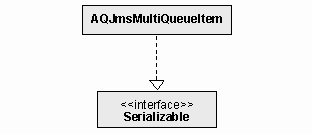
The Serializable interface in the java.io library is used for object
serialisation. Serialisation means, exchanging objects between programs on the same
machine and between remote computers. The objects are transferred via streams and
networks conserving their current states and data. They are restored by receivers, become
alive again and continue to work.
public class AQJmsMultiQueueItem implements Serializable {
private int _no;
private String _title;
private String _text;
public AQJmsMultiQueueItem(int no, String
title,
String text) {
_no = no;
_title = title;
_text = text;
}
public int getNo() { return _no; }
public String getTitle() { return _title; }
public String getText() { return _text; }
}
Publish a
Message with Oracle's JMS Interface to AQ
To establish a connection to a topic we need to create a connection
factory using JDBC. As connection string we use a host name for HOST and an Oracle
database SID for SID. Between these two values the listener port address must be
specified, e.g. 1521. We use a Properties object to pass the AQ user name and
password.
Properties info = new Properties();
info.put("aquser", "aquser");
TopicConnectionFactory
topicConnectionFactory =
AQjmsFactory.getTopicConnectionFactory(
"jdbc:oracle:thin:@HOST:1521:SID",info);
With the factory we can get now two things: An AQ topic connection and
an AQ topic session. We pass true for a transactional session and request client
acknowledges. This simply means that we like a transactional behaviour and that clients
perform ROLLBACKs and COMMITs.
aq.connection =
topicConnectionFactory.createTopicConnection(
"aquser", "aquser");
aq.session =
aq.connection.createTopicSession(
true,Session.CLIENT_ACKNOWLEDGE);
We can start the connection and create a publisher afterwards. We could
pass a topic to the publisher at the place where we pass null now. But without specifying
a topic here we can work with more than one topic using the same publisher. Afterwards we
get a reference to the topic we like to use now. The topic is owned by "aqadm" and is
called "MULTI_QUEUE".
aq.connection.start();
TopicPublisher publisher = aq.session.createPublisher(null);
Topic topic = ((AQjmsSession) aq.session).getTopic(
"aqadm", "MULTI_QUEUE");
Lets make an instance of the recently created payload class
AQJmsMultiQueueItem. This object is converted into a JMS object message.
AQJmsMultiQueueItem messageData = new AQJmsMultiQueueItem(
0,
"Published message title",
"This is the message text");
ObjectMessage objectMessage =
aq.session.createObjectMessage(
messageData);
We don't want to send and broadcast this message to everybody. Instead,
we prepare a list of agents for multicasting. These recipients are identified by
subscription names, e.g. "SUBSCRIPTION1" and "SUBSCRIPTION2". The null parameter could be
used to pass an address identifying agents on remote machines.
AQjmsAgent[] recipientList = new AQjmsAgent[2];
recipientList[0] = new AQjmsAgent("SUBSCRIPTION1", null);
recipientList[1] = new AQjmsAgent("SUBSCRIPTION2", null);
Finally we publish the message to the topic along with the recipient
list, commit the whole thing and close the session and connection.
((AQjmsTopicPublisher) publisher).publish(
topic, objectMessage, recipientList);
aq.session.commit();
aq.session.close();
aq.connection.close();
Subscribe to a Topic
and Receive a Message
We can create a subscriber agent on a topic and call it for example
"SUBSCRIPTION1". The null parameter could be replaced by a message selector that filters
some of the received messages. Here we like to get all.
TopicReceiver subscriber =
((AQjmsSession) aq.session).createTopicReceiver(
topic,
"SUBSCRIPTION1",
null);
When calling the receive method the program waits until a message
appears on the topic. After 60 seconds it runs into a time-out, the program continues and
the "objectMessage" stays null, if no message appears. The time-out is specified in
milliseconds.
System.out.println(
"Waiting 60 seconds for message");
ObjectMessage objectMessage =
(ObjectMessage) subscriber.receive(60000);
We read back our payload stored in the object message.
if (objectMessage != null) {
AQJmsMultiQueueItem messageData = (AQJmsMultiQueueItem)
objectMessage.getObject();
System.out.println("Received no: " +
messageData.getNo());
System.out.println("Received title: " +
messageData.getTitle());
System.out.println("Received text: " +
messageData.getText());
}
Again we need a final commit and we close the session and
connection.
aq.session.commit();
aq.session.close();
aq.connection.close();
Some Words About Persistence
The queues and all messages inside are persistent. Persistency means
that sending and receiving messages is a transaction controlled operation. The familiar
statements ROLLBACK and COMMIT can do this. Messages survive even system crashes. We may
use our samples to send a message, shutdown the database, restart it and receive the
message.
Oracle Message Broker OMB
Outlook
While working with Advanced Queuing and JMS we often come across the
Oracle Message Broker OMB in literature and in browsing the web. The question arises if
we need OMB and for what purpose it is.
The Oracle Message Broker provides a platform-independent messaging
mechanism. The complexity of different underlying messaging technologies should be
hidden. The Java Message Service JMS is the foundation of the message broker. Many
different drivers from several vendors are supported. Advanced Queuing is one of them. In
these articles we use directly Native AQ and JMS without any message broker.
If we need to connect many different platforms the complexity could be
reduced by using a common interface and broker mechanism. To describe OMB is not part of
this article. See for instance "Oracle Message Broker Administration Guide" for
details.
Conclusion and Prospects
Oracle Advanced Queuing is a rather simple but powerful way to work
with messages and PL/SQL, Native AQ or the Java Message Service JMS. Both articles
Parts I and II speak only about the main functionality and the essential operations that
are required to produce functioning programs. There are a lot more features available
such as message prioritisation, message grouping, rule-based subscription, message
scheduling, message histories and many more ...
In distributed systems the Java Message Service JMS can be a good
decision for a platform independent messaging implementation. On different connected
platforms, several JMS implementations can be used and can even be replaced if necessary.
Using Oracle's JMS Interface to AQ on nodes where an Oracle database server is already
installed can be very efficient and cost effective. No third-party messaging solution
must be evaluated and because we are familiar with Oracle less learning effort is
required.
How to Use the Samples
For the samples Oracle 8i (8.1.7) and Java 2 (1.2) have been
chosen. These are currently the most common releases of both products. The samples are
for demonstration only, can be used with other Oracle and Java versions and integrated in
your own applications. You may download Java 2 from http://java.sun.com/j2se/
First of all, run the following script to install the DB part with
users and queues. Modify this file to match your own DB connection SID, user name and
password prior execution.
\init\install.bat
Dequeue a Point-to-Point message with Oracle's Native AQ Interface for
Java similar to the PL/SQL dequeue sample (Part I).
You may like to open the PL/SQL sample file \plsql\sample.sql
and enqueue and dequeue messages. Start several sqlplus shells and use them as
different clients. Copy the necessary statements into these shells to send and receive
messages between clients and see how it works.
Prepare and compile
Java samples (Part I + II)
To run the Java samples adopt all path strings in stub.bat,
compile.bat and run.bat within the \java sub directory. Some constants
at the top of AQApplication.java need to be changed to your own settings too.
-
Execute stub.bat to get a Java class matching the specified
Oracle object type.
-
Compile all Java sources using compile.bat.
Dequeue a Point-to-Point message with Oracle's Native AQ Interface for
Java similar to the PL/SQL dequeue sample (Part I).
Start rundequeue.bat to dequeue messages enqueued by PL/SQL.
Publish and Subscribe
a Message with JMS Interface to AQ (Part II)
Execute runpublisher that publishes:
message 0 to SUBSCRIPTION0
message 1 to SUBSCRIPTION1
message 2 to SUBSCRIPTION2
message 3 to SUBSCRIPTION1 and SUBSCRIPTION2
To get the messages run...
runsubscriber 0
runsubscriber 1
runsubscriber 2
To get message number 3 still waiting on SUBSCRIPTION1 and
SUBSCRIPTION2 run again...
runsubscriber 1
runsubscriber 2
Sample Files and Directories
|
\init
|
Folder including all DB initialization scripts for roles,
privileges, users and queues
|
|
\init\create_admin.sql
|
Create AQ administration user
|
|
\init\create_privilege.sql
|
Create all roles and grants privileges
|
|
\init\create_queue.sql
|
Create queues
|
|
\init\create_user.sql
|
Create AQ application user
|
|
\init\install.bat
|
Windows batch file to install the above listed SQL files
|
|
\plsql
|
|
|
\plsql\sample.sql
|
PL/SQL sample to enqueue and dequeue messages in a Point-to-Point
Model
|
|
\java
|
|
|
\java\AQApplication.java
|
Base class for all AQ applications
|
|
\java\AQDequeue.java
|
Sample class that dequeues messages using the Native AQ
Interface
|
|
\java\AQJmsMultiQueueItem.java
|
This is a sample message item class for the JMS Interface to AQ
|
|
\java\AQJmsPublisher.java
|
This is a sample class that publishes messages using the JMS
Interface to AQ
|
|
\java\AQJmsSubscriber.java
|
This is a sample message receiver class using the JMS Interface to
AQ
|
|
\java\stub.bat
|
Creates stub classes out of the database using JPublisher
|
|
\java\compile.bat
|
Compiles all Java files
|
|
\java\run.bat
|
Runs a Java class file that is passed as argument, used by the
following batch files...
|
|
\java\rundequeue.bat
|
Runs the Java Point-to-Point dequeue sample
|
|
\java\runpublisher.bat
|
Publishes messages in a Publish-Subscribe Model using Java
Message Service JMS
|
|
\java\runsubscriber.bat <id>
|
Subscribes to topics and receives previously published messages
with JMS
You may pass a subscription identification <id> to create
different subscribers. For our samples pass 0, 1 and 2!
The passed characters will be added to the word SUBSCRIPTION. For
instance if you pass 2 you get SUBSCRIPTION2 or for ABC you get SUBSCRIPTIONABC.
If you do not pass any identification you get SUBSCRIPTION0.
|
Java Message Service JMS
http://java.sun.com/products/jms
Oracle Documentation
-
Application Developer's Guide - Advanced Queuing
-
Supplied PL/SQL Packages Reference
-
Supplied Java Packages Reference
Sample Files as
ZIP
Sample Files as
tar.gz
Part I as
PDF
Part II as
PDF
|

