|
 Use
Oracle9i SPFILE to overcome traditional PFILE Limitations Use
Oracle9i SPFILE to overcome traditional PFILE Limitations
The following material is from the Oracle9i Database Administrator's Guide, we tested the
examples on Oracle 9.0.1 for SUN Solaris and Windows 2000.
The ALTER SYSTEM statement allows you to set,
change, or delete (restore to default value) initialization parameter values. When the
ALTER SYSTEM statement is used to alter a parameter setting in a traditional
initialization parameter file, the change affects only the current instance, since
there is no mechanism for automatically updating initialization parameters on disk.
They must be manually updated in order to be passed to a future instance. Using a server
parameter file overcomes this limitation.
A server parameter file (SPFILE) can be
thought of as a repository for initialization parameters that is maintained on the
machine where the Oracle database server executes. It is, by design, a server-side
initialization parameter file. Initialization parameters stored in a server parameter
file are persistent, in that any changes made to the parameters while an instance is
running can persist across instance shutdown and startup. This eliminates the need to
manually update initialization parameters to make changes effected by ALTER SYSTEM
statements persistent. It also provides a basis for self tuning by the Oracle
database server.
A server parameter file is initially built from a
traditional text initialization parameter file using the CREATE SPFILE statement. It is a
binary file that cannot be browsed or edited using a text editor. Oracle provides other
interfaces for viewing and modifying parameter settings.
|
| Although you can open the binary server parameter
file with a text editor and view its text, do not manually edit it. Doing so will
corrupt the file. You will not be able to start you instance, and if the instance is
running, it could crash. |
|
At system startup, the default behavior of the
STARTUP command is to read a server parameter file to obtain initialization parameter
settings. The STARTUP command with no PFILE clause, reads the server parameter
file from an operating system specific location. If you choose to use the traditional
text initialization parameter file, you must specify the PFILE clause when issuing the
STARTUP command.
STARTUP PFILE =
/opt/oracle/prod/9.0.1/dbs/initDIA2.ora
The server parameter file must initially be created
from a traditional text initialization parameter file. It must be created prior to its
use in the STARTUP command. The CREATE SPFILE statement is used to create a server
parameter file. You must have the SYSDBA or the SYSOPER system privilege to execute this
statement.
The following example creates a server parameter
file from initialization parameter file /opt/oracle/prod/9.0.1/dbs/initDIA2.ora. In this
example no SPFILE name is specified, so the file is created in a platform-specific
default location and is named spfile$ORACLE_SID.ora.
sqlplus /nolog
SQL*Plus: Release 9.0.1.0.0 - Production on Tue Jan 1 11:20:51 2002
(c) Copyright 2001 Oracle Corporation. All rights reserved.
SQL> connect sys/manager as sysdba;
Connected to an idle instance.
SQL> create spfile from pfile='/opt/oracle/product/9.0.1/dbs/initDIA2.ora';
File created.
The server parameter file is always created on the
machine running the database server. If a server parameter file of the same name already
exists on the server, it is overwritten with the new information.
Oracle recommends that you allow the database server
to default the name and location of the server parameter file. This will ease
administration of your database. For example, the STARTUP command assumes this default
location to read the parameter file.
When the server parameter file is created from the
initialization parameter file, comments specified on the same lines as a parameter
setting in the initialization parameter file are maintained in the server parameter file.
All other comments are ignored.
The CREATE SPFILE statement can be executed before
or after instance startup. However, if the instance has been started using a server
parameter file, an error is raised if you attempt to recreate the same server parameter
file that is currently being used by the instance.
The ALTER SYSTEM statement allows you to set,
change, or delete (restore to default value) initialization parameter values. When the
ALTER SYSTEM statement is used to alter a parameter setting in a traditional
initialization parameter file, the change affects only the current instance, since
there is no mechanism for automatically updating initialization parameters on disk.
They must be manually updated in order to be passed to a future instance. Using a
server parameter file overcomes this limitation.
Use the SET clause of the ALTER SYSTEM statement to
set or change initialization parameter values. Additionally, the SCOPE clause specifies
the scope of a change as described in the following table:
|
| SCOPE = SPFILE |
The change is applied in the server
parameter file only.
The effect is as follows: |
| |
|
| |
- For dynamic parameters, the change is effective at the next
startup and is persistent.
|
| |
|
| |
- For static parameters, the behavior is the same as for
dynamic parameters. This is the only SCOPE specification allowed for static
parameters
|
|
| SCOPE = MEMORY |
The change is applied in memory only.
The effect is as follows: |
| |
|
| |
- For dynamic parameters, the effect is immediate, but it is
not persistent because the server parameter file is not updated.
|
| |
|
| |
- For static parameters, this specification is not
allowed.
|
|
| SCOPE = BOTH |
The change is applied in both the
server parameter file and memory.
The effect is as follows: |
| |
|
| |
- For dynamic parameters, the effect is immediate and
persistent.
|
| |
|
| |
- For static parameters, this specification is not
allowed.
|
|
It is an error to specify SCOPE=SPFILE or SCOPE=BOTH
if the server is not using a server parameter file. The default is SCOPE=BOTH if a server
parameter file was used to start up the instance, and MEMORY if a traditional
initialization parameter file was used to start up the instance.
For dynamic parameters, you can also specify the
DEFERRED keyword. When specified, the change is effective only for future
sessions.
A COMMENT clause allows a comment string to be
associated with the parameter update. When you specify SCOPE as SPFILE or BOTH, the
comment is written to the server parameter file.
The following statement changes the maximum number
of job queue processes allowed for the instance. It also specifies a comment, and
explicitly states that the change is to be made only in memory (that is, it is not
persistent across instance shutdown and startup).
ALTER SYSTEM SET JOB_QUEUE_PROCESSES=50
COMMENT='Temporary change by M.Zahn'
SCOPE=MEMORY;
System altered.
You can export a server parameter file to create a
traditional text initialization parameter file. Reasons for doing this
include:
-
Creating backups of the server parameter
file
-
For diagnostic purposes, listing all of the
parameter values currently used by an instance. This is analogous to the SQL*Plus
SHOW PARAMETERS command or selecting from the V$PARAMETER or V$PARAMETER2
views.
-
Modifying of the server parameter file by first
exporting it, editing the output file, and then recreating it.
The exported file can also be used to start up an
instance using the PFILE option.
The CREATE PFILE statement is used to export a
server parameter file. You must have the SYSDBA or the SYSOPER system privilege to
execute this statement. The exported file is created on the database server machine. It
contains any comments associated with the parameter in the same line as the parameter
setting.
The following example creates a text initialization
parameter file from a server parameter file where the names of the files are
specified:
CREATE
PFILE='/export/home/oracle/config/9.0.1/initDIA2.ora'
FROM SPFILE='/export/home/oracle/config/9.0.1/spfileDIA2.ora';
You have several options for viewing parameter
settings.
This SQL*Plus command displays the currently
in
use parameter values.
This SQL statement creates a text initialization
parameter file from the binary server parameter file.
This view displays the currently in effect
parameter values.
This view displays the currently in effect
parameter values. It is easier to distinguish list parameter values in this view
because each list parameter value appears as a row.
This view displays the current contents of the
server parameter file. The view returns NULL values if a server parameter file is not
being used by the instance.
The Default
Temporary Tablespace in Oracle 9i
Users can be explicitly assigned a default
temporary tablespace in the CREATE USER statement. But, if no temporary tablespace is
specified, they default to using the SYSTEM tablespace. It is not good practice to
store temporary data in the SYSTEM tablespace. To avoid this problem, and to avoid
the need to assign every user a default temporary tablespace at CREATE USER time, you
can use the DEFAULT TEMPORARY TABLESPACE clause of CREATE DATABASE.
CREATE DATABASE    ARK2
   CONTROLFILE     REUSE
   MAXDATAFILES    256
   MAXINSTANCES    4
   MAXLOGFILES     62
   MAXLOGMEMBERS   5
   MAXLOGHISTORY   1600
   CHARACTER SET   "WE8ISO8859P1"
   NATIONAL CHARACTER SET "AL16UTF16"
   DATAFILE 'D:\Ora\ARK2_sys1.dbf' SIZE 200M REUSE
   UNDO TABLESPACE undo DATAFILE 'D:\Ora\ARK2_undo1.dbf'
      SIZE 200M REUSE AUTOEXTEND ON NEXT 5120K MAXSIZE UNLIMITED
   DEFAULT TEMPORARY TABLESPACE tmp
      TEMPFILE 'D:\Ora\ARK2_tmp1.dbf' SIZE 512064K REUSE
      EXTENT MANAGEMENT LOCAL UNIFORM SIZE 256K
 LOGFILE GROUP 1 ('D:\Ora\ARK2_log1A.rdo',
                  'C:\Ora\ARK2_log1B.rdo') SIZE 5M REUSE,
         GROUP 2 ('D:\Ora\ARK2_log2A.rdo',
                  'C:\Ora\ARK2_log2B.rdo') SIZE 5M REUSE,
         GROUP 3 ('D:\Ora\ARK2_log3A.rdo',
                  'C:\Ora\ARK2_log3B.rdo') SIZE 5M REUSE,
         GROUP 4 ('D:\Ora\ARK2_log4A.rdo',
                  'C:\Ora\ARK2_log4B.rdo') SIZE 5M REUSE;
If you decide later to change the default
temporary tablespace, or to create an initial one after database creation, you can do
so. You do this by creating a new temporary tablespace (CREATE TEMPORARY TABLESPACE),
then assign it as the temporary tablespace using the ALTER DATABASE DEFAULT TEMPORARY
TABLESPACE statement. Users will automatically be switched (or assigned) to the new
temporary default tablespace.
sqlplus /nolog
connect sys/syspasswd as sysdba
CREATE TEMPORARY TABLESPACE temp
TEMPFILE 'D:\Ora\ARK2_temp1.dbf' SIZE 512064K REUSE
AUTOEXTEND ON NEXT 10M MAXSIZE UNLIMITED
EXTENT MANAGEMENT LOCAL UNIFORM SIZE 256K;
- Users can obtain the name of the current default
temporary tablespace using the DATABASE_PROPERTIES view. The PROPERTY_NAME column
contains the value "DEFAULT_TEMP_TABLESPACE" and the PROPERTY_VALUE column contains
the default temporary tablespace name.
SELECT property_value
FROM database_properties
WHERE property_name = 'DEFAULT_TEMP_TABLESPACE';
PROPERTY_VALUE
---------------------
TMP
The following statement assigns a new default
temporary tablespace. The new default temporary tablespace must be an existing
temporary tablespace.
ALTER DATABASE DEFAULT TEMPORARY TABLESPACE
temp;
Database
altered.
You cannot drop a default temporary tablespace,
but you can assign a new default temporary tablespace, then drop the former one. You
are not allowed to change a default temporary tablespace to a permanent
tablespace.
DROP TABLESPACE tmp INCLUDING CONTENTS AND DATAFILES;
Tablespace dropped.
The following statements take offline and bring
online temporary files:
ALTER DATABASE TEMPFILE
'D:\Ora\ARK2_temp1.dbf' OFFLINE;
Database altered.
ALTER DATABASE TEMPFILE
'D:\Ora\ARK2_temp1.dbf' ONLINE;
Database altered.
Undo Tablespace
instead of Rollback Segments
Historically, Oracle has used rollback
segments to store undo. Space management for these rollback segments has proven to be
quite complex. Oracle now offers another method of storing undo that eliminates the
complexities of managing rollback segment space, and enables DBAs to exert control over
how long undo is retained before being overwritten. This method uses an undo
tablespace.
You cannot use both methods in the same database
instance, although for migration purposes it is possible, for example, to create undo
tablespaces in a database that is using rollback segments, or to drop rollback segments
in a database that is using undo tablespaces. However, you must shutdown and restart your
database in order to effect the switch to another method of managing undo.
Oracle always uses a SYSTEM rollback segment for
performing system transactions. There is only one SYSTEM rollback segment and it is
created automatically at CREATE DATABASE time and is always brought online at instance
startup. You are not required to perform any operations to manage the SYSTEM rollback
segment.
You can create a specific undo
tablespace using the UNDO TABLESPACE clause of the CREATE DATABASE statement.
CREATE DATABASE VEN1
CONTROLFILE REUSE
MAXDATAFILES 256
MAXINSTANCES 4
MAXLOGFILES 62
MAXLOGMEMBERS 5
MAXLOGHISTORY 1600
CHARACTER SET "UTF8"
NATIONAL CHARACTER SET "UTF8"
DATAFILE '/u01/sys/VEN1_sys1.dbf' SIZE
300M REUSE
UNDO TABLESPACE undo DATAFILE
'/u01/sys/VEN1_undo1.dbf'
SIZE 200M REUSE AUTOEXTEND ON NEXT
5120K MAXSIZE UNLIMITED
DEFAULT TEMPORARY TABLESPACE tmp
TEMPFILE '/u01/tmp/VEN1_tmp1.dbf'
SIZE 512064K REUSE
EXTENT MANAGEMENT LOCAL UNIFORM
SIZE 256K
LOGFILE GROUP 1 ('/u01/rdo/VEN1_log1A.rdo',
'/opt/rdo/VEN1_log1B.rdo') SIZE 10M REUSE,
GROUP 2 ('/u01/rdo/VEN1_log2A.rdo',
'/opt/rdo/VEN1_log2B.rdo') SIZE 10M REUSE,
GROUP 3 ('/u01/rdo/VEN1_log3A.rdo',
'/opt/rdo/VEN1_log3B.rdo') SIZE 10M REUSE,
GROUP 4 ('/u01/rdo/VEN1_log4A.rdo',
'/opt/rdo/VEN1_log4B.rdo') SIZE 10M REUSE,
GROUP 5 ('/u01/rdo/VEN1_log5A.rdo',
'/opt/rdo/VEN1_log5B.rdo') SIZE 10M REUSE,
GROUP 6 ('/u01/rdo/VEN1_log6A.rdo',
'/opt/rdo/VEN1_log6B.rdo') SIZE 10M REUSE;
In the ALERT log, you can see, that a
SYSTEM Rollback segment is created:
create rollback segment
SYSTEM tablespace SYSTEM
storage (initial 50K next 50K)
Completed: create rollback segment SYSTEM tablespace SYSTEM
Several Undo Segments are automatically
allocated
CREATE UNDO TABLESPACE UNDO
DATAFILE '/u01/sys/VEN1_undo1.dbf'
SIZE 200M REUSE AUTOEXTEND ON NEXT 5120K MAXSIZE UNLIMITED
Fri Jul 27 08:56:49 2001
Created Undo Segment _SYSSMU1$
Created Undo Segment _SYSSMU2$
Created Undo Segment _SYSSMU3$
Created Undo Segment _SYSSMU4$
Created Undo Segment _SYSSMU5$
Created Undo Segment _SYSSMU6$
Created Undo Segment _SYSSMU7$
Created Undo Segment _SYSSMU8$
Created Undo Segment _SYSSMU9$
Created Undo Segment _SYSSMU10$
Undo Segment 1 Onlined
Undo Segment 2 Onlined
Undo Segment 3 Onlined
Undo Segment 4 Onlined
Undo Segment 5 Onlined
Undo Segment 6 Onlined
Undo Segment 7 Onlined
Undo Segment 8 Onlined
Undo Segment 9 Onlined
Undo Segment 10 Onlined
Successfully onlined Undo Tablespace
Completed: CREATE UNDO TABLESPACE UNDO DATAFILE
-
ROLLBACK_SEGMENTS
Specifies the rollback segments to be acquired at start up.
-
TRANSACTIONS
Specifies the maximum number of concurrent transactions.
-
TRANSACTIONS_PER_ROLLBACK_SEGMENT
Specifies the number of concurrent transactions that each rollback segment
is expected to handle
-
MAX_ROLLBACK_SEGMENTS
Specifies the maximum number of rollback segments that can be
online for any instance.
-
UNDO_MANAGEMENT
If AUTO, use automatic undo management mode. If MANUAL, use manual undo management
mode.
-
UNDO_TABLESPACE
A dynamic parameter specifying the name of an undo tablespace to use.
-
UNDO_RETENTION
A dynamic parameter specifying the length of time to retain undo. Default is 900
seconds.
-
UNDO_SUPPRESS_ERRORS
If TRUE, suppress error messages if manual undo management SQL statements are issued
when operating in automatic undo management mode. If FALSE, issue error message. This
is a dynamic parameter
### System Managed Undo
### -------------------
undo_management = AUTO
undo_retention = 10800
undo_tablespace = undo
More Information can be found in the
Oracle9i Database Administrator's Guide
Release 1 (9.0.1) "Managing Undo Space".
New Space
Management in Locally Managed Tablespaces
Prior to Oracle8i, all
tablespaces were created as dictionary-managed. Dictionary-managed tablespaces
rely on SQL dictionary tables to track space utilization. Beginning with Oracle8i, you
can create locally managed tablespaces, which use bitmaps (instead of SQL
dictionary tables) to track used and free space.
Beginning with Oracle9i
you can specify how free and used space within a segment is to be managed. Your choices
are:
Specifying this keyword tells Oracle
that you want to use free lists for managing free space within segments. Free lists are
lists of data blocks that have space available for inserting rows. MANUAL is the
default.
This keyword tells Oracle that you
want to use bitmaps to manage the free space within segments. A bitmap, in this case,
is a map that describes the status of each data block within a segment with respect to
the amount of space in the block available for inserting rows. As more or less space
becomes available in a data block, its new state is reflected in the bitmap. Bitmaps
allow Oracle to manage free space more automatically, and thus, this form of space
management is called automatic segment-space management.
Free lists have been the traditional
method of managing free space within segments. Bitmaps, however, provide a simpler and
more efficient way of managing segment space. They provide better space utilization and
completely eliminate any need to specify and tune the PCTUSED, FREELISTS, and
FREELISTS GROUPS attributes for segments created in the tablespace. If such
attributes should be specified, they are ignored.
The following statement creates
tablespace users with automatic segment-space management:
CREATE TABLESPACE users
DATAFILE '/u01/VEN1_users1.dbf' SIZE 10304K
REUSE
EXTENT MANAGEMENT LOCAL UNIFORM SIZE 512K
SEGMENT SPACE MANAGEMENT AUTO
PERMANENT
ONLINE;
-
It is not possible to create a temporary
tablespace with automatic space management:
-
CREATE TEMPORARY TABLESPACE temp
TEMPFILE '/u01/VEN1_temp1.dbf' SIZE
512064K REUSE
EXTENT MANAGEMENT LOCAL UNIFORM SIZE
256K
SEGMENT SPACE MANAGEMENT
AUTO;
ERROR at line 4:
ORA-30573: AUTO segment space management not valid for this type of
tablespace
-
Your specification at tablespace
creation time of your method for managing available space in segments, applies to all
segments subsequently created in the tablespace. Also, your choice of method cannot
be subsequently altered.
-
Only permanent, locally managed
tablespaces can specify automatic segment-space management.
-
For LOBs, you cannot specify
automatic segment-space management.
Redefining Tables Online with
DBMS_REDEFINITION
In highly available systems, it is
occasionally necessary to redefine large "hot" tables to improve the performance of
queries or DML performed against these tables. Oracle provide a mechanism to redefine
tables online. This mechanism provides a significant increase in availability compared to
traditional methods of redefining tables that require tables to be taken
offline.
When a table is redefined online, it is
accessible to DML during much of the redefinition process. The table is locked in the
exclusive mode only during a very small window which is independent of the size of the
table and the complexity of the redefinition.
Online table redefinition enables you
to:
-
Modify the storage parameters of
the table
-
Move the table to a different
tablespace in the same schema
-
Add support for parallel
queries
-
Add or drop partitioning
support
-
Re-create the table to reduce
fragmentation
-
Add or drop a column
The original table EMP and
DEPT are created with the following statements:
CREATE TABLE emp
(empno NUMBER(4) PRIMARY KEY
NOT NULL,
ename
VARCHAR2(10),
job
VARCHAR2(9),
mgr
NUMBER(4),
hiredate DATE,
sal
NUMBER(7,2),
comm
NUMBER(7,2),
deptno
NUMBER(2));
INSERT INTO emp VALUES
(7369,'SMITH','CLERK',7902,
TO_DATE('17-DEC-1980','DD-MON-YYYY'),800,NULL,20);
INSERT INTO emp VALUES
(7499,'ALLEN','SALESMAN',7698,
TO_DATE('20-FEB-1981','DD-MON-YYYY'),1600,300,30);
INSERT INTO emp VALUES
(7521,'WARD','SALESMAN',7698,
TO_DATE('22-FEB-1981','DD-MON-YYYY'),1250,500,30);
INSERT INTO emp VALUES
(7566,'JONES','MANAGER',7839,
TO_DATE('2-APR-1981','DD-MON-YYYY'),2975,NULL,20);
INSERT INTO emp VALUES
(7654,'MARTIN','SALESMAN',7698,
TO_DATE('28-SEP-1981','DD-MON-YYYY'),1250,1400,30);
INSERT INTO emp VALUES
(7698,'BLAKE','MANAGER',7839,
TO_DATE('1-MAY-1981','DD-MON-YYYY'),2850,NULL,30);
INSERT INTO emp VALUES
(7782,'CLARK','MANAGER',7839,
TO_DATE('9-JUN-1981','DD-MON-YYYY'),2450,NULL,10);
INSERT INTO emp VALUES
(7788,'SCOTT','ANALYST',7566,
TO_DATE('09-DEC-1982','DD-MON-YYYY'),3000,NULL,20);
INSERT INTO emp VALUES
(7839,'KING','PRESIDENT',NULL,
TO_DATE('17-NOV-1981','DD-MON-YYYY'),5000,NULL,10);
INSERT INTO emp VALUES
(7844,'TURNER','SALESMAN',7698,
TO_DATE('8-SEP-1981','DD-MON-YYYY'),1500,
0,30);
INSERT INTO emp VALUES
(7876,'ADAMS','CLERK',7788,
TO_DATE('12-JAN-1983','DD-MON-YYYY'),1100,NULL,20);
INSERT INTO emp VALUES
(7900,'JAMES','CLERK',7698,
TO_DATE('3-DEC-1981','DD-MON-YYYY'),950,NULL,30);
INSERT INTO emp VALUES
(7902,'FORD','ANALYST',7566,
TO_DATE('3-DEC-1981','DD-MON-YYYY'),3000,NULL,20);
INSERT INTO emp VALUES
(7934,'MILLER','CLERK',7782,
TO_DATE('23-JAN-1982','DD-MON-YYYY'),1300,NULL,10);
CREATE TABLE dept
(deptno NUMBER(2) PRIMARY KEY NOT NULL,
dname VARCHAR2(14),
loc
VARCHAR2(13));
INSERT INTO dept VALUES (10, 'ACCOUNTING', 'NEW
YORK');
INSERT INTO dept VALUES (20, 'RESEARCH', 'DALLAS');
INSERT INTO dept VALUES (30, 'SALES', 'CHICAGO');
INSERT INTO dept VALUES (40, 'OPERATIONS', 'BOSTON');
COMMIT;
The new table EMP is redefined as
follows:
In order to perform an online
redefinition of a table the user must perform the following steps.
... by invoking the
DBMS_REDEFINITION.CAN_REDEF_TABLE() procedure. If the table is not a candidate for online
redefinition, then this procedure raises an error indicating why the table cannot be
online redefined.
EXEC
dbms_redefinition.can_redef_table('SCOTT','EMP');
PL/SQL procedure successfully completed.
... (in the same schema as the table to
be redefined) with all of the desired attributes.
CREATE TABLE int_emp (
empno NUMBER PRIMARY KEY NOT NULL,
name VARCHAR2(100),
salary NUMBER,
hiredate DATE,
deptno NUMBER DEFAULT 10);
... by calling
DBMS_REDEFINITION.START_REDEF_TABLE(), providing the following:
If the column mapping information is
not supplied, then it is assumed that all the columns (with their names unchanged) are to
be included in the interim table. If the column mapping is supplied, then only those
columns specified explicitly in the column mapping are considered.
EXEC
dbms_redefinition.start_redef_table('SCOTT','EMP','INT_EMP',
'EMPNO EMPNO,
ENAME NAME,
SAL*1.10 SALARY,
HIREDATE HIREDATE');
PL/SQL procedure successfully completed.
... grants and constraints on the
interim table. Any referential constraints involving the interim table (that is, the
interim table is either a parent or a child table of the referential constraint) must be
created disabled. Until the redefinition process is either completed or aborted, any
trigger defined on the interim table will not execute.
When the redefinition is completed, the
triggers, constraints, indexes and grants associated with the interim table replace those
on the table being redefined. The referential constraints involving the interim table
(created disabled) transfer to the table being redefined and become enabled after the
redefinition is complete.
ALTER TABLE int_emp ADD (
CONSTRAINT fk_emp_dept
FOREIGN KEY (deptno)
REFERENCES dept (deptno));
ALTER TABLE int_emp DISABLE CONSTRAINT
fk_emp_dept;
CREATE OR REPLACE TRIGGER trg_hiredate
BEFORE UPDATE OF hiredate ON int_emp FOR EACH ROW
BEGIN :new.hiredate := SYSDATE; END;
/
ALTER TRIGGER trg_hiredate DISABLE;
After the redefinition process has been
started by calling START_REDEF_TABLE() and before FINISH_REDEF_TABLE() has been called,
it is possible that a large number of DML statements have been executed on the original
table. If you know this is the case, it is recommended that you periodically synchronize
the interim table with the original table. This is done by calling the
DBMS_REDEFINITION.SYNC_INTERIM_TABLE() procedure. Calling this procedure reduces the time
taken by FINISH_REDEF_TABLE() to complete the redefinition process.
The small amount of time that the
original table is locked during FINISH_REORG_TABLE() is independent of whether
SYNC_INTERIM_TABLE() has been called.
EXEC
dbms_redefinition.sync_interim_table('SCOTT','EMP','INT_EMP');
PL/SQL procedure successfully completed.
... executing the
DBMS_REDEFINITION.FINISH_REDEF_TABLE() procedure to complete the redefinition of the
table. During this procedure, the original table is locked in the exclusive mode for a
very small window. This window is independent of the amount of data in the original
table. Also, as part of this procedure, the following occurs:
-
The original table is redefined
such that it has all the attributes, indexes, constraints, grants and triggers of the
interim table.
-
The referential constraints
involving the interim table now involve the post redefined table and are
enabled.
EXEC
dbms_redefinition.finish_redef_table('SCOTT','EMP','INT_EMP');
PL/SQL procedure successfully completed.
... any indexes created on the interim
table and that are now defined on the redefined table.
The following is the end result of the
redefinition process:
-
The original table is redefined
with the attributes and features of the interim table.
-
The triggers, grants, indexes and
constraints defined on the interim table after START_REDEF_TABLE() and before
FINISH_REDEF_TABLE() are now defined on the post-redefined table. Any referential
constraints involving the interim table before the redefinition process was finished
now involve the post-redefinition table and are enabled.
-
Any indexes, triggers, grants and
constraints defined on the original table (prior to redefinition) are transferred to
the interim table and are dropped when the user drops the interim table. Any
referential constraints involving the original table before the redefinition now
involve the interim table and are disabled.
-
Any PL/SQL procedures and cursors
defined on the original table (prior to redefinition) are invalidated. They are
automatically revalidated (this revalidation can fail if the shape of the table was
changed as a result of the redefinition process) whenever they are used
next.
select CONSTRAINT_NAME,TABLE_NAME,STATUS from
user_constraints;
CONSTRAINT_NAME
TABLE_NAME
STATUS
------------------------------ ------------------------------ --------
FK_EMP_DEPT
EMP
ENABLED
select TRIGGER_NAME,TABLE_NAME,status from
user_triggers;
TRIGGER_NAME
TABLE_NAME
STATUS
------------------------------ ------------------------------ --------
TRG_HIREDATE
EMP
DISABLED
ALTER TRIGGER trg_hiredate ENABLE;
The following restrictions apply to the online
redefinition of tables:
-
Tables must have primary keys to be candidates
for online redefinition.
-
The table to be redefined and the final
redefined table must have the same primary key column.
-
Tables that have materialized views and
materialized view logs defined on them cannot be online redefined.
-
Tables that are materialized view container
tables and Advanced Queuing tables cannot be online redefined.
-
The overflow table of an index-organized table
cannot be online redefined.
-
Tables with user-defined types (objects, REFs,
collections, typed tables) cannot be online redefined.
-
Tables with FILE columns cannot be online
redefined.
-
Tables with LONG columns cannot be online
redefined. Tables with LOB columns are acceptable.
-
The table to be redefined cannot be part of a
cluster.
-
Tables in the SYS and SYSTEM schema cannot be
online redefined.
-
Temporary tables cannot be redefined.
-
There is no horizontal subsetting
support.
-
Only simple deterministic expressions can be
used when mapping the columns in the interim table to those of the original table.
For example, subqueries are not allowed.
-
If new columns (which are not instantiated with
existing data for the original table) are being added as part of the redefinition,
then they must not be declared NOT NULL until the redefinition is
complete.
-
There cannot be any referential constraints
between the table being redefined and the interim table.How to combine Automatic Memory Management
(AMM) with manually sized SGA
ONLINE option
for ANALYZE VALIDATE STRUCTURE statement
You can specify that you want to perform structure
validation online while DML is occurring against the object being validated. There can be
a slight performance impact when validating with ongoing DML affecting the object, but
this is offset by the flexibility of being able to perform ANALYZE online. The following
statement validates the emp table and all associated indexes online:
ANALYZE TABLE emp VALIDATE STRUCTURE CASCADE
ONLINE;
Suspending and Resuming a
Database
The ALTER SYSTEM SUSPEND statement suspends a
database by halting all input and output (I/O) to datafiles (file header and file data)
and control files, thus allowing a database to be backed up without I/O interference.
When the database is suspended all preexisting I/O operations are allowed to complete and
any new database accesses are placed in a queued state.
The suspend command suspends the database, and is
not specific to an instance. Therefore, in an Oracle Real Application Clusters
environment, if the suspend command is entered on one system, then internal locking
mechanisms will propagate the halt request across instances, thereby quiescing all active
instances in a given cluster. However, do not start a new instance while you suspend
another instance, since the new instance will not be suspended.
Use the ALTER SYSTEM RESUME statement to
resume normal database operations. You can specify the SUSPEND and RESUME from different
instances. For example, if instances 1, 2, and 3 are running, and you issue an ALTER
SYSTEM SUSPEND statement from instance 1, then you can issue a RESUME from instance 1, 2,
or 3 with the same effect.
The suspend/resume feature is useful in systems that
allow you to mirror a disk or file and then split the mirror, providing an alternative
backup and restore solution. If you use a system that is unable to split a mirrored disk
from an existing database while writes are occurring, then you can use the suspend/resume
feature to facilitate the split.
The suspend/resume feature is not a suitable
substitute for normal shutdown operations, however, since copies of a suspended database
can contain uncommitted updates.
Do not use the ALTER SYSTEM SUSPEND statement as a
substitute for placing a tablespace in hot backup mode. Precede any database suspend
operation by an ALTER TABLESPACE BEGIN BACKUP statement.
The following statements illustrate ALTER SYSTEM
SUSPEND/RESUME usage. The V$INSTANCE view is queried to confirm database
status.
SQL> ALTER SYSTEM SUSPEND;
System altered
SQL> SELECT DATABASE_STATUS FROM V$INSTANCE;
DATABASE_STATUS
---------
SUSPENDED
SQL> ALTER SYSTEM RESUME;
System altered
SQL> SELECT DATABASE_STATUS FROM V$INSTANCE;
DATABASE_STATUS
---------
ACTIVE
Oracle9i "AL16UTF16"
National Character Set
The national character set is specified when you
create an Oracle database:
CREATE
DATABASE ARK1
CONTROLFILE REUSE
MAXDATAFILES 256
MAXINSTANCES 4
MAXLOGFILES 62
MAXLOGMEMBERS 5
MAXLOGHISTORY 1600
CHARACTER SET "WE8ISO8859P1"
NATIONAL CHARACTER SET "AL16UTF16"
DATAFILE 'D:\Oradata\sys\ARK1_sys1.dbf' SIZE 200M
REUSE
AUTOEXTEND ON NEXT 20M MAXSIZE UNLIMITED
LOGFILE GROUP 1 ('D:\Oradata\rdo\ARK1_log1A.rdo',
'C:\Oradata\rdo\ARK1_log1B.rdo') SIZE 5M REUSE,
GROUP 2
('D:\Oradata\rdo\ARK1_log2A.rdo',
'C:\Oradata\rdo\ARK1_log2B.rdo') SIZE 5M REUSE,
GROUP 3
('D:\Oradata\rdo\ARK1_log3A.rdo',
'C:\Oradata\rdo\ARK1_log3B.rdo') SIZE 5M REUSE,
GROUP 4
('D:\Oradata\rdo\ARK1_log4A.rdo',
'C:\Oradata\rdo\ARK1_log4B.rdo') SIZE 5M REUSE;
Oracle9i only supports UTF8 and AL16UTF16 character
sets for NCHAR. AL16UTF16 is the name of the new character set introduced in Oracle9i to
store 16 bit fixed width Unicode data.
The default NATIONAL CHARACTER SET (NLS_NCHAR_CHARACTERSET) for databases
created with Oracle9i will be the new character set "AL16UTF16". As this character set
does not exist in Oracle8/8i then applications need a client side NLS patch in order to
make sense of data stored in NCHAR, NVARCHAR2 or NCLOB columns in any Oracle9i database
using AL16UTF16.
New SQL join support in
Oracle9i
Historically, the Oracle database has supported the
join syntax defined for SQL/86. In the following example this older standard join syntax
is shown:
CREATE TABLE tour (
  tour_name VARCHAR2(10),
  duration  NUMBER(2));
CREATE TABLE registration (
  tour_name VARCHAR2(10),
  duration  NUMBER(2),
  guest     VARCHAR2(10));
CREATE TABLE guest (
  guest    VARCHAR2(10),
  vip      NUMBER(2));
INSERT INTO tour (tour_name, duration)
  VALUES ('Moench', 1);
INSERT INTO tour (tour_name, duration)
  VALUES ('Jungfrau', 6);
INSERT INTO tour (tour_name, duration)
  VALUES ('Eiger', 3);
INSERT INTO tour (tour_name, duration)
  VALUES ('Gruenhorn', 4);
INSERT INTO registration (tour_name, duration, guest)
  VALUES ('Gruenhorn', 4, 'Mueller');
INSERT INTO registration (tour_name, duration, guest)
  VALUES ('Moench', 1, 'Maier');
INSERT INTO registration (tour_name, duration, guest)
  VALUES ('Moench', 6, 'Holzer');
INSERT INTO registration (tour_name, duration, guest)
  VALUES ('Moench', 1, 'Konrad');
INSERT INTO registration (tour_name, duration, guest)
  VALUES ('Gruenhorn', 4, 'Jenzer');
INSERT INTO guest (guest, vip)
  VALUES ('Mueller', 2);
INSERT INTO guest (guest, vip)
  VALUES ('Maier', 3);
INSERT INTO guest (guest, vip)
  VALUES ('Holzer', 10);
INSERT INTO guest (guest, vip)
  VALUES ('Konrad', 1);
INSERT INTO guest (guest, vip)
  VALUES ('Jenzer', 5);
COMMIT;
SELECT t.tour_name, t.duration, r.guest
FROM tour t, registration r
WHERE t.tour_name = r.tour_name
  AND t.duration = r.duration;
Before Oracle9i, Oracle databases supported outer
joins through the use of a proprietary syntax:
SELECT t.tour_name, t.duration, r.guest
FROM tour t, registration r
WHERE t.tour_name = r.tour_name(+)
AND t.duration = r.duration(+)
ORDER BY 1,2,3;
Note the use of "(+)" in the WHERE clause
following the names of the REGISTRATION table columns in order to make that table the
optional table in the join.
The traditional join syntax has its problems.
Given a complex query, it can often be difficult to parse the WHERE clause to separate
the join conditions from other restrictions placed on the query results. And
programmers occasionally overlook specifying any join conditions at all, leading to a
Cartesian product.
ANSI standard SQL join syntax brings some new
keywords and clauses to Oracle9i, and these allow you to specify joins entirely in the
FROM clause of a SELECT statement. Consider the problem of joining the TOUR and
REGISTRATION tables. Using the traditional approach, you begin by listing the two tables
in the FROM clause of your query, as follows:
FROM tour t, registration r
Using the new ANSI syntax, however, you dispense
with the commas and instead explicitly specify the type of join you want. To do an inner
join between the TOUR and REGISTRATION tables, you write:
FROM tour t
INNER JOIN registration r
Having specified that you want an inner join, you
specify the conditions of that join. Rather than mixing your join conditions with your
other WHERE clause restrictions, you specify your join conditions in an ON clause that is
part of the FROM clause:
SELECT t.tour_name, t.duration, r.guest
FROM tour t INNER JOIN registration r
ON t.tour_name = r.tour_name
AND t.duration = r.duration;
TOUR_NAME    DURATION GUEST
---------- ---------- ----------
Gruenhorn           4 Mueller
Gruenhorn           4 Jenzer
Moench              1 Maier
Moench              1 Konrad
The new syntax offers several advantages:
-
All the information for a join is specified in
one place. You no longer need to wade through a complex WHERE clause, trying to
separate out join conditions from other restrictions on query results.
-
You aren't allowed to "forget" to specify join
conditions. Once you specify an inner join, for example, Oracle9i requires that you
use the ON clause—or another clause—to explicitly specify the join
condition.
-
You can perform a full outer join, something not
possible with the previous Oracle database join syntax. You don't have to worry about
omitting an occurrence of "(+)," thus inadvertently converting an outer join into an
inner join.
So far, we have used the ON clause to specify join
conditions. The ON clause allows you to specify any Boolean expression as a join
condition. Most joins, however, are equi-joins. An equi-join is one in which you
compare related columns from two tables for equality. So, if the columns defining a join
are named identically in the two tables, you can take advantage of some simplified syntax
that also increases the clarity of your queries. Instead of using the ON clause to
specify a Boolean join condition, you can specify the join columns in a USING
clause.
SELECT tour_name, duration, r.guest
FROM tour t INNER JOIN registration r
USING (tour_name,duration);
TOUR_NAME    DURATION GUEST
---------- ---------- ----------
Moench              1 Maier
Moench              1 Konrad
Gruenhorn           4 Mueller
Gruenhorn           4 Jenzer
The USING clause in this example specifies that rows
from the two tables be joined when they have the same values in their respective
TOUR_NAME and DURATION columns. Listing 3 shows an example of an equi-join performed with
the USING clause.
If you use column aliases like these with the
USING clause, you'll receive an "invalid column name" error. When you specify the
USING clause, the database engine merges the two COURSE_NAME columns and recognizes only
one such column in the result. That column is not associated with either of the joined
tables, so you can't qualify it with an alias. This makes sense because, by definition,
an equi-join means that there's only one COURSE_NAME value for each row returned by the
query.
The new ANSI syntax recognizes three types of outer
join: left outer joins, right outer joins, and full outer joins.
Left and right outer joins are really the same thing - all rows from one table are
included, along with any matching rows from the other table. The only difference between
a left and a right outer join is the order in which you list the tables. The following
two queries, are semantically identical:
SELECT t.tour_name, t.duration, r.guest
FROM tour t LEFT OUTER JOIN registration r
ON t.tour_name = r.tour_name
AND t.duration = r.duration
ORDER BY 1,2,3;
SELECT t.tour_name, t.duration, r.guest
FROM registration r RIGHT OUTER JOIN tour t
ON t.tour_name = r.tour_name
AND t.duration = r.duration
ORDER BY 1,2,3;
The full outer join represents a new capability,
returning all rows from both tables. Rows are matched on the join columns where
possible, and NULLs are used to fill in the empty columns for any rows that don't have a
match in the other table. Here is a pre-Oracle9i simulated full outer join and an
Oracle9i full outer join.
SELECT t.tour_name, t.duration, r.guest
FROM tour t, registration r
WHERE t.tour_name = r.tour_name(+)
  AND t.duration = r.duration(+)
UNION
SELECT r.tour_name, r.duration, r.guest
FROM registration r
WHERE NOT EXISTS (
   SELECT *
   FROM tour t2
   WHERE t2.tour_name = r.tour_name
     AND t2.duration = r.duration
   )
ORDER BY 1,2,3;
SELECT tour_name, duration, r.guest
 FROM tour t FULL OUTER JOIN registration r
 USING (tour_name, duration)
ORDER BY 1,2,3;
TOUR_NAME    DURATION GUEST
---------- ---------- ----------
Eiger               3
Gruenhorn           4 Jenzer
Gruenhorn           4 Mueller
Jungfrau            6
Moench              1 Konrad
Moench              1 Maier
Moench              6 Holzer
If you prefer to see the columns as NULL, use an ON
clause to specify the join condition:
SELECT t.tour_name, t.duration, r.guest
FROM tour t FULL OUTER JOIN registration r
ON t.tour_name = r.tour_name
AND t.duration = r.duration
ORDER BY 1,2,3;
TOUR_NAME    DURATION GUEST
---------- ---------- --------
Eiger               3
Gruenhorn           4 Jenzer
Gruenhorn           4 Mueller
Jungfrau            6
Moench              1 Konrad
Moench              1 Maier
                      Holzer
Because the ON clause was used, the TOUR_NAME and
DURATION columns for Holzer's row are NULL.
You can specify multiple join conditions to join
more than two tables in a query. By default, Oracle9i processes the joins from left to
right. The following examples are equivalent and produces the same output. The first
query joins TOUR to REGISTRATION and then joins the result to GUEST.
USING syntax:
SELECT tour_name, duration, guest, g.vip
  FROM tour t INNER JOIN registration r
 USING (tour_name, duration)
 INNER JOIN guest g USING (guest)
ORDER BY 1,2,3,4;
ON syntax:
SELECT t.tour_name, t.duration, r.guest, g.vip
  FROM tour t INNER JOIN registration r
    ON t.tour_name = r.tour_name
   AND t.duration = r.duration
 INNER JOIN guest g
    ON r.guest = g.guest
ORDER BY 1,2,3,4;
Pre Oracle9i syntax:
SELECT t.tour_name, t.duration, r.guest, g.vip
  FROM tour t, registration r, guest g
 WHERE t.tour_name = r.tour_name
   AND t.duration = r.duration
   AND r.guest = g.guest
ORDER BY 1,2,3,4;
TOUR_NAME    DURATION GUEST             VIP
---------- ---------- ---------- ----------
Gruenhorn           4 Jenzer              5
Gruenhorn           4 Mueller             2
Moench              1 Konrad              1
Moench              1 Maier               3
Generate Insert Statements For
Existing Data In A Table
Suppose you have a lookup table with existing data
on your test system and you need an INSERT script to fill the same, empty table on the
production system. Then you need our script GENINS.SQL, which solves exactly this situation.
For an example, we use the well known table DEPT.
SQL> SELECT * FROM dept;
DEPTNO
DNAME LOC
---------- -------------- --------
10 ACCOUNTING NEW
YORK
20
RESEARCH DALLAS
30
SALES CHICAGO
40 OPERATIONS
BOSTON
Now generate the INSERT script:
sqlplus scott/tiger
SQL> start genins.sql
Enter value for table_name: dept
Enter
value for col1: <RETURN>
Enter value for col1_value: <RETURN>
Enter value for col1: <RETURN>
Enter value for col1_value: <RETURN>
The generated SQL code looks as follows:
INSERT INTO dept (DEPTNO,DNAME,LOC)
VALUES (10,'ACCOUNTING','NEW YORK');
INSERT INTO dept (DEPTNO,DNAME,LOC)
VALUES (20,'RESEARCH','DALLAS');
INSERT INTO dept (DEPTNO,DNAME,LOC)
VALUES (30,'SALES','CHICAGO');
INSERT INTO dept (DEPTNO,DNAME,LOC)
VALUES (40,'OPERATIONS','BOSTON');
Add a new column MODDATE to the table DEPT, and initialize the new
column with SYSDATE in the generated script.
SQL> alter table dept add (moddate DATE);
SQL> start genins.sql
Enter value for table_name: dept
Enter
value for col1: moddate
Enter value for col1_value: SYSDATE
Enter value for col1: <RETURN>
Enter value for col1_value: <RETURN>
INSERT INTO dept (DEPTNO,DNAME,LOC,MODDATE)
VALUES (10,'ACCOUNTING','NEW YORK',SYSDATE);
INSERT INTO dept (DEPTNO,DNAME,LOC,MODDATE)
VALUES (20,'RESEARCH','DALLAS',SYSDATE);
INSERT INTO dept (DEPTNO,DNAME,LOC,MODDATE)
VALUES (30,'SALES','CHICAGO',SYSDATE);
INSERT INTO dept (DEPTNO,DNAME,LOC,MODDATE)
VALUES (40,'OPERATIONS','BOSTON',SYSDATE);
You can see, that the new column MODDATE is
initialized with SYSDATE in the generated output.
Suppose, you want to change the LOC column to the
Default Value 'THUN'.
SQL> start genins.sql
Enter value for table_name: dept
Enter value for col1: moddate
Enter value for col1_value: SYSDATE
Enter value for col2: loc
Enter value for col2_value: ''THUN''
You can see, that the existing column LOC is
initialized with 'THUN' in the generated output.
INSERT INTO dept (DEPTNO,DNAME,LOC,MODDATE)
VALUES (10,'ACCOUNTING','THUN',SYSDATE);
INSERT INTO dept (DEPTNO,DNAME,LOC,MODDATE)
VALUES (20,'RESEARCH','THUN',SYSDATE);
INSERT INTO dept (DEPTNO,DNAME,LOC,MODDATE)
VALUES (30,'SALES','THUN',SYSDATE);
INSERT INTO dept (DEPTNO,DNAME,LOC,MODDATE)
VALUES (40,'OPERATIONS','THUN',SYSDATE);
The script GENINS.SQL may help you to generate
INSERT scripts for existing data in a table on test system to initialize the same table
on another system. You have the possibility to initialize existing columns (max 2
columns) with a Default Value.
Due a limitation of the package DBMS_OUTPUT (Line length overflow,
limit of 255 bytes per line), the generated VALUE (....) list can actually have a maximal
size of 255 characters.
The Script GENINS.SQL can be downloaded from
here.
Loading Data using External
Tables
Oracle 9i allows you read-only access to data
in external tables. External tables are defined as tables that do not reside in the
database, and can be in any format for which an access driver is provided. By
providing Oracle with metadata describing an external table, Oracle is able to expose the
data in the external table as if it were data residing in a regular database table. The
external data can be queried directly and in parallel using SQL.
You can, for example, select, join, or sort external
table data. You can also create views and synonyms for external tables. However, no DML
operations (UPDATE, INSERT, or DELETE) are possible, and no indexes can be created, on
external tables.
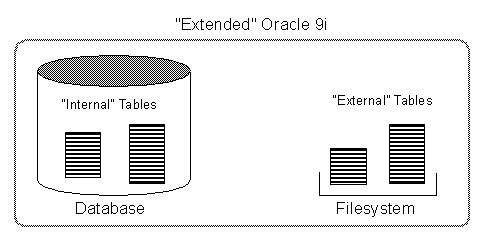
The means of defining the metadata for external
tables is through the CREATE TABLE ... ORGANIZATION EXTERNAL statement. This external
table definition can be thought of as a view that allows running any SQL query against
external data without requiring that the external data first be loaded into the database.
An access driver is the actual mechanism used to read the external data in the
table.
Oracle provides an access driver for external
tables. It allows the reading of data from external files using the Oracle loader
technology. The ORACLE_LOADER access driver provides data mapping capabilities which are
a subset of the control file syntax of SQL*Loader utility.
Oracle's external tables feature provides a valuable
means for performing basic extraction, transformation, and transportation (ETT) tasks
that are common for datawarehousing.
The following example creates an external table,
then uploads the data to a database table. We have tested the examples in the Oracle9i
Database Administrator's Guide Release 1 (9.0.1) using Oracle 9.0.1 on Windows
2000.
The file empxt1.dat in C:\Users\Zahn\Work contains
the following sample data:
7369,Schmied,Schlosser,7902,17.12.1980,800,0,20
7499,Zaugg,Verkäufer,7698,20.02.1981,1600,300,30
7521,Müller,Verkäufer,7698,22.02.1981,1250,500,30
7566,Holzer,Informatiker,7839,02.04.1981,2975,0,20
7654,Zahn,Verkäufer,7698,28.09.1981,1250,1400,30
7698,Sutter,Informatiker,7839,01.05.1981,2850,0,30
7782,Graf,Informatiker,7839,09.06.1981,2450,0,10
The file empxt2.dat in C:\Users\Zahn\Work contains
the following sample data:
7788,Gasser,Analytiker,7566,19.04.1987,3000,0,20
7839,Kiener,Lehrer,,17.11.1981,5000,0,10
7844,Stoller,Verkäufer,7698,08.09.1981,1500,0,30
7876,Amstutz,Automechaniker,7788,23.05.1987,1100,0,20
7900,Weigelt,Automechaniker,7698,03.12.1981,950 ,0,30
7902,Wyss,Analytiker,7566,03.12.1981,3000,0,20
7934,Messerli,Automechaniker,7782,23.01.1982,1300,0,10
The following SQL statements create an external table and load its
data into database table EMP of the user scott.
sqlplus /nolog
SQL*Plus: Release 9.0.1.0.1 - Production on
Sat Jan 26 10:44:48 2002
(c) Copyright 2001 Oracle Corporation. All rights reserved.
CONNECT SYS/MANAGER AS SYSDBA;
SET ECHO ON;
CREATE OR REPLACE DIRECTORY dat_dir AS
'C:\Oracle\Data';
CREATE OR REPLACE DIRECTORY log_dir AS 'C:\Oracle\Log';
CREATE OR REPLACE DIRECTORY bad_dir AS 'C:\Oracle\Bad';
Directory created.
GRANT READ ON DIRECTORY dat_dir TO scott;
GRANT WRITE ON DIRECTORY log_dir TO scott;
GRANT WRITE ON DIRECTORY bad_dir TO scott;
Grant succeeded.
CONNECT scott/tiger;
DROP TABLE empxt;
CREATE TABLE empxt
(empno NUMBER(4),
ename VARCHAR2(20),
job VARCHAR2(20),
mgr NUMBER(4),
hiredate DATE,
sal NUMBER(7,2),
comm NUMBER(7,2),
deptno NUMBER(2)
)
ORGANIZATION EXTERNAL
(
TYPE ORACLE_LOADER
DEFAULT DIRECTORY dat_dir
ACCESS PARAMETERS
(
records delimited by newline
badfile bad_dir:'empxt%a_%p.bad'
logfile log_dir:'empxt%a_%p.log'
fields terminated by ','
missing field values are null
( empno,
ename,
job,
mgr,
hiredate char date_format date mask
"dd.mm.yyyy",
sal,
comm,
deptno
)
)
LOCATION ('empxt1.dat', 'empxt2.dat')
)
PARALLEL
REJECT LIMIT UNLIMITED;
Table created.
ALTER SESSION ENABLE PARALLEL DML;
Session altered.
The first few statements in this example create the
directory objects for the operating system directories that contain the data
sources, and for the bad record and log files specified in the access parameters. You
must also grant READ or WRITE directory object privileges, as appropriate.
The TYPE specification is given only to
illustrate its use. If not specified, ORACLE_LOADER is the default access driver. The
access parameters, specified in the ACCESS PARAMETERS clause, are opaque to Oracle. These
access parameters are defined by the access driver, and are provided to the access driver
by Oracle when the external table is accessed.
The PARALLEL clause enables parallel query on
the data sources. The granule of parallelism is by default a data source, but parallel
access within a data source is implemented whenever possible. For example, if PARALLEL=3
were specified, then more than one parallel execution server could be working on a data
source.
The REJECT LIMIT clause specifies that there
is no limit on the number of errors that can occur during a query of the external data.
For parallel access, this limit applies to each parallel query slave independently. For
example, if REJECT LIMIT 10 is specified, each parallel query process is allowed 10
rejections. Hence, the only precisely enforced values for REJECT LIMIT on parallel query
are 0 and UNLIMITED.
SELECT * FROM empxt;
EMPNO ENAME
JOB MGR
HIREDATE SAL COMM DEP
----- -------- -------------- ---- --------- ----- ---- ---
7788 Gasser Analytiker 7566 19-APR-87
30000 20
7839 Kiener
Lehrer
17-NOV-81 50000 10
7844 Stoller Verkäufer 7698 08-SEP-81
15000 30
7876 Amstutz Automechaniker 7788 23-MAY-87 11000 20
7900 Weigelt Automechaniker 7698 03-DEC-81 9500 30
7902 Wyss Analytiker 7566 03-DEC-81
30000 20
7934 Messerli Automechaniker 7782 23-JAN-82 13000 10
7369 Schmied Schlosser 7902 17-DEC-80
8000 20
7499 Zaugg Verkäufer 7698
20-FEB-81 1600 300 30
7521 Müller Verkäufer 7698
22-FEB-81 1250 500 30
7566 Holzer Informatiker 7839 02-APR-81 29750
20
7654 Zahn Verkäufer 7698
28-SEP-81 1250 1400 30
7698 Sutter Informatiker 7839 01-MAY-81 28500
30
7782 Graf Informatiker 7839 09-JUN-81
24500 10
CREATE TABLE emp2 AS SELECT * FROM empxt;
Table created.
DELETE FROM emp2;
14 rows deleted.
INSERT INTO emp2 SELECT * FROM empxt;
14 rows created.
In this example, the INSERT INTO statement generates a dataflow
from the external data source to the Oracle SQL engine where data is processed. As data
is parsed by the access driver from the external table sources and provided to the
external table interface, the external data is converted from its external representation
to its Oracle internal data type.
UPDATE empxt SET empno = 6534 WHERE empno =
7654;
ERROR at line 1:
ORA-30657: operation not supported on ext organized table
External Tables are a great alternative for the well
known SQL*Loader Utility. Everything can be done from the database side, no more external
processes for data loading and complicated Control Files - Congratulation Oracle
!
No DML operations (UPDATE, INSERT, or DELETE) are possible, and no
indexes can be created, on external tables.
Oracle9i Database Administrator's Guide Release 1 (9.0.1)
Managing Tables
Secure Random Number
Generator
Oracle 9i's DBMS_OBFUSCATION_TOOLKIT now
includes a secure random number generator, DES3GETKEY. Secure random number
generation is a very important aspect of cryptography; predictable cryptographic keys can
easily be decrypted by a person or machine performing crypto analysis.
The DBMS_OBFUSCATION_TOOLKIT.DES3GETKEY procedure
computes a 16-byte random value. At any rate, one of the ways to call DES3GETKEY is as a
function that returns a random value of type RAW. By using the built-in RAWTOHEX
function, it's possible to produce a more usable "hex" value (which is really just a
VARCHAR2).
The procedure requires an 80-byte seed value. A seed
value is needed to kick-start the algorithm to compute the random value. A simple way to
do this is to hardcode the seed (which we actually generated by repeated invocations to
the procedure). Despite the constant seed, the random value does not repeat.
The function SECURE_RAND produces the 16-byte random
value
sqlplus scott/tiger
CREATE OR REPLACE FUNCTION secure_rand
RETURN VARCHAR2 IS
seedval RAW(80) := HEXTORAW('72DD046BF9892A3544B7587475FDF5A0'
|| 'B8F6C44F5C33B57C8156E5CBE92A8477'
|| 'F4F8FCDE5A21236CA1D7938C4D5E47A8'
|| 'D7BBC407DB6DB8EB7695BA5565218C4F'
|| 'D66D5C41523FDCBA8D92CDBD8DC75C54');
BEGIN
RETURN RAWTOHEX(DBMS_OBFUSCATION_TOOLKIT.DES3GETKEY(
seed => seedval));
END;
/
Function created.
Test the function with the following code
fragment
set serveroutput on
DECLARE
rand_val VARCHAR2(32);
BEGIN
rand_val := secure_rand;
DBMS_OUTPUT.PUT_LINE(rand_val);
END;
/
The first call to the function returns a value such as:
86A6D743152E41608D4FF7AFFEFC3EFA
PL/SQL procedure successfully completed.
The second call to the function returns a value such as:
382BDDB7A56E736615A89BC596FEAFEA
PL/SQL procedure successfully completed.
Manually install Oracle9i
JVM (9.0.1)
If you want to install the Oracle 9i Java Virtual
Machine, you have to run the following Scripts as user SYS. Using the database
configuration assistant, this scripts will be executed.
Make sure, your INIT.ORA Paramaters
SHARED_POOL_SIZE
and JAVA_POOL_SIZE are big enough. We have successfully installed the 9i JVM with
the following settings on a Windows 2000 server.
shared_pool_size = 200000000
java_pool_size = 100000000
Note, that Oracle Home is: D:\Ora9i
sqlplus /nolog
connect sys/.... as sysdba;
-- Setup a database for
running Java and the ORB
@D:\Ora9i\javavm\install\initjvm.sql;
-- INITialize (load) XML components in JServer
@D:\Ora9i\xdk\admin\initxml.sql;
-- Loads NCOMP'ed XML Parser
@D:\Ora9i\xdk\admin\xmlja.sql;
-- Loads the XMLSQL Utility (XSU) into the database.
@D:\Ora9i\rdbms\admin\catxsu.sql;
-- Install the Oracle Servlet Engine (OSE)
@D:\Ora9i\javavm\install\init_jis.sql D:\Ora9i;
-- Adds the set of default end points to the server
-- with hardcoded values for the admin service
@D:\Ora9i\javavm\install\jisaephc.sql D:\Ora9i;
-- Turn on J Accelerator
@D:\Ora9i\javavm\install\jisja.sql D:\Ora9i;
-- Register EJB\Corba Dynamic Registration Endpoint
@D:\Ora9i\javavm\install\jisdr.sql 2481 2482;
-- Init Java server pages ???
@D:\Ora9i\jsp\install\initjsp.sql;
-- Turn on J Accelerator for JSP libs
@D:\Ora9i\jsp\install\jspja.sql;
-- Script used to load AQ\JMS jar files into the
database
@D:\Ora9i\rdbms\admin\initjms.sql;
-- Load RepAPI server classes and publish 'repapi' obj
@D:\Ora9i\rdbms\admin\initrapi.sql;
-- Loads sql, objects, extensibility and xml related
java
@D:\Ora9i\rdbms\admin\initsoxx.sql;
-- Loads appctxapi.jar for JavaVm
enabled
-- Database.Called by jcoreini.tsc
@D:\Ora9i\rdbms\admin\initapcx.sql;
-- Script used to load CDC jar files into the database
@D:\Ora9i\rdbms\admin\initcdc.sql;
-- Loads the Java stored procedures as required by the
-- Summary Advisor.
@D:\Ora9i\rdbms\admin\initqsma.sql;
-- Initialize sqlj type feature in
9i db
@D:\Ora9i\rdbms\admin\initsjty.sql;
-- Load java componenets for AQ HTTP
Propagation
@D:\Ora9i\rdbms\admin\initaqhp.sql;
Oracle 9i
Data Recovery with DBMS_FLASHBACK
Oracle9i flashback query offers the ability
to query the database for data as it was at some point in the past. In order to issue
flashback queries, you need to be using automated undo management, which means
that your database must be configured to write rollback data into an undo tablespace
instead of into rollback segments.
Oracle9i Database automatically manages undo
tablespaces, so you no longer need to worry about creating and sizing the right number of
rollback segments. You can create a specific undo tablespace using the UNDO TABLESPACE
clause of the CREATE DATABASE statement.
CREATE
DATABASE ARK2
CONTROLFILE REUSE
MAXDATAFILES 256
MAXINSTANCES 4
MAXLOGFILES 62
MAXLOGMEMBERS 5
MAXLOGHISTORY 1600
CHARACTER SET "WE8ISO8859P1"
NATIONAL CHARACTER SET "AL16UTF16"
DATAFILE 'D:\Ora\ARK2_sys1.dbf' SIZE 200M REUSE
UNDO TABLESPACE undo DATAFILE 'D:\Ora\ARK2_undo1.dbf'
SIZE 200M REUSE AUTOEXTEND ON NEXT 5120K MAXSIZE UNLIMITED
DEFAULT
TEMPORARY TABLESPACE tmp
TEMPFILE 'D:\Ora\ARK2_tmp1.dbf' SIZE 512064K REUSE
EXTENT MANAGEMENT LOCAL UNIFORM SIZE 256K
LOGFILE GROUP 1 ('D:\Ora\ARK2_log1A.rdo',
'C:\Ora\ARK2_log1B.rdo') SIZE 5M REUSE,
GROUP 2 ('D:\Ora\ARK2_log2A.rdo',
'C:\Ora\ARK2_log2B.rdo') SIZE 5M REUSE,
GROUP 3 ('D:\Ora\ARK2_log3A.rdo',
'C:\Ora\ARK2_log3B.rdo') SIZE 5M REUSE,
GROUP 4 ('D:\Ora\ARK2_log4A.rdo',
'C:\Ora\ARK2_log4B.rdo') SIZE 5M REUSE;
If you already have a running database using rollback segments,
then the process for switching to automated undo management is fairly trivial. Begin by
creating an undo tablespace:
CREATE UNDO TABLESPACE undo
DATAFILE 'D:\Ora\ARK2_undo1.dbf';
Once you've created an undo tablespace, you need to configure your
database instance to use it, specify a retention time, and switch your database instance
to automated undo management mode. Do that by setting the three initialization parameters
in the INIT.ORA shown in the following example:
### System Managed Undo
### -------------------
undo_management = AUTO
undo_retention = 10800
undo_tablespace = UNDO
The true power of flashback queries, comes into play when you can
relate prior data to current data or when you can take that prior data and make it
current again.
As an example, we show how to recover the deleted data from the
table EMP.
User scott removes all data from table EMP at 14:00
SQL> delete from emp;
14 rows deleted.
SQL> commit;
Commit complete.
At 15:30 you notice, that table EMP is empty ... don't worry
...
SQL> select * from emp;
no rows selected
... install and execute the following procedure:
CREATE OR REPLACE PROCEDURE
my_flashback (delete_date VARCHAR2) IS
del_date DATE;
emp_rec emp%ROWTYPE;
CURSOR emp_flash IS SELECT * FROM emp;
BEGIN
del_date := TO_DATE(delete_date,'DD.MM.YYYY:HH24:MI');
--
-- Go back in time to the desired date
--
DBMS_FLASHBACK.ENABLE_AT_TIME(del_date);
--
-- Retrieve lost data
--
OPEN emp_flash;
--
-- Return to the present
--
DBMS_FLASHBACK.DISABLE;
--
-- Recover and reinsert the accidentally deleted rows
--
LOOP
FETCH emp_flash INTO emp_rec;
EXIT WHEN emp_flash%NOTFOUND;
INSERT INTO emp
VALUES (emp_rec.empno,
emp_rec.ename,
emp_rec.job,
emp_rec.mgr,
emp_rec.hiredate,
emp_rec.sal,
emp_rec.comm,
emp_rec.deptno);
END LOOP;
--
-- Close the cursor and commit the recovered rows.
--
CLOSE emp_flash;
COMMIT;
END;
/
Procedure created.
SQL> execute
my_flashback('08.02.2002:14:00');
PL/SQL procedure
successfully completed.
Exit SQLPLUS and restart it again, then check the table
EMP
SQL> exit;
sqlplus scott/tiger
SQL> select count(*) from emp;
COUNT(*)
----------
14
All Rows are recovered into table EMP !
To specify a date/time value, use DBMS_FLASHBACK
.ENABLE_AT_TIME, as shown in the procedure, 14:00 in the past.
When you enable flashback query mode, you can issue
only SELECT statements. No INSERT, UPDATE, or DELETE statements are allowed until you
exit flashback query mode by using DBMS_FLASHBACK.DISABLE.
When DBMS_FLASHBACK is enabled, the user session
uses the Flashback version of the database, and applications can execute against the
Flashback version of the database. DBMS_FLASHBACK is automatically turned off when the
session ends, either by disconnection or by starting another connection.
Problem
loading Class File into Oracle 9.0.1 Database
Last week, we failed to load a Java Class File into
the Oracle 9.0.1 Database.
loadjava -verbose -u scott/tiger
ReadEmployees.class
arguments:
'-verbose' '-u' 'scott/tiger'
creating : class ReadEmployees
Error while creating CREATE$JAVA$LOB$TABLE
ORA-03001: unimplemented feature
loading : class ReadEmployees
Error while deleting ReadEmployees from lob table
ORA-00942: table or view does not exist
Error while loading class ReadEmployees
ORA-00942: table or view does not exist
Error while creating class ReadEmployees
ORA-29506: invalid query derived from USING clause
ORA-00942: table or view does not exist
The following operations failed
class ReadEmployees: creation
exiting : Failures occurred during processing
LOBs cannot be stored in tablespaces created with
SEGMENT SPACE MANAGEMENT set to AUTO.
Change your DEFAULT Tablespace from ....
CREATE TABLESPACE tab
DATAFILE '/u01/VEN1_tab1.dbf' SIZE 819264K REUSE
EXTENT MANAGEMENT LOCAL UNIFORM SIZE 512K
SEGMENT SPACE MANAGEMENT AUTO
PERMANENT
ONLINE;
.... to (remove SEGMENT SPACE MANAGEMENT AUTO) and it will
work.
CREATE TABLESPACE tab
DATAFILE '/u01/VEN1_tab1.dbf' SIZE 819264K REUSE
EXTENT MANAGEMENT LOCAL UNIFORM SIZE 512K
PERMANENT
ONLINE;
Migrating LONGs to LOBs in
Oracle9i
Oracle9i supports the LONG API for LOBs. This API
ensures that when LONG columns are changed to LOBs, existing applications will require
few changes, if any.
Although Oracle9i supports LONG as well as LOB
datatypes, Oracle recommends that existing applications should migrate to use LOBs
instead of LONGs because of the added benefits that LOBs provide. For example, a single
row can have multiple LOB columns as opposed to only one LONG or LONG RAW column. LOBs
can also be used as attributes of a user-defined type, which is not possible with either
a LONG or a LONG RAW.
ALTER TABLE now allows a LONG column to be modified
to CLOB or NCLOB and a LONG_RAW column to be modified to BLOB. The syntax is as
follows:
ALTER TABLE [<schema>.]<table_name>
MODIFY ( <long_column_name> { CLOB | BLOB | NCLOB }
[DEFAULT <default_value>]) [LOB_storage_clause];
CREATE TABLE picture (id NUMBER, picture
LONG);
ALTER TABLE picture MODIFY (picture CLOB);
CREATE TABLE picture (id NUMBER, picture LONG
RAW);
ALTER TABLE picture MODIFY (picture BLOB);
Cursor
Expressions in Oracle 9i
Cursor Expressions are already known since Oracle
8i, new in Oracle 9i is the possibility to pass a Cursor Expression as a REF CURSOR
argument to a function.
A cursor expression returns a nested cursor. Each
row in the result set can contain values as usual, plus cursors produced by
subqueries involving the other values in the row. Thus, a single query can return a
large set of related values retrieved from multiple tables.
PL/SQL supports queries with cursor expressions as
part of cursor declarations, REF CURSOR declarations and ref cursor variables. You can
also use cursor expressions in dynamic SQL queries. Here is the syntax:
CURSOR ( subquery )
Look at the following output from the well known EMP, DEPT
tables
SELECT d.dname, e.sal,e.comm
FROM emp e, dept d
WHERE e.deptno = d.deptno;
DNAME
SAL COMM
-------------- ---------- ----------
ACCOUNTING 2450
ACCOUNTING 5000
ACCOUNTING 1300
RESEARCH
800
RESEARCH 1100
RESEARCH 3000
RESEARCH 3000
RESEARCH 2975
SALES
1600 300
SALES
2850
SALES
1250 1400
SALES
950
SALES
1500 0
SALES
1250 500
The following simple (not very exciting) example
shows the use of a CURSOR expression in the select list of a query.
SELECT dname "DEP",
CURSOR(SELECT sal, comm
FROM emp e
WHERE e.deptno =
d.deptno) "SAL-COMM"
FROM dept d;
DEP
SAL-COMM
-------------- --------------------
ACCOUNTING CURSOR STATEMENT : 2
CURSOR STATEMENT : 2
SAL COMM
---------- ----------
2450
5000
1300
RESEARCH CURSOR STATEMENT : 2
CURSOR STATEMENT : 2
SAL COMM
---------- ----------
800
2975
3000
1100
3000
SALES CURSOR STATEMENT : 2
CURSOR STATEMENT : 2
SAL COMM
---------- ----------
1600 300
1250 500
1250 1400
2850
1500
0
950
The next example shows the use of a CURSOR expression as a function
argument.
We want to find those managers in the sample EMP table, where all
of whose employees were hired before the manager. Use the following query to get an
overview.
column ename format A20
SELECT LPAD(' ',2*(LEVEL-1)) || ename
ename,mgr,TO_CHAR(hiredate,'DD.MM.YYYY') hiredate
FROM emp
CONNECT BY PRIOR empno = mgr
START WITH job = 'PRESIDENT';
ENAME
MGR HIREDATE
-------------------- ---------- ----------
KING
17.11.1981
JONES
7839 02.04.1981
SCOTT
7566 09.12.1982
ADAMS
7788 12.01.1983
FORD
7566 03.12.1981
SMITH
7902 17.12.1980
BLAKE
7839 01.05.1981
ALLEN
7698 20.02.1981
WARD
7698 22.02.1981
MARTIN
7698 28.09.1981
TURNER
7698 08.09.1981
JAMES
7698 03.12.1981
CLARK
7839 09.06.1981
MILLER
7782 23.01.1982
King has the employees Jones, Blake and Clark, all
where hired before King ... well that's live. Ford has one employee Smith, which was
hired before him.
The function ALL_EMP_BEFORE_HIRED accepts a cursor
and a date. The function expects the cursor to be a query returning a set of
dates.
CREATE OR REPLACE FUNCTION all_emp_before_hired
  ( pCur SYS_REFCURSOR,
    mgr_hiredate DATE
  ) RETURN NUMBER IS
  emp_hiredate   DATE;
  before_hired   NUMBER :=0;
  after_hired    NUMBER :=0;
BEGIN
  LOOP
    FETCH pCur INTO emp_hiredate;
    EXIT WHEN pCur%NOTFOUND;
    IF (emp_hiredate > mgr_hiredate) THEN
      after_hired := after_hired +  1;
    ELSE
      before_hired:= before_hired + 1;
    END IF;
  END LOOP;
  CLOSE pCur;
  IF (before_hired > after_hired) THEN
    RETURN 1;
  ELSE
    RETURN 0;
  END IF;
END;
/
Now enter the query returning a set of dates.
SELECT e1.ename FROM emp e1
   WHERE all_emp_before_hired (
   CURSOR(SELECT e2.hiredate FROM emp e2
           WHERE e1.empno = e2.mgr),
                 e1.hiredate) = 1;
ENAME
--------------------
KING
FORD
More Information about Cursor Expressions can be
found in the Oracle 9i PL/SQL User's
Guide and Reference.
Extract Object DDL and XML
Definition from Oracle 9i
The Oracle 9i Metadata API provides an interface
that allows you to extract Oracle DDL (Data Definition Language) from the data
dictionary. This eliminates the need to query the data dictionary views to etract the
object information required to re-create the object. This new functionality is provided
through the new Oracle 9i package DBMS_METADATA.
The GET_DDL procedure provides an example of the use
of the DBMS_METADATA package. In this example, we will extract the DDL for the table EMP
in the SCOTT schema.
select dbms_metadata.get_ddl
('TABLE','EMP','SCOTT')
"Definition of EMP table"
from dual;
Definition of EMP table
--------------------------------------------------------
CREATE TABLE "SCOTT"."EMP"
( "EMPNO" NUMBER(4,0) NOT NULL ENABLE,
"ENAME" VARCHAR2(10),
"JOB" VARCHAR2(9),
"MGR" NUMBER(4,0),
"HIREDATE" DATE,
"SAL" NUMBER(7,2),
"COMM" NUMBER(7,2),
"DEPTNO" NUMBER(2,0)
) PCTFREE 10 PCTUSED 40 INITRANS 1 MAXTRANS 255 LOGGING
STORAGE(INITIAL 524288 NEXT 524288 MINEXTENTS 1
MAXEXTENTS 2147483645 PCTINCREASE 0
FREELISTS 1 FREELIST GROUPS 1 BUFFER_POOL DEFAULT)
TABLESPACE "TAB"
In the next example we extract the definition of one
of SCOTT's functions.
column object_name format a20
select object_name,object_type from user_objects;
OBJECT_NAME OBJECT_TYPE
-------------------- ------------------
ALL_EMP_BEFORE_HIRED FUNCTION
BONUS
TABLE
DEPT
TABLE
DUMMY
TABLE
EMP
TABLE
MGR_EMP
FUNCTION
SALGRADE
TABLE
TEST
TABLE
select dbms_metadata.get_ddl
('FUNCTION','MGR_EMP','SCOTT')
"Definition of MGR_EMP function"
from dual;
Definition of MGR_EMP
function
-----------------------------------------------
CREATE OR REPLACE FUNCTION "SCOTT"."MGR_EMP"
( pCur SYS_REFCURSOR,
mgr_hiredate DATE
) RETURN NUMBER IS
emp_hiredate DATE;
before NUMBER :=0;
after NUMBER:=0;
BEGIN
LOOP
FETCH pCur INTO emp_hiredate;
EXIT WHEN pCur%NOTFOUND;
IF (emp_hiredate > mgr_hiredate) THEN
after := after + 1;
ELSE
before:= before + 1;
END IF;
END LOOP;
CLOSE pCur;
IF (before > after) THEN
RETURN 1;
ELSE
RETURN 0;
END IF;
END;
In the next example we extract the XML
definition of SCOTT's EMP table. The corresponding XSL style sheets are available in
$ORACLE_HOME/rdbms/xml/xls.
select dbms_metadata.get_xml ('TABLE','EMP','SCOTT')
       "XML data of EMP table"
 from dual;
XML data of EMP table
---------------------------------------
<?xml version="1.0"?>
 <ROWSET>
  <ROW>
   <TABLE_T>
    <VERS_MAJOR>1</VERS_MAJOR>
    <VERS_MINOR>0</VERS_MINOR>
    <OBJ_NUM>27920</OBJ_NUM>
    <SCHEMA_OBJ>
     <OBJ_NUM>27920</OBJ_NUM>
     <DATAOBJ_NUM>27920</DATAOBJ_NUM>
     .......
     .......
With DBMS_METADATA you can retrieve complete
database object definitions (metadata) from the dictionary by specifying:
-
The type of object, for example, tables,
indexes, or procedures
-
Optional selection criteria, such as owner or
name
-
Optional transformations on the output. By
default the output is represented in XML, but callers can specify transformations
(into SQL DDL, for example), which are implemented by XSL-T stylesheets stored in the
database or externally.
DBMS_METADATA provides the following retrieval
interfaces:
-
For programmatic use: OPEN, SET_FILTER,
SET_COUNT, GET_QUERY, SET_PARSE_ITEM, ADD_TRANSFORM, SET_TRANSFORM_PARAM, FETCH_xxx
and CLOSE retrieve multiple objects.
-
For browsing: GET_XML and GET_DDL return
metadata for a single object and are used in SQL queries and for browsing.
More Information can be found in the Oracle9i Supplied PL/SQL Packages and Types
Reference Release 1 (9.0.1) Manual.
Some small, useful SQL*Plus Tips
Oracle has long warned of the removal of the Server
Manager (SVRMGRL) product as well as the ability to issue the CONNECT INTERNAL command.
In Oracle 9i you can connect internal as user SYS as a privileged user:
$ sqlplus "sys as sysdba"
Enter password: <SYS Password>
SQL>
$ sqlplus /nolog
connect sys/<SYS Password> as sysdba;
SQL>
You are spooling a file and want to avoid having
remaining characters filled with blanks or tabs (Default). This may happen if you have
set LINESIZE 500 and your table rows are only 100 in size. The resulting script will not
have the correct format although the display on the screen will look correct.
Another situation when this may happen is if you are
dumping a table to a comma delimited ASCII file to be used with SQL*Loader. The line
length is likely to be padded with blanks and will dramatically increase the size of the
file.
The solution is to use the TRIMSPOOL ON at the
beginning oy your SQL script. This will trim the unneeded spaces in your file.
SQL> set trimspool on
Since version 8.1.6 it is possible to create HTML within Sql*Plus.
This tip deals with this enhancement. It is easy to migrate scripts from character mode
to html, because all of the SQl*Plus tags are converted to HTML tags without any code
change
-- start output in html and
spool output
set markup html on spool on
-- specify a file with extension htm or html
spool dept.html
-- your query
select * from dept;
-- end the html file
spool off
-- set back to normal output
set markup html off spool off
Here is the Result:
SQL>
SQL> -- your query
SQL> select * from dept;
| DEPTNO |
DNAME |
LOC |
| 10 |
ACCOUNTING |
NEW YORK |
| 20 |
RESEARCH |
DALLAS |
| 30 |
SALES |
CHICAGO |
| 40 |
OPERATIONS |
BOSTON |
SQL>
SQL> -- end the html file
SQL> spool off
SQL*Plus provides many useful options and commands
that you will make frequent use when you work with Oracle. Soon you will get tired of
typing this in each and every time you start a SQL*PLus session. Further, it allows to
set an environment variable, SQLPATH, so that it can find the startup script
login.sql, regardless of the directory in which it is stored.
Set the Environment Variable SQLPATH and save your
login.sql script in this location. Here is an example for such a login
script.
define _editor=vi
set serveroutput on size 1000000
set trimspool on
set long 5000
set linesize 100
set pagesize 9999
column plan_plus_exp format a80
column global_name new_value gname
set termout off
select lower(user) || '@' ||
decode(global_name, 'ARK1.WORLD', 'ARK1', 'ARK2.WORLD',
'ARK2', global_name) global_name from global_name;
set sqlprompt '&gname> '
set termout on
Connect to sqlplus and all this variables are
automatically setup.
scott@ARK2>
Oracle 9i Database Properties
If you wish to know what tablespace is current assigned as the
default tablespace, you can use the new DATABASE_PROPERTIES view. Look in the
PROPERTY_NAME column for the value DEFAULT_TEMP_TABLESPACE, and you will find the
tablespace name associated PROPERTY_VALUE column. You will find many other useful
information in this view.
column property_value format a30
select property_name, property_value
from database_properties
PROPERTY_NAME
PROPERTY_VALUE
------------------------------ ----------------------------
DICT.BASE
2
DEFAULT_TEMP_TABLESPACE TMP
DBTIMEZONE
+01:00
NLS_LANGUAGE
AMERICAN
NLS_TERRITORY
AMERICA
NLS_CURRENCY
$
NLS_ISO_CURRENCY
AMERICA
NLS_NUMERIC_CHARACTERS .,
NLS_CHARACTERSET
WE8ISO8859P1
NLS_CALENDAR
GREGORIAN
NLS_DATE_FORMAT
DD-MON-RR
NLS_DATE_LANGUAGE
AMERICAN
NLS_SORT
BINARY
NLS_TIME_FORMAT
HH.MI.SSXFF AM
NLS_TIMESTAMP_FORMAT
DD-MON-RR HH.MI.SSXFF AM
NLS_TIME_TZ_FORMAT
HH.MI.SSXFF AM TZR
NLS_TIMESTAMP_TZ_FORMAT DD-MON-RR HH.MI.SSXFF
AM TZR
NLS_DUAL_CURRENCY
$
NLS_COMP
BINARY
NLS_LENGTH_SEMANTICS BYTE
NLS_NCHAR_CONV_EXCP
FALSE
NLS_NCHAR_CHARACTERSET AL16UTF16
NLS_RDBMS_VERSION
9.0.1.2.1
GLOBAL_DB_NAME
ARK2.WORLD
EXPORT_VIEWS_VERSION
8
Monitoring Unused Indexes in Oracle 9i
Oracle 8i introduced table-usage monitoring
to help streamline the process of statistics collection. To automatically gather
statistics for a particular table, enable the monitoring attribute using the MONITORING
keyword. This keyword is part of the CREATE TABLE and ALTER TABLE statement
syntax.
After it is enabled, Oracle monitors the table for
DML activity. This includes the approximate number of inserts, updates, and deletes for
that table since the last time statistics were gathered. Oracle uses this data to
identify tables with stale statistics.
View the data Oracle obtains from monitoring these
tables by querying the USER_TAB_MODIFICATIONS view.
With Oracle 9i, you can now also monitor the
usage of indexes. Unused indexes are, of course, a waste of space, and also can cause
performance problems, as Oracle is required to maintain the index each time the table
associated with the index is involved in a DML operation.
Use ALTER INDEX index_name MONITORING USAGE
clause to begin the collection of statistics on index usage. This clause is useful in
determining whether an index is being used.
Example
Create an index on the EMP table, issue a SELECT
statement which will use the index (check this with AUTOTRACE) and monitor the index
during this operation.
CONNECT scott/tiger
ALTER TABLE emp ADD CONSTRAINT pk_emp PRIMARY KEY (empno);
ALTER INDEX pk_emp MONITORING USAGE;
SET AUTOTRACE ON;
SELECT ename FROM emp WHERE empno = 7900;
Execution Plan
-------------------------------------------------------
0 SELECT STATEMENT Optimizer=CHOOSE
1 0 TABLE ACCESS (BY INDEX ROWID) OF 'EMP'
2 1 INDEX (UNIQUE SCAN) OF
'PK_EMP' (UNIQUE)
COLUMN index_name FORMAT A10
COLUMN table_name FORMAT A10
COLUMN start_monitoring FORMAT A10
COLUMN end_monitoring FORMAT A10
SELECT * FROM v$object_usage;
INDEX_NAME TABLE_NAME MON USE START_MONI END_MONITO
---------- ---------- --- --- ---------- ----------
PK_EMP EMP YES
YES 03/30/2002
12:33:01
ALTER INDEX pk_emp NOMONITORING USAGE;
While the index is in monitoring mode, you can use
the V$OBJECT_USAGE view to determine whether the index has been used. Note that the view
will show usage information only when queried by the index owner. The V$OBJECT_USAGE
column USED can be queried. If the columns value is NO, then the index has not been used.
If the columns value is YES, then the index has been used.
Select for Update Wait
By default, Oracle locks data structures for you automatically.
However, you can request specific data locks on rows or tables when it is to your
advantage to override default locking. Explicit locking lets you share or deny access to
a table for the duration of a transaction.
With the SELECT FOR UPDATE statement, you can explicitly lock specific
rows of a table to make sure they do not change before an update or delete is executed.
However, Oracle automatically obtains row-level locks at update or delete time. So, use
the FOR UPDATE clause only if you want to lock the rows before the update or delete.
Oracle 9i has enhanced the WAIT clause to the
select for update command. Now the WAIT clause allows you to define a period of
time in seconds that the command must wait to be able to access locked rows. Using wait
without an specified time will result in the query indefinitely waiting until the row is
unlocked. The default is nowait, in which case the statement will not wait for any row
that is locked, and will fail.
DECLARE
CURSOR c1 IS SELECT empno, sal FROM emp
WHERE job = 'SALESMAN' AND comm > sal
FOR UPDATE WAIT
3;
The SELECT ... FOR UPDATE statement identifies the
rows that will be updated or deleted, then locks each row in the result set. This is
useful when you want to base an update on the existing values in a row. In that case, you
must make sure the row is not changed by another user before the update.
The optional keyword NOWAIT tells Oracle not
to wait if requested rows have been locked by another user. Control is immediately
returned to your program so that it can do other work before trying again to acquire the
lock. If you omit the keyword NOWAIT, Oracle waits until the rows are
available.
All rows are locked when you open the cursor, not as
they are fetched. The rows are unlocked when you commit or roll back the transaction. So,
you cannot fetch from a FOR UPDATE cursor after a commit. So, you cannot fetch from a FOR
UPDATE cursor after a commit, if you
do, PL/SQL raises an exception (see Fetching Across
Commits).
Fetching Across
Commits
The FOR UPDATE clause acquires exclusive row locks.
All rows are locked when you open the cursor, and they are unlocked when you commit your
transaction. In the following example, the cursor FOR loop
fails after the tenth insert:
DECLARE
CURSOR c1 IS SELECT ename FROM emp FOR UPDATE OF sal;
my_ename emp.ename%TYPE;
ctr NUMBER := 0;
BEGIN
OPEN c1;
LOOP
ctr := ctr + 1;
FETCH c1 INTO my_ename;
EXIT WHEN c1%NOTFOUND;
UPDATE emp SET sal = sal * 1.05 WHERE CURRENT OF
c1;
IF ctr >= 10 THEN
COMMIT;
END IF;
END LOOP;
CLOSE c1;
END;
/
ERROR at line 1:
ORA-01002: fetch out of sequence
ORA-06512: at line 9
If you want to fetch across commits, do not use the
FOR UPDATE and CURRENT OF clauses. Instead, use the ROWID pseudocolumn to mimic the
CURRENT OF clause. Simply select the rowid of each row into a UROWID variable. Then, use
the rowid to identify the current row during subsequent updates and deletes.
Note that the fetched rows are not locked because no
FOR UPDATE clause is used. So, other users might unintentionally overwrite your changes.
Also, the cursor must have a read-consistent view of the data, so rollback segments used
in the update are not released until the cursor is closed.
DECLARE
CURSOR c1 IS SELECT ename, rowid FROM emp;
my_ename emp.ename%TYPE;
my_rowid UROWID;
ctr NUMBER := 0;
BEGIN
OPEN c1;
LOOP
ctr := ctr + 1;
FETCH c1 INTO my_ename, my_rowid;
EXIT WHEN c1%NOTFOUND;
UPDATE emp SET sal = sal * 1.05
WHERE rowid = my_rowid;
IF ctr >= 10 THEN
COMMIT;
END IF;
END LOOP;
CLOSE c1;
END;
/
PL/SQL procedure successfully
completed.
Skip Scanning of Indexes in Oracle
9i
Have you ever executed a query and discovered it
didn't use any indexes because the columns in the query were not in the leading edge of
the query, but deeper within the structure of the index ?
With Oracle9i index skip scans improve index scans by nonprefix
columns. Often, it is faster to scan index blocks than it is to scan table data
blocks.
For example, our table emp looks as
follows
Name Null?
Type
----------- -------- ------------
EMPNO NOT NULL NUMBER(4)
ENAME
VARCHAR2(10)
NATURAL
VARCHAR2(1)
CODE
NUMBER(5)
JOB
VARCHAR2(9)
MGR
NUMBER(4)
HIREDATE
DATE
SAL
NUMBER(7,2)
COMM
NUMBER(7,2)
DEPTNO
NUMBER(2)
There is a composite index on (NATURAL, CODE). The number of
logical subindexes is determined by the number of distinct values in the initial
column.
The column NATURAL has only two distinct values ' F ' and ' M ',
the column CODE is more selective.
SELECT natural, COUNT(*)
FROM EMP
GROUP BY natural;
N COUNT(*)
- ----------
F 5120
M 9216
Let's create the composite index on NATURAL, CODE and analyze the
table.
CREATE INDEX nat_code ON emp
(natural,code);
ANALYZE TABLE EMP COMPUTE STATISTICS;
Note that the usage of an index for retrieval depends on the optimizer. If the optimizer
determines (with the help of available statistics) that it is more efficient to use a full table scan rather than an
index, it will not use an index even if it exists. Therefore we added more than 10'000
rows to table EMP
SELECT COUNT(*) FROM emp;
COUNT(*)
----------
14336
Now let's check the execution plan for the following
query:
SELECT COUNT(*) FROM emp WHERE code =
33;
COUNT(*)
----------
256
Execution Plan
----------------------------------------------------------
0 SELECT STATEMENT Optimizer=CHOOSE
1 0 SORT (AGGREGATE)
2 1 INDEX (SKIP SCAN) OF
'NAT_CODE' (NON-UNIQUE)
You can see, that the optimizer performed an index
scan, even though NATURAL was the leading column !
Oracle 9i has addressed the problem of the "leading
column in a composite index" by introducing SKIP SCANNING of indexes. With skip scanning,
you do not need to use the leading column of an index, and you can use any column or
columns that the index is built on, regardless of the order the were created in the
index.
Bitmap Join Indexes in Oracle
9i
A join index is an index structure which
spans multiple tables and improves the performance of joins of those tables. With
materialized views. Bitmap join indexes can be particularly
useful for star queries. Due to their space-efficient compressed storage, bitmap join
indexes also take up little disk space.
Bitmap join indexes represent the join of columns in
two or more tables. With a bitmap join index, the value of a column in one table
(generally a dimension table) is stored with the associated ROWIDs of the like value in
other tables that the index is defined on. This provides fast join access between the
tables, if that query uses the columns of the bitmap join index.
Bitmap join indexes are best understood by examining
a simple example. Suppose that a data warehouse contains a star schema with a fact table
named SALES and a dimension table
named CUSTOMER which holds each
customer's home location. A bitmap
join index can be created which indexes SALES
by customer home locations.
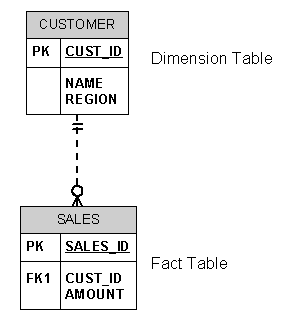
Create the tables first:
DROP TABLE sales;
CREATE TABLE sales (
sales_id NUMBER(4) NOT NULL,
cust_id NUMBER(4) NOT NULL,
amount NUMBER(6) NOT NULL
)
/
DROP TABLE customer;
CREATE TABLE customer (
cust_id NUMBER(4) NOT NULL,
name VARCHAR2(20) NOT NULL,
region VARCHAR2(100) NOT NULL
)
/
ALTER TABLE customer ADD (
CONSTRAINT pk_customer
PRIMARY KEY (cust_id)
)
/
ALTER TABLE sales ADD (
CONSTRAINT pk_sales
PRIMARY KEY (sales_id)
)
/
ALTER TABLE sales ADD (
CONSTRAINT fk_sales_customer
FOREIGN KEY (cust_id)
REFERENCES customer (cust_id)
)
/
INSERT INTO customer VALUES (1,'Müller','Thun');
INSERT INTO customer VALUES (2,'Meier','Bern');
INSERT INTO customer VALUES (3,'Holzer','Münsigen');
INSERT INTO customer VALUES (4,'Ammann','Interlaken');
INSERT INTO customer VALUES (5,'Glaus','Gunten');
INSERT INTO customer VALUES (6,'Keller','Oberhofen');
INSERT INTO customer VALUES (7,'Indermühle','Gwatt');
INSERT INTO customer VALUES (8,'Stoller','Wimmis');
INSERT INTO customer VALUES (9,'Marty','Noflen');
INSERT INTO customer VALUES (10,'Schweizer','Seftigen');
COMMIT;
INSERT INTO sales VALUES (1,1,570);
INSERT INTO sales VALUES (2,10,1300);
COMMIT;
Usually the dimension
table (e.g. CUSTOMER table) is large (and customer-based
dimension tables can reach tens of millions of records), then the bitmap join index can
vastly improve performance by not requiring any access to the CUSTOMER table. In
addition, bitmap join indexes can eliminate some of the key iteration and bitmap merge
work which is often present in star queries with bitmap indexes on the fact table.
CREATE BITMAP INDEX cus_sal
ON sales
(customer.region)
FROM sales, customer
WHERE sales.cust_id = customer.cust_id;
Now, let's create the corresponding query for the
created bitmap join index. In this example we added the hint /*+ INDEX_COMBINE
(sales cus_sal) */, because we have only a few records in the CUSTOMER
table.
set autotrace on
SELECT /*+ INDEX_COMBINE (sales cus_sal) */
SUM (sales.amount)
FROM sales, customer
WHERE sales.cust_id = customer.cust_id
AND customer.region =
'Thun';
Execution Plan
----------------------------------------------------------
   0      SELECT STATEMENT Optimizer=CHOOSE
   1    0   SORT (AGGREGATE)
   2    1     TABLE ACCESS (BY INDEX ROWID) OF 'SALES'
   3    2       BITMAP CONVERSION (TO ROWIDS)
   4    3         BITMAP INDEX (SINGLE VALUE) OF 'CUS_SAL'
The execution plan shws that no
access to the (large) CUSTOMER table was necessary for this query!
Join results must be stored, therefore, bitmap join
indexes have the following restrictions:
-
Parallel DML is currently only supported on the
fact table. Parallel DML on one of the participating dimension tables will mark the
index as unusable.
-
Only one table can be updated concurrently by
different transactions when using the bitmap join index.
-
No table can appear twice in the
join.
-
You cannot create a bitmap join index on an
index-organized table or a temporary table.
-
The columns in the index must all be columns of
the dimension tables.
-
The dimension table join columns must be either
primary key columns or have unique constraints.
-
If a dimension table has composite primary key,
each column in the primary key must be part of the join.
Shared Server Changes in
Oracle 9i
Oracle9i has renamed the multi-threaded server (MTS)
to shared server. The shared-server architecture increases the scalability of
applications and the number od clients that can be simultaneously connected to the
database. The shared server architecture also enables existing applications to scale up
without making any changes to the application itself.
Several parameters names have been added and changed
regarding the shared server, you should use the new parameters in place od the deprecated
ones. The new parameters and the old parameters they replace are as follows:
|
|
|
| Required
Parameters |
| mts_dispatchers |
dispatchers |
Optional. If you do
not specify the following parameters
Oracle selects appropriate defaults |
| mts_max_dispatchers |
max_dispatchers |
| mts_servers |
shared_servers |
| mts_max_servers |
max_shared_servers |
| mts_circuits |
circuits |
| mts_sessions |
shared_server_sessions |
Specifies the size in bytes of the large pool allocation heap.
Shared server may force the default value to be set too high, causing performance
problems or problems starting the database.
Specifies the maximum number of sessions that can be created in
the system. May need to be adjusted for shared server.
To force the IP address used for the dispatchers, enter the
following:
dispatchers =
"(address=(protocol=tcp)\
(host=diamond))dispatchers=2)"
max_dispatchers = 20
shared_servers = 1
max_shared_servers = 20
The following are useful views for obtaining
information about your shared server configuration and for monitoring
performance.
Connecting Oracle
DB without TNSNAMES entry
There are several possibilities to connect a client application to
an Oracle database. The client uses a resolution method to resolve a connect
identifier to a connect descriptor when attempting to connect to a database
service.
Oracle Net provides five naming methods:
- Local naming
- Directory naming
- Oracle Names
- Host naming
- External naming
The local naming method locates network addresses by using
information configured and stored on each individual client's configuration file:
TNSNAMES.ORA. This file contains one or more domains mapped to connect
descriptors. The tnsnames.ora file typically resides in $ORACLE_HOME/network/admin
on UNIX and ORACLE_HOME\network\admin on Windows.
The basic syntax for a tnsnames.ora file contains
the connect descriptor, ADDRESS contains the protocol address, and CONNECT_DATA contains
the database service identification information.
net_service_name=
(DESCRIPTION=
(ADDRESS=(protocol_address_information))
(CONNECT_DATA=
(SERVICE_NAME=service_name)))
Example
ARK2.WORLD =
(DESCRIPTION =
(ADDRESS = (PROTOCOL = TCP)(Host = arkum)(Port = 1521))
(CONNECT_DATA =
(SERVICE_NAME = ARK2)
(SERVER = DEDICATED)
)
)
However you need write access on your client host to
enter or update an entry. If you do not have such an access to modify the TNSNAMES.ORA
file, you can specify these parameters on the command
line.
Enter the parameters directly on the command
line, all in one line:
sqlplus
user/pwd@'(DESCRIPTION=(ADDRESS=(protocol_address_information))
(CONNECT_DATA=(SERVICE_NAME=service_name)))'
Example
If the Net Service Name ARK2 is not in the
TNSNAMES.ORA file, you can directly connect using the following command on the
command line (all in one line).
sqlplus
test/test@'(DESCRIPTION=(ADDRESS=(PROTOCOL=TCP)
(Host=arkum)(Port=1521))(CONNECT_DATA=(SERVICE_NAME=ARK2)
(SERVER=DEDICATED)))'
SQL*Plus: Release 9.2.0.1.0 -
Production on Fri Jul 26
Copyright (c) 1982, 2002, Oracle Corporation.
All rights reserved.
Connected to:
Oracle9i Enterprise Edition Release 9.2.0.1.0 - Production
With the Partitioning, OLAP and Oracle Data Mining options
JServer Release 9.2.0.1.0 - Production
SQL>
How to get a Report on the Execution Path in SQLPLUS ?
You can automatically get a report on the execution path used by the
SQL optimizer and the statement execution statistics. The report is generated after
successful SQL DML (that is, SELECT, DELETE, UPDATE and INSERT) statements. It is useful
for monitoring and tuning the performance of these statements.
Here is what is needed to get autotrace working:
- cd $ORACLE_HOME/rdbms/admin
- log into sqlplus as system
- run SQL> @utlxplan
- run SQL> create public public synonym plan_table for plan_table
- run SQL> grant all on plan_table to public
- exit sqlplus and cd $ORACLE_HOME/sqlplus/admin
- log into sqlplus as SYS
- run SQL> @plustrce
- run SQL> grant plustrace to public
You can replace public with some user if you want. by making it public,
you let anyone trace using sqlplus.
You can control the report by setting the AUTOTRACE system variable.
|
SET AUTOTRACE OFF
|
No AUTOTRACE report is generated. This is the default.
|
|
SET AUTOTRACE ON EXPLAIN
|
The AUTOTRACE report shows only the optimizer execution path.
|
|
SET AUTOTRACE ON STATISTICS
|
The AUTOTRACE report shows only the SQL statement execution
statistics.
|
|
SET AUTOTRACE ON
|
The AUTOTRACE report includes both the optimizer execution path
and the SQL statement execution statistics.
|
|
SET AUTOTRACE TRACEONLY
|
Like SET AUTOTRACE ON, but suppresses the printing of the user's
query output, if any.
|
To use this feature, you must have the PLUSTRACE role granted to
you and a PLAN_TABLE table created in your schema. For more information on the PLUSTRACE
role and PLAN_TABLE table, see the SQL*Plus Guide.
The Execution Plan shows the SQL optimizer's query execution path.
Each line of the Execution Plan has a sequential line number. SQL*Plus also displays
the line number of the parent operation.
The Execution Plan consists of four columns displayed in the following order:
|
|
|
|
ID_PLUS_EXP
|
Shows the line number of each execution step.
|
|
PARENT_ID_PLUS_EXP
|
Shows the relationship between each step and
its parent. This column is useful for large reports.
|
|
PLAN_PLUS_EXP
|
Shows each step of the report.
|
|
OBJECT_NODE_PLUS_EXP
|
Shows the database links or parallel query servers used.
|
The format of the columns may be altered with the COLUMN command. For
example, to stop the PARENT_ID_PLUS_EXP column being displayed, enter:
SQL> COLUMN PARENT_ID_PLUS_EXP NOPRINT
The following is an example of tracing statements for performance
statistics and query execution path.
SELECT d.dname, e.ename, e.sal, e.job
  FROM emp e, dept d
 WHERE e.deptno = d.deptno;
DNAME          ENAME             SAL JOB
-------------- ---------- ---------- ---------
RESEARCH       SMITH             800 CLERK
SALES          ALLEN            1600 SALESMAN
SALES          WARD             1250 SALESMAN
RESEARCH       JONES            2975 MANAGER
SALES          MARTIN           1250 SALESMAN
SALES          BLAKE            2850 MANAGER
ACCOUNTING     CLARK            2450 MANAGER
RESEARCH       SCOTT            3000 ANALYST
ACCOUNTING     KING             5000 PRESIDENT
SALES          TURNER           1500 SALESMAN
RESEARCH       ADAMS            1100 CLERK
SALES          JAMES             950 CLERK
RESEARCH       FORD             3000 ANALYST
ACCOUNTING     MILLER           1300 CLERK
14 rows selected.

Execution Plan
----------------------------------------------------------
   0      SELECT STATEMENT Optimizer=CHOOSE
   1    0   NESTED LOOPS
   2    1     TABLE ACCESS (FULL) OF 'EMP'
   3    1     TABLE ACCESS (BY INDEX ROWID) OF 'DEPT'
   4    3       INDEX (UNIQUE SCAN) OF 'DEPT_PK' (UNIQUE)

Statistics
----------------------------------------------------------
        487  recursive calls
          0  db block gets
        131  consistent gets
         25  physical reads
          0  redo size
        941  bytes sent via SQL*Net to client
        499  bytes received via SQL*Net from client
          2  SQL*Net roundtrips to/from client
          8  sorts (memory)
          0  sorts (disk)
         14  rows processed
Creating Indexes on Foreign Keys in Oracle 9 ?
Oracle maximizes the concurrency control of parent keys in relation to
dependent foreign key values. You can control what concurrency mechanisms are used to
maintain these relationships, and, depending on the situation, this can be highly
beneficial. The following sections explain the possible situations and give
recommendations for each.
The following figure illustrates the locking
mechanisms used by Oracle when no index is defined on the foreign key and when rows are
being updated or deleted in the parent table. Inserts into the parent table do not
require any locks on the child table.
Oracle 9 no longer requires a share lock on
unindexed foreign keys when doing an update or delete on the primary key. It still
obtains the table-level share lock, but then releases it immediately after obtaining it.
If multiple primary keys are update or deleted, the lock is obtained and released once
for each row.
In previous Oracle releases, a share lock of
the entire child table was required until the transaction containing the DELETE statement
for the parent table was committed. If the foreign key specifies ON DELETE CASCADE, then
the DELETE statement resulted in a table-level share-subexclusive lock on the child
table. A share lock of the entire child table was also required for an UPDATE statement
on the parent table that affected any columns referenced by the child table. Share
locks allow reading only. Therefore, no INSERT, UPDATE, or DELETE statements could be
issued on the child table until the transaction containing the UPDATE or DELETE was
committed. Queries were allowed on the child table.
INSERT, UPDATE, and DELETE statements on the child table do not acquire
any locks on the parent table, although INSERT and UPDATE statements wait for a row-lock
on the index of the parent table to clear.
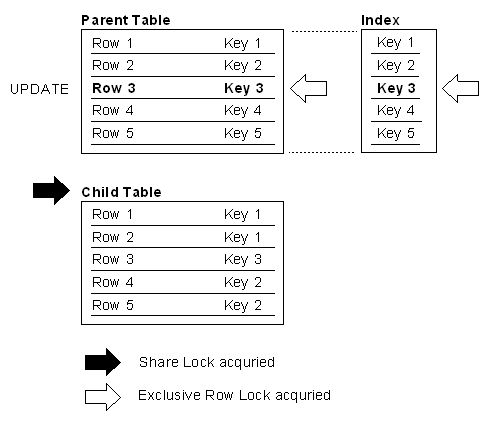
The illustration shows a parent table and its child table. Rows 1 through 5 of the parent table are indexed on keys 1 through 5, respectively. The child table is not foreign-key indexed to the parent
table. Row 3 in the parent table is updated and acquires an exclusive row lock. At
the same time, the child table acquires a share lock on the whole table. In Oracle
9i, this share lock on the child table is immediately released.
The next Figure illustrates the locking
mechanisms used by Oracle when an index is defined on the foreign key, and new rows are
inserted, updated, or deleted in the child table.
Notice that no table locks of any kind are acquired on the parent table
or any of its indexes as a result of the insert, update, or delete. Therefore, any type
of DML statement can be issued on the parent table, including inserts, updates, deletes,
and queries.
This situation is preferable if there is any update or delete activity
on the parent table while update activity is taking place on the child table. Inserts,
updates, and deletes on the parent table do not require any locks on the child table,
although updates and deletes will wait for row-level locks on the indexes of the child
table to clear.
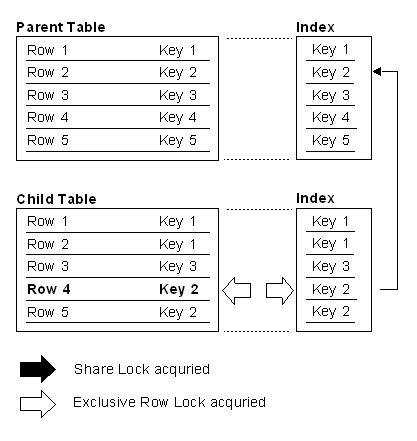
- Table Locks can arise, see above.
- ON DELETE CASCADE in Foreign Key Constraint
If the child table specifies ON DELETE CASCADE, then deletes from the parent
table can result in deletes from the child table. In this case, waiting and locking
rules are the same as if you deleted yourself from the child table after performing the
delete from the parent table.
For example, EMP is child of DEPT. Delete deptno = 10 should cascade to EMP. If
deptno in EMP is not indexed, you will get a full table scan
of EMP. This full scan is probably undesirable, and if you delete many rows from the
parent table, the child table will be scanned once for each parent row deleted.
- Joins between Parent and Child Table
When you query from the PARENT to the CHILD. Consider the EMP, DEPT tables. It is very common to query the EMP table in the context of a
deptno.
If you frequently query:
select * from dept, emp
where emp.deptno = dept.deptno
and dept.deptno = :X;
to generate a report or something, you'll find that not having the index in place
will slow down the queries.
In general, when the following conditions are met:
- When you do not delete from the parent table with delete cascade.
- When you do not update the parent table's unique/primary key value.
- When you do not join from the PARENT to the CHILD
If you satisfy all three conditions above, feel free to skip the
index.
If you do not frequently update the foreign key, the overhead is during
the insert and might not be noticed. If you update it frequently, the overhead might be
worse. It's like any other index - you just have more reasons
to consider adding that index than would normally be the case.
Speed Up your Queries with Function
Based Indexes
One of the many new features in Oracle 8i is the Function-Based
Index. This allows the DBA to create indexes on functions or expressions; these functions
can be user generated pl/sql functions, standard SQL functions (non-aggregate only) or
even a C callouts.
Oracle internal functions can be used in Function
Based Indexes. A useful example is case-insensitive selection of names. In the example,
the names are duplicates differing only by the case. A case-insensitive index on the last
name speeds searching. The function UPPER converts an alphanumeric string to all upper
case letters:
set autotrace on explain;
update emp set ename = initcap(ename);
create index emp_ename_idx on emp(ename);
In the following simple query the index
EMP_ENAME_IDX will be used:
select ename, empno, sal
from emp where ename = 'KING';
Execution Plan
----------------------------------------------------------
0 SELECT STATEMENT Optimizer=CHOOSE
1 0 TABLE ACCESS (BY INDEX ROWID) OF 'EMP'
2 1 INDEX (RANGE SCAN) OF 'EMP_ENAME_IDX'
(NON-UNIQUE)
But what if you change your query to the UPPER
function?
select ename, empno, sal
from emp where UPPER(ename) = 'KING';
ENAME           EMPNO        SAL
---------- ---------- ----------
King             7839       5000
Execution Plan
----------------------------------------------------------
   0      SELECT STATEMENT Optimizer=CHOOSE
   1    0   TABLE ACCESS (FULL) OF 'EMP'
Hops ... the index is no more used. To overcome this
problem, you can create the following Function Based Index.
create index emp_upper_idx on
emp(UPPER(ename));
In addition to the above step, there are some
init.ora or session settings you must use and a privilege you must have. The following is
a list of what needs to be done to use function based indexes:
-
You must have the system privilege query
rewrite to create function based indexes on tables in your own schema.
-
You must have the system privilege global
query rewrite to create function based indexes on tables in other
schemas.
For the optimizer to use function based indexes, the
following session or system variables must be set:
QUERY_REWRITE_ENABLED=TRUE
QUERY_REWRITE_INTEGRITY=TRUSTED
You may enable these at either the session level
with ALTER SESSION or at the system level via ALTER SYSTEM or by setting them in the
init.ora parameter file.
alter session set query_rewrite_enabled = true;
alter session set query_rewrite_integrity = trusted;
alter session set optimizer_goal=first_rows;
We now have an index on the "UPPER" of the column
ENAME. Any application that already issues 'case insensitive' queries of the
form:
select ename, empno, sal
 from emp where UPPER(ename) = 'KING'
ENAME           EMPNO        SAL
---------- ---------- ----------
King             7839       5000
Execution Plan
----------------------------------------------------------
0   SELECT STATEMENT Optimizer=FIRST_ROWS
1 0  TABLE ACCESS (BY INDEX ROWID) OF 'EMP'
2 1   INDEX (RANGE SCAN) OF 'EMP_UPPER_IDX' (NON-UNIQUE)
will transparently make use of this index -- gaining
the performance boost an index can deliver. Before this feature was available, every row
in the EMP table would have been scanned, upper-cased and compared. In contrast, with the
index on UPPER(ename), the query takes the constant KING to the index, range scans a
little data and accesses the table by rowid to get the data. This is very
fast.
Oracle7 Release 7.1 added the ability to use user
written functions in SQL:
select test_function(ename)
from emp
where some_other_function(empno) > 10
/
This was great because you could now effectively
extend the SQL language to include application specific functions. Unfortunately however,
the performance of the above query was a bit disappointing. Say the EMP table had 1,000
rows in it -- the function "some_other_function" would be executed 1,000 times during the
query, once per row. Additionally, assume the function took 1/100 of a second to execute.
This relatively simple query now takes at least 10 seconds.
An Oracle 8i extension to PL/SQL is the new keyword
DETERMINISTIC. This is the required syntax when used in Function Based
Indexes. It declares the function to always return the same value for any given
input, thus the return value is deterministic given the input. This is an optimizer
constraint on the function.
Example
We will use the test_pkg package to count the number of
times the test_fun function is called. The package will just let us maintain the state. This also
demonstrates that the 'purity' restrictions from Oracle 8 and less have been relaxed a
great deal. There are no pragmas and we will be calling a function that modifies a
package state in a where clause -- two things that could not happen in previous
releases
alter session set query_rewrite_enabled = true;
alter session set query_rewrite_integrity = trusted;
alter session set optimizer_goal=first_rows;
create or replace package test_pkg
as
cnt number default 0;
end;
/
create or replace function test_fun(
p_string in varchar2) return varchar2
deterministic
as
     l_str  varchar2(6) default substr(p_string,1,1);
     l_chr  varchar2(1);
     l_dig  number default 0;
     type vcArray is table of varchar2(10)
          index by binary_integer;
     l_tab  vcArray;
begin
     test_pkg.cnt := test_pkg.cnt+1;
     l_tab(1) := 'BPFV';
     l_tab(2) := 'CSKGJQXZ';
     l_tab(3) := 'DT';
     l_tab(4) := 'L';
     l_tab(5) := 'MN';
     l_tab(6) := 'R';
     for i in 1 .. length(p_string)
     loop
         exit when (length(l_str) = 6);
         l_chr := substr(p_string,i,1);
         for j in 1 .. l_tab.count
         loop
         if (instr(l_tab(j),l_chr) > 0 AND j <> l_dig)
         then
             l_str := l_str || to_char(j,'fm9');
             l_dig := j;
         end if;
         end loop;
     end loop;
     return rpad(l_str,6,'0');
end;
/
How the created function performs without an index?
drop table test_tab;
create table test_tab(name varchar2(30));
set timing on
insert into test_tab
select object_name
from
all_objects
where rownum
<= 1000;
1000 rows created.
Elapsed: 00:00:00.03
set autotrace on explain
exec test_pkg.cnt := 0;
select name
from test_tab A
where test_fun(name) = test_fun('FILE$')
/
NAME
------------------------------
FILE$
Elapsed:
00:00:01.00
Execution Plan
-------------------------------------------
0 SELECT STATEMENT Optimizer=FIRST_ROWS
1 0 TABLE ACCESS (FULL) OF 'test_tab'
set autotrace off
set timing off
set serveroutput on
exec dbms_output.put_line(test_pkg.cnt);
2000
So, we can see this query took 1 second to execute
and had to do a full scan on the table. The function test_fun was
invoked 2,000 times (according to the counter), twice for each row. Lets see how indexing
the function can be used to speed things up.
How the created function performs with an
index?
drop table test_tab;
create table test_tab(name varchar2(30));
create index test_idx on
test_tab(substr(test_fun(name),1,6));
The interesting thing to note in this create index command is the
use of the substr function. This is because we are indexing a function that
returns a string. If we were indexing a function that returned a number or date this
substr would not be necessary. The reason we must substring the user written function
that returns a string is that they return varchar2(4000) types. That is too big to be
indexed -- index entries must fit within 1/3 the size of the block.
We are now ready to test the performance of the table with the
index on it. We would like to monitoring the effect of the index on INSERTS as well
as the speedup for SELECTS.
set timing on
insert into test_tab
select object_name
from
all_objects
where rownum
<= 1000;
1000 rows created.
Elapsed: 00:00:00.09
set autotrace on explain
exec test_pkg.cnt := 0;
select name
from test_tab A
where substr(test_fun(name),1,6)
= test_fun('FILE$')
/
NAME
------------------------------
FILE$
Elapsed:
00:00:00.00
Execution Plan
----------------------------------------------------------
0 SELECT STATEMENT Optimizer=FIRST_ROWS
1 0 TABLE ACCESS (BY INDEX ROWID) OF
'TEST_TAB'
2 1 INDEX (RANGE SCAN) OF
'TEST_IDX' (NON-UNIQUE)
exec dbms_output.put_line(test_pkg.cnt);
2
The insert of 1,000 records took longer. Indexing
a user written function will affect the peformance of inserts and some
updates.
While the insert ran slower, the query ran much
faster. It evaluated the test_fun function 2 times instead
of 2,000. Also, as the size of our table grows, the full scan query will take longer and
longer to execute. The index based query will always execute with the near same
performance characteristics as the table gets larger.
We had to use "substr()" in the query. This is not
as nice as just coding "where test_fun(name) = test_fun('FILE$')" but we can
easily get around this using a view.
How to skip columns with SQLLDR
How can you load
a file full of delimited data and load just some of the columns,
skipping over fields you don't want. You cannot use the SQLLDR
syntax POSTION(x:y) because it is stream data, there are no
positional fields -- the next field begins after some delimiter, not in column
X.
In Oracle Release 8.1 the keyword FILLER was
added to SQLLDR. Create the following controlfile including the data
to load. The columns COL1 and COL3 should be loaded, COL2 must be skipped.
Create the following Table:
CREATE TABLE test (
col1 VARCHAR2(20),
col2 VARCHAR2(20),
col3 VARCHAR2(20)
);
Create the following Control File:
LOAD DATA
INFILE *
TRUNCATE INTO TABLE test
FIELDS TERMINATED BY ','
(
col1,
col2 FILLER,
col3
)
BEGINDATA
martin,zahn,seftigen
Load the data using SQLLDR
sqlldr userid=scott/tiger
control=load.ctl
Check the loaded data:
select * from test;
COL1
COL2
COL3
------------------ ------------------ ------------------
martin
seftigen
SQLLDR can load data from a pipe. If you are using UNIX, using "cut" on the file
and piping the results of this into a named pipe (and having SQLLDR eat that pipe) is pretty
efficient.
Create the Named Pipe
$ mknod fifo.dat p
Create the following Datafile:
load.dat
martin,zahn,seftigen
Create the following SQLLDR Controlfile:
load.ctl ( Note that COL2 is missing ! )
LOAD DATA
TRUNCATE INTO TABLE test
FIELDS TERMINATED BY ','
(
col1,
col3
)
Write in the Named Pipe, put the process in the
background:
$ cut -f2- -d, < load.dat > fifo.dat
&
[1] 4612
Let SQLLDR read from the Named Pipe:
sqlldr userid=scott/tiger control=load.ctl
data=fifo.dat
SQL*Loader: Release 9.0.1.2.0
- Production on Sun Aug 18
(c) Copyright 2001 Oracle Corporation. All rights reserved.
Commit point reached - logical record count 1
[1]+ Done cut -f2- -d, <load.dat >fifo.dat
This would just let SQLLDR have at column 2 on in the file
load.dat (separated by commas). The Unix cut command is pretty flexible in what it can do, please see
the man page for more info on using it.
We can use the fact that SQLLDR can perform functions on input
data to skip columns as well.
Create a Controlfile such as:
LOAD DATA
INFILE *
REPLACE
INTO TABLE test
(
COL1 position(1:4096) "dlm.word(:col1,1,chr(34),chr(44))",
COL2 position(1:1) "dlm.word(:col1,4,chr(34),chr(44))"
)
BEGINDATA
Martin Zahn,"Sonnenrain 5",Seftigen,033 345 02 40
Fritz Moser,Bahnhof,"3623 Gunten","Pst, 1297, Mitglied"
The above control file would load columns 1 and 4 of the input
data, skipping columns 2 and 3. The way this works is that COL1 is mapped to the entire INPUT record (postion 1-4096 or whatever
the max record may be). We send col1
down to the dlm.word subroutine for EVERY column. The dlm.word routine
compares the string it was called with against the last string it parsed and if they
differ - dlm.word parses the string and caches the results (making subsequent
calls against the same string of the i'th column instantaneous).
Dlm is a PL/SQL Package, inputs to dlm.word are:
|
p_str
|
The string to get the i'th word
from
|
|
p_n
|
The word to get from the string - an
index into the string
|
|
p_enclosed_by
|
What the words might be wrapped in. In
the above example, chr(34) is a double quote.
|
|
p_terminated_by
|
What separates the words. In the above
example, chr(44) is a comma.
|
Load the Data using SQLLDR
sqlldr userid=scott/tiger
control=load.ctl
SQL*Loader: Release 9.2.0.1.0
- Production on Sun
Copyright (c) 1982, 2002, Oracle Corporation.
Commit point reached - logical record count 1
Commit point reached - logical record count 2
Check the loaded Data
select * from test;
COL1                 COL2                 COL3
-------------------- -------------------- --------------------
Martin Zahn          033 345 02 40
Fritz Moser          Pst, 1297, Mitglied
How to unload data in a format
for SQLLDR to reload later
Sometimes you need a simple way to transfer one or
more tables from Oracle to Oracle. If you have a network connection to both databases you
can use the INSERT / SELECT statement. However if the databases are located in protected
areas you have to unload the data on the source database and then load it again on the
target database using SQLLDR. It would be nice, if you can generate the complete
controlfile including the data for SQLLDR.
The Unix and Windows script SQLLDR_EXP can be used to accomplish
this task, be aware of the following.
- There is an absolute limit of 2000 bytes in 7.x and 4000 bytes
in 8.x per line/row for unloaded data. The total size of the unloaded data is
unlimited.
- Date columns are unloaded in the format
"DD.MM.YYYY".
- Beware of data with pipes or tabs in it.
- Beware of data with newlines as well.
- The Windows script need modifications if your command line
SQLPLUS is not called SQLPLUS (eg: its plus33 or something similar).
- On Windows, you need to set your SQLPATH environment variable
and put these files into that directory OR you need to run SQLLDR_EXP.CMD from those
directories so SQLPLUS can find the corresponding SQLLDR_EXP.SQL file.
Generate the controlfile including the data for the
SCOTT.EMP table:
$ ./sqlldr_exp
scott/tiger@RAB1 emp > emp.ctl
$ cat
emp.ctl
LOAD DATA
INFILE *
INTO TABLE emp
REPLACE
FIELDS TERMINATED BY '|'
(
empno
,ename
,job
,mgr
,hiredate
,sal
,comm
,deptno
)
BEGINDATA
7369|SMITH|CLERK|7902|17.12.1980|800||20
7499|ALLEN|SALESMAN|7698|20.02.1981|1600|300|30
7521|WARD|SALESMAN|7698|22.02.1981|1250|500|30
7566|JONES|MANAGER|7839|02.04.1981|2975||20
7654|MARTIN|SALESMAN|7698|28.09.1981|1250|1400|30
7698|BLAKE|MANAGER|7839|01.05.1981|2850||30
7782|CLARK|MANAGER|7839|09.06.1981|2450||10
7788|SCOTT|ANALYST|7566|09.12.1982|3000||20
7839|KING|PRESIDENT||17.11.1981|5000||10
7844|TURNER|SALESMAN|7698|08.09.1981|1500|0|30
7876|ADAMS|CLERK|7788|12.01.1983|1100||20
7900|JAMES|CLERK|7698|03.12.1981|950||30
7902|FORD|ANALYST|7566|03.12.1981|3000||20
7934|MILLER|CLERK|7782|23.01.1982|1300||10
C:\Users\Zahn\Work sqlldr_exp.cmd scott/tiger
emp
LOAD DATA
INFILE *
INTO TABLE emp
REPLACE
FIELDS TERMINATED BY '|'
(
empno
,ename
,job
,mgr
,hiredate
,sal
,comm
,deptno
)
BEGINDATA
7369|SMITH|CLERK|7902|17.12.1980|800||20
7499|ALLEN|SALESMAN|7698|20.02.1981|1600|300|30
7521|WARD|SALESMAN|7698|22.02.1981|1250|500|30
7566|JONES|MANAGER|7839|02.04.1981|2975||20
7654|MARTIN|SALESMAN|7698|28.09.1981|1250|1400|30
7698|BLAKE|MANAGER|7839|01.05.1981|2850||30
7782|CLARK|MANAGER|7839|09.06.1981|2450||10
7788|SCOTT|ANALYST|7566|09.12.1982|3000||20
7839|KING|PRESIDENT||17.11.1981|5000||10
7844|TURNER|SALESMAN|7698|08.09.1981|1500|0|30
7876|ADAMS|CLERK|7788|12.01.1983|1100||20
7900|JAMES|CLERK|7698|03.12.1981|950||30
7902|FORD|ANALYST|7566|03.12.1981|3000||20
7934|MILLER|CLERK|7782|23.01.1982|1300||10
Click here to download the ZIP file.
How to setup the desired DATE
Display Format in Oracle ?
In date expressions, SQL and PL/SQL automatically
converts character values in the default date format to DATE values. The default date
format is set by the Oracle initialization parameter NLS_DATE_FORMAT. For example,
the default might be 'DD-MON-YY', which includes a two-digit number for the day of the
month, an abbreviation of the month name, and the last two digits of the year.
The initialization parameter NLS_DATE_FORMAT can be
set in the following locations:
- Global Initialization File (INIT.ORA) on the Database
Server
- In the Registry of the Database Client
- Setup using ALTER SESSION SET NLS_DATE_FORMAT
If the client sets the NLS_* parameters -- they
override the server in all cases. In fact, if the client sets the NLS_LANG parameter
-- that causes all NLS_* settings on the server to be ignored and the defaults for
that NLS_LANG specified on the client on used.
Where that comes into play is typically if the
client is WINDOWS and the server is UNIX. The client install on windows set the NLS_LANG
parameter in the registry by default. This setting is different from the default you find
for UNIX. Any NLS_* settings you put in the INIT.ORA will not be used by those
clients.
The initialization parameter NLS_DATE_FORMAT in the
INIT.ORA file is set as:
### NLS Default Settings
### --------------------
nls_date_format =
'DD.MM.YYYY:HH24:MI'
nls_numeric_characters = '.,'
nls_language =
AMERICAN
nls_territory =
AMERICA
How to overwrite the NLS_DATE_FORMAT in the INIT.ORA
File?
You have to set the NLS_DATE_FORMAT in the registry
on the client as follows:
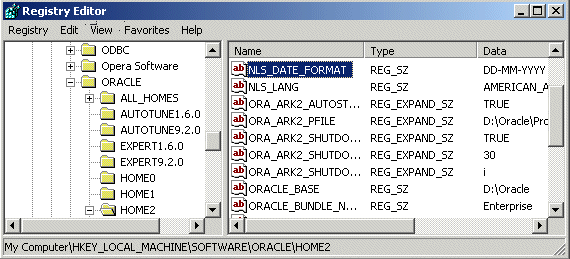
sqlplus scott/tiger
SQL> select sysdate from dual;
SYSDATE
----------
04-10-2002
How to overwrite the NLS_DATE_FORMAT in the INIT.ORA
File and in the registry?
You can alter the NLS_DATE_FORMAT using an
"alter session set nls_date_format='yyyymmdd'" in your application right after the
connect:
sqlplus scott/tiger
SQL> alter session set
nls_date_format='yyyymmdd';
Session altered.
SQL> select sysdate from dual;
SYSDATE
----------
20021004
If you don't want to alter the session each time you
logon, you can code a database trigger:
sqlplus scott/tiger
SQL> create or replace trigger data_logon_trigger
after logon
ON DATABASE
begin
execute immediate
'alter session set nls_date_format=''yyyymmdd:hh24:mi''';
end;
/
Trigger created.
SQL> exit;
sqlplus scott/tiger
SQL> select sysdate from dual;
SYSDATE
--------------
20021004:14:32
Concurrency
Problems and Isolation Levels
Databases such as Oracle and
Microsoft® SQL Server™ 2000 uses locking to ensure transactional
integrity and database consistency. Locking prevents users from reading data being
changed by other users, and prevents multiple users from changing the same data at the
same time. If locking is not used, data within the database may become logically
incorrect, and queries executed against that data may produce unexpected results.
If locking is not available and several users access a database
concurrently, problems may occur if their transactions use the same data at the same
time.
A dirty read occurs when a transaction can see uncommitted changes to a row.
If another transaction changes a value, your transaction can read that changed value,
but the other transaction will roll back its transaction, making the value invalid, or
dirty.
A non-repeatable read occurs when a row not updated during the transaction is read
twice within that transaction, and different results are seen from the two
reads. If your transaction reads a value, and another transaction commits a change
to that value (or deletes the row), then your transaction could read the changed value
(or find the row missing) even though your transaction has not committed or rolled
back.
A phantom read occurs when a transaction reads a row inserted by another
transaction that has not been committed. If another transaction inserts a row to a
table, when your transaction queries that table it can read the new row even if the
other transaction subsequently rolls back.
The ANSI/ISO SQL standard SQL92 defines three possible kinds of transaction
interaction, and four levels of isolation that provide increasing protection
against these interactions. These interactions and isolation levels are:
The behavior of Oracle and
Microsoft® SQL Server™ 2000 is:
How to create missing
Primary- or Foreign Keys in large Tables ?
A database administrator noticed after a migration, that a few
primary keys are missing in the master table which exists in the detail table due to the
foreign key constraints couldn't be enabled. Well, this should not be a severe problem,
the missing primary keys can be recreated. The question is - what is the most effective
way to do this especially if the
tables are very, very large. Oracle and SQL Server offers several ways to accomplish
this, if you take the wrong approach you have to wait a long time until the query
completes. Read this tip and you will have no time for a coffee
...
We create two tables TabA and TabB, the table TabA
is the Master (Parent) and the table TabB is the Detail (Child) table. The primary
keys 5,7,8 are missing in the master table TabA and
must be manually created. This example shows just very small tables, in the real world
they may contain more than one million rows.
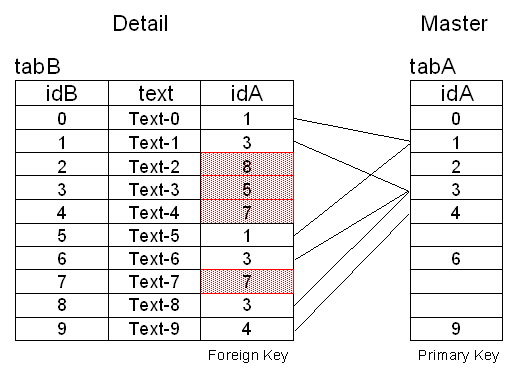
Create the Tables
DROP TABLE tabA;
CREATE TABLE tabA (
idA NUMBER(2) NOT NULL PRIMARY KEY
);
DROP TABLE tabB;
CREATE TABLE tabB (
idB NUMBER(2) NOT NULL PRIMARY KEY,
idA NUMBER(2) NOT NULL,
text VARCHAR2(20)
);
Insert some Values in both Tables
INSERT INTO tabA (idA) VALUES (0);
INSERT INTO tabA (idA) VALUES (1);
INSERT INTO tabA (idA) VALUES (2);
INSERT INTO tabA (idA) VALUES (3);
INSERT INTO tabA (idA) VALUES (4);
INSERT INTO tabA (idA) VALUES (6);
INSERT INTO tabA (idA) VALUES (9);
COMMIT;
INSERT INTO tabB (idB,idA,text) VALUES (0,1,'Text-0');
INSERT INTO tabB (idB,idA,text) VALUES (1,3,'Text-1');
INSERT INTO tabB (idB,idA,text) VALUES (2,8,'Text-2');
INSERT INTO tabB (idB,idA,text) VALUES (3,5,'Text-3');
INSERT INTO tabB (idB,idA,text) VALUES (4,7,'Text-4');
INSERT INTO tabB (idB,idA,text) VALUES (5,1,'Text-5');
INSERT INTO tabB (idB,idA,text) VALUES (6,3,'Text-6');
INSERT INTO tabB (idB,idA,text) VALUES (7,7,'Text-7');
INSERT INTO tabB (idB,idA,text) VALUES (8,3,'Text-8');
INSERT INTO tabB (idB,idA,text) VALUES (9,4,'Text-9');
COMMIT;
Try to enable the Foreign Key Constraint
...
ALTER TABLE tabB ADD (
CONSTRAINT fk_tabB_TabA
FOREIGN KEY (idA)
REFERENCES tabA (idA)
)
/
... and you will get
ORA-02298: cannot validate
(SCOTT.FK_TABB_TABA)
- parent keys not found
Start SQL*Plus an enter the following
Query:
SET AUTOTRACE ON EXPLAIN
SELECT 'INSERT INTO tabA (idA) VALUES ('||idA||');' as
"INS"
FROM tabB
WHERE idA IN (SELECT idA
FROM tabB MINUS
SELECT idA
FROM tabA)
GROUP BY idA
ORDER BY idA;
INS
-----------------------------------------------------
INSERT INTO tabA (idA) VALUES (5);
INSERT INTO tabA (idA) VALUES (7);
INSERT INTO tabA (idA) VALUES (8);
Execution Plan
-----------------------------------------------------
0 SELECT STATEMENT Optimizer=CHOOSE
1 0 SORT (GROUP BY)
2 1 MERGE JOIN
3 2 SORT (JOIN)
4 3 TABLE
ACCESS (FULL) OF 'TABB'
5 2 SORT (JOIN)
6 5 VIEW
OF 'VW_NSO_1'
7
6 MINUS
8
7 SORT
(UNIQUE)
9
8
TABLE ACCESS (FULL) OF 'TABB'
10
7 SORT
(UNIQUE)
11
10
TABLE ACCESS (FULL) OF 'TABA'
The execution plan in Oracle 9.2 shows three full
table scans, if both tables are very large this may last hours ... do NOT use this
solution.
Start SQL*Plus an enter the following
Query:
SET AUTOTRACE ON EXPLAIN
SELECT 'INSERT INTO tabA (idA) VALUES
('||idA||');' as "INS"
FROM tabB
WHERE idA NOT IN (SELECT idA FROM tabA)
GROUP BY idA
ORDER BY idA;
INS
---------------------------------------------
INSERT INTO tabA (idA) VALUES (5);
INSERT INTO tabA (idA) VALUES (7);
INSERT INTO tabA (idA) VALUES (8);
Execution Plan
---------------------------------------------
   0      SELECT STATEMENT Optimizer=CHOOSE
   1    0   SORT (GROUP BY)
   2    1     FILTER
   3    2       TABLE ACCESS (FULL) OF 'TABB'
   4    2       TABLE ACCESS (FULL) OF 'TABA'
The execution plan in Oracle 9.2 still shows two full table
scans, there must be a better solution.
Start SQL*Plus an enter the following
Query:
SET AUTOTRACE ON EXPLAIN
SELECT 'INSERT INTO tabA (idA) VALUES
('||B.idA||');' as "INS"
FROM tabB B, tabA A
WHERE B.idA = A.idA (+)
AND A.idA IS NULL
GROUP BY B.idA
ORDER BY B.idA;
The same Query in ANSI Syntax
SELECT 'INSERT INTO tabA (idA) VALUES
('||B.idA||');' as "INS"
FROM tabB B LEFT OUTER JOIN tabA A ON B.idA = A.idA
WHERE A.idA IS NULL
GROUP BY B.idA
ORDER BY B.idA;
INS
---------------------------------------------
INSERT INTO tabA (idA) VALUES (5);
INSERT INTO tabA (idA) VALUES (7);
INSERT INTO tabA (idA) VALUES (8);
Execution Plan
----------------------------------------------------------
0 SELECT STATEMENT Optimizer=CHOOSE
1 0 SORT (GROUP BY)
2 1 FILTER
3 2 NESTED LOOPS
(OUTER)
4 3
TABLE ACCESS (FULL) OF 'TABB'
5 3 INDEX
(UNIQUE SCAN) OF 'SYS_C163' (UNIQUE)
The execution plan in Oracle 9.2 still shows one full table
scan and a primary key scan, a good solution.
Start SQL*Plus an enter the following
Query:
SET AUTOTRACE ON EXPLAIN
SELECT 'INSERT INTO tabA (idA) VALUES
('||B.idA||');' as "INS"
FROM tabB B
WHERE NOT EXISTS (SELECT 'X'
FROM tabA A
WHERE A.idA = B.idA)
GROUP BY B.idA
ORDER BY B.idA;
INS
---------------------------------------------
INSERT INTO tabA (idA) VALUES (5);
INSERT INTO tabA (idA) VALUES (7);
INSERT INTO tabA (idA) VALUES (8);
Execution Plan
----------------------------------------------------------
0 SELECT STATEMENT Optimizer=CHOOSE
1 0 SORT (GROUP BY)
2 1 FILTER
3 2 TABLE ACCESS
(FULL) OF 'TABB'
4 2 INDEX (UNIQUE
SCAN) OF 'SYS_C163' (UNIQUE)
The execution plan in Oracle 9.2 still shows one full table
scan and a primary key scan, but no NESTED LOOP is necessary in this solution -
from our point of view the best solution.
|

